Silicon Logic: From Metal to Mastermind
To build true defense, one must understand the rules of the machine. The cloud is just a metaphor; underneath the abstraction layers, it is still electricity flowing through silicon gates, governed by the rigid logic of the CPU and the orchestrating will of the Operating System.
The Integrated View
Security flaws often hide in the gaps between these layers. A buffer overflow in C abuses memory management; a rootkit manipulates OS structures; a side-channel attack exploits CPU branch prediction. Mastering these fundamentals is not just academic—it's the bedrock of effective cybersecurity.
1. The Silicon Heart: x86 Architecture
At the core of over 90% of desktop and server computing lies the x86 architecture. It is a complex beast, evolved over decades, but its fundamental structure remains deterministic.
Anatomy of a Processor
Modern x86 processors split their work into two logical powerhouses to maximize efficiency:
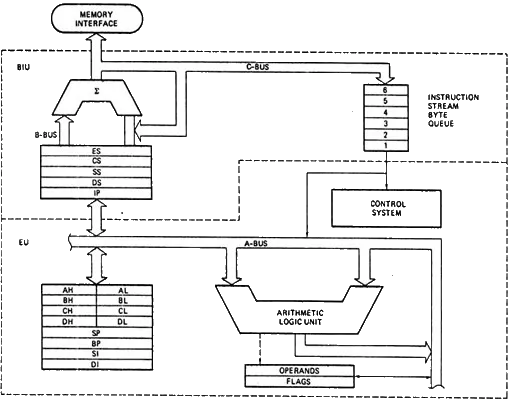
Figure 1: The dual-engine design of the x86: BIU fetching data, EU crushing numbers.
-
Bus Interface Unit (BIU) & The Pipeline
The logistics manager. It fetches instructions from memory, calculates addresses, and manages
the Instruction Queue. The BIU implements Pipelining—fetching
the next instruction while the previous one is still being executed.
However, pipelines face Hazards:- Data Hazards: Waiting for previous instruction's result.
- Control Hazards: Jumps/Branches change the execution flow.
- Execution Unit (EU) The worker. It decodes the raw manufacturing instructions and executes them. It contains the ALU (Arithmetic Logic Unit) which performs the actual math, and the Control Unit which directs traffic based on those instructions.
Registers: The CPU's Workbench
The CPU doesn't like reaching out to RAM—it's too slow. Instead, it uses strictly defined internal memory slots called Registers.
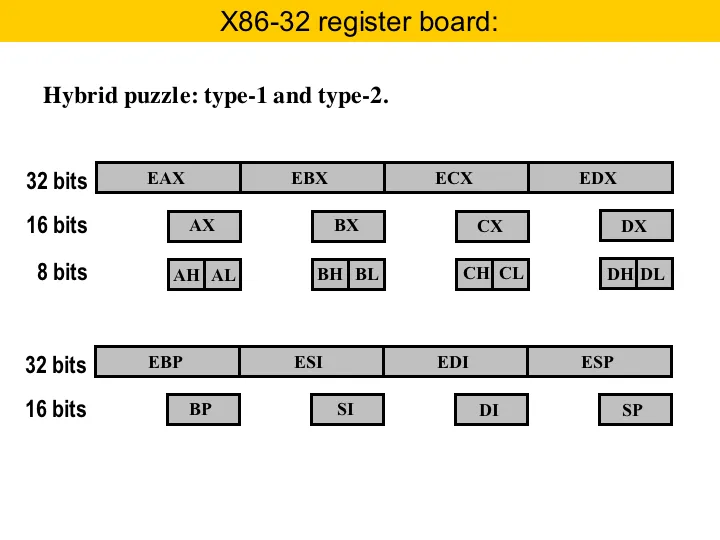
Figure 2: The General Purpose Registers (AX, BX, CX, DX) are the primary workspace.
Segment Registers: Mapping the Map
To manage large amounts of memory, x86 uses Segmentation. Memory is divided into logical chunks (segments). Segment registers hold the starting addresses of these chunks:
- CS (Code Segment): Where the executable instructions live.
- DS (Data Segment): Where your variables generally live.
- SS (Stack Segment): The LIFO structure for function calls and local variables.
- ES, FS, GS: Extra segments for additional data storage. (FS/GS are often used by the OS for thread-specific data structures like the TIB).
The Flag Register: The CPU's Mood Ring
How do we know if a calculation resulted in zero? Or if it was negative? The FLAGS register keeps track of the state of the processor.
- ZF (Zero Flag): Set if the result is zero. Crucial for loops and comparisons.
- CF (Carry Flag): Set if an arithmetic operation generates a carry (unsigned overflow).
- SF (Sign Flag): Set if the result is negative.
- OF (Overflow Flag): Set if a signed arithmetic overflow occurs.
- IF (Interrupt Flag): Controls whether the CPU responds to external interrupts (like keyboards).
2. Speaking the Language: Assembly
Machine code is a stream of 1s and 0s. Assembly is the mnemonic representation of this chaos. It is a 1:1 mapping to hardware instructions.
Instruction Set Architecture (ISA) & Directives
Assembly isn't just commands; it's also about directing the assembler itself.
db / dw
Define Byte / Define Word. Allocates raw storage.
ORG
Origin. Sets the starting address for code generation.
The Palette of Logic
Beyond simple math (`ADD`, `SUB`, `MUL`, `DIV`), Assembly gives us bitwise control:
| Instruction | Function | Use Case |
|---|---|---|
| AND / OR / XOR | Logical Operations | Masking bits, clearing registers (XOR AX, AX), setting flags. |
| SHL / SHR | Shift Left/Right | Fast multiplication/division by 2. |
| CMP | Compare | Subtracts operand2 from operand1 solely to set flags for the next JUMP. |
The Stack: LIFO Storage
The Stack is a temporary scratchpad.
- PUSH AX -> Decrements SP, saves AX to [SP].
- POP AX -> Loads AX from [SP], increments SP.
Crucial for saving state before function calls (CALL/RET).
Addressing Modes: Fetching the Data
Assembly instructions need operands. Addressing Modes define how the CPU calculates the memory address of an operand. This is where high-level variables strictly translate to hardware reality.
MOV AX, 5The data (5) is encoded directly into the instruction. Fast, but hardcoded.
MOV AX, BXMoves data between CPU registers. The fastest possible transfer.
MOV AX, [1234]Goes to memory address 1234 to fetch the data. Slower due to memory access.
MOV AX, [BX]Uses the address stored in BX to find the data. This is how pointers work!
Flow Control: Jumps and Loops
The CPU reads linearly unless told otherwise.
MOV CX, 5       ; Set loop counter to 5
START_LOOP:
    DEC CX      ; Decrement counter
    CMP CX, 0   ; Check if zero
    JNZ START_LOOP ; Jump if Not Zero back to start
This mechanic—Compare (`CMP`) followed by a Conditional Jump (`JNZ`, `JE`, `JG`)—is the physical realization of `if`, `for`, and `while` loops in high-level languages.
3. The Unifying Bridge: C Programming
If Assembly is the native tongue, C is the universal translator. Created by Dennis Ritchie in 1972, it was the successor to the B language (which came from BCPL). Its purpose? To rewrite Unix.
From Code to Binary: The Compilation Process
C doesn't run directly. It undergoes a metamorphosis:
- Preprocessing: Handles `#include` and macros, expanding the code.
- Compilation: Translates C code into Assembly code.
- Assembly: Translates Assembly into machine code object files (`.o` or `.obj`).
- Linking: Combines object files and libraries into a final executable (`.exe` or `a.out`).
Memory Layout: Stack vs Heap
When a C program runs, it doesn't just "have memory". It has a strict layout:
Automatic storage. Fast. Grows downwards. Used for local variables (`int x;`). Cleared when function exits.
Dynamic storage. Manual. Grows upwards. Used for `malloc()`. Persists until `free()`.
Pointers: Power and Peril
C is often called "portable assembly" because it exposes memory addresses directly via Pointers. An integer variable `int a` lives at a specific address. A pointer `int *p = &a` stores that address.
Why C is Dangerous
C does not check boundaries. If you have an array of 5 items and try to write to the 6th, C will happily overwrite whatever data is next in memory—potentially the return address of a function. This is the mechanism behind the infamous Buffer Overflow exploit.
4. The Grand Orchestrator: Operating Systems
A CPU without an Operating System is like a powerful engine sitting on a garage floor. It runs, but it goes nowhere. The Operating System (OS) converts this raw power into a usable environment via Resource Abstraction.
History of Control
From the manual Batch Processing of the 50s, to the revolutionary Time-Sharing Unix systems of the 70s, to the GUI-driven Windows and Linux distributions of today, the goal has remained: hiding hardware complexity.
The Process: Life of a Program
A program on disk is passive. Loaded into memory, it becomes a Process.
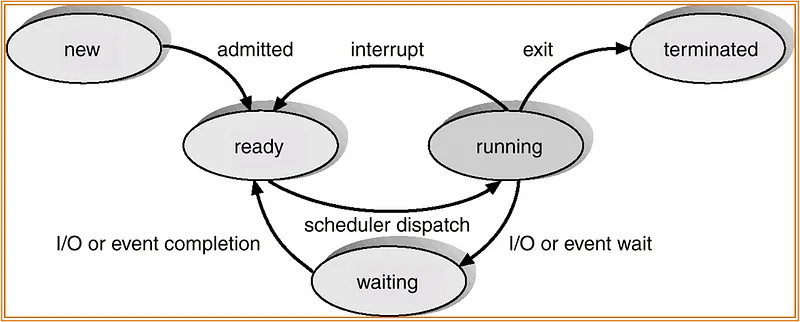
Figure 3: The lifecycle of a process. A process moves from New -> Ready -> Running. It can be interrupted (back to Ready) or wait for I/O (Waiting).
The PCB (Process Control Block)
To manage this, the OS creates a data structure called the PCB for every process, storing:
- **Process State:** (Running, Waiting, etc.)
- **Program Counter:** Address of the next instruction.
- **CPU Registers:** Saved state when context switching.
- **Memory Limits:** Access rights to prevent crashes.
Context Switching: The Cost of Multitasking
Switching from Process A to Process B is expensive. The OS must save A's registers to its PCB, load B's registers, and often flush the TLB (Translation Lookaside Buffer), which temporarily kills memory access performance.
Threading Models
1:1 (Kernel-Level): True parallelism. OS manages every thread. Heavy.
N:1 (User-Level): Fast switching, but one blocked thread blocks all.
Synchronization: Order from Chaos
When multiple processes (or Threads) access shared memory, we get Race Conditions. To prevent data corruption, we use synchronization primitives:
- Mutex (Mutual Exclusion): A lock. Only one thread can hold the key.
- Semaphore: A counter. Allows a set number of threads to access a resource.
- Monitor: A high-level abstraction (used in Java/C#) that handles locking automatically.
The Nightmare: Deadlock
Synchronization can lead to Deadlock, where processes wait on each other forever. It happens if and only if four conditions are met (The Coffman Conditions):
- Mutual Exclusion: Resources cannot be shared.
- Hold and Wait: Holding one resource while waiting for another.
- No Preemption: Resources cannot be forcibly taken away.
- Circular Wait: Process A waits for B, B waits for A.
Memory Management
The OS pulls a magic trick called Virtual Memory used by the MMU (Memory Management Unit).
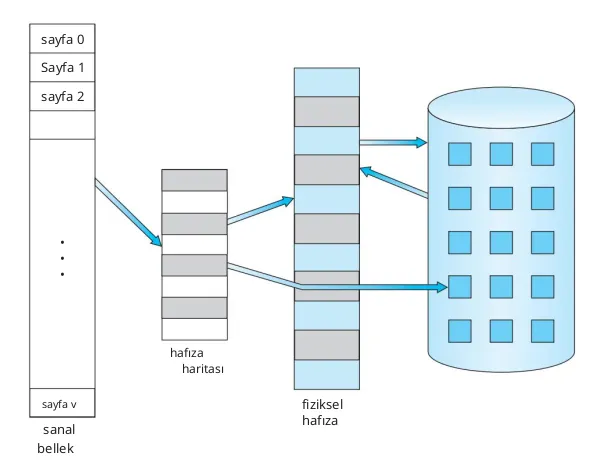
Figure 4: Virtual Memory maps logical addresses to physical RAM frames.
It uses techniques like Paging (fixed-size blocks) or Segmentation (variable-size blocks) to fit programs into RAM. When RAM is full, it moves inactive pages to the hard disk—a process called Swapping.
Disk Management & Scheduling
Disks are slow. The OS optimizes I/O requests using scheduling algorithms:
- FCFS (First-Come First-Served): Fair but slow.
- SSTF (Shortest Seek Time First): Fast, but can starve distant requests.
- SCAN (Elevator): The disk head moves in one direction, servicing all requests, then reverses.
- C-SCAN: Like SCAN, but only services requests in one direction (like a circular list), providing more uniform wait times.
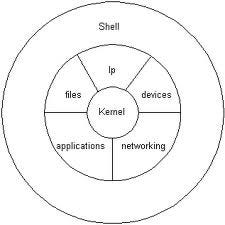
Figure 5: The OS structure: User Space on top, Kernel Space managing Hardware below.