Basic C Programming Tutorial
Basic C Programming Tutorial
Basic C Programming Tutorial #1
Basic C Programming Tutorial #1
In this article, I will share the notes and practice questions of the Basic C Programming Training, the first week of which we completed. You can access my previous article here, where I explained the development and syntax of the C language.
Definitions
In our first lesson, we introduced the C language and touched on the basic definitions.
Variable & Constant Definition
Variables and Constants are the components we use to hold data. The point we need to pay attention to when defining these components is the data type that the variable or constant accepts. There are 5 types of data types in standard C:
- int â€" used for integer values.
- float â€" used for decimal number values.
- double â€" used for large decimal number values.
- char â€" used for character values.
- void â€" means without type.
We can define variables using these data types:
int a = 5;            // a variable of integer type named a with value '5'
float b = 7.5;        //a variable named b of type float with value '7.5'
char c = 'a';         //A variable named c with value 'a' of type char
double d = 8965.3645; //A variable of double type named d with value '8965.3645'
If we want to define constants with these data types, all we need to do is add the 'const' keyword to the beginning of the variable definition.
const int a = 5;            // a constant of integer type named a with value '5'
const float b = 7.5;        //a constant named b of type float with value '7.5'
const char c = 'a';         //Create a constant named c with value 'a' of type char
const double d = 8965.3645; //a constant with the name d of type double and the value '8965.3645'
Constants, unlike variables, remain at the same value throughout the program's runtime. If you try to change the value they hold in the program flow, they will give an error.
Array Definition
The definition of arrays is very similar to variables. In fact, arrays are structures that hold more than one variable of the same type. For example, an array of type int; It contains integer values ​​that can change.
The most important point when defining arrays is to specify the array size. When the program runs, it requests space from memory according to the size of this array, and this size does not change during the program's runtime.
We can define arrays in two ways. One of them is specifying its size and the other is specifying the values it will take:
int array1[10];            //A 10-element integer array.

int array2[] = {1,2,3,4} //A 4-element integer array.
To access the elements of the arrays, we write the index of the element we will access in square brackets. The index of an element is the number that indicates the rank of that element in the array. The first element of an array is at index 0, and when each element is added, it gets the next index value.
number1 = array2[0];  //assigns the first element of array2 to number1
number2 = array2[1];  //assigns the second element of array2 to number2
number3 = array3[2];  //assigns the third element of array2 to number3
number4 = array4[3];  //assigns the fourth element of array2 to number4
We can access the elements of the array named array2, which we defined in the previous example, as above.
We could only receive a single character with the char variable type. We need strings of characters to get a word.
char str1[20]; //Definition of a 20-character string


char str2[] = "string expression"; //character array with a certain value (string)
printf() & scanf() functions
These are two functions we use to interact with the user while making console applications in C language. printf() is used to return a message to the user and scanf() is used to get a value from the user.
printf("Hello World\n");
With printf, we can return the message we want to the user within double quotes. The '\n' statement at the end is used to move to the next line in the console.
If we want to suppress the console screen of a variable or get a value from the console, we need specifiers. Some of them are:
- %d: used for integer values.
- %f: Used for float values.
- %lf : used for double values.
- %c: used for char values.
- %s : used for string values.
- %x: used for hexadecimal values.
We can take input from the user and give output using these specifiers:
int number;
printf("Enter a number: ");scanf("%d", &number);
printf("The entered number is %d", number);
Things we need to pay attention to here:
In the scanf() function, placing the '&' sign when specifying the variable to which the value will be assigned and using the specifiers in the first parameter and in double quotes in both functions.
char[20] name;  //Definition of a 20-character string named name
printf("enter your name: ");
In the example above, a program was written that takes a string from the user and returns this value to the user in a message.
Condition Structures
In our second volume, we touched on condition structures and made examples of these structures. There are three types of conditionals in the C language. Comparison operators and logical operators are used in these conditionals.
Comparison operators:
- == â€" if equal
- != â€" if not equal
 â€" if greater
- < â€" if small
- < = â€" if greater than or equal to
= â€" if less than equal
Logical operators:
- && â€" and
- || - or
- ! â€" not
if-else structure
The if else structure is one of the structures we can use to define condition statements. It always starts with an if statement, and falls into an else statement if the condition is not met. else if statement can be used to define more than one condition.
if(a==b){
  printf("a and b equal");
}else if(a>b){
  printf("a is greater than b");
}else{
  printf("a is less than b");
}
printf("outside condition);
If the if condition is met, the statements within the condition are executed and the program flow continues outside the condition statement. If the if condition is not met, the next else looks at the condition in if (if any), if no condition is met, it falls to else (if any).
switch-case structure
The switch-case structure is a structure developed to deal with multiple situations.
int number;
printf("Enter a number: ");
scanf("%d", &number);

switch(condition){
  case 1:
    printf("Number 1 entered");
    break;
  case 2:
    //Since we don't break it, it continues to run with case3.
  case 3:
    printf("The number 2 or 3 was entered");
    break;
  case 4:
    printf("The number 4 was entered");
    //Since we do not put a break statement, it also works as default
  default:
    printf("undefined number");
}
It executes the statements in case that are appropriate based on the value of the given condition variable. This condition variable can only be of type int and char. Execution of statements continues until you see a break statement. That is, unless there is a break, the program continues to execute the statements in other cases.
ternary operator
ternaty operator is used to define quick and short conditional expressions in a single line
(a==b)?printf("a and b are equal"):printf("a and b are not equal");
A condition is written in parentheses, followed by a question mark. The section after the question mark is the section that will be executed if the condition is true. Two points are placed after this section. The next part runs if the condition is false.
Practice Questions
question-1
Write a C program that displays the sum of two given numbers on the console screen.
question-2
Write a C program that performs four operations with two numbers received from the user and displays the results on the console screen.
question-3
Write a C program that calculates the area of a rectangle given two side lengths and prints it to the screen.
question-4
Write a C program that finds the largest of 3 numbers received from the user.
question-5
Write a C program that performs the specified operation among four operations based on an operation code entered from the keyboard and two numbers, and prints the result on the screen.
question-6
Calculate the average of three different grade values for a course. If the result is less than 50, write a C program that says "fail", if the result is greater than 50, "pass".
question-7
Get 3 numbers from the user. Write a C program that calculates the square of the first number when you enter 1, the square of the second number when you enter 2, and the square of the 3rd number when you enter 3, using the switch structure.
Basic C Programming Tutorial #2
Basic C Programming Tutorial #2
In this article, I will share the notes and practice questions of the Basic C Programming Training, of which we completed the second week. You can access the first week of the training here.
Loops
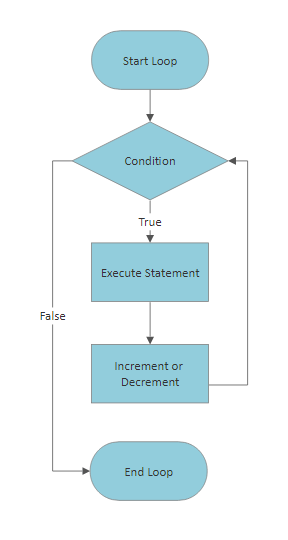
A loop statement allows us to execute a statement or group of statements multiple times. Below is the general form of a loop statement in most programming languages:
There are three types of loops in C language. These are for, while and do-while loops.
for loop
It executes statements multiple times and shortens the code that manages the loop variable.
//Program that prints numbers from 0 to 10
for(int i=0;i<=10;++i){
    printf("number: %d\n",i);
}
Loop expressions can be nested, this is called a nested loop. This is mostly used in matrix operations.
//Program that prints the indices of a 20x20 matrix
for(int i=1;i<=20;++i}{
  for(int j=1;j<=20;++j){
    printf("(%d,%d)\n",i,j);
  }
}

while loop
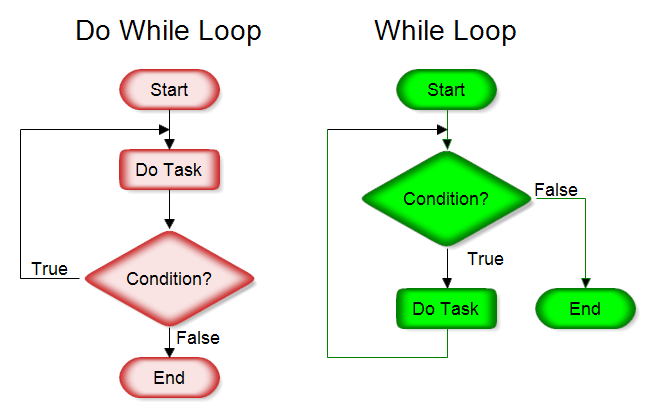
Repeats a statement or group of statements when a given condition is true. Tests the condition before executing the loop body.
//Program that prints numbers from 10 to 1
int i = 10;
while(i>0){
  printf("number: %d\n",i);
  i--;
}
If the condition inside the while loop is always true, an infinite loop occurs. Since there is no condition to stop the loop, the loop continues until the program is terminated.
//Value 1 represents true value
while(1){
  printf("this is an infinite loop");
}
do while loop
Unlike the while loop, it checks the loop condition at the end, not at the beginning.
//Program that prints numbers from 10 to 1
int number=10;
do{
  printf("number: %d\n", number);
  number--;
}while(number>0);
The do-while loop first executes the statements and then queries the condition. This can be quite useful in some situations.
//program that prints the numbers received from the user until 0 is reached.
int number;
do{
  printf("Enter a number: ");
  scanf("%d", &number);
  printf("\nEntered number: %d", number);
}while(number!=0);
Loop control statements
break statement: Terminates the loop statement and transfers execution to the statement immediately after the loop.
//program to press q to exit the loop
char c;
while(1){
  printf("enter a character: ");
  scanf("%c", &c);
  if(c=='q'){
    break;
  }
  printf("\n loop continues");
}

printf("\n loop ended");
continue statement: Skips the rest of the body of the loop and moves on to the next iteration of the loop.
for(;;){ // infinite loop with for
  printf("this statement works");
  continue;
  printf("this statement does not work");
}
In the example above, if the remainder is below the continue statement, printf() will not work at all because it skips the statements under continue and starts the loop.
Functions and Structures
The main function of functions and structures is to group/package statements. In general, we can say that functions are working statements and structures are groups of data.
Struct Definition
Structs are used to represent a record. Let's say you want to keep track of your books in the library. You may want to keep the following properties associated with each book:
- Book name
- Subject
- Author
- Number of Pages
If we want to define this book with a struct:
struct books {
   char title[50];
   char author[50];
   char subject[100];
   int pages;
} books;
We can define it as . As can be seen, we obtain a wider range of data types by using many data types. To use this broad data type:
struct Books book1;
//A data type definition named book1 of type struct books

strcpy(book1.title, "C programming");
strcpy(book1.author, "author name");
strcpy(book1.subject, "C");
book1.pages = 680;
In the above code snippet, the strcpy() function is used to assign string values. Other values can be assigned with the '=' operator.
typedef
typedef is a keyword used in C programming to provide a new name for existing data types. The typedef keyword is used to redefine the name that already exists. It is very easy to use with struct statement.It is sober. This way, we don't have to reuse the struct keyword in each definition:
#include <stdio.h>
#include <string.h>

typedef struct students
{
  char name[50];
  char branch[50];
  int ID_no;
} students;

int main()
{
  students st;  //We did not use the struct keyword in the definition
  strcpy(st.name,
         "Ahmet Yilmaz");
  strcpy(st.branch,
         "Computer Science");
  st.ID_no = 108;

  return 0;
}
Functions
A function is a group of statements that together perform a task. Every C program has at least one function, main(). Functions are symbolized with following () signs.
Defining a function:
return_type function_name( parameters) {
   function body
  return
}
- return type: Specifies the type of value returned by the function with the return statement.
- function name: The name we use when calling the function.
- parameters: parameter is like a placeholder. When the function is called, values ​​are given to the parameters and this is called the actual value.
- function body: The section where the statements inside the function are written.
//returns an integer value and returns num1 and num2 values in integer type.
//a function named field max
int max(int num1, int num2) {

   int result;

   if (num1 > num2)
      result = num1;
   else
      result = num2;

   return result;
}
function signature/declaration
A function declaration tells the compiler a function name and information about how to call the function. The actual body of the function can be defined separately.
int max(int num1, int num2); //function signature
function call
To use a function, you must call that function according to the defined parameters.
#include <stdio.h>

/* function signature*/
int max(int num1, int num2);

/* main function */
int main() {

   int a = 100;
   int b = 200;
   int rejection;

   /* function call*/
   ret = max(a, b);

   printf( "Max value is : %d\n", ret );

   return 0;
}

/* function definition */
int max(int num1, int num2) {

   int result;

   if (num1 > num2)
      result = num1;
   else
      result = num2;

   return result;
}
Recursive Functions
They are loop-like structures created with functions that call themselves. In short, it is a function calling itself.
void recursion() {
   recursion(); /* function calls itself */
}

int main() {
   recursion();
}
As seen above, the function named recursion calls itself. However, in this usage, the program continues forever, because there is no condition to stop it. Therefore, two cases are required when using recursive functions:
Base case: The state in which the function stops calling itself.
Recursive case: This is the case where the function calls itself.
int factorial(unsigned int i) {

   if(i <= 1) {
      return 1;  //base case
   }
   return i * factorial(i - 1); //recursive case
}
Practice Questions
question-1
Create a struct named computer, define it such as processor, memory capacity, disk capacity, and make assignments to these definitions.
question-2
Create a struct named course and define the name of the course, the teacher teaching the course, the class of the course and the code of the course in this struct. Take this data from the user in the registration section and write the program that prints the desired course on the screen in the control section.
question-3
Write a function that takes a name as a parameter and prints "hello _name_" on the screen with the name it receives.
question-4
Write a function that can calculate the area or perimeter of a circle based on a selected operation type and use it in the program.
question-5
Write a function that calculates the average for a data array with 25 elements and use it in the program.
question-6
Define three functions that return the minimum value, maximum value and average values for two numbers entered from the keyboard and write a program that uses them.
question-7
Define the function that reverses a given string and use it in the program.