Docker Basics
What is Docker?
Docker is an open source container platform used to develop, deploy and manage applications in virtualized environments. It is a technology that distributes the resources of the operating system to the applications it manages. Docker is lighter and faster than virtual machines.
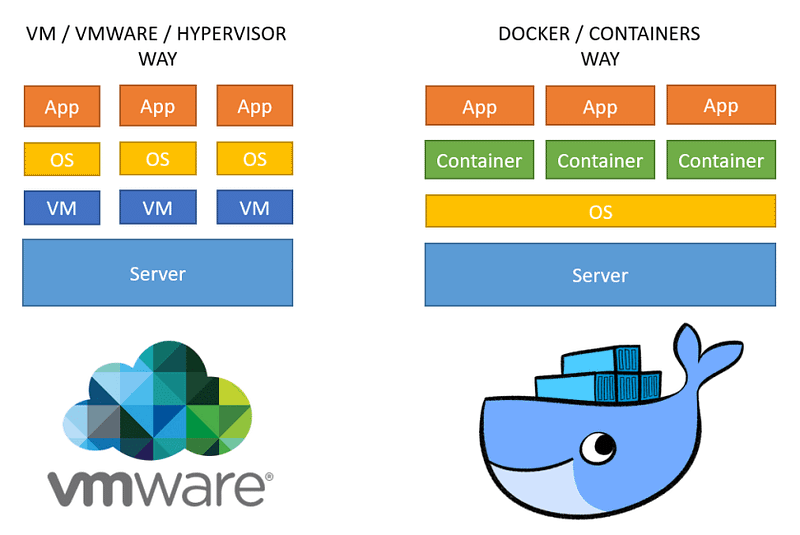
docker vs virtual machines
Docker containers provide lightweight virtualized runtime environments for running applications. Package applications in isolated environments; makes it easier to develop, deploy and maintain applications. Containers are independent and isolated from the host and other applications running on the host.
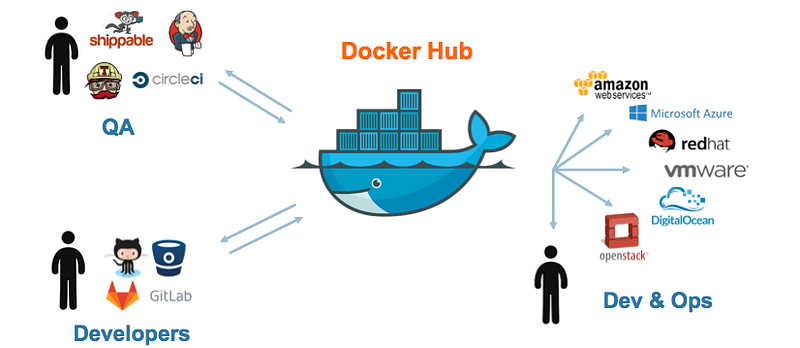
What is Docker Hub?
It is Docker's repository service. You can become a member of this platform and store the docker containers you have prepared here. You can also download ready-made Docker containers from this platform and install them quickly. You can access Docker hub here.
Docker Installation
Docker supports windows, mac and linux platforms.
Docker Daemon Installation
You can easily install the Docker service by following the steps on the website.
For Linux installation: https://docs.docker.com/desktop/install/linux-install/
For Windows installation: https://docs.docker.com/desktop/install/windows-install/
For macOS installation: https://docs.docker.com/desktop/install/mac-install/
Docker Image Installation
As we mentioned above, docker has a repository service. We can directly install ready images via Docker hub. These ready-made images contain various web applications, system tools and service software.
You can use Docker CLI commands to install these images or you can install via the derstop application.
As an example, we can give vulnhub. Testing environments are needed to practice in the field of Cyber ​​Security. This is where docker containers become very useful. vulnhubda is a docker compose that makes it easy to install these containers.
An easier way to install vulnerable web applications is the dockervuln tool. This tool provides automatic installation and operation of indexed images with a graphical interface. I recommend it :)
Docker Architecture
Docker architecture consists of many subroutines. The task of Docker CLI and API is to enable the user to communicate with the docker daemon.
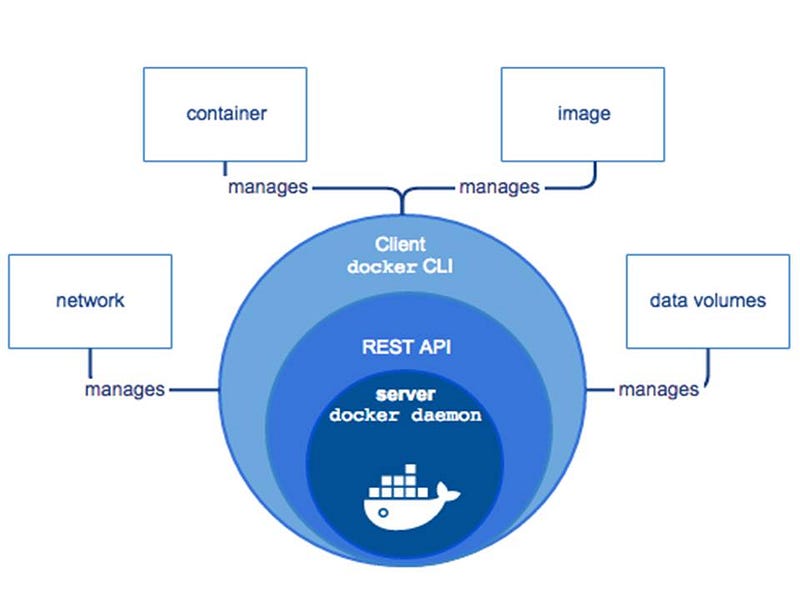
docker architecture
Docker Image
It is the image used to create Docker containers. There are base images provided by Docker. New images can be created using these base images.
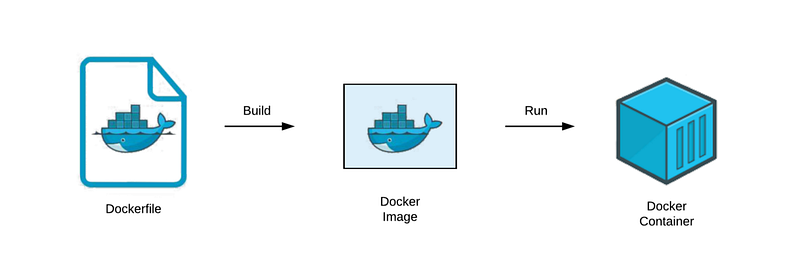
Docker Containers
Docker containers are structures that run the applications installed in them independently and isolated from the main system.

Docker Volume
If we want to keep the data in the container even if it is deleted, we use docker volume. Volume is a mechanism produced by the docker container that stores data on the host.
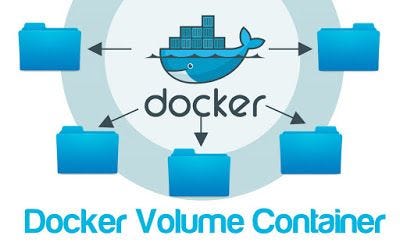
The data in the Docker volume can be used in more than one container. Even if the Docker image is updated, the data in the volume does not change. Data in the Docker volume can be moved and backed up. Docker volumes does not increase the container size.
DockerNetwork
It allows containers on the same network to communicate with each other. It segments multiple network traffic. It allows containers to be included in more than one network.

Docker CLI (Command Line Interface)
In this section, we will talk about the basic commands of docker.
You can also use the "play with docker" application to learn and practice Docker commands.
docker info
It is the command that provides all the information specific to Docker in the current operating system. Details about Dockerbrings the .
docker ps
Shows containers running in the Docker environment.
docker ps -a
It shows all containers installed in the Docker environment.
docker run
Installs and runs the image file of the specified container.
docker container run -it bash
It creates a new container and enters its shell.
docker container start <container_name>
It is used to initialize the current container.
docker container exec <container_id>
Runs the specified command on the relevant container and returns the result.
docker container exec -it <container_id> bash
It connects to the shell of a running container.
docker container run -d
It creates and runs the container in deattach mode, that is, in the background.
docker container stop <container_name>
It is used to stop a running container.
docker container kill <container_id>
It directly closes the running container.
docker container inspect <container_id>
Returns all the details of the container.
docker container rm <container_id>
It is used to delete the container. The employee cannot delete the container!
docker images
Lists installed images.
docker pull <docker_image>
It is used to download the Docker image.
docker push <docker_repo>
It is used to upload the image to the Docker repo.
Docker File
Docker file is a file we use to create docker images. The commands in the Dockerfile are run sequentially by the docker engine. At the end of Docker build, we have a Docker image of our application. Docker containers can then be created using this image.
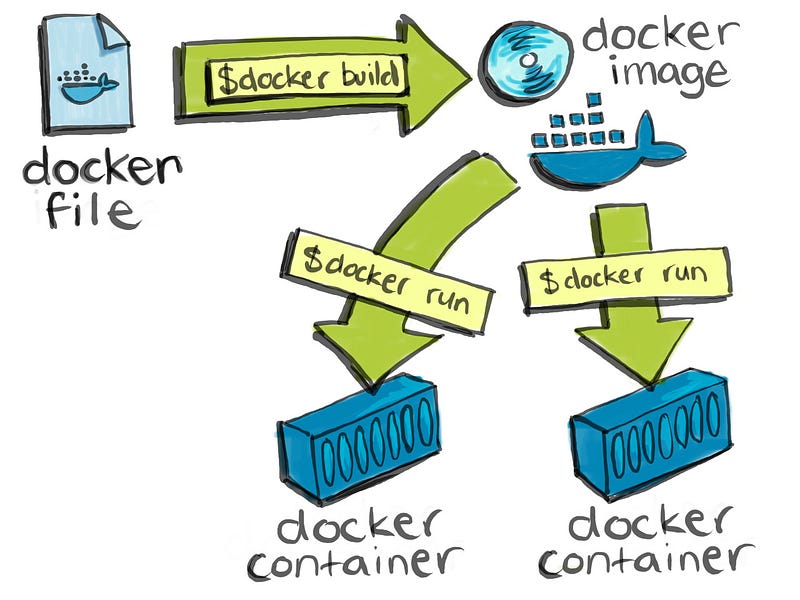
A base image is selected when writing the Dockerfile. The specified commands are run on this base image and a new image is created.
Dockerfile Commands
- FROM: The command where you specify your base image.
- RUN: is used to run commands during the build phase within the relevant application.
- CMD: is used for commands to be run when the container stands up.
- LABEL: is used for naming
- MAINTAINER: contains information about the creator of the file.
- EXPOSE: is used to open a port to the container.
- ENV: is used to define variables in the environment.
- ADD: Used to copy files from local or internet.
- COPY: copies the specified files directly to the specified location in the container.
- ENTRYPOINT: defines a default parameter when the container runs.
- VOLUME: defines a volume where the data in the container will be kept.
- USER: identifies the authorized user in the user.
- WORKDIR: determines the working directory of the container.
- MKDIR: creates directory in the container.
Dockerfile example
# syntax=docker/dockerfile:1
FROM golang:1.16-alpine AS build

# Install tools required for project
# Run `docker build --no-cache .` to update dependencies
RUN apk add --no-cache git
RUN go get github.com/golang/dep/cmd/dep

# List project dependencies with Gopkg.toml and Gopkg.lock
# These layers are only re-built when Gopkg files are updated
COPY Gopkg.lock Gopkg.toml /go/src/project/
WORKDIR /go/src/project/
# Install library dependencies
RUN dep ensure -vendor-only

# Copy the entire project and build it
# This layer is rebuilt when a file changes in the project directory
COPY . /go/src/project/
RUN go build -o /bin/project

# These results in a single layer image
FROM scratch
COPY --from=build /bin/project /bin/project
ENTRYPOINT ["/bin/project"]
CMD ["--help"]