Is RDP Secure?
Is RDPÂ Secure?
In this article, we will discuss whether the RDP (Remote Desktop Protocol) protocol is secure or not. RDP (Remote Desktop Protocol) has become a protocol frequently used by APT (Advanced Persistent Threat) groups for lateral movement, that is, horizontal movement within the network. In this respect, it creates the impression that it is not a secure protocol. So what is the reason for this?
What is RDP (Remote Desktop Protocol)?
Let's first understand what exactly RDP is.
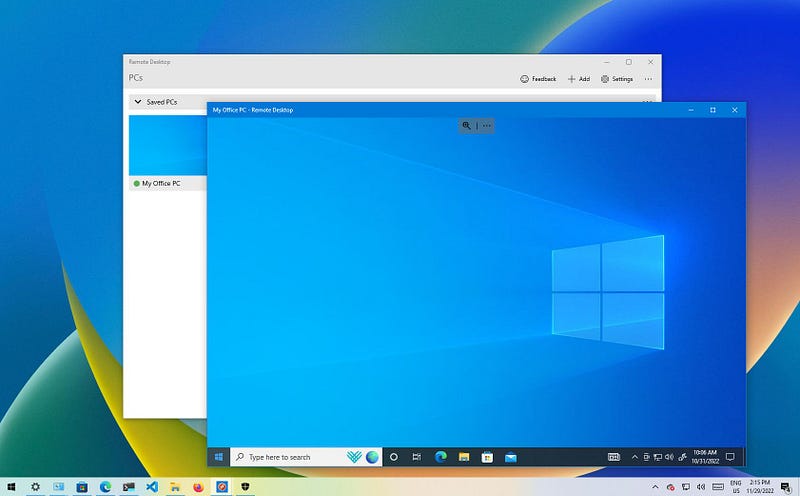
RDP is a protocol developed by Microsoft and widely used for remote desktop connections. RDP allows users to use a remote desktop environment as if it were local by connecting to another computer or server over the network.
RDP Protocol
Key Features of RDP:
- Remote Access: RDP allows users to directly manage a remote system's desktop or server.
- Encryption and Security: RDP ensures the security of data transmission by using TLS (Transport Layer Security) to encrypt connections. However, older versions may have security vulnerabilities.
- Access Control: RDP allows system administrators to control remote access, but can be vulnerable to malicious attacks if not configured correctly.
- User Authentication: RDP uses traditional username and password authentication for login, but multi-factor authentication (MFA) can also be integrated to add security.
RDP seems to be a secure protocol in the presence of mechanisms such as MFA, SSL/TLS, access control. In this respect, RDP is a truly secure protocol. The question is whether these mechanisms are actually used or not. The problem is whether the correct configurations are made or not!
Security Risks of RDP:
- Weak Passwords and Brute Force Attacks: When RDP uses weak passwords and is vulnerable to brute force attacks, unauthorized access to remote systems can be gained.
- Open Ports and Open Access to Attacks: When RDP's port number 3389** is made directly accessible over the internet, these connections can be targeted by attackers by performing port scanning.
- Vulnerabilities: RDP has had vulnerabilities in the past (for example, the BlueKeep vulnerability). Such vulnerabilities can be used to infiltrate systems.
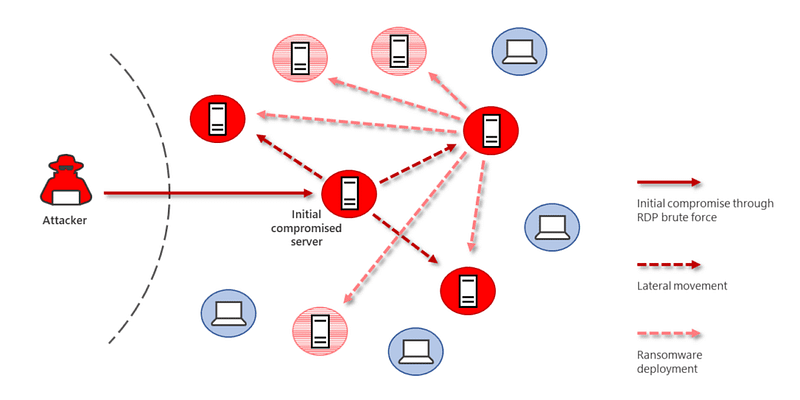
RDP (Remote Desktop Protocol) has become a protocol frequently used by APT (Advanced Persistent Threat) groups for lateral movement, that is, horizontal movement within the network.
Role of RDP in APT Attacks
APT groups often carefully monitor a specific target for long periods of time. After initial access is achieved, attackers often move through the network using vulnerabilities and credentials in existing systems to make lateral movement. RDP plays a critical role in such attacks because RDP allows attackers to remotely connect to different devices on a network. APT groups move to other systems on the network using the credentials of the first target they capture. This allows them to move quickly through the network.
Lateral Movement with RDP
APT groups can use RDP to engage in lateral movement in several ways:
- Pass-the-Hash (PTH): By using the hashes of the captured usernames and passwords, you can connect to other systems without knowing the password.
- Credential Dumping: Obtaining usernames and passwords from the network to open RDP sessions, using tools such as Mimikatz.
- Brute-force attacks: If weak passwords or default passwords are used, attackers can perform brute-force attacks by targeting the RDP port.
In fact, the fact that these attacks can be performed does not directly make the RDP protocol unsafe.
Looking at the first attack: RDP uses the kerberos protocol in the Active Directory environment for authentication processes. Pass-the-Hash attack is a type of attack that occurs as a result of TGT tickets being manipulated and used due to the stateless structure of the Kerberos protocol. The main culprit here is the kerberos protocol.
second attack, reading the memory area of ​​the lsass.exe process with the mimikatz tool and using the credentials in itIt involves stealing data and then using it for authentication. The RDP protocol is not at fault here either.
In the third attack**, incoming RDP login requests in the brute-force attack are again verified by the kerberos protocol. Again, my dear, RDP is not guilty of anything :(
In fact, the main function of RDP is to provide remote access and it does this securely with SSL/TLS encryption. It would be unfair to blame attacks resulting from Kerberos authentication processes on the RDP protocol.
APT Attacks and Using RDP: Examples and Methods
- APT33: This group, thought to be backed by Iran, infiltrated target systems using RDP and used methods such as credential theft to move through the network.
- APT29 (Cozy Bear): Cozy Bear, another APT group affiliated with Russia, gained access to internal networks and critical systems using RDP. One of the methods the group used was to use hijacked RDP sessions to spread through the network and steal data.
Reasons Why RDP is Preferred by APTs
- Easy Access and Propagation: RDP allows attackers to easily switch to different devices after infiltrating the target. This is a critical advantage, especially in large networks.
- Effective and Fast Data Stealing: RDP allows attackers to quickly access important data or system resources. This is especially useful for long-lasting, low-profile infiltration attacks.
- Prevalence of RDP and Configuration Errors: In most networks, RDP is widely used to make remote connections. However, security measures are often lacking. This allows attackers to easily enter the system through brute force attacks or credential theft.
Despite the fact that RDP is innocent, the opportunities it offers continue to make hackers salivate! So what can we do? Let's discuss these now.
Security Precautions Against Lateral Movement with RDP
- Restricting RDP Access: RDP port (3389) should only be opened to internal networks and, if possible, accessed via VPN or other secure connection means.
- Network Level Authentication (NLA): RDP connections must be protected with NLA. This prevents connecting before authentication and makes it harder for malicious actors to hijack the system.
- Multi-Factor Authentication (MFA): Implementing MFA for RDP sessions can prevent password-only login and adds an additional layer of security.
- Password Security: Passwords must be strong and complex. Simple passwords can make RDP easier to abuse.
- Intrusion Detection and Monitoring: RDP sessions should be monitored and suspicious activities should be detected. Suspicious login attempts or unknown IP addresses moving through the network should be carefully monitored.
- Updates and Patching: Systems should be updated regularly and vulnerabilities should be patched. Old versions and vulnerabilities can easily give attackers access.
So is the only problem with RDP? Aren't other remote access tools dangerous? Let's discuss this now.
APT Attacks and Popular Use of Remote Access Tools
- RDP (Remote Desktop Protocol):Â
RDP is a tool very often used by attackers to spread across the network. - TeamViewer:
TeamViewer is a widely used remote access tool and is often used by system administrators. However, APT groups can abuse this tool to connect to target computers. Having TeamViewer installed and running can often go unnoticed by network administrators, allowing attackers to secretly move around the network. Initiating the installation of TeamViewer on target machines via social engineering attacks gives attackers covert access to the network. - AnyDesk:
AnyDesk is another common remote access tool used to gain access to target systems, similar to TeamViewer. It is generally preferred because it offers fast connections and high performance. APT groups can use this software to steal data from target devices on the network or infiltrate more systems. Because AnyDesk, like TeamViewer, is often used legitimately by users for business purposes, malicious use may go undetected.
As you can see, RDP was not the culprit. All remote access tools carry similar risks. In fact, RDP's APT attackThe popularity of its use on the internet stems from the popularity of using RDP. Since many institutions already use RDP, hackers also use this tool. The same goes for other widely used remote access tools!Â
A while ago, many institutions were hacked due to a vulnerability in the Anydesk application. This shows how careful we need to be about the risks of remote access tools.
Privileged Access Management (PAM)
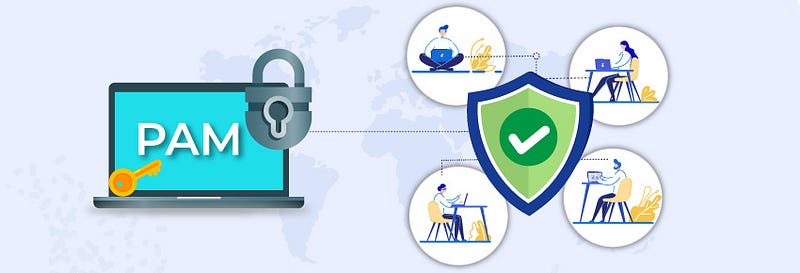
PAM, Privileged Access Management (Privileged Access Management**), is a security solution used to control and audit the access of users with high privileges on systems and networks in organizations. PAM solutions apply specifically to system administrators, network administrators, and other privileged accounts.
PAM
I'm talking about a system that can be used to make remote access more secure.
Relationship of PAM to RDP:
PAM plays a critical role, especially in managing high-privilege access. Remote desktop connections made via RDP are a potential entry point that can be exploited and is vulnerable to attacks. PAM provides strong security measures for auditing, managing passwords, and access monitoring of high-privilege transactions over RDP connections.
In this article, I discussed whether the RDP protocol is secure or not. You can express your opinions and support me in the comments.