Operating System Concepts
Operating System Concepts: In the Footsteps of the Dinosaur Book
Every computer science or software engineering student who steps into an Operating Systems class is bound to encounter it, and industry veterans keep it on their shelves as a mark of respect: the famous "Dinosaur Book" (originally titled Operating System Concepts). Authored by Abraham Silberschatz, Peter B. Galvin, and Greg Gagne, this work is not just a textbook; it is a computer science classic that explains the fascinating bridge between hardware and software: the Operating System (OS).
Why Does Everyone Call It the "Dinosaur Book"?
Although the official title is Operating System Concepts, almost no one in the industry or academia uses this long name. The reason is simple: since its first editions, the cover art has always featured a dinosaur illustration. Over time, this became so iconic that the authors placed a different dinosaur species on the cover of each new edition (for instance, the 10th edition features a T-Rex).
There is also a popular joke in the computer science world about this cover: operating systems might initially seem bulky, ancient, and complex (just like a dinosaur), but as you dive deeper, you realize how powerful and highly evolved they actually are.
In this technical guide, building upon the core pillars of the Dinosaur Book, we will microscopically examine the operations running in the background from the moment you press the power button, CPU scheduling, how RAM is partitioned, and how hardware and the operating system work together as a cohesive whole.
Operating System
An operating system is a program that manages a computer's hardware. It also provides a basis for application programs and acts as an intermediary between the computer user and the computer hardware.
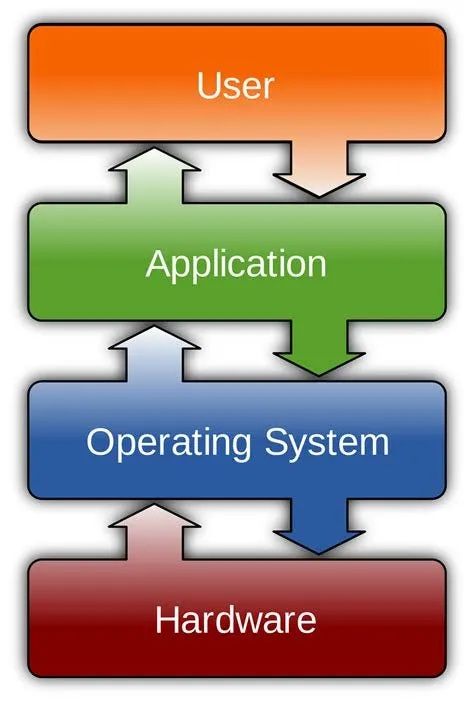
At this point, we are talking about a system that depends on the hardware it will run on. Therefore, operating systems are directly related to system hardware. Single and multi-processor architectures and organizations containing more than one persistent memory-disk must be supported by the operating system.
In addition, it must provide a working environment to the applications running on it, for this it must allocate resources to the applications and allow them to perform operations with system calls. Moreover, it must have the ability to work integrated with other externally connected devices.
Yes, we are talking about an extremely complex system. Making all components interoperable does not seem to be an easy task.
Operating System Structure
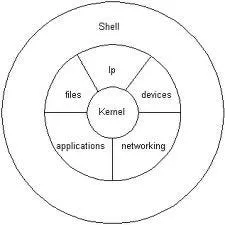
An operating system is software that acts as an interface between computer hardware and software and manages the computer's resources. The operating system regulates access to the computer's resources such as memory, processor, file systems, device drivers and network connections and ensures that users can use these resources effectively.
Operating System Structure
The operating system generally consists of two basic components: the kernel and the user interface (shell).
1. Kernel: The kernel is the fundamental part of the operating system and manages hardware resources at the lowest level. It performs basic functions such as memory management, process management, file systems, drivers, and network connections. The kernel communicates directly with the hardware and provides applications with access to these resources.
2. User Interface (Shell): The user interface is a layer that allows users to interact with the operating system. There are two basic types of user interfaces: graphical user interface (GUI) and command line interface (CLI).
- Graphical User Interface (GUI): A GUI is an interface through which users interact with input/output devices such as a mouse, keyboard, and screen. This interface allows users to easily use the operating system by using graphical elements such as menus, windows, and icons. Examples include Windows' desktop environment or macOS's Aqua interface.
- Command Line Interface (CLI): CLI is an interface through which users instruct the operating system with text-based commands. Users can issue orders to the operating system by entering predefined commands or using scripts. Examples include the Bash shell used on Unix or Linux-based systems or the Command Prompt in Windows.
This basic structure may differ depending on the different features and designs of operating systems. For example, operating systems such as Windows, macOS, Linux, Unix and Android.
User Mode vs. Kernel Mode Transition
To ensure system security and protect critical hardware components, modern processors and operating systems support at least two distinct modes of operation: User Mode (Mode Bit = 1) and Kernel Mode / Privileged Mode (Mode Bit = 0).
User applications cannot directly access hardware or execute privileged machine instructions. When an application requires a hardware resource (reading/writing a file, network card access, allocating memory, etc.), it must request the operating system to perform the operation on its behalf. This request is initiated via a System Call.
The sequence diagram below illustrates the process of transitioning from User Mode to Kernel Mode when an application invokes a system call, highlighting how the hardware boundary is crossed:
sequenceDiagram
    autonumber
    actor User as User Application
    participant CPU as Processor (CPU)
    participant Kernel as OS Kernel

    Note over User: Running in User Mode<br/>(Mode Bit = 1)
    User->>CPU: Call System Call API (e.g., read())
    Note over CPU: Non-privileged instructions executed

    activate CPU
    CPU->>CPU: Generate Trap / Interrupt
    Note over CPU: Crossing Hardware Boundary:<br/>Mode Bit: 1 -> 0 (Kernel Mode)

    CPU->>Kernel: Branch to System Call Vector Table (Interrupt Vector)
    deactivate CPU

    activate Kernel
    Note over Kernel: Running in Kernel Mode<br/>(Mode Bit = 0)
    Kernel->>Kernel: Perform Requested Service (Disk / RAM Access)
    Kernel->>CPU: Return Result and Command Mode Reset
    deactivate Kernel

    activate CPU
    Note over CPU: Crossing Hardware Boundary:<br/>Mode Bit: 0 -> 1 (User Mode)
    CPU->>User: Return from System Call
    deactivate CPU
    Note over User: Resume Execution<br/>(Mode Bit = 1)
Operating System Tasks
The operating system performs a number of important tasks in computer systems. Here are some of the basic tasks of the operating system:
1. Resource Management: The operating system effectively manages hardware resources. These resources include memory, processing power, disk space, network connections, and other peripherals. The operating system allocates, prioritizes and coordinates these resources according to demands.
2. Process Management: The operating system manages the processes running on the computer. Transaction management includes operations such as creating a transaction, pausing, resuming, prioritizing, and operating across time periods. The operating system effectively schedules processor usage and can run multiple processes simultaneously.
3. Memory Management: The operating system manages the computer's memory. Memory management includes operations such as memory allocation, memory release, and virtual memory management. The operating system shares memory among programs and monitors memory usage.
4. File Management: BusinessThe operating system manages file systems to store, organize, and access users' data. File management provides operations such as creating, reading, writing, deleting, moving and renaming files. The operating system also ensures the organization and security of files.
5. Input/Output Management: The operating system enables communication with external devices (keyboard, mouse, printer, disk drives, etc.). Input/output management controls data transfer between these devices, manages the input/output sequence, and deals with error conditions.
6. Network Management: The operating system manages network connections and enables communication on the network. Network management includes tasks such as configuring network settings, controlling the transmission of data packets, ensuring network security, and regulating access to the network.
7. Security and Access Control: The operating system takes security measures to keep the computer system safe. Controls user access, provides authorization, manages user accounts and ensures data security
Processes
In an operating system environment, a process is an executable instance of a program. A process is an entity that is managed, uses resources (such as memory, processor time, files, and input/output devices) and is executed by the operating system.
The process occurs when a program becomes executable. A program exists in the form of a file stored on disk, while the process represents its state while running in memory. The process contains program code, variables, execution status (program counter, pointers, etc.), and other running information.
We would like to emphasize that a program is not a process in itself.
A program is a passive entity, such as a file containing a list of instructions stored on disk. In contrast, a process is an active entity with a program counter and a set of associated resources that specify the next instruction to be executed. A program becomes a process when an executable file is loaded into memory.
Transaction Status
Changes state while an operation is executing. The state of a process is partially defined by the current activity of that process. A transaction may be in one of the following states.
- New–”ŠCreating the transaction.
- Running–”ŠInstructions are being executed.
- Waiting–”ŠThe process is waiting for an event to occur (for example, an I/O
completion or reception of a signal). - Ready–”ŠThe process is waiting to be assigned to a processor.
- *Terminated⊖*The execution of the transaction is complete.
stateDiagram-v2
    [*] --> New : Created (New)
    New --> Ready : Admitted
    Ready --> Running : Scheduler Dispatch
    Running --> Ready : Interrupt
    Running --> Waiting : I/O or Event Wait
    Waiting --> Ready : I/O or Event Completion
    Running --> Terminated : Exit
    Terminated --> [*]
PCB(Process Control Block)
Each process is represented by a process control block (PCB) in the operating system. It contains many pieces of information associated with a particular process, including:
- Process status: Status is new, ready, running, waiting, stopped, etc.
it could be. - Program counter: The counter indicates the next instruction to be executed for this operation.
shows the address. - CPU registers: Registers vary in number and type depending on the computer architecture. These include accumulators, index registers, stack pointers, and general-purpose registers, as well as any status code information. This status information, along with the program counter, must be recorded when an interrupt occurs to ensure that the operation continues correctly at a later time.
- CPU timing information: This information is a process priority, timing
Contains pointers to queues and other timing parameters. - Memory management information: This information may include items such as the value of base and boundary registers and page tables or segment tables, depending on the memory system used by the operating system.
- Accounting information: This information includes the amount of CPU and actual time used, time limits, account numbers, job or transaction numbers, etc. Contains.
- I/O status information: This information includes information about the I/O devices allocated to the process.
list, list of open files, etc. Contains.
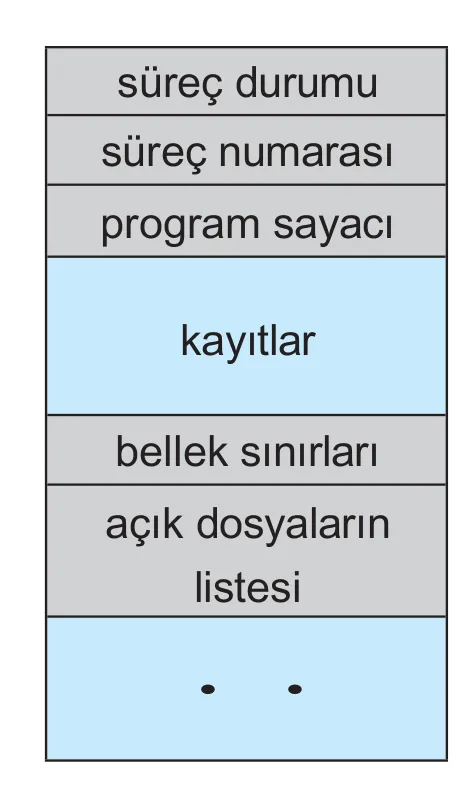
Process control block (PCB)
Inter-Process Communication
Processes running concurrently in the operating system can be independent processes or collaborating processes. A process is independent if it does not affect or is affected by other processes running in the system. Any process that does not share data with another process is independent. A process affects other processes running in the system.Knowing or being influenced by them is a collaborative process.
There are several reasons to provide an environment conducive to process collaboration:
- Information sharing
- Calculation acceleration
- Modularity
- Convenience
Collaborating processes will enable them to exchange data and information
It requires an inter-process communication (IPC) mechanism. interprocess
There are two basic models of communication: shared memory and message passing.
Threads
A thread is a basic unit of CPU usage; It consists of a thread ID, a program counter, a register set, and a stack. It shares the code section, data section, and other operating system resources such as open files and signals with other threads belonging to the same process. A traditional process has a single thread of control. A process can have multiple threads.
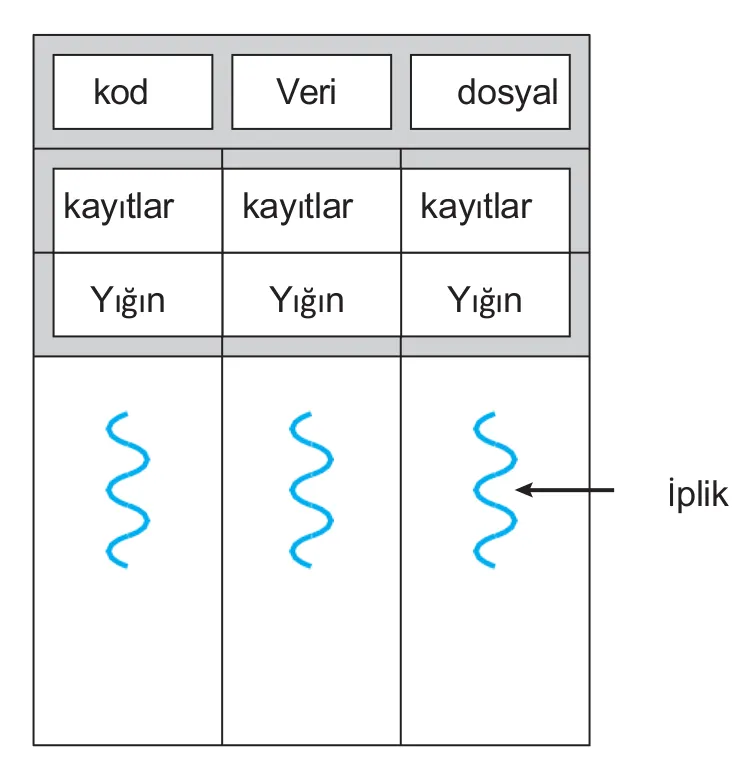
Threaded Processing
Multithreading Models
Support for threads may be provided at the user level for user threads or by the kernel for kernel threads.
While user threads are supported on top of the kernel and managed without kernel support, kernel threads are supported and managed directly by the operating system. Nearly all contemporary operating systems, including Windows, Linux, Mac OS X, and Solaris, support kernel threads. After all, there must be a relationship between user threads and kernel threads. These models:
- Many-to-One Model (Multiple user threads to one core thread)
- One to One Model (One user thread to one kernel thread)
- Many to Many Model (Multiple user threads to multiple seed threads)
Linux implements the same model as the Windows family of operating systems.
CPU Scheduling
CPU scheduling is the process by which the operating system manages the running time of processes or threads in the processor and switches between time slots. The operating system uses the CPU scheduling mechanism to run multiple processes or threads fairly.
The queueing model diagram below illustrates the flow of processes from the ready queue to the CPU, and how they cycle between queues due to events like I/O requests, time slice expirations, child process creation, or interrupts:
graph LR
    RQ["Ready Queue"]
    CPU["CPU"]
    IO["I/O Queue"]
    IOD["I/O Device"]
    Child["Child Process<br/>(Fork)"]
    Int["Interrupt"]

    RQ -->|CPU Scheduler| CPU
    CPU -->|Execution Ended| Terminated["Terminated"]
    CPU -->|I/O Request| IO
    IO --> IOD
    IOD -->|I/O Complete| RQ
    CPU -->|Time Slice Expired| RQ
    CPU -->|Create Child| Child
    Child -->|Wait for Child| RQ
    CPU -->|Interrupt Occurs| Int
    Int --> RQ
The operating system determines how it schedules threads or processes using the CPU scheduling mechanism. The operating system often uses scheduling algorithms. The operating system allocates time slots based on the priorities of the processes or threads sharing processor time. For example, different scheduling algorithms such as Round Robin, Priority Scheduling, Shortest Job First (SJF) can be used.
First-Come, First-Served
The simplest scheduling algorithm, allocating the CPU to the process that requests it first. It runs entirely non-preemptive. Its main disadvantage is the Convoy Effect, where short processes wait behind long ones, increasing the average waiting time.
Shortest Job First
Associates with each process the length of its next CPU burst, prioritizing the shortest. It is theoretically optimal, providing the minimum average waiting time. However, predicting future CPU bursts is difficult, and it can cause Starvation for longer processes.
Round Robin (RR)
A preemptive algorithm designed for time-sharing systems. Each process is allocated a small unit of CPU time called a Time Quantum. When this time expires, the process is preempted and put at the end of the ready queue. The quantum size must be chosen carefully.
Priority Scheduling
Each process is assigned a numerical priority, and the CPU is allocated to the process with the highest priority. It can be preemptive or non-preemptive. The primary challenge is Starvation of low-priority processes, which is solved via Aging (gradually increasing priority over time).
Transaction Synchronization
The process may have a section of code called the critical section, where the process modifies public variables. While a process is executing in the critical section, no other processes are allowed to execute in the critical section. That is, two processes cannot run on their critical section at the same time.
The solution to the critical section problem must meet the following three requirements:
- Mutual exclusion: if the process is running on its critical section, no other
The process cannot run on the critical section. - Progress: If no process is running on its critical partition and some
If processes want to enter the critical section, only the remaining
The processes that do not work in the sections should be transferred to the next critical section.
may participate in deciding whether to enter, and this choice may last indefinitely.
It cannot be postponed. - Limited waitinge: After a transaction, other transactions have critical
a limit or limit on the number of people allowed into the section
There is.
Peterson Solution was developed for these requirements.
Software-based solutions like Peterson's are not guaranteed to work on modern computer architectures. All these solutions are based on locking, that is, protecting critical areas through the use of locks.
A situation in which multiple processes access and manipulate the same data simultaneously and the outcome of the execution depends on the specific order in which the access occurs is called a race condition.
Mutex Locks
Hardware-based solutions to the critical cross-section problem are complex and often inaccessible to application programmers. Instead, operating system designers develop software tools to solve the critical section problem. The simplest of these tools is the mutex lock. (In fact, the term mutex is short for mutual exclusion.) MWe use uteks lock to protect critical regions and thus prevent race conditions. So, one
The transaction must acquire the lock before entering a critical section; from critical section
When it comes out, it releases the lock.
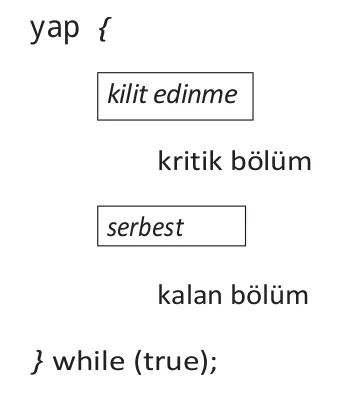
Use of mutex locks
The acquire() function acquires the lock and the release() function releases the lock. Calls to acquire() or release() must be executed atomically.
A mutex lock has a boolean variable whose value indicates whether the lock is usable. If the lock is usable, the acquire() call succeeds and the lock is then considered unusable. A process attempting to acquire an unusable lock is blocked until the lock is released.
Semaphores
It acts similar to a mutex lock, but locks down the activities of processes.
It can also provide more complex ways for them to sync.
A semaphore S is an integer variable that is accessed by only two standard atomic operations other than initialization.
Operating systems often distinguish between counting and binary semaphores. The value of a counting semaphore can vary over an unlimited area. The value of a binary semaphore can only vary between 0 and 1. Therefore, binary semaphores behave similarly to mutex locks.
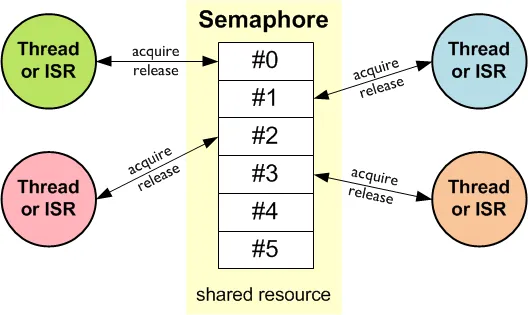
Counting semaphores can be used to control access to a specific resource consisting of a finite number of instances. The semaphore is initialized to the number of available resources. Each process that wants to use a resource performs a wait() operation on the semaphore (thus reducing the count). When a process releases a resource, it performs a signal() operation (increments the count). When the number of semaphores drops to 0, all resources are being used. After that, processes that want to use a resource are blocked until the count is greater than 0.
Monitors
Although semaphores provide a convenient and effective mechanism for process synchronization, their misuse can cause timing errors that are difficult to detect, because these errors occur only when certain execution sequences occur, and these sequences do not always occur.
Monitors do not require any specific implementation of an abstract data type (ADT).
data with a set of functions that will operate on that data independently
covers. The monitor structure allows only one process to be active within the monitor at a time.
makes it happen.
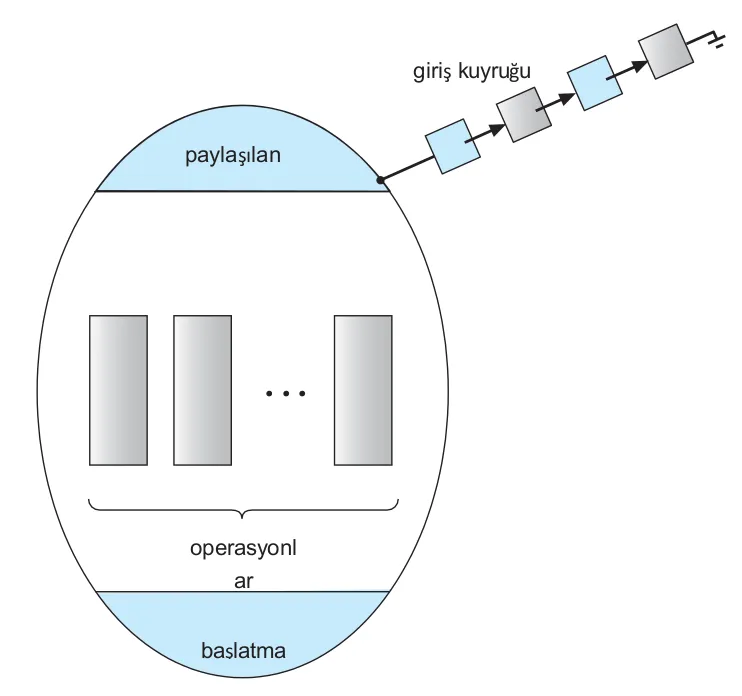
monitor
A function defined within a monitor can only access variables declared locally within the monitor and its formal parameters. Similarly, a monitor's local variables can only be accessed by local functions.
Deadlocks
In a deadlock, processes never finish executing and system resources are tied up in a way that prevents other jobs from starting.
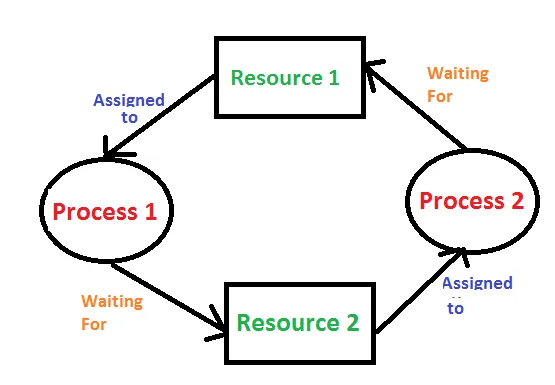
A deadlock condition can occur in a system if the following four conditions occur simultaneously:
Mutual Exclusion
At least one resource must be held in a non-shareable mode. Only one process can use the resource at a time. If another process requests that resource, the requesting process must be delayed until the resource has been released.
Hold and Wait
A process must be concurrently holding at least one resource and waiting to acquire additional resources that are currently being held by other processes.
No Preemption
Resources cannot be preempted. A resource can be released only voluntarily by the process holding it, after that process has completed its task.
Circular Wait
A closed loop of processes must exist, {P₀, P₁, ..., Pₙ}, such that P₀ is waiting for a resource held by P₁, P₁ is waiting for a resource held by P₂, and Pₙ is waiting for a resource held by P₀.
All four conditions must hold simultaneously for a deadlock to occur. The circular-wait condition implies the hold-and-wait condition, meaning that the four conditions are not completely independent.
Banker's Algorithm
The most well-known deadlock avoidance algorithm is the Banker's Algorithm, named after its analogy to a bank where resources are allocated based on safety evaluations. It is designed for systems with multiple resource types, where each resource type can have multiple instances.
When a new process enters the system, it must declare the maximum number of resource instances of each type that it may ever need. When a process requests resources, the system simulates whether allocating them would leave the system in a safe state (safe state). If a safe sequence exists where all processes can eventually run to completion, the allocation is granted. Otherwise, the process must wait.
In general, we can deal with the deadlock problem in one of three ways:
- A protocol to prevent or avoid deadlocks to ensure that the system never enters a deadlock state by using we can provide.
- Allow the system to enter a deadlock state, detect it, and recover.
- You can completely ignore the problem and assume that deadlocks never occur in the system.
Memory Management
The operating system's memory management refers to the process of effectively allocating and controlling the computer's memory resources. Thanks to memory management, the operating system monitors the memory usage of processes and programs, allocates and retrieves memory space when necessary.
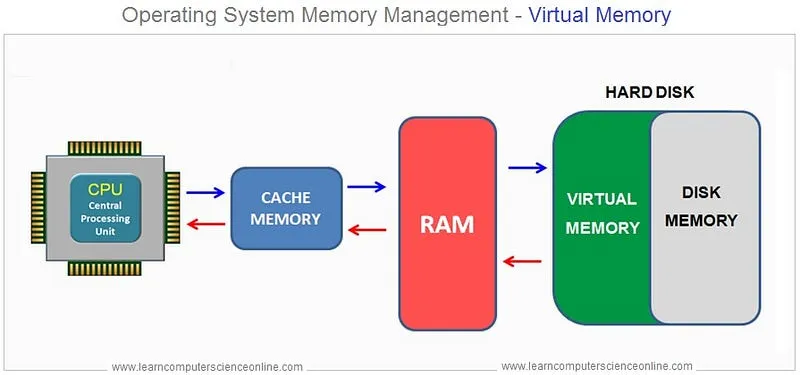
Main memory (RAM) and registers located inside the processor (Cache) are the only general-purpose storage areas that the CPU can directly access. There are machine instructions that take memory addresses as arguments, but there are no instructions that take disk addresses. Therefore, all instructions being executed and all data used by the instructions must be on one of these direct access storage devices. If the data is not in memory, it must be moved to main memory (RAM) before the CPU can operate on it.
An address generated by the CPU is usually called a logical address.
An address seen by the memory unit — that is, the address loaded into the memory address register of the memory — is usually called a physical address. The runtime mapping from virtual addresses to physical addresses is done by a hardware device called a memory management unit (MMU).
Swap
For a process to be executed, it must be in memory. However, a process can be temporarily moved from memory to disk and then brought back to memory to continue execution.
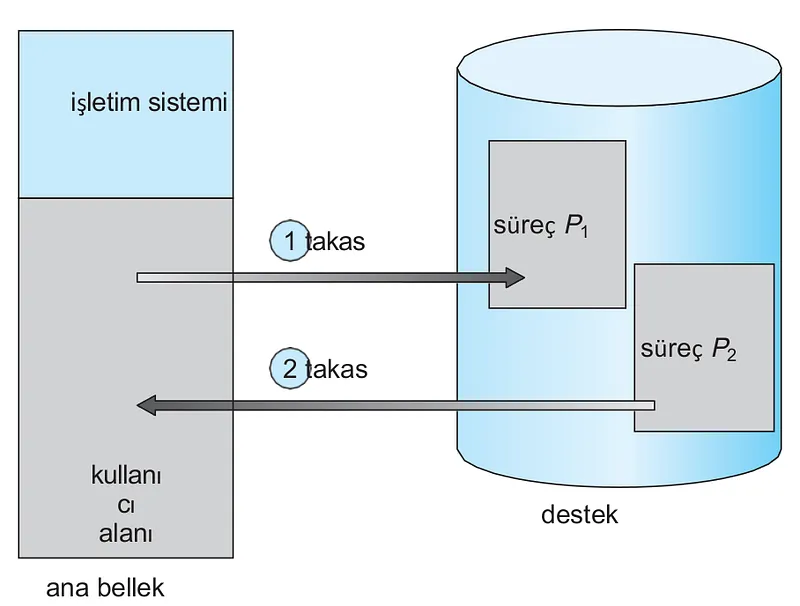
Swap transaction
Memory Allocation
Main memory supports both the operating system and various user processes.
should contain. Therefore, we need to allocate main memory in the most efficient way possible.
One of the simplest methods for memory allocation is to divide memory into several fixed-size partitions. Each section can contain exactly one transaction. Thus, the degree of multiprogramming depends on the number of partitions. In this multi-partition method, when a partition is empty, a process is selected from the input queue and loaded into the empty partition. When the process ends, the partition becomes available for another process.
In a variable partition scheme, the operating system determines which parts of the memory
keeps a table showing which ones are available and which are occupied. Available memory blocks consist of a series of spaces of various sizes distributed throughout memory. When a process arrives and needs memory, the system looks for a space large enough for that process. If there is too much space
If it is large, it is divided into two parts. A piece is allocated to the incoming process; the other is sent back to the set of spaces. When a process terminates, it frees the block of memory, which is then placed back into the set of holes.
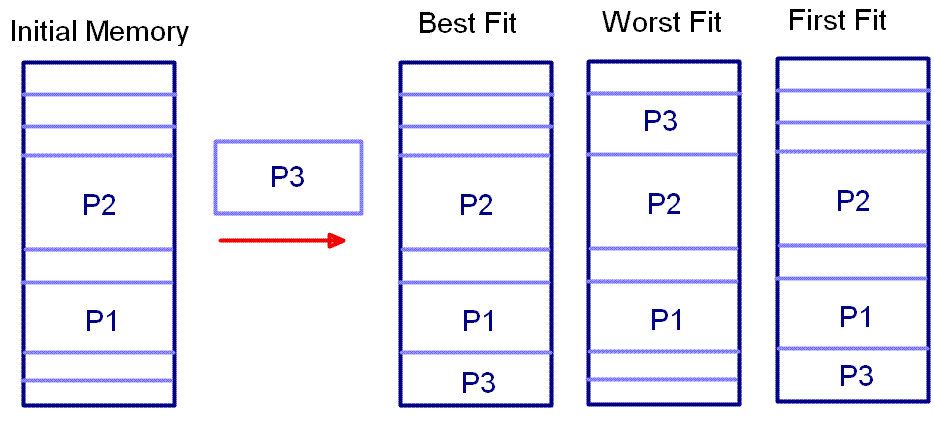
Memory Allocation
Strategies developed for this process:
- First-Fit: Allocate to the first space that is large enough. The search can start from the beginning of the hole cluster or from the position where the previous first suitability search ended. Once we find a big enough gap we can stop the search.
- Best-Fit: Allocate the smallest space that is large enough. Unless the list is sorted by size we must search the entire list. This strategy produces the smallest remaining gap.
- Worst-Fit: Allocate to the largest gap. Again, we need to search the entire list unless it is sorted by size. This strategy produces the largest residual gap, which may be more beneficial than the smaller residual gap obtained from the optimal approach.
Segmentation
Considering memory in terms of its physical properties is harmful for both the operating system and the programmer. What if hardware could provide a memory mechanism that mapped the programmer's view to actual physical memory? While the system would have more freedom to manage memory, the programmer would have a more natural programming environment. Segmentation provides such a mechanism.
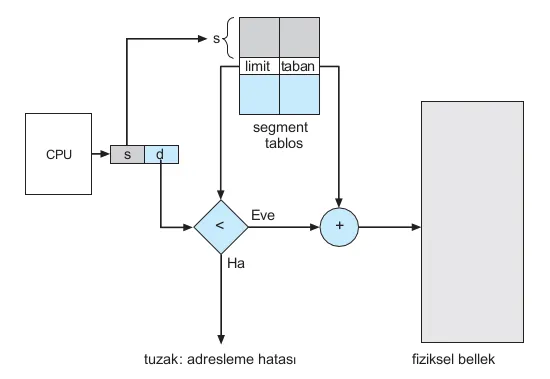
Segmentation Hardware
Each segment has a name and length. Addresses specify both the segment name and the offset within the segment. Therefore, the programmer specifies each address with two quantities: a segment name and an offset. Segments for ease of applicationIt is classified and referred to by the segment number instead of the segment name. Thus, a logical address consists of two tuples:
Paging
Segmentation allows the physical address space of a process to be non-contiguous. Paging is another memory management scheme that offers this advantage. However, paging prevents and compresses external fragmentation, whereas segmentation does not. Additionally, different sizes of memory
It also solves the important problem of fitting parts into the support tank.
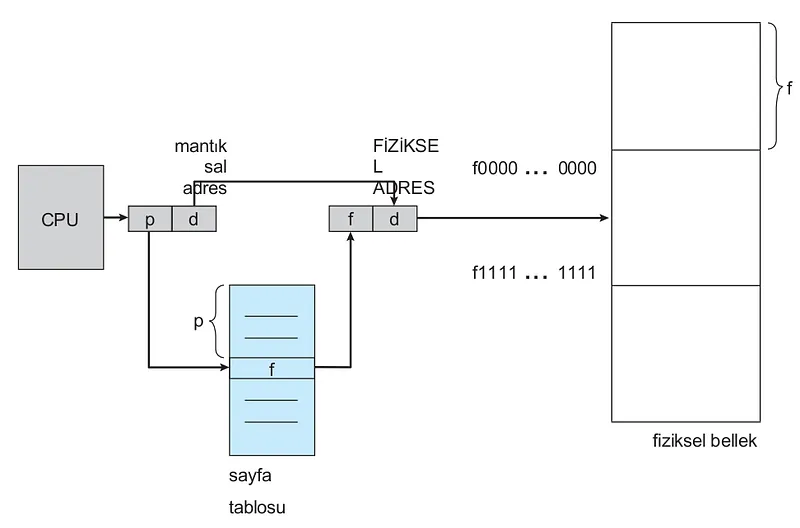
Paging Hardware
The basic method for implementing paging involves dividing physical memory into fixed-size blocks called frames and dividing logical memory into blocks of the same size called pages. When a process is to be executed, its pages are loaded from their source (a file system or backing store) into any available memory frame. The backing store is divided into fixed-size blocks that are the same size as memory frames or clusters of multiple frames. This rather simple idea has great functionality and wide implications. For example, the logical address space is now completely separate from the physical address space, so a process can have a logical 64-bit address space even if the system has less than 264 bytes of physical memory.
Virtual Memory
Virtual memory involves separating logical memory from physical memory as perceived by users. This allocation allows an extremely large amount of virtual memory to be available to programmers when only smaller physical memory is available. Virtual memory makes the programming task much easier because the programmer no longer needs to worry about the amount of physical memory available; instead
can concentrate on the problem to be programmed.
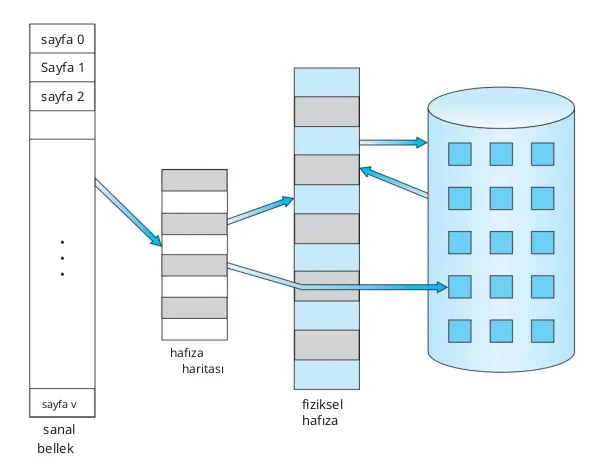
Virtual Memory
A process's virtual address space refers to the logical (or virtual) view of how a process is stored in memory. Typically, this view is that a process starts at a particular logical address (e.g. address 0) and exists in contiguous memory.
In addition to separating logical memory from physical memory, virtual memory allows files and memory to be shared by two or more processes through page sharing. This leads to the following advantages:
- System libraries can be shared by several processes by mapping the shared object to a virtual address space. Although each process sees the libraries as part of the virtual address space, the actual pages where the libraries reside in physical memory are shared by all processes. Typically, a library is mapped read-only to the space of each process associated with it.
- Similarly, processes can share memory. Recall from Chapter 3 that two or more processes can communicate through the use of shared memory. Virtual memory allows a process to create a region of memory that it can share with another process. Processes sharing this region consider it part of their virtual address space, but the actual physical pages of memory are shared.
- Pages can be shared with the fork() system call during process creation, thus speeding up process creation.
Page Replacement Algorithms
In demand paging systems, when physical memory is full and a new page needs to be loaded, the operating system must decide which page to swap out to disk (to select a "victim" page). Operating systems employ various page replacement algorithms to keep the page fault rate as low as possible:
First-In, First-Out
The simplest page replacement algorithm, associating a FIFO queue with memory. The oldest page is replaced first. Its main disadvantage is Belady's Anomaly, where the page-fault rate can increase as the number of allocated frames increases.
Optimal (OPT)
Replaces the page that will not be used for the longest period of time. This algorithm yields the lowest possible page-fault rate and is theoretically perfect. However, it requires future knowledge of reference strings, making it impossible to implement in practice.
Least Recently Used
Replaces the page that has not been used for the longest period of time. It relies on temporal locality (past behavior as an indicator of future use). It is highly effective but requires significant hardware support (counters or stacks) to implement efficiently.
Second-Chance / Clock
An approximation of LRU that reduces hardware overhead. It uses a circular list of pages and a Reference Bit. If the bit is 1, it is cleared to 0 (given a second chance) and the clock hand moves to the next page. A page with a bit value of 0 is selected as the victim.
Disk Management (Mass Storage Management)
It is a component that allows the operating system to manage large data storage units on the computer. These volumes typically include devices such as hard disk drives, SSDs, external disks, USB sticks, and network shared storage (NAS).
Disk Structure
A disk is a storage unit where data is permanently stored and accessed. Disks commonly used in computer systems are divided into two main categories: hard disk drives (Hard Disk Drive — HDD) and solid state drives (Solid State Drive — SSD).
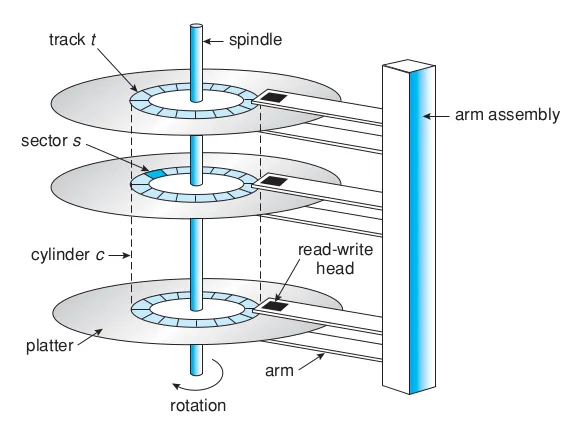
HDD Disk
Modern magnetic disk drives are treated as large one-dimensional arrays. logical blocks, where logical block is the smallest transfer unit. The logical block size is usually 512 bytes, but some disks may be low-level formatted to have a different logical block size, such as 1,024 bytes.
Disk Connection
Disk Attachment refers to how a disk drive connects and communicates with the computer system. discs,They use a specific connection interface to transfer data to the computer. Here are some commonly used disk connections:
- ATA (Advanced Technology Attachment)
- SATA (Serial ATA)
- SCSI (Small Computer System Interface)
- NVMe (Non-Volatile Memory Express)
These connectivity standards allow disk drives to be connected to the system motherboard or additional cards. Each connection standard comes with different speeds, features and supported devices.
Disk Scheduling
Disk Scheduling is an operating system concept used to manage and optimize access to data on disk. Data access on disks is achieved by performing read or write requests in the order given by the operating system. Accessing data on disks is a time-consuming process due to physical delays caused by their location. Disk scheduling algorithms are used to minimize disk access times and make data access efficient.
Disk scheduling algorithms manage incoming requests and determine the order in which they will be processed. The most commonly used disk scheduling algorithms are:
- FCFS (First-Come, First-Served): This algorithm processes incoming requests sequentially and processes incoming requests first. However, this algorithm does not take into account physical locations on the disk and can increase disk access times in case of an out-of-order sorting.
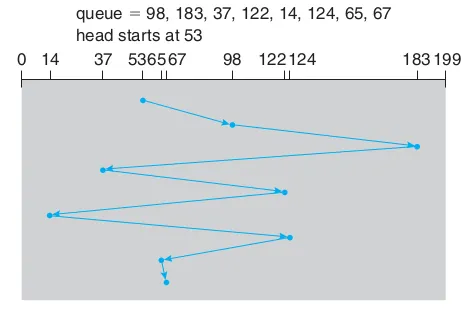
FCFS
- SSTF (Shortest Seek Time First): This algorithm processes the request with the shortest travel distance from where the disk head is currently positioned. That is, requests where the head must travel the shortest distance are processed with priority. This algorithm reduces the total disk access time and provides better performance.
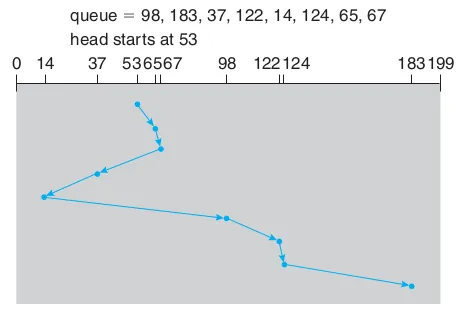
SSTF
- SCAN (Elevator): This algorithm processes requests when moving the disk head in a specific direction (for example, inward or outward). As the head progresses, it processes all the requests and when it reaches the end, it turns away from the direction and comes back. This way, it constantly scans for requests on the disk. The SCAN algorithm processes requests fairly and reduces waiting times for on-disk requests.
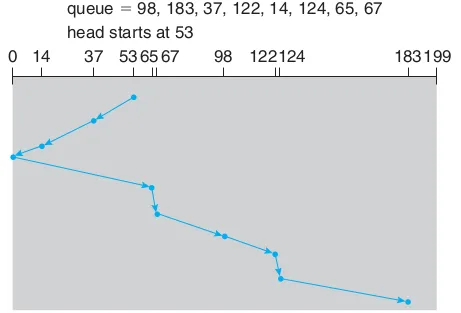
SCAN
- C-SCAN (Circular SCAN): This algorithm processes requests similar to the SCAN algorithm, but unlike SCAN, it starts from the last request when returning. That is, it moves across the disk in one direction as it processes requests, and when it reaches the last request it quickly moves to the other end and starts again. C-SCAN provides a fairer request processing order than SCAN.
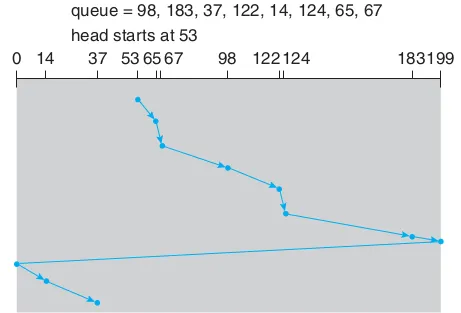
C-SCAN
In addition to these algorithms, there are other disk timing algorithms such as LOOK, C-LOOK, N-Step-SCAN and N-Step-LOOK. Disk Scheduling algorithms use various strategies to optimize on-disk data access and reduce wait times. every
Disk Management
Disk Management, as an operating system component, is a tool or service that performs operations such as creating, partitioning, formatting, defragmenting and managing disks. Disk Management allows users or system administrators to organize and manage disks.
Here are some basic functions that disk management provides:
Disk Creation and Management: Disk Management allows adding and defining new disks to the system. This could be physically adding a new disk drive or creating a virtual disk. Disk Management associates disks with existing disks in the system and assigns a drive letter or path.
Disk Partitioning: Disk Management is used to divide disks into logical regions (partitions). Partitioning allows splitting a disk drive into multiple logical drives. This may be done to accommodate different operating systems, organize data storage, or use different file systems.
Formatting: Disk Management performs formatting of a partitioned disk. Formatting makes the disk drive ready for use by creating the file system. Formatting will delete all data on the disk, so important data may need to be backed up beforehand.
Disk Defragmentation: Disk Management, multiple disksPerforms defragmentation of the isk drive. Disk defragmentation combines separate disk drives to create a single logical volume (a defragmented disk). This may be done to expand data storage or provide higher performance.
Disk Targeting and Monitoring: Disk Management provides the opportunity to monitor the physical and logical status of disks. Disk targeting means assigning a specific path for a particular disk drive to be used by the operating system. Disk Monitoring provides the ability to monitor disk health, space used, free space, and other performance statistics.
Disk Management makes it easy for users or system administrators to configure, manage and troubleshoot disks. Users, Disk Management
File System
A file is a named collection of related information saved on secondary storage. From the user's perspective, a file is the smallest piece of logical secondary storage; that is, data cannot be written to secondary storage unless it is in a file.
File Systems are a structural and logical system that manages the organization, storage and access of data in computer systems. File systems perform operations such as organizing, storing, naming, copying, moving and deleting files. Additionally, file systems include methods that determine the structure of files and how blocks of data are placed on disk.
Operating systems often support a variety of file systems and provide data storage and access to users or applications. The most commonly used file systems in operating systems include:
FAT (File Allocation Table): FAT file system is a file system developed by Microsoft and used especially in Windows operating systems. FAT uses a file table to store files and has a file allocation table that determines the location of files on the disk.
NTFS (New Technology File System): NTFS is a file system developed by Microsoft and widely used in Windows NT-based operating systems. NTFS offers advanced security features, such as file encryption, file compression, fault tolerance, and journaling.
HFS+ (Hierarchical File System Plus): HFS+ is a file system used in Apple's macOS operating systems. HFS+ is an improved version of the previous HFS file system and features features such as large file sizes, journaling, file encryption, and Unicode support.
ext4 (Fourth Extended File System): ext4 is a file system used in Linux operating systems. ext4 is an improved version of the previous ext2 and ext3 file systems, providing no journaling, larger file and partition sizes, faster data access, and better data integrity.
APFS (Apple File System): APFS is a new file system used in Apple's macOS and iOS operating systems. APFS supports features such as fast data access, high performance, file encryption, space compression, and fault tolerance.
File systems use a variety of structures and methods for data organization and management. These include organizing data into folders and subfolders in a hierarchical order, naming files,
Access Methods
Files store information. When used, this information must be accessed and read into computer memory. The information in the file can be accessed in various ways. Some systems provide only one access method for files. Others support many access methods, and choosing the right one for a particular application is a major design challenge.
Below are the access methods with their explanations:
- Sequential Access: The simplest access method is sequential access. The information in the file is processed sequentially, one record after the other. This form of access is the most common; for example, editors and compilers often access files this way.
- Direct Access: Direct access files are very useful for instant access to large amounts of information. Databases are often of this type. When a query comes in on a particular topic, we calculate which block contains the answer and then read that block directly to provide the desired information.
- Other Access Methods: Other access methods can be built directly on top of the access method. With this methodr usually involves creating a directory for the file. An index contains pointers to various blocks, like the index at the back of a book. To find a record in the file, we first search the index and then use the pointer to directly access the file and find the desired record.
Protection and Security
Protection and Security is an important issue in operating systems to protect users and system resources from unauthorized access and ensure data security. Operating systems have various mechanisms and methods for protection and security.
In terms of operating system security, the concepts of "confidentiality", "integrity" and "availability" play an important role. These concepts work together to ensure operating system security. Confidentiality ensures that data is protected from unauthorized access, while integrity ensures that data is secure in terms of accuracy and immutability. Compatibility ensures the ability of systems to provide continuous service. Operating system security is achieved by a balanced application of these three concepts and ensures the security of users' data, systems and resources.
Accessibility
Operating systems ensure data security by setting rights and permissions on files and folders. These rights control operations such as reading, writing, executing and sharing files. Different access rights can be defined between file owners, groups and other users. This way, sensitive data can only be accessed by authorized users.
Access control is a mechanism used in operating systems to manage and control the access rights of users and resources. Access control is used to prevent unauthorized access, block unauthorized access to sensitive data or system resources, and enforce security policies.
Access control in operating systems consists of the following components:
User and Group Management: The operating system manages user accounts and groups. User accounts contain each user's credentials, authorizations, and access rights. Users can be assigned to specific groups, and groups bring together users with similar privileges. In this way, the operating system provides user- and group-based access control.
Permissions and Rights: The operating system determines permissions and rights on files, directories and other resources. These permissions define the access levels and authority of users or groups to certain resources. For example, a file may have read, write, or execute permissions, and these permissions can be determined on a user or group basis. The operating system ensures that users can only access authorized resources and blocks access to resources for which they are not authorized.
Access Control Lists (ACL) and Role-Based Access Control (RBAC): Operating systems provide more granular and complex access control using mechanisms such as ACL and RBAC. ACLs are user or group-based permission lists defined separately for each resource. RBAC is a management approach that assigns access rights to users with specific roles. These mechanisms are used to manage more complex access scenarios.
Audit Logs: The operating system maintains audit logs to record users' activities and access attempts. These logs are used to track security events, perform troubleshooting, and perform security audits. Audit logs are an important tool in assessing the effectiveness and security posture of access control.
Access control ensures that the operating system enforces security policies, prevents unauthorized access, and keeps sensitive data or system resources safe.
Security Updates
Security updates are updates released by operating systems or software to fix security vulnerabilities or fix bugs. These updates are important to increase the security of the system or software, protect it from malicious attacks and keep users' data and resources safe.
Patch Updates: A patch is a small update released to fix vulnerabilities or fix bugs in an existing software or operating system. This update does not make the system or software more secure.It completes the deficiencies for k. Patch updates often contain important fixes for common vulnerabilities or attacks. Users should ensure that the system remains up-to-date and secure by downloading and installing these updates regularly.
Zero-day Vulnerabilities: Zero-day vulnerabilities are vulnerabilities that have not yet been discovered or published. Attackers may attempt to infiltrate and attack systems or software by using such vulnerabilities. The reason zero-day vulnerabilities are potentially dangerous is that software developers become targets of attacks before they have the opportunity to discover and fix them.
Security updates are vital to keep systems and software up to date and secure. It is important for users to regularly monitor updates and install the necessary updates to fix security vulnerabilities. This supports protecting from malicious attacks and ensuring data security.
In this article, I tried to explain the general concept of operating systems. I talked about what features it has and what difficulties it has. You can look at this link for more details: https://www.geeksforgeeks.org/operating-systems/ If there are points I am missing, you can write a comment.