System Programming Fundamentals

System Programming Fundamentals
Development of C Programming Language
Programming is giving a computer a set of instructions to execute. The computer executes the given instructions sequentially. Various methods have been used to program a computer since the first computers.
Programming languages ​​are the tools we use to write instructions for computers to follow. Computers think in binary, that is, they perform operations with strings of 1s and 0s. Programming languages ​​allow us to translate 1s and 0s into something humans can understand and write. A programming language consists of a set of symbols that act as a bridge that allows humans to translate our thoughts into instructions that computers can understand. Sentences consisting of these symbols are converted into machine code (binary code) through the compiler.
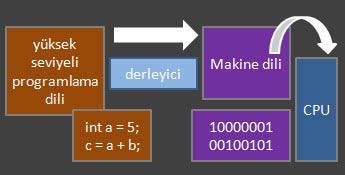
Compiler's Task
Classification of Programming Languages
With the developing technology, many different application types have emerged today and programming languages are specialized according to these application types. You can find a list of programming languages ​​here.
For example;
- PHP, JavaScript for web application development.
- Kotlin, Swift for mobile application development.
- Python, R for developing artificial intelligence applications.
- C, C++ for system program development.
can be given. So is there a single programming language that works for everything? While computer programs are so diverse, it must be quite difficult to develop a language that is good at everything.
We can classify programming languages ​​according to their closeness to human language and machine language. In this image, the programming language gets closer to spoken language as you go up, and to machine language as you go down.
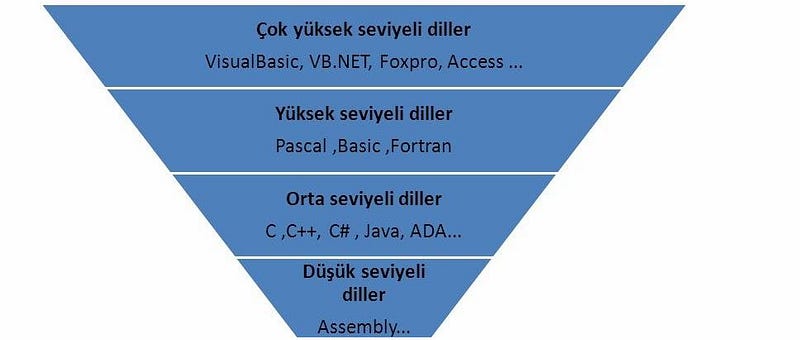
Classification of Programming Languages
C Programming Language
Although C is mostly known as an intermediate level language; This does not mean that it is less powerful or less useful than other languages. The reason why it is called so is because it has functions that both low-level languages ​​such as assembly language and high-level languages ​​such as C# and Pascal have.
C is a systems language used by high-level professional programmers today. The most distinctive feature of C is that it allows direct access to pointers, words, bits and bytes. This allows C to be used in writing system programs - in embedded systems.
Another advantage of C is that the number of keywords is low. Keywords are very important in a language. For example; While there are 159 keywords in Basic, this number is only 27 in C.
As a result, C is a language used by professional programmers that allows the programmer to do whatever he needs. Programmers can create incredible programs using C. One of these incredible programs is the operating system.
History of the C language
First BCPL language and then B language were used to develop operating system software. BCPL was developed in 1967, but the inadequacies of this language led to the development of the B language in 1970. There is no concept of data type in either the BCPL language or the B language. The Unix operating system was initially written in B language. However, B language was not sufficient to implement operating system software. Thereupon, in 1972, the C programming language was developed by Dennis Ritchie on DEC PDP-11 computers used in the UNIX operating system. There are many data types in C language. C language was used successfully in the development of the UNIX operating system.
In later years, the C language became available outside the operating system. It was used especially in engineering studies and scientific applications. Although C peripherals were very good at the source code level and in their adaptation to machine language, the lack of standards in this period was a negative situation. There were many variants of C, and they all had differences in syntax. To correct this situation, ANSI (American National Standards Institute) created a board in 1983 and prepared a standard for C. This board determines the functions that should be included in the C compiler, in other words, the standard library functions.suction.
Introduction to Programming
When entering C programming, we start with the "hello world" program, which is the same as in every programming language. We can get an idea about the syntax of the language from this program.
#include <stdio.h>
#include <stdlib.h>

int main()
{
    printf("Hello world!\n");
    return 0;
}
When we look at the C program structure;
- In the first section, we see that there is adding a library. At the very beginning of a C program, libraries for the functions to be used in the program must be added. For example; If a message is to be displayed on the screen, the function required for this is the printf() function, and the <stdio.h> library, which includes this function, should be added at the beginning as #include<stdio.h>.
- In the second section, we see the main() function. This command shows where the program starts. The main() function consists of two parts. function definition and function body.
- int main(): function definition
-{} between curly braces: function body
In the function definition, the name of the function and input-output types are specified. The function body contains the statements necessary to perform the desired operations and see their results.
- int main(): function definition
- The return() statement indicates that the function is finished. The program exits this function and returns to the line that called it.
In this article, we took a look at the development of the C language. We talked about how it was born, what it brought and how it was used. In the next step, you can take a look at this site to continue on the programming side.
X86 Based Microprocessor Architecture
The name x86 is the name given to processors based on the original Intel processor core license. X86-based microprocessors (Intel and AMD etc.) are used in more than 90% of desktop and laptop computers in the world. The basic structure of all modern processors is similar to each other, but they differ from each other only in some of their features.
Processor Architecture for Programming
Advanced microprocessors also have a register section, ALU and Control unit, basically like 8-bit microprocessors. However, as the architectural structure was later adapted to a multitasking environment, the sections within the processor needed to be explained in more detail in terms of functionality, as two logical main sections.
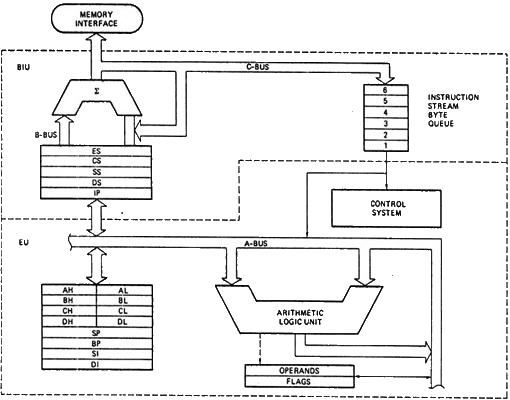
X86-based processors can be examined in two main parts: Bus Adaptation Unit (BIU) and Execution Unit (EU). The BIU unit is responsible for feeding the EU unit with data, while the EU unit is responsible for executing the instructions.
Data Integration Unit (BIU)
It handles all data and address movements on buses for the EU.
Duties:
- Fetching orders (Instruction Fetching)
- Calculating addresses of operands
- Writing operands to memory, reading operands from memory
- Transferring order bytes to the instruction queue
Main Components:
1.Segment registers:
Memory addresses used in advanced microprocessor systems are today expressed in two parts. These are segment and offset addresses. The reason why it is expressed this way is that the amount of memory must be quite high. Management of information in large capacity memories is quite complex. For this reason, large memories can be managed more easily by dividing them into small groups (segments) of 64KB for certain purposes. The starting addresses of these segments are kept in memory by segment registers. The addresses of the data in this section are the distance from the segment recorder content and are called offset addresses.
Each segment register holds the starting address of a segment. Segments have special functions. Advanced processors have 6 segments:
- CS â€" Code Segment: Segment where orders are kept
- DS â€" Data Segment: Segment where data is kept
- SS â€" Stack Segment: It is a stack segment, it can temporarily hold orders when necessary.
- ES â€" Extra Segment: This is the extra segment used when DS and CS are not sufficient.
- FS â€" File Segment: It has no predetermined purpose by the CPU. Used by the windows operating system on i386 and later processors to point to a thread information block (TIB).
- GS â€" Graphic Segment: It has no predetermined purpose by the CPU. Used by the windows operating system to access thread-specific memory on i386 and later processors.
2.Instruction Queue:
BIU implements pipeline architecture using a mechanism known as order queuing. Received orders are kept in a queue that works with FIFO (first-in first-out) logic. When the EU unit is ready for the execution of the next order, it easily reads the next order from this queue in the BIU.
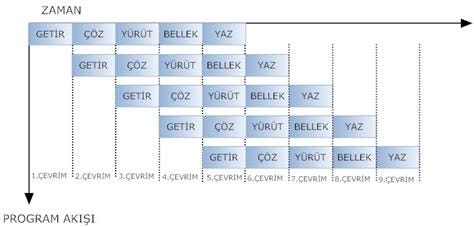
pipeline architecture
3. Order Pointer (IP):
It is a 16-bit register. The code keeps the 16-bit offset of the next order in the segment. BIU; It generates the 20-bit address of the order to be brought from memory by using IP and CS registers.
4. Address Summing Block:
It is used to generate memory addresses. For example; It combines the 16-bit offset address in the IP register with the code segment address in the CS register to create the 20-bit address of the next instruction.
Like this; CS:IP, SS:SP, SS:BP, DS:BX, DS:SI, ES:DI, DS:DI combine to produce a 20-bit address.
Enforcement Unit (EU)
It is the unit where orders are decoded and executed.
Duties:
- Decode orders
- Ensuring the execution of orders
- Returning the result to BIU
Main Components:
1.Instruction Decoder:
It decodes the orders coming from memory and transforms them into a series of actions executed by the execution unit.
2. Control System:
It generates timing and control signals for the processor to perform its internal operations.
3. ALU:
As we mentioned before, AriThe unit responsible for mechanical and logic operations.
4. General Purpose Loggers:
EU has many general purpose registers. We can divide it into 3 categories: 32-bit, 16-bit and 8-bit. Non-32-bit processors do not support 32-bit registers starting with E (extended).

General Purpose Loggers
16-bit registers are a combination of their 8-bit derivatives. For example; The AX register is a combination of the AH and AL registers. The first 8-bits of AX are kept by the AH register, and the last 8-bits are kept by the AL register. H-high means L-low. Likewise, this applies to registers BX, CX, DX.
Multi-purpose loggers are generally used in operations specific to their name:
- AX recorder (accumulator): This recorder, known as the accumulator, plays a leading role in handling data. It is effectively used in arithmetic operations and some I/O operations.
- BX register (base): The register, known as the base address register, is used to keep the offset values ​​of data groups in memory.
- CX register (count): It is known as the counter register and is used as a loop variable, especially in loops.
- DX register (data): The data register is the register that generally supports the accumulator and acts as a buffer in all operations.
5. Pointer and Index Registers:
In microprocessor systems, registers that show intermediate addresses in memory are called pointers. Pointer and index registers in x86 architecture:
- DI â€" destination-index
- SI â€" source-index
- SP â€" stack-pointer
- BP â€" base-pointer
- IP â€" instruction pointer
These registers are 16-bit. Extended 32-bit variants starting with E are also supported on processors above i386.
IP-instruction pointer helps to find the offset value of the CS register in determining the location of an instruction in the code segment. The CS:IP pair gives the address of the next instruction to be processed in the code segment.
The SP or BP register along with the SS register helps in locating a data in the stack segment. The SS:SP pair gives the address of a free space in the stacked segment.
DS and SI registers are used in address indexing operations. These index registers are needed for string and array operations. The DS:SI pair gives the address of string instructions.
6.Flag Recorder:
The flag register consists of a memory cell that reflects in the register bits what the result is at the end of an operation. The arithmetic operations performed affect the flags present in the X86 architecture. There are 9 flags in total, 6 status and 3 control.

Flag Register
6 status flags:
- Carry Flag (CF-Carry Flag): Holds the bit in hand.
- Parity Bit (PF-Parity Flag): Holds the parity bit.
- Auxiliary Carry Flag (AC-Auxilary Carry): If there is an excess of the 3rd bit, it is set. It does the same job as CF.
- ZF-Zero Flag: is set if the result of the operation is 0.
- Sign Flag (SF-Sign Flag): 1 for negative numbers and 0 for positive numbers.
- OF-Overflow Flag: is set if overflow occurs as a result of the process.
3 control flags:
- Trap Flag (TF-Trap Flag): It is used to execute the commands step by step in debug operations.
- Interrupt Flag (IF-Interrupt Flag): allows interrupt requests from other processes connected to the system.
- Direction Flag (DF-Direction Flag): Allows the index register to move forward or backward in string operations.
In this article, I talked about the basic and programming-based X86-based microprocessor architecture. In order to write a program with assembly, you have to know the architecture of the processor you are using. There have been many architectural changes in the x86 family, from more primitive processors to today's advanced processors. Here we tried to discuss architecture in general.
X86-BASED ASSEMBLY LANGUAGE
Assembly language Overview
A computer system basically consists of elements such as hardware and software. Hardware is the structure that connects the electronic and mechanical systems of the computer. If we consider a personal computer, the monitor, keyboard, system unit and other physical cables and devices all constitute hardware parts. The existence of all these elements is useless without software. The software regulates all operations of the system from opening to closing. Software is divided into two: system software and application software. Application software is used in performing statistical analysis, executing game programs, etc. used in transactions. System software is used to perform the functions of the system. Application software is routed through system software. The best example of system software is operating systems (windows, linux, unix).
Machine Language
In order for a human being to communicate with a machine, he must understand its language. For this purpose, the language of the system is created by serializing the logical 0 and 1 values, which are the basic elements in the operation of the system, in certain proportions and interpreting them according to a certain order.
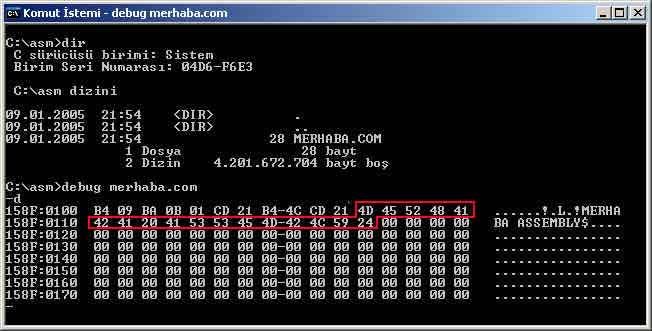
In microprocessor systems, the language consisting of logical 0s and 1s and written to perform a certain task is called machine language. The juxtaposition of these numbers that make up the machine language creates a sequence that is incomprehensible to the programmer.
Programs written in machine language are difficult to interpret by programmers or users and are difficult to remember. There are a few drawbacks to writing a program directly in machine language. It is very difficult to write error-free programs, except for small programs. Since what is written consists of 0s or 1s, everything is similar and it is not easy to eliminate errors.
Assembly Language
To overcome the difficulties that arise in machine language, assembly language, which belongs to the low-level language group, is used. Instead of binary or hex representation of command codes, assembly language uses command abbreviations called mnemonic.
Usage of mnemonic:
MOV AX.05
ADD AX,10
SUB AX.05
NOT AX
MOV BX,AX
INT 21H
Each company also offers mnemonics related to the microprocessor it produces to the market. In the small program snippet above, each line handles a complete command. Each instruction corresponds to one two or 3 bytes of binary code.

assembler
Every program written in assembly language needs to be translated into machine code while being stored or processed in memory. This conversion process is done manually or with the help of an assembler.
ISA (Instruction Set Architecture)
When talking about commands, it is impossible not to mention ISA. Instruction Set Architecture (ISA) is part of an abstract computer model that defines how the CPU is controlled by software. ISA acts as an interface between hardware and software, specifying both what the processor can do and how it does it.
ISA provides the only way a user can interact with the hardware. It can be viewed as a programmer's manual because it is the part of the machine visible to the assembly language programmer, compiler writer, and application programmer.
Program Format
Four separate fields can be defined in each line of source codes written in assembly language, consisting of Commands and Instructions.
- Label area
- Command area
- Operand space
- Description field
Label, command and operand fields are separated from each other by one or more spaces or tabs. The description field must be separated by a semicolon.
Start:
  MOV EDX, 2025H;  ;Load number 2025H into EDX register
  ADD EAX, EDX;    ;Add this value to the EAX register
End:
In the small code snippet above, Start and End are labels, MOV and ADD are commands, EDX, 2025H and EAX, EDX are operands, and after the semicolon is the description field.
X86 Instruction Set
The instruction set used by x86-based processors consists of a series of mnemoics used during program writing. Some commands in the instruction set may perform the same function as each other. The programmer does not need to know all the commands in the instruction set. 500 commandsKnowing about 100 of them will be enough to write a program in assembly language.
We can divide commands into groups according to their intended use:
- Data transfer commands
- Arthimetic and Logic commands
- Program Control Commands
Let's look at the commonly used commands.
Data Transfer Commands
- MOVcopies operand2 to operand1. It cannot change the value of the CS and IP registers. It does not directly copy the value of a segment record or an immediate value to another segment record. It does not affect status flags. Operands:
- REG, memory- memory, REG
- REG, REG
- memory, immediate
- REG, immediate
- PUSH/POPPUSH and POP commands allow us to store data in the stack segment. PUSH pushes data to the stack, POP pulls data from the stack. It takes a single operand. It does not affect status flags.
Openrands:- REG
memory- immediate
- IN/OUTIN command enables data transfer to AL or AX via ports, it can be used in DX if necessary. The second operand is a port number.Â
The out command is the opposite. Operands:
- GET, im.byte â€" im.byte, GET- BUY, DX â€" DX, BUY
- AX, im.byte â€" im.byte, AX
- AX, DX â€" DX, AX
Arithmetic and Logic Instructions
- ADD/ADCadds operand2 to operand1 and assigns the result to operand1. The difference of ADC is that it also includes the carry bit in addition. Affects all status flags.
Operands:
- REG, memory- memory, REG
- REG, REG
- memory, immediate
- REG, immediate
- SUB/SBBsubtracts operand2 from operand1 and assigns the result to operand1. The difference of SBB is that it also includes the carry bit in extraction. Affects all status flags.
Operands:
- REG, memory- memory, REG
- REG, REG
- memory, immediate
- REG, immediate
- MUL/IMULMUL and IMUL instructions multiply the operand it receives for 8-bit numbers with AL and assign the result to AX. For 16-bit numbers, it multiplies the received operand by AX and assigns the result to the DX:AX registers. The difference between Ä°MUL and the MUL command is that it is for signed numbers. It only affects the carry and overflow flags. Operands:
- REG
memory - DIV/IDIVDIV and IDIV instruction divides the AX register into the operand for the 8-bit operand and assigns the result to AL. For the 16-bit operand, it assigns the DX:AX registers to AX as the result of dividing the operand. The difference between IDIV and DIV command is that it is for signed numbers.Operands:
- REG
memory - INC/DECINC command is used to increase the value of the operand by one, and DEC command is used to decrease it by 1. Affects all flags except the Carry flag. Operands:
- REG
memory - NEGAssigns the 2's complement of the operand to the back operand.
Operands:
- REG
memory - AND/OR/XOR/NOTThese are commands used to perform logical operations. They take two operands except the NOT instruction. They affect the zero, sign and parity flags. Operands:
- REG, memory- memory, REG
- REG, REG
- memory, immediate
- REG, immediate
- SHR/SHLThe SHR instruction shifts operand1 to the right by the number specified in operand2. It takes logic-0 from the shifted part and the resulting value is copied to carry. SHL does the same by shifting it to the left. Affects the Carry and Overflow flags. OF=0 if the first operand retains the original sign.
Operands:- memory, immediate
- REG, immediate
-memory, CL - REG, CL
- ROR/ROLThe ROR command rotates operand1 to the right by the number specified in operand2. The resulting value is taken back from the beginning and also copied to Carry. The ROL command is the left-rotated version of this operation. Affects the Carry and Overflow flags. OF=0 if the first operand retains the original sign. Operands:
- memory, immediate
- REG, immediate
-memory, CL - REG, CL
- RCR/RCLRCR command rotates operand1 to the right via the carry flag by the number specified in operand2. The resulting value is copied to carry, and the value of carry is taken back from the beginning. The RCL command is the left-rotated version of this operation. Affects the Carry and Overflow flags. OF=0 if the first operand retains the original sign. Operands:
- memory, immediate
- REG, immediate
-memory, CL - REG, CL
- CMPThis is the command used for the comparison process. It takes two operands, subtracts operand2 from operand1 but does not assign. This arranges the flags according to the subtraction process.
Operands:
- REG, memory- memory, REG
- REG, REG
- memory, immediate
- REG, immediate
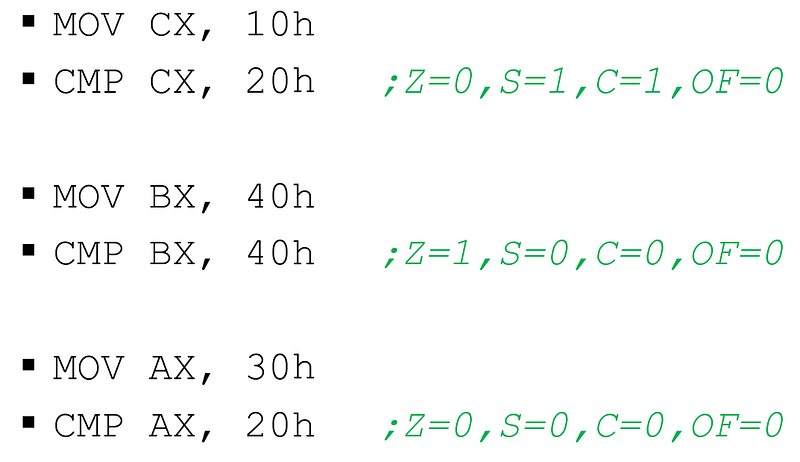
Status of flags at the end of the CMP process
Program Control Commands
- JMP
These are commands that allow us to make branches in the program flow. The JMP command is used for unconditional branching. It takes the part of the program flow to be branched as an operand with a label. There are many commands that allow us to do conditional branching.

JUMP INSTRUCTIONS
- LOOP
The LOOP command makes it easier to set up a loop. At each iteration, it decrements the CX register by one and ends the loop if CX is zero. It takes the part of the program flow to be branched as an operand with a label.
Assembly Instructions
To develop a program in assembly language, some basic rules need to be known. These rules include the general coding format, description fields, instructions that control the list of programs to be translated, and stages of defining segments and procedures.
As mentioned before, two types of expressions are used in the command field. These are instruction and instructions. Both refer to the word instruction, but instructions are for the processor and instructions are for the assembler. Instructions are used to set up segments and procedures such as subroutines, define symbols, allocate memory for temporary storage, and perform similar tasks. Instructions; We can discuss it in 3 groups: data, listing and operating mode.
Listing Instructions
In an assembled program, they determine the page format, program title and subheadings, and the writing format.
Page 60,120; the page will consist of 60 rows and 120 columns
Title prog1 ;prog1 title
The number of rows and columns determines the width and height of a page when printing a program written in assembly language. With the Title instruction, what the program generally does is printed on the second line of each list.
Data Instructions
Data instructions are divided into five groups. These are segment or procedure definitions, symbol definitions, data definitions, external references and assembly control definitions.
SEGMENT InstructionThe segment instruction is used to define the beginning of a segment. Each segment must be expressed with a meaningful label. While the opening of a segment begins with a name, it must be closed with the same name and ENDS.
NAME SEGMENT
... ...
... ...
... ...
... ...
NAME ENDS
One or more segments can be defined in a program depending on its type (exe or com). As we remember from the x86 microprocessor architecture; The code segment refers to the area where commands are placed, the data segment refers to the area where data is stored, and the stack segment refers to the memory area where data is temporarily discarded. Outside the stack, data segments and code segments can be defined more than once.
PROC Instruction Program parts that contain codes written for a specific purpose are called procedures. Many procedures can be placed inside the code segment, one of which is the main one. The main procedure includes the installation (initial) and execution (development) and result phases of the program. Procedure calls are generally made in the enforcement department. A simple procedural mechanism is expressed within the segment as follows:
PROCADI PROC HEADLIGHT/NEAR
   <expressions>
PROCADI ENDP
As can be seen, the procedure definition is similar to the segment definition, except for the label naming. Another procedure can be called from within the main procedure or from another procedure called from within the main procedure. However, the important point is that each procedure has its own name and return command. Subprocedures are generally called from within the main procedure by calling them with the CALL command.
ASSUME InstructionThe Assume instruction informs the assembler about the segment used and defines which segments will use which segment registers. The format is as follows:
ASSUME Segment register:segment name
Segment registers; Segment names CS, DS, SS, and ES are the names given to the segments by the programmer. JMP, CALL, and similar code references are relative to the current code segment. The assembler has to know which segment is data and which segment is code segment. Because the assembler translates the program in the assembly language written by the programmer into machine code, defines the places where the segments will be placed in memory, and acts according to the tag address of the segments during program execution.has to push.
Operating Modes With the emergence of 8086 and 8088 processors, DOS came to the fore as an operating system. The commands and memory usage that DOS could run on the processor at that time were sufficient for the current system.
Processors using the x86 microarchitecture must be backward compatible. However, the development and increased performance of processors have made backward compatibility difficult. To ensure this compatibility, the processor is divided into various operating modes.
- Real Mode: Systems on which the DOS operating system runs operate under Real Mode.
- Protected Mode: Protected Mode programs, where data protection is a priority, run under Protected Mode.
- Virtual Mode: It is a virtualization technology that can run more than one real mode program at the same time by using virtual memory space and can also run protected mode programs.
An Assembly Program Using the 8086 Processor
;Increase received from the keyboard through the virtual ports of EMU8086
display from virtual ports by accumulating the amount in a counter.
program that reflects on its port with a certain delay

PORTA EQU 110 ; Virtual input port for logging in from the keyboard
PORTB EQU 199 ; Virtual output port, diplay

organ 100h
  MOV SI,1 ; counter value to be shown on the display
  MOV CX,1 ; increase amount

again:
  MOV DX,PORTA
  IN AL,DX ;Read the value entered from the keyboard from the input port
  cbw ;convert the byte in the ax register to word
  MOV CX,AX ;back up the increment amount entered from the keyboard
  ADD SI,CX ; update the value in the counter
  MOV DX,PORTB
  MOV AX,SI
  OUT PORTB,AX ;carry the value from the counter to the diplayer
  CALL DELAY; delay for the value on the display to be visible
  JMP again
  REJECTION


;Procedure recognition
DELAY PROC
  PUSH CX ; backup the registers used in the main program to the stack
  MOV CX,020H
J1:
  NOP
  NOP
  LOOP J1
  POP CX ;get backed up reg from stack
  REJECTION
DELAY ENDP
In this article, I tried to cover the issue of Assembly Programming in X86-based microprocessors without going into too much detail. You can access my article describing the The most critical point in assembly programming is to recognize the architecture of the hardware/processor we use and to write our program according to the command set and instructions that this architecture offers us. This aspect distinguishes assembly language from high-level languages ​​in which we do not depend on hardware. It falls under the definition of low-level language. I hope it was useful. Don't forget to comment!
Basic Microprocessor Architecture
The microprocessor works like the central processing unit of a computer. It carries out the vital functions of the computer. The functional configuration of a microprocessor is:
- Loggers
- Command decoder
- Arithmetic and Logic unit
- Frequency generator
- Timing and Control elements
creates. As can be seen, the microprocessor represents a structure consisting of many parts.
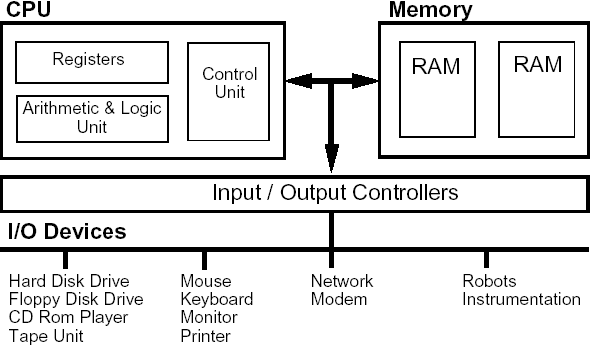
a standard microprocessor architecture
Microprocessors, called the heart and brain of the computer, are also called Central Processing Unit (CPU). The CPU generally performs the following operations:
- Retrieves commands from memory
- Decodes the command
- Provides control signals to all elements and units in the system
- Execute Arithmetic and Logic operations
- Responds to requests from other hardware units
If the architectural structure of a microprocessor is to be expressed in the simplest way, it consists of a group of registers, Arithmetic Logic Unit and a Control Unit that controls what work the system will do and when.
Registers
While a program is executing on the processor, registers are needed inside the processor, right next to it.
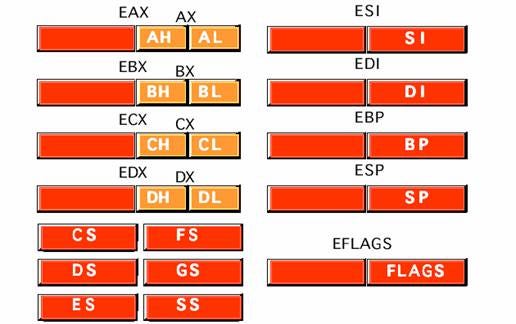
loggers
Registers have an important place in the microprocessor architecture and are one of the elements that directly determine the processor architecture. Loggers are primarily responsible for the maneuvering and temporary retention of data.
Arithmetic and Logic Unit (ALU)
ALU is one of the most important units in the microprocessor where arithmetic and logic operations are performed. Input operations to this unit can be between the accumulator register and the data retrieved from memory, or between the accumulator and other registers.
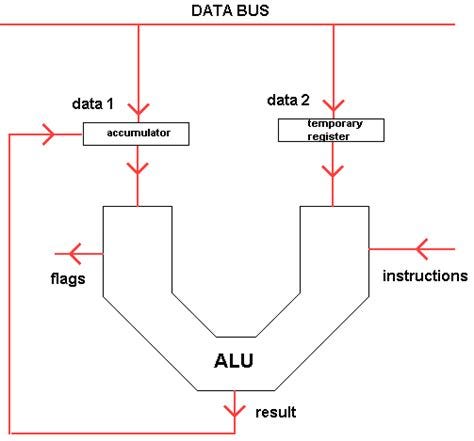
ALU
All operations taking place in the ALU are carried out simultaneously under the supervision of the Control Unit through control signals. The ALU receives the instruction and data (operand) and executes the order on this data.
Control Unit
This part, which constitutes the third part of the Central Processing Unit, is responsible for the entire operation of the system and the timeliness of the transaction. The control unit produces the control signals necessary to retrieve the instruction code in the program section in memory, decode it, process it by the ALU, and retrieve the result and put it back into memory. All internal and external elements in the computer system are controlled by these control signals.
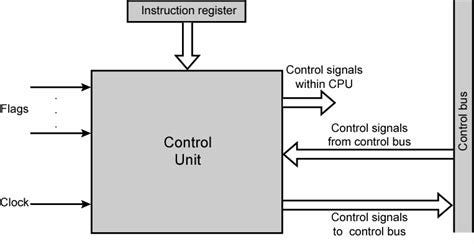
control unit
In a simple microprocessor, this section performs three different functions:
- Timing Control: The processor has an internal-clock circuit that receives input from a unit that generates an external clock signal. This signal is received and converted into timing signals according to demand and distributed to the system.
- Instruction decoder: This circuit interprets the instructions held in the instruction register (IR) and sends appropriate signals to the ALU to operate with the registers. (referring to timing and interrupt signals)
- Interrupt logic unit: This unit is similar to other control elements. It warns the processor by receiving interrupt signals when necessary.
C Programming Fundamentals
It is an English word with Turkish meaning and syntax. All the rules of the language used in programming are called syntax. In this article, we will talk about the syntax of the C language.
Definitions
Variable & Constant Definition
Variables and Constants are the components we use to hold data. The point we need to pay attention to when defining these components is the data type that the variable or constant accepts. There are 5 types of data types in standard C:
- int â€" used for integer values.
- float â€" used for decimal number values.
- double â€" used for large decimal number values.
- char â€" used for character values.
- void â€" means without type.
We can define variables using these data types:
int a = 5;            // a variable of integer type named a with value '5'
float b = 7.5;        //a variable named b of type float with value '7.5'
char c = 'a';         //A variable named c with value 'a' of type char
double d = 8965.3645; //A variable of double type named d with value '8965.3645'
If we want to define constants with these data types, all we need to do is add the 'const' keyword to the beginning of the variable definition.
const int a = 5;            // a constant of integer type named a with value '5'
const float b = 7.5;        //a constant named b of type float with value '7.5'
const char c = 'a';         //Create a constant named c with value 'a' of type char
const double d = 8965.3645; //a constant with the name d of type double and the value '8965.3645'
Constants, unlike variables, remain at the same value throughout the program's runtime. If you try to change the value they hold in the program flow, they will give an error.
Array Definition
The definition of arrays is very similar to variables. In fact, arrays are structures that hold more than one variable of the same type. For example, an array of type int; It contains integer values ​​that can change.
The most important point when defining arrays is to specify the array size. When the program runs, it requests space from memory according to the size of this array, and this size does not change during the program's runtime.
We can define arrays in two ways. One of them is specifying its size and the other is specifying the values it will take:
int array1[10];            //A 10-element integer array.
int array2[] = {1,2,3,4} //A 4-element integer array.
To access the elements of the arrays, we write the index of the element we will access in square brackets. The index of an element is the number that indicates the rank of that element in the array. The first element of an array is at index 0, and when each element is added, it gets the next index value.
number1 = array2[0];  //assigns the first element of array2 to number1
number2 = array2[1];  //assigns the second element of array2 to number2
number3 = array3[2];  //assigns the third element of array2 to number3
number4 = array4[3];  //assigns the fourth element of array2 to number4
We can access the elements of the array named array2, which we defined in the previous example, as above.
We could only receive a single character with the char variable type. We need strings of characters to get a word.
char str1[20]; //Definition of a 20-character string
char str2[] = "string expression"; //character array with a certain value (string)
printf() & scanf() functions
These are two functions we use to interact with the user while making console applications in C language. printf() is used to return a message to the user and scanf() is used to get a value from the user.
printf("Hello World\n");
With printf, we can return the message we want to the user within double quotes. The '\n' statement at the end is used to move to the next line in the console.
If we want to suppress the console screen of a variable or get a value from the console, we need specifiers. Some of them are:
- %d: used for integer values.
- %f: Used for float values.
- %lf : used for double values.
- %c: used for char values.
- %s : used for string values.
- %x: used for hexadecimal values.
We can take input from the user and give output using these specifiers:
int number;
printf("Enter a number: ");
scanf("%d", &number);
printf("The entered number is %d", number);
What we need to pay attention to heres;
In the scanf() function, placing the '&' sign when specifying the variable to which the value will be assigned and using the specifiers in the first parameter and in double quotes in both functions.
char[20] name;  //Definition of a 20-character string named name
printf("enter your name: ");
In the example above, a program was written that takes a string from the user and returns this value to the user in a message.
Condition Structures
In our second volume, we touched on condition structures and made examples of these structures. There are three types of conditionals in the C language. Comparison operators and logical operators are used in these conditionals.
Comparison operators:
- == â€" if equal
- != â€" if not equal
 â€" if greater
- < â€" if small
- < = â€" if greater than or equal to
= â€" if less than equal
Logical operators:
- && â€" and
- || - or
- ! â€" not
if-else structure
The if else structure is one of the structures we can use to define condition statements. It always starts with an if statement, and falls into an else statement if the condition is not met. else if statement can be used to define more than one condition.
if(a==b){
  printf("a and b equal");
}else if(a>b){
  printf("a is greater than b");
}else{
  printf("a is less than b");
}
printf("outside condition);
If the if condition is met, the statements within the condition are executed and the program flow continues outside the condition statement. If the if condition is not met, the next else looks at the condition in if (if any), if no condition is met, it falls to else (if any).
switch-case structure
The switch-case structure is a structure developed to deal with multiple situations.
int number;
printf("Enter a number: ");
scanf("%d", &number);

switch(number){
  case 1:
    printf("Number 1 entered");
    break;
  case 2:
    //Since we don't break it, it continues to run with case3.
  case 3:
    printf("The number 2 or 3 was entered");
    break;
  case 4:
    printf("The number 4 was entered");
    //Since we do not put a break statement, it also works as default
  default:
    printf("undefined number");
}
It executes the statements in case that are appropriate based on the value of the given condition variable. This condition variable can only be of type int and char. Execution of statements continues until you see a break statement. That is, unless there is a break, the program continues to execute the statements in other cases.
ternary operator
ternaty operator is used to define fast and short conditional expressions in a single line.
(a==b)?printf("a and b are equal"):printf("a and b are not equal");
A condition is written in parentheses, followed by a question mark. The section after the question mark is the section that will be executed if the condition is true. Two points are placed after this section. The next part runs if the condition is false.
Loops
A loop statement allows us to execute a statement or group of statements multiple times. Below is the general form of a loop statement in most programming languages:
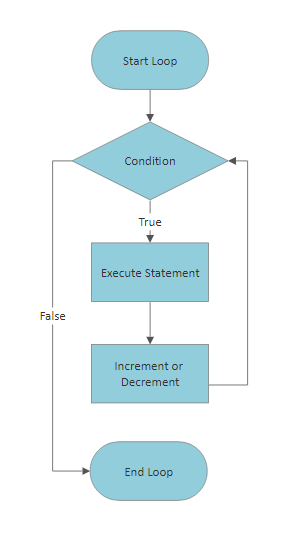
There are three types of loops in C language. These are for, while and do-while loops.
for loop
It executes statements multiple times and shortens the code that manages the loop variable.
//Program that prints numbers from 0 to 10
for(int i=0;i<=10;++i){
    printf("number: %d\n",i);
}
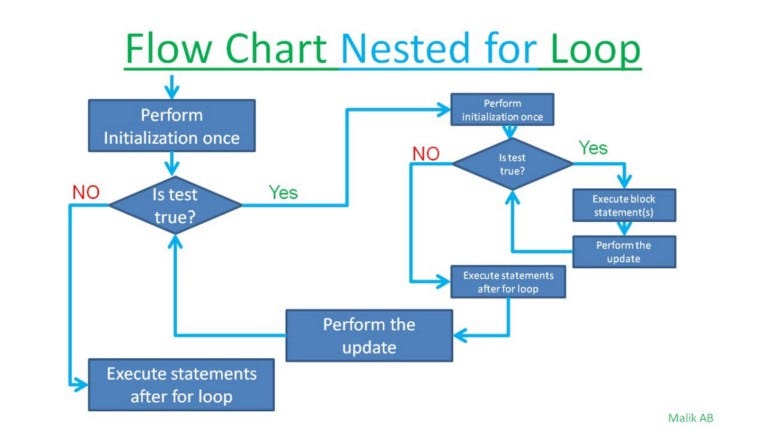
Loop expressions can be nested, this is called a nested loop. This is mostly used in matrix operations.
//Program that prints the indices of a 20x20 matrix
for(int i=1;i<=20;++i}{
  for(int j=1;j<=20;++j){
    printf("(%d,%d)\n",i,j);
  }
}
while loop
Repeats a statement or group of statements when a given condition is true. Tests the condition before executing the loop body.
//Program that prints numbers from 10 to 1
int i = 10;
while(i>0){
  printf("number: %d\n",i);
  i--;
}
If the condition inside the while loop is always true, an infinite loop occurs. Since there is no condition to stop the loop, the loop continues until the program is terminated.
//Value 1 represents true value
while(1){
  printf("this is an infinite loop");
}
do while loop
Unlike the while loop, it checks the loop condition at the end, not at the beginning.
//Program that prints numbers from 10 to 1
int number=10;
do{
  printf("number: %d\n", number);
  number--;
}while(number>0);
The do-while loop first executes the statements and then queries the condition. This can be quite useful in some situations.
//program that prints the numbers received from the user until 0 is reached.
int number;
do{
  printf("Enter a number: ");
  scanf("%d", &number);
  printf("\nEntered number: %d", number);
}while(number!=0);
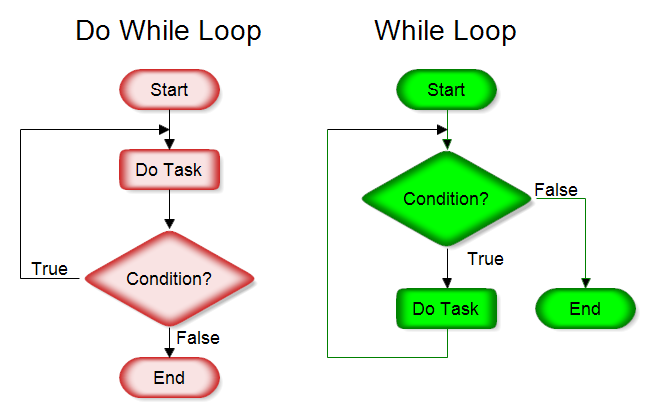
Loop control statements
break statement: Terminates the loop statement and transfers execution to the statement immediately after the loop.
//program to press q to exit the loop
char c;
while(1){
  printf("enter a character: ");
  scanf("%c", &c);
  if(c=='q'){
    break;
  }
  printf("\n loop continues");
}
printf("\n loop ended");
continue statement: Skips the rest of the body of the loop and moves on to the next iteration of the loop.
for(;;){ // infinite loop with for
  printf("this statement works");
  continue;
  printf("this statement does not work");
}
In the example above, if the remainder is below the continue statement, printf() will not work at all because it skips the statements under continue and starts the loop.
Functions and Structures
The main function of functions and structures is to group/package statements. In general, we can say that functions are working statements and structures are groups of data.
Struct Definition
Structs are used to represent a record. Let's say you want to keep track of your books in the library. You may want to keep the following properties associated with each book:
- Book name
- Subject
- Author
- Number of Pages
If we want to define this book with a struct:
struct books {
   char title[50];
   char author[50];
   char subject[100];
   int pages;
} books;
We can define it as . As can be seen, we obtain a wider range of data types by using many data types. To use this broad data type:
struct Books book1;
//A data type definition named book1 of type struct books
strcpy(book1.title, "C programming");
strcpy(book1.author, "author name");
strcpy(book1.subject, "C");
book1.pages = 680;
In the above code snippet, the strcpy() function is used to assign string values. Other values ​​can be assigned with the '=' operator.
typedef
typedef is a keyword used in C programming to provide a new name for existing data types. The typedef keyword is used to redefine the name that already exists. It is very common to use it with the struct statement. This way, we don't have to reuse the struct keyword in each definition:
#include <stdio.h>
#include <string.h>

typedef struct students
{
  char name[50];
  char branch[50];
  int ID_no;
} students;

int main()
{
  students st;  //We did not use the struct keyword in the definition
  strcpy(st.name,
         "Ahmet Yilmaz");
  strcpy(st.branch,
         "Computer Science");
  st.ID_no = 108;

  return 0;
}
Function Definition
A function is a group of statements that together perform a task. Every C program has at least one function, main(). Functions are symbolized with following () signs.
Defining a function:
return_type function_name( parameters) {
   function body
  return
}
- return type: Specifies the type of value returned by the function with the return statement.
- function name: The name we use when calling the function.
- parameters: parameter is like a placeholder. When the function is called, values ​​are given to the parameters and this is called the actual value.
- function body: The section where the statements inside the function are written.
//returns an integer value and returns num1 and num2 values in integer type.
//a function named field max
int max(int num1, int num2) {
int result;

   if (num1 > num2)
      result = num1;
   else
      result = num2;

   return result;
}
function signature/declaration
A function declaration tells the compiler a function name and information about how to call the function. The actual body of the function can be defined separately.
int max(int num1, int num2); //function signature
function call
To use a function, you must call that function according to the defined parameters.
#include <stdio.h>

/* function signature*/
int max(int num1, int num2);
/* main function */
int main(){
   int a = 100;
   int b = 200;
   int rejection;

   /* function call*/
   ret = max(a, b);

   printf( "Max value is : %d\n", ret );

   return 0;
}

/* function definition */
int max(int num1, int num2) {
   int result;

   if (num1 > num2)
      result = num1;
   else
      result = num2;

   return result;
}
Recursive Functions
They are loop-like structures created with functions that call themselves. In short, it is a function calling itself.
void recursion() {
   recursion(); /* function calls itself */
}

int main() {
   recursion();
}
As seen above, the function named recursion calls itself. However, in this usage, the program continues forever, because there is no condition to stop it. Therefore, two cases are required when using recursive functions:
Base case: The state in which the function stops calling itself.
Recursive case: This is the case where the function calls itself.
int factorial(unsigned int i) {
if(i <= 1) {
      return 1;  //base case
   }
   return i * factorial(i - 1); //recursive case
}
Referencing
Pointers
Pointers are part of what makes the C programming language a systems language. With pointers, we can access and manage memory as much as the operating system allows. Some C programming tasks are more easily accomplished with pointers, and other tasks, such as dynamic memory allocation, cannot be accomplished without using pointers.
A pointer is a variable whose value is the address of another variable, that is, the direct address (physical address) of the memory location. We can directly access memory cells using pointers. An array or function in C is actually a pointer, it points to the starting address of the array or function in memory.
int *ip;    /* pointer to an integer */
double *dp;    /* pointer to a double */
float *fp;    /* pointer to a float */
char *ch /* pointer to a character */
Above you see the definitions of different types of pointers. Two operators are important in the use of pointers:
- referencing *Â : returns the value held at the referenced address.
- de-referencing &: retrieves the memory location address of a value.
We can think of these two operators as opposites of each other. While the * operator retrieves the memory address of the value, the & operator retrieves the value at the given address.

referencing de-referencing
Let p be a variable that holds the memory address, that is, a pointer. *p returns the value at the memory address held in p, &p returns the memory address of p itself.
With this logic, we can create another pointer that references a pointer.

pointer to pointer
Let's have a variable named var and assign the address of this variable to ptr. Afterwards, let's assign the address of ptr to another pointer named pptr.
int var = 1234;
int *ptr = &var;
int **pptr = &ptr;
We defined the pointer to pointer case above. We can extend this situation as a chain as long as we want. Below is a working example.
#include <stdio.h>

int main() {

   int var;
   int *ptr;
   int **pptr;

   var = 3000;

   /* take the address of var */
   ptr = &var;

   /* take the address of ptr using address of operator & */
   pptr = &ptr;

   /* take the value using pptr */
   printf("Value of var = %d\n", var );
   printf("Value available at *ptr = %d\n", *ptr );
   printf("Value available at **pptr = %d\n", **pptr);

   return 0;
}
pointer arithmetic
In the previous section, we mentioned that pointers are variables that hold memory addresses. That is, the value it holds is only the memory address. However, we have seen it defined in different types such as int, float, char, double. These 4 definitions actually hold the same type of value. So what are the differences?
This is where pointer arithmetic comes into play. The pointer in c is an address, which is a numeric value. Therefore, you can perform arithmetic operations on a pointer as well as on a numeric value. These arithmetic operations will be performed depending on the type you define the pointer. For example:
- char â€" 1 byte: increment the pointer by one and it will point to the next location in memory by 1 byte.
- int â€" 4 bytes: increment the pointer by one and it will point to the next 4 bytes in memory.
- float â€" 4byte: signWhen you increase the value by one, it will point to the next 4 bytes in memory.
- double â€" 8byte: increment the pointer by one and it will point to the next 8 bytes in memory.
This logic comes in handy in TV series. Consider an integer array with 10 elements; You can easily navigate that array with an integer pointer. When you increment the pointer by one, it moves to the next element. When you lower it, it moves to the previous element. However, you must be careful not to stray from the sequence!
#include <stdio.h>

const int MAX = 3;

int main() {

   int var[] = {10, 100, 200};
   int i, *ptr;

   /* let us have array address in pointer */
   ptr = var;

   for ( i = 0; i < MAX; i++) {

      printf("Address of var[%d] = %x\n", i, ptr );
      printf("Value of var[%d] = %d\n", i, *ptr );

      /* move to the next location */
      ptr++;
   }

   return 0;
}
The example above gives an example of navigating an array with pointers. ptr++ points to the next location 4 bytes in memory.
Dynamic Memory Management
This section explains dynamic memory management in C. The C programming language provides various functions for memory allocation and management. These are:
- malloc(): allocates a certain size of space from memory.
- calloc(): clears and allocates a certain size of space from memory.
- realloc(): resizes and reallocates an area in memory.
- free(): terminates the allocation of an area in memory.
If you know the size of an array while programming, you can define it as a static array. The space of this array is allocated when the program starts and persists until the program terminates. However, if you want to define or modify an array within the program flow, you cannot do this statically. To define an array dynamically you have to use dynamic memory management.
#include <stdio.h>
#include <stdlib.h>
#include <string.h>

int main() {

   char name[100];
   char *a1;

   strcpy(name, "Zara Ali");

   /* allocate memory dynamically */
   a1 = malloc( 200 * sizeof(char) );

   printf("Name = %s\n", name );
   printf("Description: %s\n", a1);

  free(a1);
}
In the above program, a space of 200 chars is allocated dynamically from memory. This area is left with free() at the end of the program.
File operations
We need some functions to read/write from a file in C language. These are fopen() and fclose() functions. File opening modes are important when performing operations with these functions. Operations can be performed in whatever mode the file is opened in.Â
File opening modes:
- r: Opens an existing text file for reading.
- w: Opens a text file for writing. If it does not exist, a new file is created. If it exists, it overwrites it.
- a: Opens a text file for writing in insertion mode. If it does not exist, a new file is created. It will start adding content to the file if it is available.
- r+: Opens a text file for both reading and writing.
- w+: Opens a text file for both reading and writing. If it exists, it first resets the file,. Otherwise it creates a file.
- a+: Opens a text file for both reading and writing. If the file does not exist, it creates the file. Reading will start from the beginning, but text can only be added.
We can use these functions and modes together to open and close files.
FILE *fp;
fp = fopen( filename, mode );
Below is a working example of file operations.
#include <stdio.h>

void main() {
   FILE *fp;

   fp = fopen("/tmp/test.txt", "w+");
   fprintf(fp, "This is testing for fprintf...\n");
   fputs("This is testing for fputs...\n", fp);
   fclose(fp);
}