Pygoat OWASP TOP 10 2021 WRITE-UP
Hello, in this article, I will solve the examples prepared in accordance with OWASP TOP 10 2021 in the Pygoat lab environment. I will try to explain both the OWASP TOP 10 vulnerabilities and the reasons why these vulnerabilities arise.
What is Pygoat?
Pygoat is a vulnerable web application developed by OWASP(Open Worldwide Application Security Project**)**. The goal is to provide a platform to teach both developers and testers how to test and code applications securely. PyGoat is written in Python and uses the Django Framework.
PyGoat also has an area where you can view the source code to determine where the error was made that caused the vulnerability and allows you to make changes to make it secure.
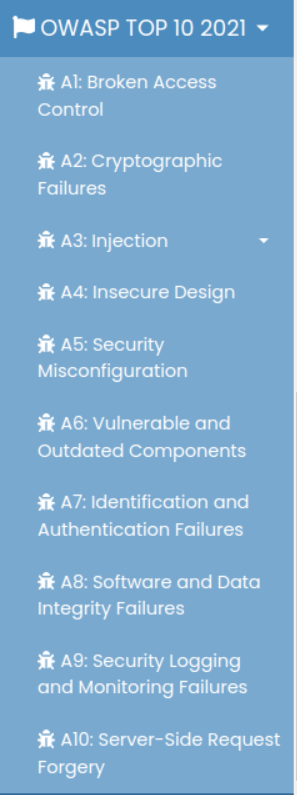
OWASP TOP 10 2021
In this article, we will solve the 2021 vulnerabilities in the left menu in Pygoatta.
Pygoat Installation
There are several different ways to install the application:
- Running with Source Code: You can download the source code from the github repo, install Django and run it with Python. This can help you work more clearly because you have the source code at hand. Github repo: https://github.com/adeyosemanputra/pygoat
- Running with Docker: Pygoat has a ready-made docker container in which the application is installed. To install this, you can install Docker on your computer and run the container. Docker Container: https://hub.docker.com/r/pygoat/pygoat
- Running with DockerVuln: DockerVuln is a program with an interface that contains vulnerable web applications. By installing this program on any Linux distribution, you can run its web applications with two clicks. DockerVuln: https://github.com/yusufarbc/DockerVuln
A1: Broken Access Control
Access control, sometimes called authorization, is when a web application grants access to content and functionality to some users but not to others. These checks occur after authentication and govern what 'authorised' users can do. A web application's access control model is closely linked to the content and functionality the site provides. In addition, users can belong to a number of groups or roles with different capabilities or privileges.
Access control enforces the policy so that users cannot act outside their intended permissions. Errors here often lead to unauthorized disclosure of information, alteration or destruction of all data, or performance of a business action beyond the user's authority.
LAB 1
When we enter the lab and log in with the 'jack:jacktheripper' credentials, we see that this account does not have a secret key. We were informed that the Secret Key is in the admin account.
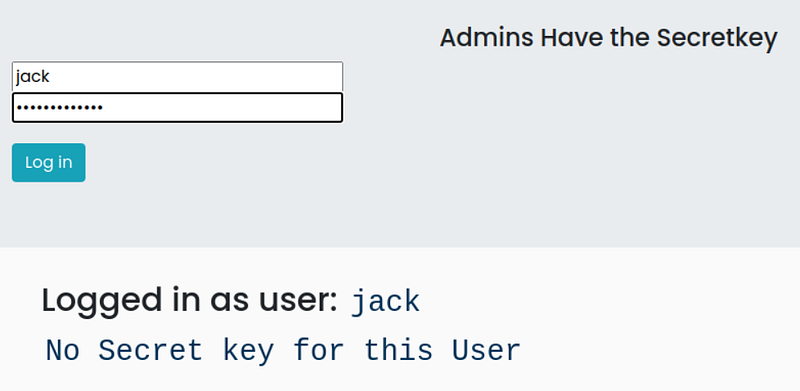
When we capture and examine the request with burp suite, we see that I have a parameter named admin and it is given a value of 0. Access control is provided by this parameter, but we can manipulate this request.

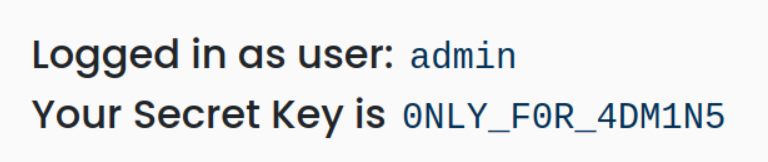
When we set this parameter to 1 and send the request, we log in with admin authority and obtain the password.
LAB 2
When we enter the lab and log in with the 'jack:jacktheripper' credentials, we see that the jack user is not an admin and does not have a secret key.

When we look at the source code of the page, it is written that the admin cannot use a bowser such as Google Chrome or Mozilla, but can only use the pygoat_admin browser. Interesting.

When we catch the Bur suite request and look at it, we see that we are passing our browser information in the user-agent parameter.

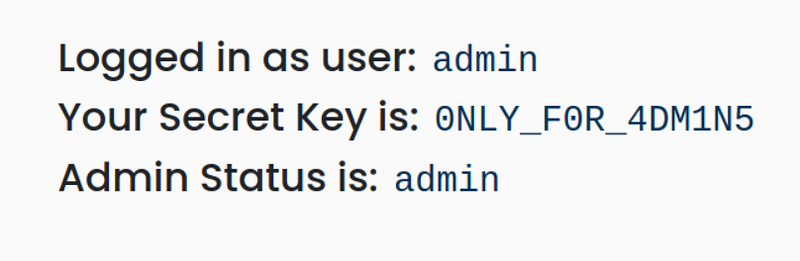
I change the value here to pygoat_admin. And yes, we obtained the secret key.
 ---
---
A2: Cryptographic Failures
Cryptographic errors can cause sensitive information leaks (Sensitive Data Exposure). Information leakage is when a website unintentionally discloses sensitive information to its users. Depending on the context, websites can leak all kinds of information to a potential attacker, including:
- Data about other users, such as usernames or financial information
- Sensitive commercial or business data
- Technical details about the website and its infrastructure
LAB
There is a DEBUG attribute that includes showing errors to developers who are developing in the Django Framework. One of the features of having DEBUG=True is that it dumps a lot of metadata from your environment, including all settings.py configurations, when an exception occurs. This is necessary for the developer to resolve the bug. However, having this attribute enabled in a published application provides the attacker with too much information about the web application.
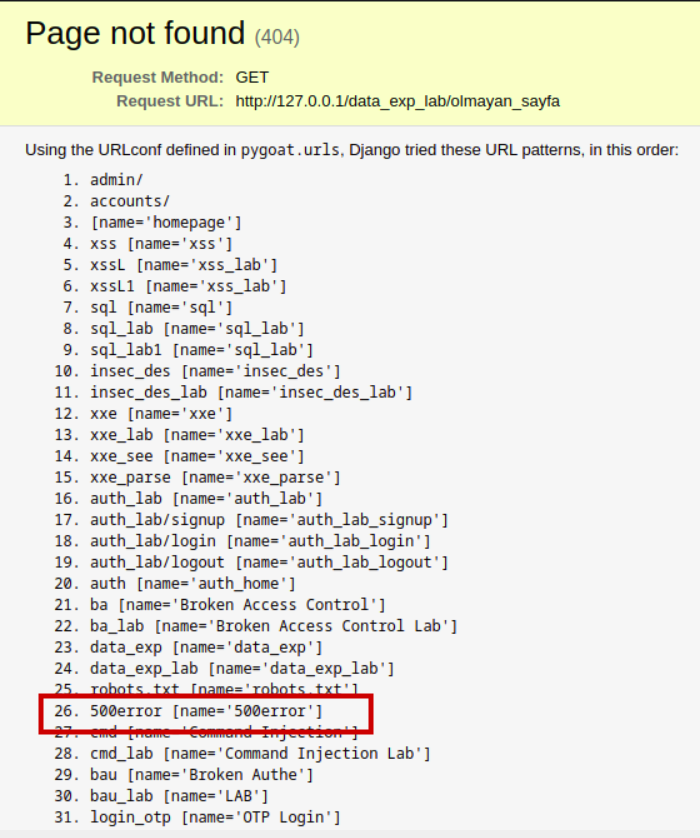
In LAB, he wanted us to find the 500error page.
When we wanted to go to a page that was not like the one in the figure, it gave us the website directories.

DEBUG=TRUE
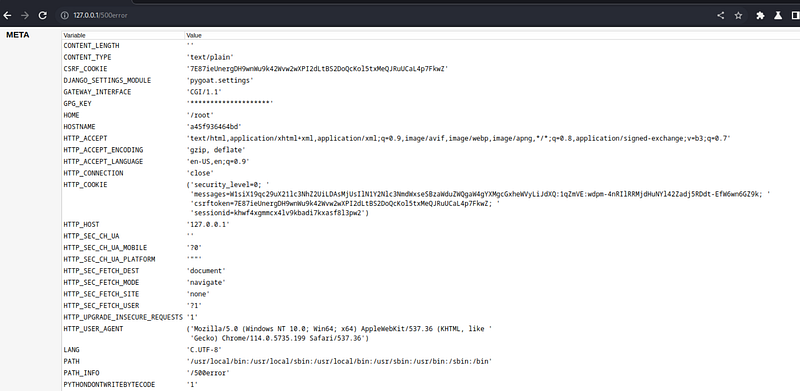
500error
When we go to the page we find, it provides us with a lot of metadata about the web application.
A3: Injection
Some of the most common injections are SQL, NoSQL, OS command, Object Relational Mapping (ORM), LDAP, and Expression Language (EL) or Object Graph Navigation Library (OGNL) injection.
Source code review is the best method to detect whether applications are vulnerable to injections. Automated testing of all parameters, headers, URLs, cookies, JSON, SOAP and XML data input is highly recommended. Organizations can use static (SAST), dynamic (DAST), and interactive (IAST) application security testing tools to identify injection vulnerabilities that occur before application deployment.
An application is vulnerable to injection attack if:
- User-provided data is not verified, filtered or sanitized by the application.
- Dynamic queries or non-parameterized calls without context-sensitive escaping are used directly in the interpreter.
- Unverified data is used within object-relational mapping (ORM) search parameters to extract additional, sensitive records.
- Unverified data is used directly or combined. SQL or command contains structure and malicious data (usually a piece of code) in dynamic queries, commands, or stored procedures.
SQL Injection LAB
SQL injection is a famous Injection attack that consists of insertion or "injection" of a SQL query through input data from the client to the application. A successful SQL injection can read sensitive data from the database, modify database data (Insert/Update/Delete), perform administrative operations on the database (such as shutting down the DBMS), recover the contents of a specific file located on the DBMS file system, and in some cases issue commands to the operating system. SQL injection attacks are a type of injection attack in which SQL commands are injected into the data plane input with the aim of affecting the execution of predefined SQL commands.
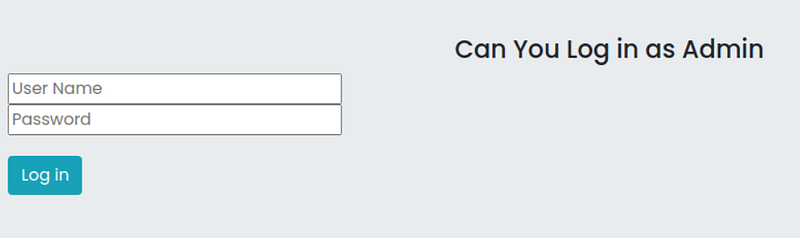
Login Form
When we try to log in to the LAB environment with user/password credentials, we see the following SQL query.

SQL Script
To log in to the admin account, we need to give the value "admin" to the username field. But we don't know the password. However, we can manipulate this SQL script.
The password value in quotes in the password='password' section is the value we entered into the form. We can first close the quotes in the form and then run the SQL command I wrote.
username: admin
password: ' OR '1' ='1
The expression 1=1 in the SQL statement will ensure that the result returns TRUE and the SQL statement runs, thus allowing us to log in to the page.
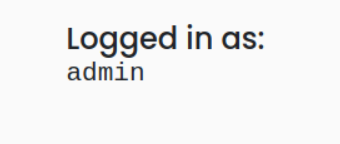
Log in as admin
Command Injection LAB
Command injection is an infiltration of the target's host operating system via a vulnerable application.It is an attack that involves the execution of arbitrary commands. Command injection attacks are possible when an application passes unsecured user-supplied data (forms, cookies, HTTP headers, etc.) into a system shell. In this attack, attacker-supplied operating system commands are typically executed with the privileges of the vulnerable application. Command injection attacks are possible largely due to inadequate input validation.
There is a Name Server Lookup application in the LAB environment. It gives the domain name it receives from the user as a parameter to a command that performs name lookup on the operating system it runs on and returns the output to us.
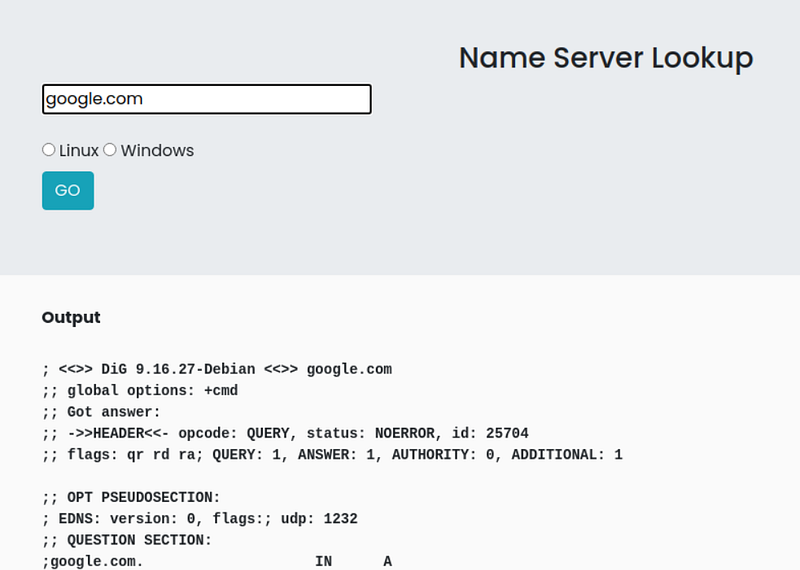
For Linux systems, dig uses the nslookup tool for Windows systems. It allows us to finish the command statement and run a different command on both Linux and Windows systems; There is an expression.
For Linux systems, after typing a domain in the input field; We can finish the command with and run the command we want. For example, we can try to read the passwd file containing users on Linux systems with the cat command.
google.com; cat /etc/passwd
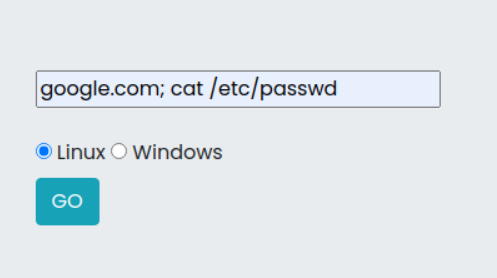
When we run this command, the passwd file will be printed on the web page after the dig results.
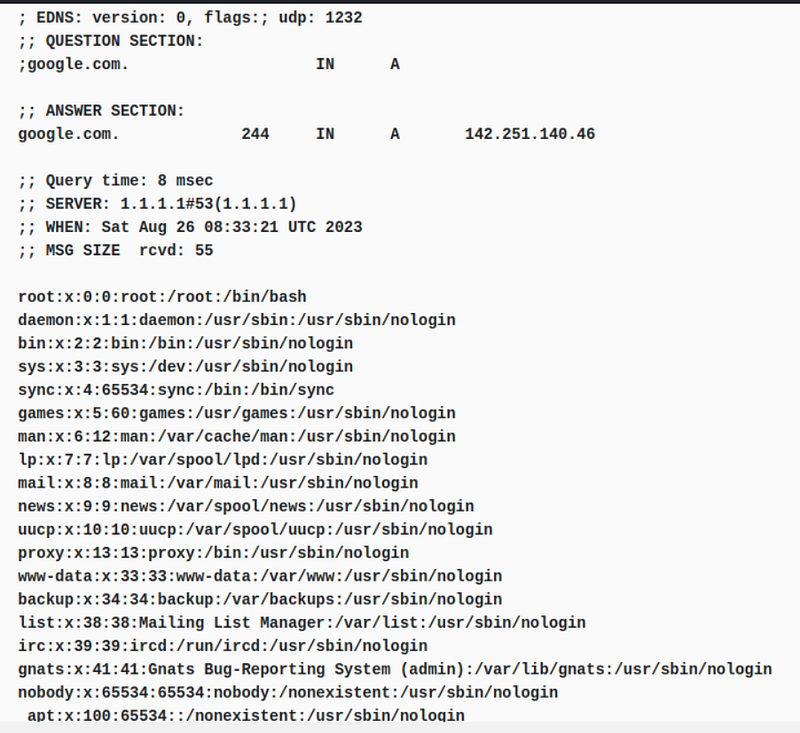
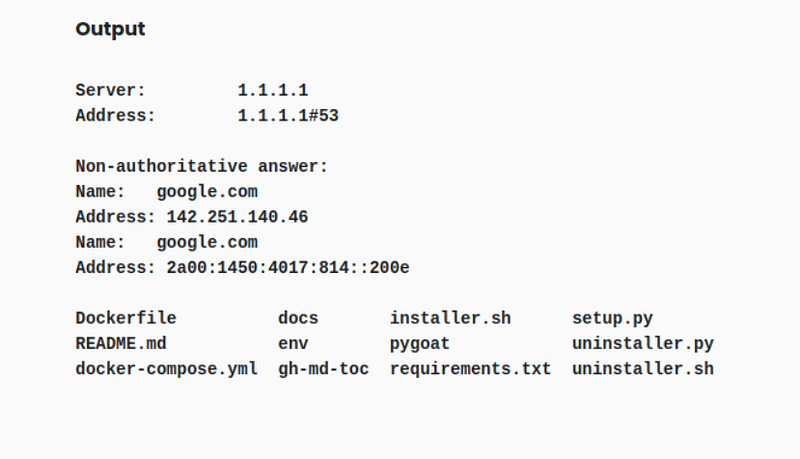
For Windows systems, after typing domain in the input field; We can finish the command with and run the command we want. For example, we can print the files in the directory on Windows systems with the dir command.
google.com; is
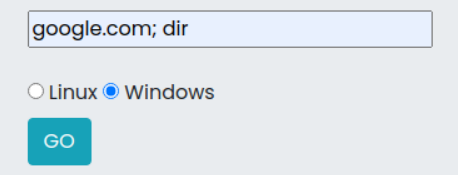
After running this command, the files in the directory will be printed to the web page after nslookup results.
A4: Insecure Design
Insecure design is a broad category that represents different vulnerabilities. There is a difference between insecure design and insecure implementation. There's a reason we distinguish between design flaws and implementation flaws; They have different root causes and ways to fix them. A secure design may still have implementation flaws that lead to vulnerabilities that can be exploited. An insecure design cannot be fixed with a perfect implementation because, by definition, the required security controls were never built to defend against specific attacks. One factor contributing to insecure design is the lack of business risk profile inherent in the software or system being developed, and thus the inability to determine what level of security design is required.
LAB
When we look at the example in the lab environment, we are faced with an application that gives us 5 free tickets but does not allow us to watch the movie until all the tickets are sold.
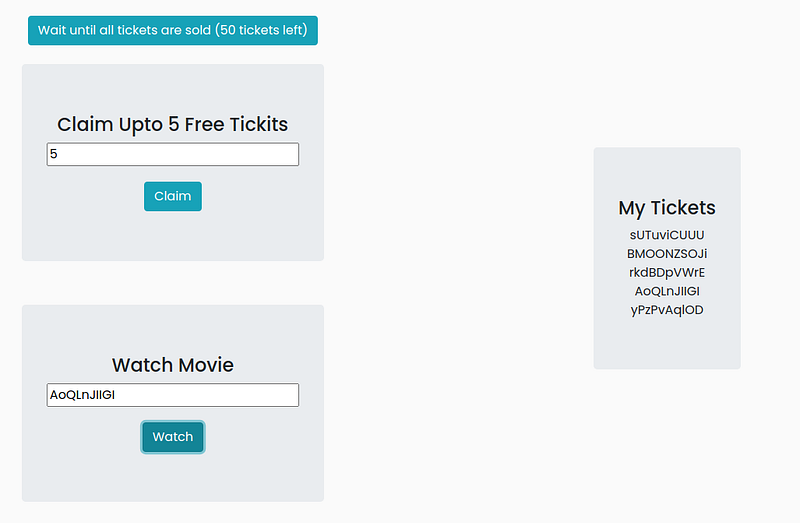
This app only provides us 5 tickets for free. When I caught and looked at the burp request, I did not see any vulnerability.
The statement in the lab environment said that we could buy all the tickets. But how? He said logout and think as a hint. I wonder if we can log out, create a new account and get free tickets from there?
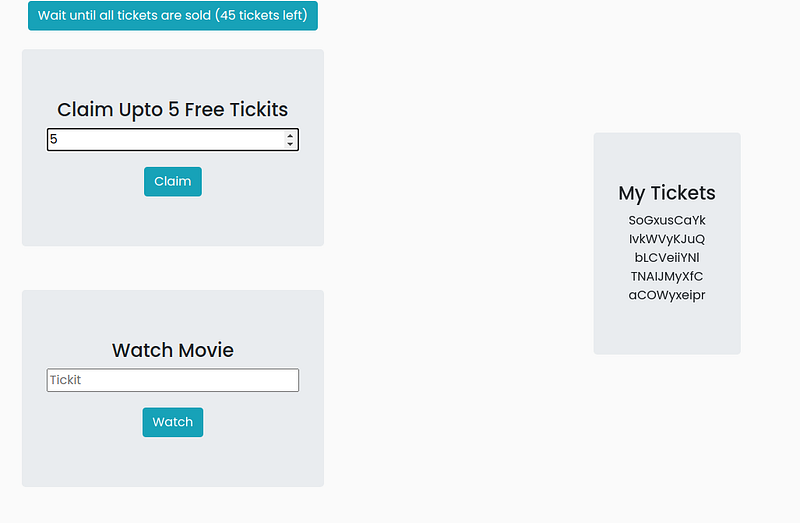
Yes it worked, we created another account and got 5 more free tickets. If we create 9 more accounts this way, we can buy all the tickets and watch our movie :)Â
As you can see, there is no known vulnerability in the application, but an error in the design, that is, in creating the business rules, brought us to this point.
A5: Security Misconfiguration
Misconfigurations can occur at any level of an application stack, including network services, platform, web server, application server, database, frameworks, custom code, and pre-installed virtual machines, containers, or storage. Automated tools can detect misconfigurations, use of default accounts or configurations, unnecessary services, outdated options, etc. Useful for detection.
Thanks to such flaws, attackers gain unauthorized access to some system data or functions. Sometimes such flaws cause the system to be completely compromised.
LAB
This is a misconfiguration in the laboratorybut there is It reveals the secret key and only the admin can view this key. What we need to ask here is how does it verify that you are an admin? Is there a cookie or header?
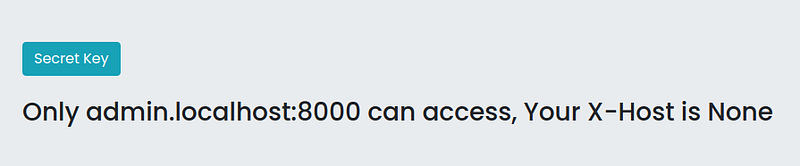
When we press the Labda secret key button, it says that only admin.localhost:8000 can access this secret key. How could it be? Let's capture the request with Burp.
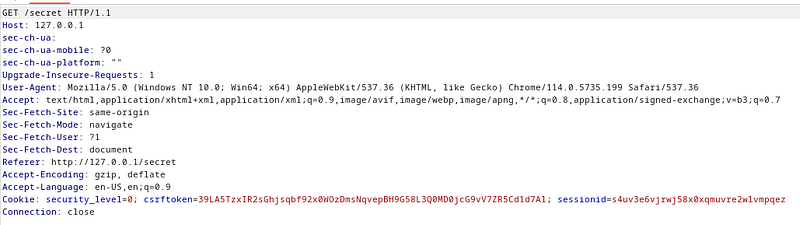
In this burp request, we see that it sends a GET request to the secret. However, the X-Host header specified in the error message is not here. He did not inform us that its value was none anyway. What we need to do here is to add a header called X-Host and give its value as admin.localhost:8000.
This application verifies the admin account by looking at the X-Host value in the request, but it ignores that we can manipulate this request on the client side.
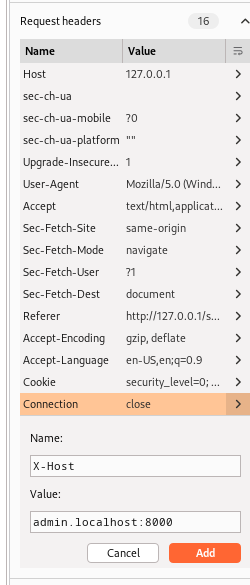
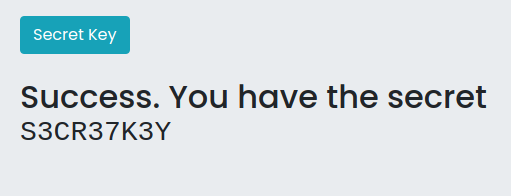
When we capture the request in Burp's Proxy menu, there is a menu on the right where we can see and edit the headers. From here we add the X-Host header and give the required value. Then we can send the request. And we obtained the secret key.
A6: Vulnerable and Outdated Components
When a developer uses a piece of code or library that already has a known vulnerability, this can compromise the entire application. This occurs when components such as libraries and frameworks used within the application often run with full permissions. A vulnerable component can cause serious data loss or server takeover.
LAB
In this lab environment, there is an application that converts yaml files to json files. A yaml file needs to be selected and loaded to get the json data. There is also a get version feature that tells the user the version of the library the application is using.
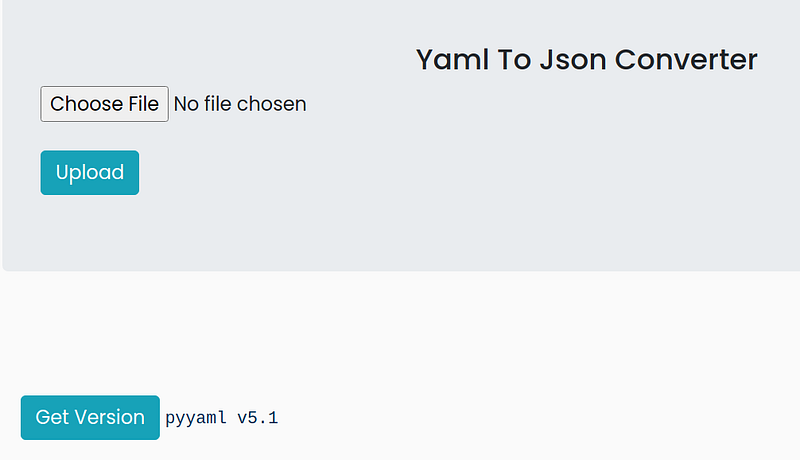
When we press the Get Version button, we see that pyyaml v5.1 is used in this application. Let's search for this version on the internet.
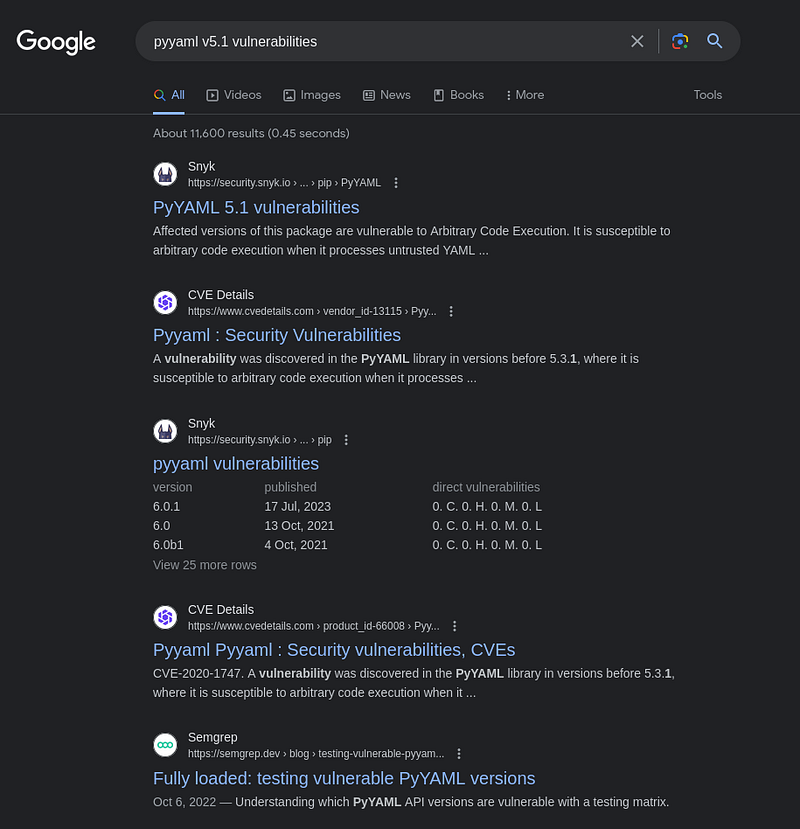
Vulnerability Research
As a result of research, I found that the module used has a critical vulnerability called Arbitary Code Execution. Then you can do research on how to exploit this vulnerability.
In order to exploit this vulnerability, we need to prepare a yaml file-payload. I saved the following script in a yaml file.
!!python/object/apply:subprocess.check_output
-ls
Then I selected the file I created and clicked the upload button.
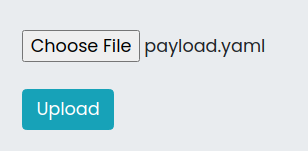
When the payload we prepared runs, the command we gave, ls, will run and print the files in the directory on the server. And we can see the directories and files in the resulting output.

A7: Identification and Authentication Failures
Authentication and Identification Failures is a term used for various vulnerabilities that attackers use to impersonate legitimate users online.
Attackers use a variety of strategies to exploit these vulnerabilities, from authentication attacks to highly targeted schemes aimed at gaining access to a specific person's credentials.
LAB
The lab consists of a login page that asks users for their username and password. There is also a feature to login via otp(one-time-pad) if you don't know the password! When users click on the OTP login feature, the user is redirected to a page that asks for the email id to send the OTP. You can see that when the user provides an email ID, the 3-digit opt ​​is sent back to the page itself. This is not the common scenario, usually the code is sent to the user's registered email.
Once the user gets the 3 digit code he can now enter the code in the input box that says Enter your OTP After entering the valid OTP the user will get a page that says Login Successful as user : email. If the OTP is incorrect, the user will receive a message saying Invalid OTP.
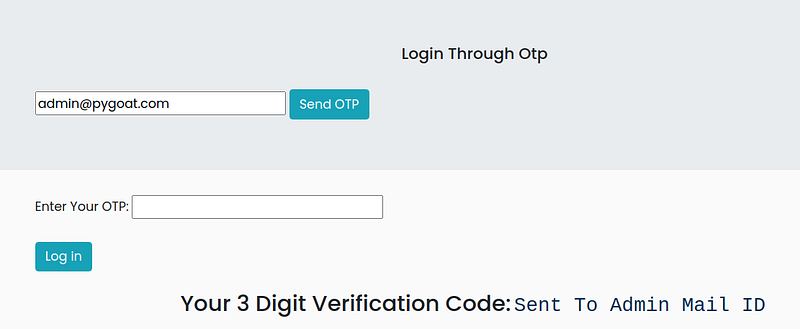
The admin e-mail address is given as admin@pygoat.com. When we came to the OTP login section in the application interface, I received an OTP code by typing this e-mail. OTP code is 3 digits and has no restrictions captcha etc. no. We can find the OTP by brute force on the application.
We can try capturing the burp request, throwing it to the intruder, and doing a brute force attack from there.
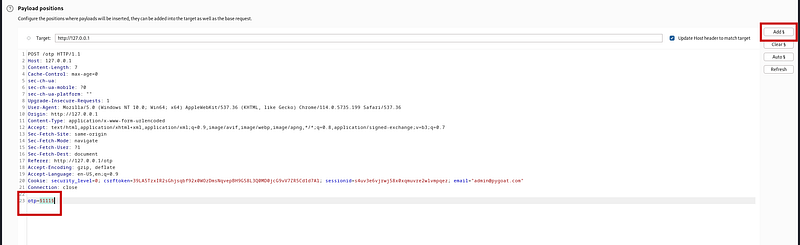
We select the otp header value in the Intruder, click on the add button and mark this value as payload. Then we move on to the payload tab, which is the second tab on the top right.
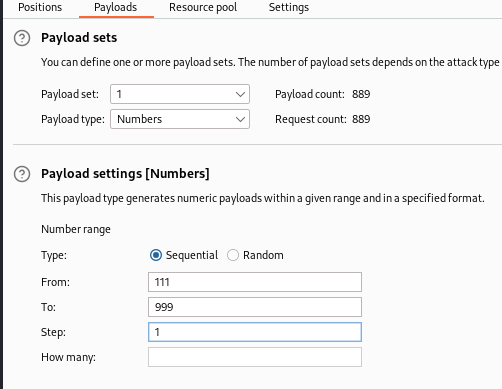
In the Payload tab, we define a payload in which we will try all values between 111â€"999. Then we can launch the attack. In the community version of Burp, brute force attack speeds are slowed down. It may take a while for this to happen.

As a result, we will find the OTP in the request with a different length value.
A8: Software and Data Integrity Failures
Serialization and Deserilazsyo exploits rarely work without causing an error. Some tools can discover deserialization defects, but human assistance is often needed to verify the problem. Prevalence data on serialization defects is expected to increase as tools are developed to help identify and address them. These flaws can lead to remote code execution vulnerabilities, one of the most serious attacks possible.
Serialization is the process of converting complex data structures, such as objects and their fields, into a "flatter" format that can be sent and received as a sequential stream of bytes. Deserialization is the process of restoring this byte stream into a fully functional copy of the original object, exactly as it was in the state in which it was serialized.
Applications and APIs will be vulnerable to deserialized malicious or tampered objects provided by an attacker. This can result in two basic types of attacks:
- Object and data structure-related attacks: Attacks in which the attacker modifies application logic or achieves arbitrary remote code execution if the application contains classes that can change behavior during or after deserialization.
- Typical data manipulation attacks, such as access control-related attacks where existing data structures are used but the content is changed.
Serialization can be used in applications for:
- Remote and inter-process communication (RPC/IPC)
- Wire protocols, web services, message brokers
- Caching/Persistence
- Databases, cache servers, file systems
- HTTP cookies, HTML form parameters, API authentication tokens
Insecure Deserialization LAB
In the lab environment, we are faced with a page that only the admin can access. How to verify that you are an admin? We need to investigate this.

Let's capture the request to the page with burp. In this request, we see that the cookie information is base64 encoded.
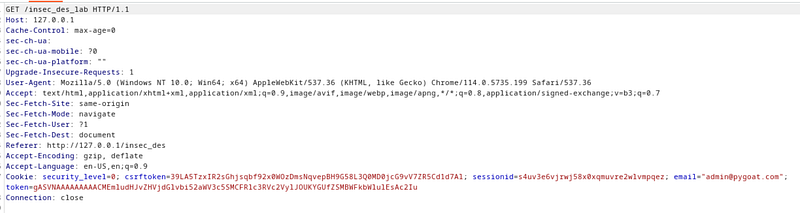
We can decode the base64 encoded token value with Burp Suite's decoder tool.

A9: Security Logging and Monitoring Failures
Improper logging and monitoring are the basis of nearly every major cyber attack. Attackers rely on a lack of monitoring and timely response to achieve their goals without being detected.
Most successful attacks start with vulnerability research. Allowing such probes to persist can increase the likelihood of a successful exploit to almost 100%.
LAB
This lab helps you get an idea of how sometimes improper logging can lead to information disclosure. The user who accesses the lab is given a login page saying that the logs have been leaked. The user must find the leak and attempt to obtain the leaked credentials in the logs.
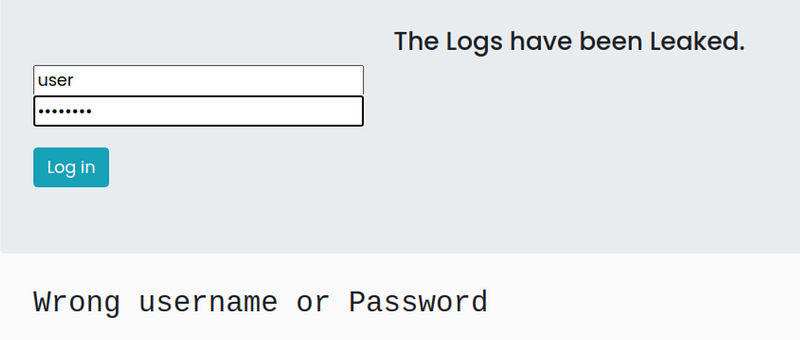
When I enter an ordinary username and password on the page, I normally get an error saying incorrect username or password. When I scanned with dirb, I discovered a directory called /debug.
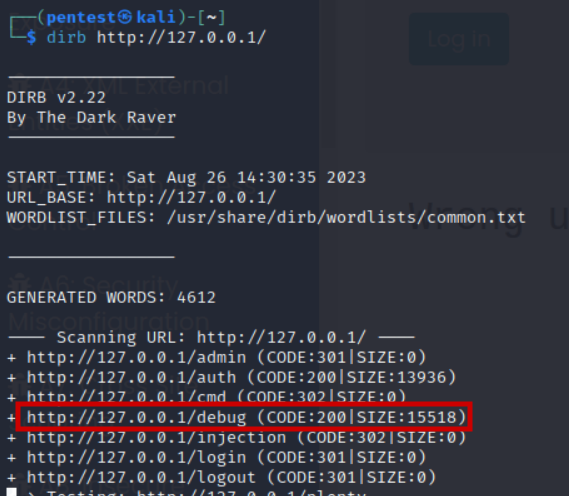
The logs kept by the system can be viewed in the /debug directory. When we search the a10 page on these logs, we see an interesting log.
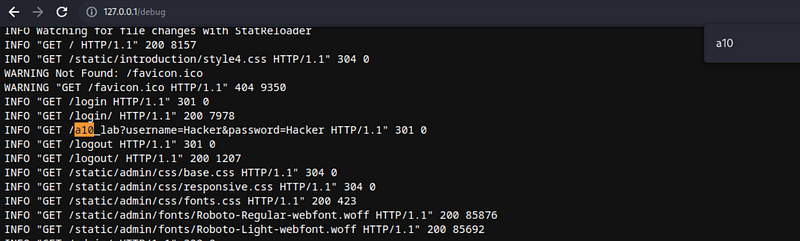
Since the login page works with a GET request, the credentials used to log in are written in the url and recorded in the logs. We can log in with these credentials.
A10: Server-Side Request Forgery
SSRF flaws occur when a web application fetches a remote resource without validating the user-supplied URL. It allows an attacker to force an application to send a crafted request to an unexpected destination, even if it is protected by a firewall, VPN, or other type of network access control list (ACL). As modern web applications (microservice architecture) provide useful features to end users, getting URLs is becoming a common scenario. As a result, the incidence of SSRF is increasing. Additionally, the severity of SSRF increases due to the complexity of cloud services and architectures.
LAB
These lab environment pages show some blogs, but can you understand how the blogs are presented?
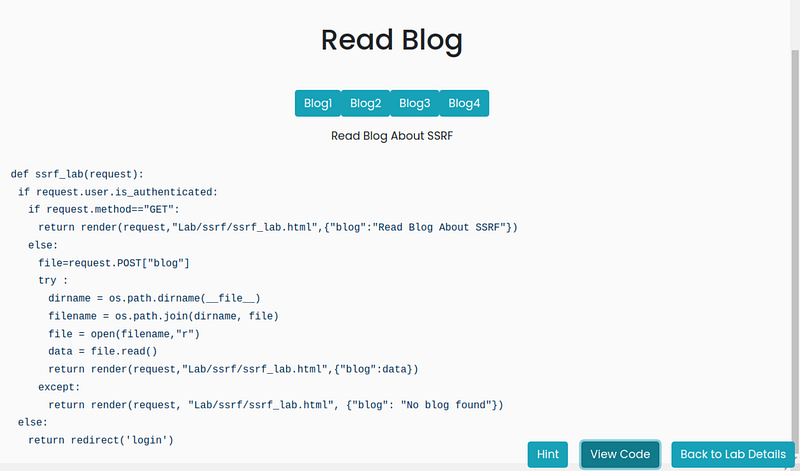
The code running in the background in the lab environment is given and we are asked to find the env file. When we burp the request and inspect it,
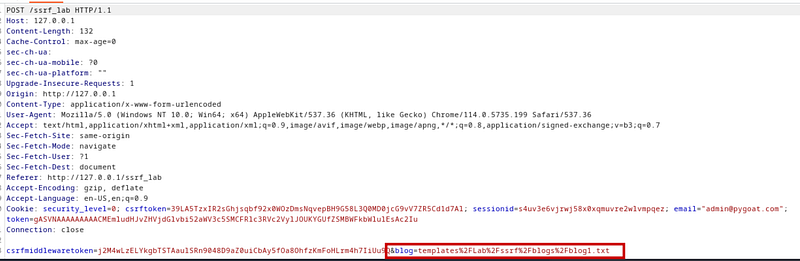
We see that the text file in this directory, given a directory with the blog parameter, is read and printed on the page. By manipulating this value, we can read the file we want in the directory. We were asked to read the a.env file. By trial and error, we can read the a.env file by searching for it.
Resources
OWASP TOP 10 2021: https://owasp.org/Top10/
Web Security Academy: https://portswigger.net/web-security/
Mastering Modern Web Penetration Testing