Threat Hunting with DNS Walkthrough — LetsDefend

Introduction
Domain Name System (DNS) is one of the fundamental building blocks of the internet. DNS translates domain names (e.g., www.example.com) into IP addresses when users want to access a specific website on the internet. This translation allows users to easily access websites and contributes to the smooth functioning of internet traffic. However, this critical role of DNS can be abused by cybercriminals.
Cyber attackers can target DNS infrastructure to carry out various attacks. DNS-based attacks can be used to infiltrate organizational networks, steal data, and disrupt services. As a result, DNS-based threat hunting has become an essential part of cybersecurity strategies.
DNS Tunneling
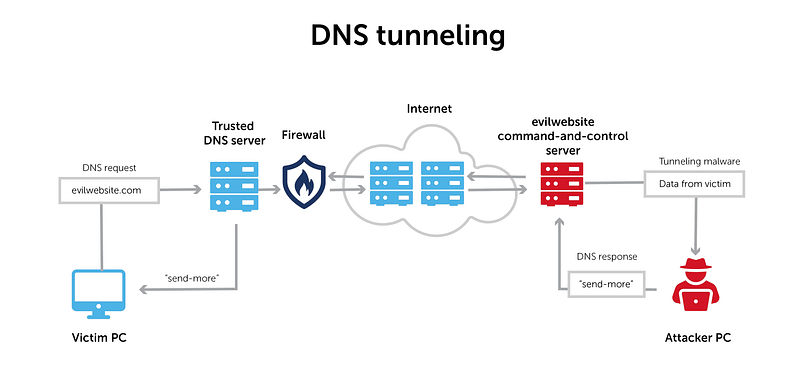
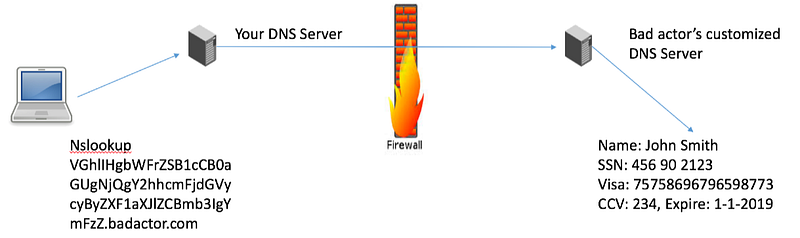
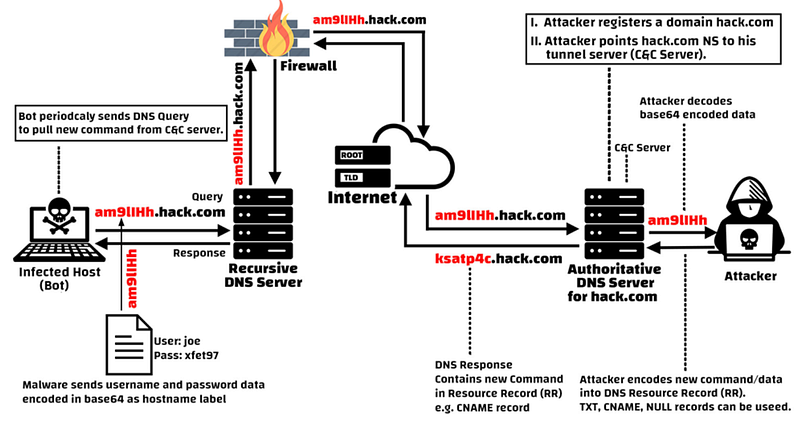
DNS tunneling is a method where attackers abuse the DNS protocol to exfiltrate data or send malicious content. In this type of attack, data or commands are hidden within DNS requests. Attackers can use this technique to exfiltrate data from a network or establish remote communication with a device.
DNS tunneling attacks typically work as follows:
- Attackers embed encrypted or encoded data into a DNS query.
- When these queries reach the target server, the encrypted data is decrypted, and malicious content is spread or data is exfiltrated.
This method often bypasses firewalls, allowing attackers to secretly transmit data.
Detecting this type of attack is challenging because DNS traffic is generally considered trustworthy and is not closely monitored in most networks.
DNS Cache Poisoning
DNS cache poisoning is a type of attack where attackers flood DNS servers with false information to redirect users to fake websites. It causes users to receive an incorrect IP address from the DNS server, redirecting them to a site controlled by the attackers.
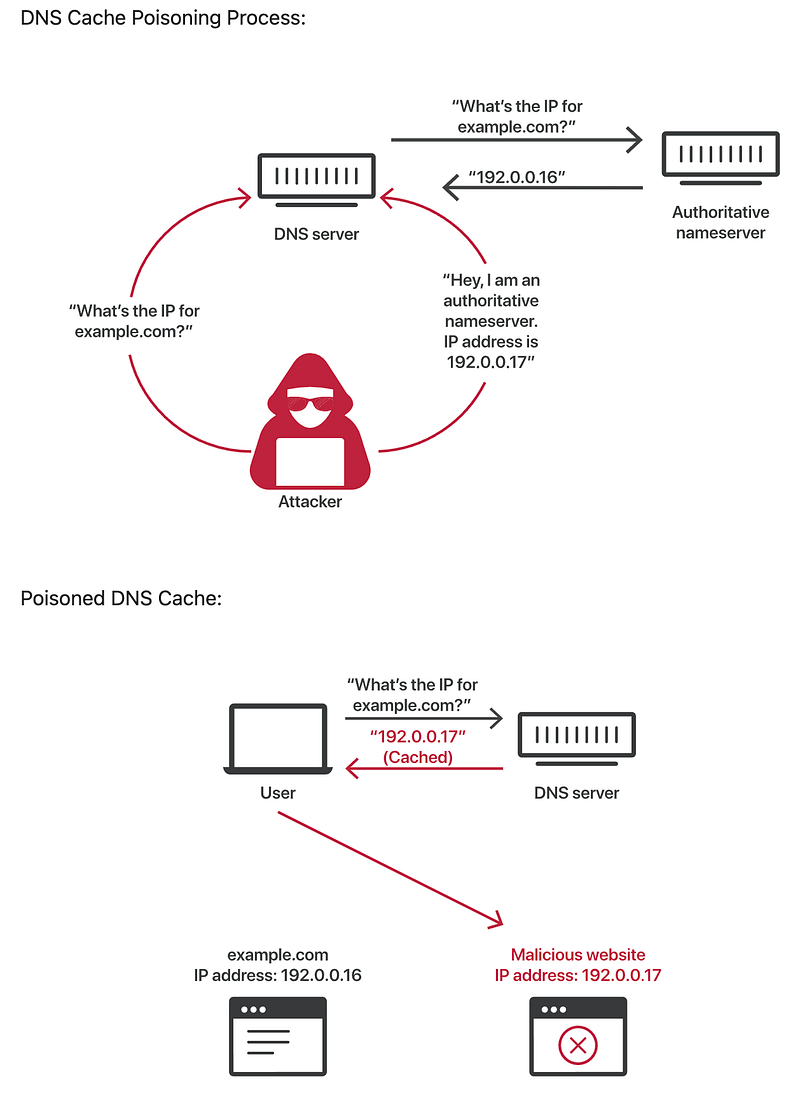
For example, when a user tries to access a bank’s website, a DNS cache poisoning attack may cause them to receive an incorrect IP address and be redirected to a fake banking site.
If the user enters their credentials on this fake site, the information is captured by the attackers.
This type of attack is often used to steal personal information or spread malware.
DNS Amplification Attacks
DNS amplification is a technique used in distributed denial-of-service (DDoS) attacks. In this type of attack, attackers use DNS servers as reflectors to overwhelm the target server or network. DNS amplification attacks generate a massive amount of traffic, rendering the targeted system unusable.
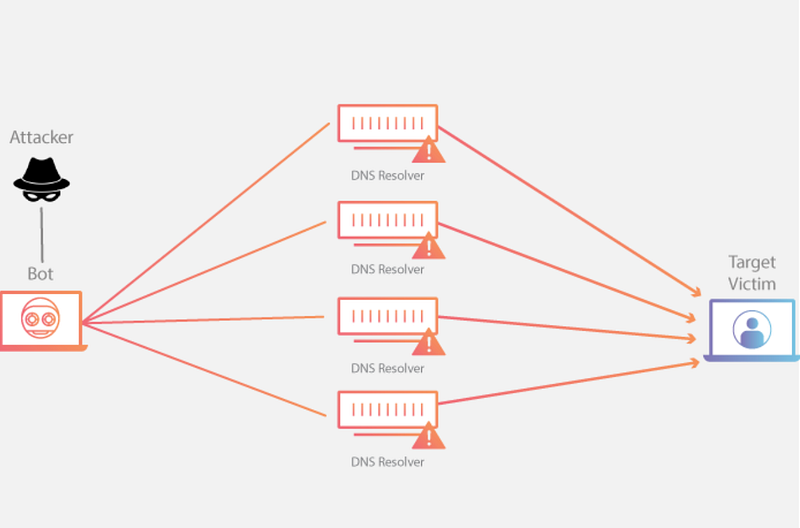
Attackers send a small DNS query, but this query generates a large response.
These large responses are directed to the target server, causing it to become overloaded and leading to a denial of service (DoS).
Such attacks often target weak or misconfigured DNS servers.
Typosquatting
Typosquatting is an attack in which users are redirected to fake or malicious websites due to typographical errors. In this type of attack, attackers register domain names based on common misspellings.
For example, users might accidentally type “gooogle.com” instead of “google.com.”
Attackers register these misspelled domain names and redirect users to sites filled with phishing attacks or malware downloads.
Typosquatting is often used to steal financial information or personal data, and users may not easily realize they have landed on a fake site.
DNS Hijacking
DNS hijacking is an attack where attackers redirect DNS queries to send users to fake websites or malicious content. This type of attack is typically carried out by gaining access to DNS servers or users’ routers.
Attackers alter DNS settings and redirect users to an IP address of their choice.
Users unknowingly enter a fake site and may share personal information.
Such attacks are particularly common on public Wi-Fi networks, where users may be redirected to rogue DNS servers.

DNS Rebinding
DNS rebinding is a technique where attackers use the victim’s browser to attack systems on the victim’s local network. This attack is often carried out through malicious ads or code downloaded from insecure websites.
Attackers manipulate DNS responses to redirect the victim’s browser to an IP address on the victim’s local network.
The browser trusts this response, allowing the attacker to access devices on the local network.
This type of attack is often used to gather information about internal networks or spread malware.
This lesson has discussed DNS-based attacks. The next lesson will cover the topic “ Role of DNS Security Systems .”
Questions
No Anser Needed
Role of DNS Security Systems
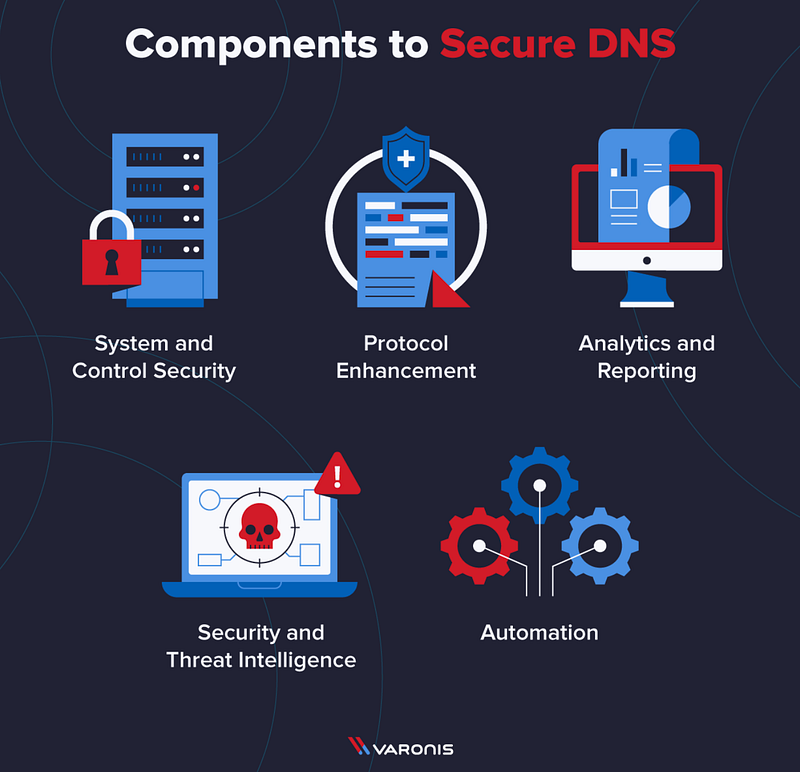
Domain Name System (DNS), as one of the foundational components of the internet, performs many critical functions, from enabling website access to facilitating network communication. However, due to its important role, DNS has also become an attractive target for cyber attackers. DNS security systems have been developed to detect and prevent cyberattacks targeting the DNS protocol. Threat hunting proactively detects and stops potential attacks before they occur using the data provided by these systems. In this lesson, we will focus on how DNS security systems are used in the threat hunting process and the benefits they provide.
The Role of DNS Security Systems
DNS security systems are used to monitor and analyze DNS traffic to detect and prevent cyber threats. These systems track DNS requests on the network, identify suspicious activities, and generate alerts. Some of the core functions provided by DNS security systems include:
- Anomaly Detection: It is the process of identifying patterns of normal DNS traffic and detecting activities that deviate from these patterns.
- Blocking Malicious Domains: It involves preventing requests to known malicious domains and stopping users from being redirected to harmful sites.
- Detecting DNS Tunneling and Other Threats: It is the process of identifying DNS-based attacks such as DNS tunneling and cache poisoning, and taking measures to mitigate them.
- Real-Time Monitoring and Analysis: It is the continuous monitoring of DNS traffic in real time to quickly detect suspicious activities.
Threat Hunting with DNS Security Systems
DNS security systems provide cybersecurity teams with critical data during the threat hunting process. Threat hunting is a proactive process designed to detect and stop cyber attacks before they occur.

The role of DNS security systems in this process is significant:
- Proactive Monitoring: DNS security systems continuously monitor DNS traffic and identify abnormal activities. These systems record DNS requests over a period of time, and the data is analyzed by threat hunters.
- Data Enrichment: DNS logs are integrated with platforms like SIEM (Security Information and Event Management) to provide a broader security perspective. This integration allows threat hunters to correlate DNS data with other security events.
- Suspicious Activity Detection: Threat hunters use the data provided by DNS security systems to detect requests to suspicious domains, DNS tunneling attempts, and other abnormal activities. These activities may indicate attempts to infiltrate the network with malware or exfiltrate data.
- Incident Response: Detailed analysis of detected threats enables a rapid response. DNS security systems provide critical information to determine the source and methods of attacks during the incident response process.
Techniques Used in Threat Hunting with DNS Security Systems
The primary techniques used in threat hunting with DNS security systems include:
- Machine Learning: DNS security systems use machine learning algorithms to learn patterns of normal DNS traffic and detect activities that deviate from these patterns. Machine learning is highly effective in identifying unknown threats.
- Behavioral Analysis: DNS requests are analyzed to determine if they deviate from normal behavior. Abnormal behavior often appears in the early stages of an attack, and detecting it helps prevent attacks.
- Threat Intelligence: DNS security systems integrate with threat intelligence sources to quickly identify known malicious domains and block requests to them. Threat intelligence provides up-to-date information about current threats.
- DNS Log Analysis: Detailed analysis of DNS logs plays a critical role in threat hunting. Logs are used to monitor suspicious activities on the network and identify potential attacks. DNS log analysis is often performed in integration with SIEM platforms.
Benefits of Threat Hunting with DNS Security Systems
Threat hunting with DNS security systems provides several benefits to organizations:
- Early Threat Detection: DNS security systems help threat hunters to detect threats at an early stage, allowing attacks to be stopped before they occur.
- Preventing Data Loss: DNS-based attacks often aim to exfiltrate data. DNS security systems prevent data loss by detecting and blocking such attacks.
- Strengthening Network Security: DNS security systems monitor all DNS activities on the network, helping to identify vulnerabilities and strengthen network security.
- Reducing the Attack Surface: DNS security systems block requests to known malicious domains, reducing potential entry points for attackers.
Summary
DNS security systems play a critical role in the threat hunting process, helping to prevent and detect cyberattacks. These systems create a proactive defense line by continuously monitoring and analyzing DNS traffic. The use of advanced techniques such as machine learning, behavioral analysis, and threat intelligence ensures that even unknown threats are detected early. The effective use of DNS security systems strengthens organizations’ cybersecurity strategies and plays a vital role in securing their networks.
This lesson has discussed the importance of DNS security systems in the threat hunting process. The next lesson will cover the topic “ Using DNS Security Systems ”.
Questions
No Anser Needed
Using DNS Security Systems
Domain Name System (DNS) security systems have become a critical part of cybersecurity strategies. Cybercriminals can use DNS to carry out various attacks such as data exfiltration, malware distribution and network disruption. Therefore, the effective use of DNS security systems plays a vital role in threat hunting processes. This lesson covers the collection and analysis of DNS log data, detection and analysis of malicious DNS activity, and real-time and retrospective DNS traffic analysis.
Collection and Analysis of DNS Log Data
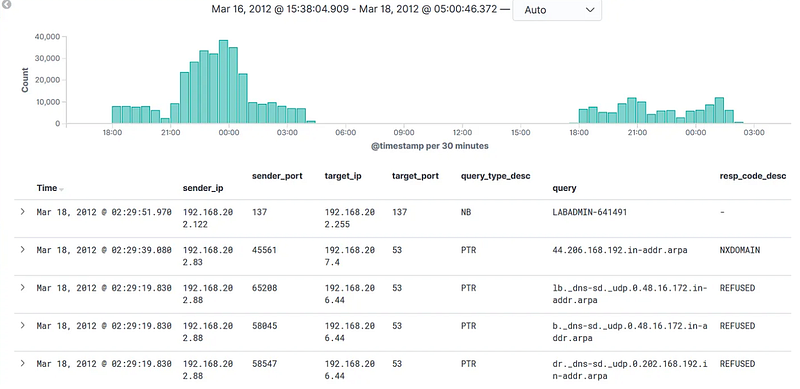
DNS log data consists of the records of DNS requests and responses on the network and plays a significant role in threat hunting processes. DNS logs are used to monitor suspicious activities on a network and detect threats at an early stage. Key considerations in the collection and analysis of DNS log data include:
- Data Collection: DNS logs include all DNS queries and their responses on the network. This data is collected from DNS servers, firewalls, and other network devices. The collected data typically includes timestamps, source and destination IP addresses, queried domain names, and response codes.
- Centralized Log Management: Transferring DNS logs to a centralized log management system or SIEM (Security Information and Event Management) platform makes it easier to manage and analyze the data. These systems can efficiently store and analyze large volumes of data.
- Identifying Normal Traffic Patterns: Understanding normal DNS traffic patterns is the first step in detecting abnormal activities. Analysts can examine DNS logs collected over a specific period to identify typical DNS queries and responses on the network.
- Anomaly Detection: Detecting deviations from normal traffic patterns plays a critical role in identifying potential threats. For example, a sudden surge in DNS requests to a specific IP address that normally receives few requests may indicate an anomaly.
Detection and Analysis of Malicious DNS Activities
Malicious DNS activities include various attacks that threaten network security. The detection and analysis of these activities is at the heart of the threat hunting process. Techniques used in this process include:
- Signature-based Detection: Signature-based detection methods are used to identify known threats. These methods involve comparing DNS logs to known malicious domains or IP addresses. If a DNS query matches these signatures, it is flagged as a threat.
- Behavioral Analysis: Behavioral analysis techniques are used to detect unknown or zero-day threats. It analyzes whether DNS queries deviate from normal behavior. For example, if a user device suddenly starts communicating with many different domains, this may indicate the presence of malware.
- Machine Learning: Machine learning algorithms can analyze DNS logs to distinguish between normal and abnormal behavior. The algorithms continuously learn and become more effective at detecting new threats on the network.
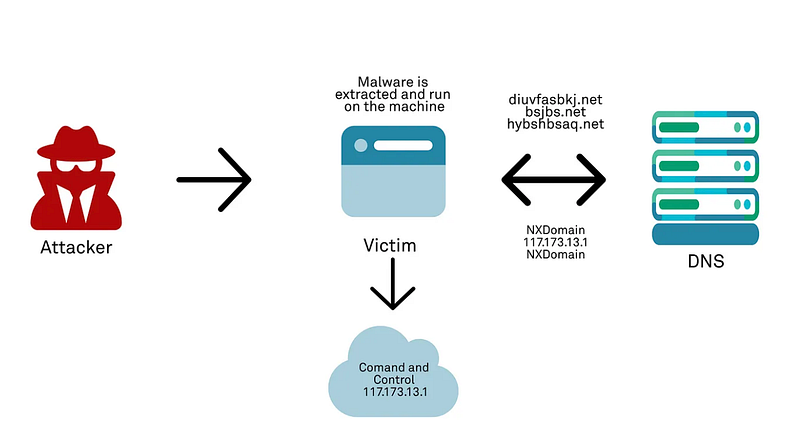
- Threat Intelligence Integration: DNS security systems can integrate with threat intelligence to block requests to known malicious domains. This integration provides threat hunters with access to the latest threat data.
- Correlation of Anomalies: Detecting malicious DNS activities cannot rely on a single data source. By correlating DNS logs with other security logs and events, threat hunters conduct more reliable threat analysis. For example, if a DNS query originates from a user device and there is a security alert on that device, it may indicate a more serious threat.
Real-Time and Retrospective DNS Traffic Analysis
Both real-time and retrospective analysis of DNS traffic play an important role in the threat hunting process. Both approaches offer different benefits, and when used together, they provide more effective results.
- Real-time DNS Analysis: Real-time analysis involves the real-time monitoring of DNS traffic and the rapid detection of suspicious activity. DNS security systems monitor all incoming and outgoing DNS queries and generate alerts when anomalies are detected. For example, if a device suddenly starts making a large number of DNS queries, it could be a sign of an attack, which can be immediately identified through real-time analysis.
- Retrospective DNS Analysis: Retrospective analysis is the study of past events. This method is used to understand how an attack occurred in hindsight and to prevent similar attacks in the future. Retrospective analysis typically works on large data sets and provides more in-depth analysis. For example, in the aftermath of a security breach, a retrospective log analysis can be performed to understand which DNS queries were used by the attacker.
- Incident Response and Investigation : Both real-time and retrospective DNS analysis play a critical role in the incident response process. When an attack is detected, both types of analysis can be used to understand the scope and impact of the incident. Real-time analysis allows for quick intervention, whereas retrospective analysis reveals all the details of the incident.
- Monitoring and Reporting: The results of real-time and retrospective analysis should be supported by continuous monitoring and reporting processes. These reports provide an overview of the security status of the network and identify measures to prevent future threats.
Summary
The effective use of DNS security systems in the threat hunting process plays a critical role in the early detection and neutralization of cyber attacks. The collection and analysis of DNS logs, the detection and analysis of malicious DNS activity, and the real-time and historical analysis of DNS traffic are fundamental processes that strengthen network security. To build a proactive line of defense against cyber threats, the comprehensive monitoring and analysis capabilities provided by DNS security systems are essential. Organizations can strengthen their security strategies and prepare for potential attacks by effectively executing these processes.
This lesson discussed the use of DNS security systems in the threat hunting process. The next lesson will cover “ DNS Queries and Data Exfiltration Hypothesis “.
Questions
No Anser Needed
DNS Queries and Data Exfiltration Hypothesis
Hypothesis
A device may be exfiltrating data by making malicious DNS requests (after communicating with a command-and-control server).
Data Resources
- DNS Logs: Records of DNS requests made.
- Firewall Logs: Records of data traffic between internal and external networks.
- DLP (Data Loss Prevention) Logs: Records related to data leakage.
- DNS Security Logs: Logs related to DNS security (DNS categorization) solutions.
Threat hunting effectiveness can be optimized by accessing the logs from these data sources through a centralized log management or SIEM solution.
Analysis Steps
- Domain Requests: Identify requests to known malicious or suspicious domains in DNS logs.
- Domain Reputation Check: Check the reputation of domains queried in DNS requests and compare them with a list of malicious domains.
- Request Frequency: Check if a specific device is making an abnormally high number of DNS requests in a short period.
- Time Analysis: Monitor DNS requests made at unusual times (e.g., outside business hours or late at night).
- Large-Sized DNS Requests: Identify DNS requests that are larger in size and contain more data than normal DNS requests.
- Target IP Address Analysis: Monitor data transfers to external IP addresses following DNS requests.
- Firewall Rules: Check traffic allowed or blocked by the firewall and identify abnormal activities.
- Unexpected Ports: Check connections made through ports that are not normally used or are unexpected.
- Suspicious Data Transfers: Check DLP logs to see if sensitive data is being transferred to external IP addresses.
- Abnormal User Behavior: Monitor deviations from normal user behavior patterns (e.g., large file transfers, frequent file access).
Expected Results
- Intense DNS requests to malicious or unknown domains.
- Large amounts of data transfers from the same device to the same target.
- DLP alerts indicating data leakage.
Summary
Threat hunting can be performed using sources such as DNS, firewall, DLP, and DNS security logs. Analysis includes examining suspicious domain requests, domain reputation, request frequency, timing, large DNS requests, and unexpected port usage. Anomalous user behavior and firewall logs are also evaluated to detect data leakage. Findings such as heavy requests to malicious domains or large data transfers can confirm the leak.
This lesson hypothesized data exfiltration through malicious DNS requests. The next lesson will cover the “ Suspicious DNS Queries Hypothesis “.
Questions
No Anser Needed
Suspicious DNS Queries Hypothesis
Hypothesis
A sudden increase in requests from suspicious or unknown domains from a specific internal IP address may be an indication that a device has been compromised by malware or that malicious activity, such as DNS tunneling, is in progress.
Data Sources
- DNS Logs: Records of all DNS requests and responses on the network.
- SIEM Logs: Centralized collection and analysis of DNS logs integrated into a SIEM platform.
- Firewall Logs: Logs that monitor internal and external network traffic and record anomalous DNS-related activity.
- Threat Intelligence Databases: Up-to-date information on known malicious domains and IP addresses.
- DNS Server Configuration Logs: Logs that keep records of DNS server configuration changes.
Analysis Steps
- Transfer DNS logs to a centralized log management system or SIEM solution.
- Record all DNS queries and responses collected over a specific period.
- Analyze DNS logs to identify patterns of normal DNS traffic.
- Determine which domains are frequently queried and which IP addresses they are directed to.
- Detect DNS queries to suspicious or unknown domains.
- Investigate queries that deviate from normal traffic or are directed to known malicious domains.
- Correlate DNS logs with other security logs (e.g., firewall logs).
- Investigate the connection between suspicious traffic from the same IP address and other network activities.
- Perform a detailed analysis of abnormal DNS traffic.
- Examine logs in detail to detect threats such as DNS tunneling, data exfiltration, or malware communication.
- Assess the accuracy and severity of detected suspicious activities.
- Evaluate the source of suspicious DNS queries and the trustworthiness of the targeted domains.
- Collect additional data to confirm the incident and determine the stage of the attack.
- Use additional logs and threat intelligence to gather more evidence and determine the scope of the potential attack.
Expected Outcomes
You will:
- Detect an abnormal number of DNS queries from a specific internal IP address in DNS logs.
- Identify queries to suspicious or unknown domains with evidence that these domains are malicious.
- Correlate with SIEM and other security logs to determine if this activity is indicative of a potential attack.
- Detect and prevent threats such as DNS tunneling or malware communication.
Summary
These steps provide strategies for detecting a sudden increase in suspicious or unknown domain requests from a particular internal IP address. DNS logs are a critical data source for monitoring and identifying such anomalous activity. Detected anomalies enable early identification of potential attacks and facilitate rapid response. This process is critical to network security and proactive threat management.
Questions
No Anser Needed
Practical Lab
Hypothesis
Note: The questions in this section are prepared for Threat Hunting based on the following hypothesis:
Hypothesis: Attackers may be abusing the DNS protocol to enable systems within the organization to communicate with command and control (C2) servers.
Threat Hunting Lab Environment
- SIEM (Wazuh)
- IDS (Suricata)
- Firewall Traffic Events
Lab Notes
- Analyze the logs between “Aug 8, 2024 00:00 — Aug 13, 2024 00:00” to answer the questions below.
- Subsequent questions require correct answers from previous ones. Answer all questions strictly in the order they appear.
Note: Analyze the logs between “Aug 8, 2024 00:00 — Aug 13, 2024 00:00” to answer the questions below.
Note: Subsequent questions require correct answers from previous ones. Answer all questions strictly in the order they appear.
What is the name (data.alert.signature) of the triggered IDS alert related to DNS?
In SIEM, use the filter “rule.groups: ids” and analyze the results. You can also search for the term *DOMAIN*.
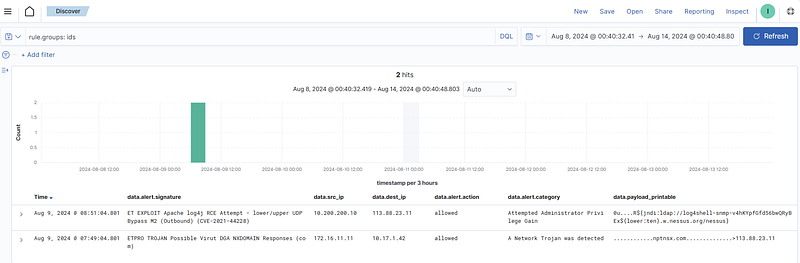
Answer: ETPRO TROJAN Possible Virut DGA NXDOMAIN Responses (com)
Which source IP address triggered the DNS-related IDS alert among the IDS events?
In SIEM, use the filter “rule.groups: ids” and analyze the results. You can also search for the term *DOMAIN*.
Answer: 172.16.11.11
What is the domain queried in the DNS request within the DNS-related IDS alert?
In SIEM, apply the filter “rule.groups: ids” and analyze the results. Check the “data.payload_printable” field.
Answer: nptnsx.com
What IP address is included in the DNS response from the DNS server for the queried domain in the IDS alert?
In SIEM, apply the filter “rule.groups: ids” and analyze the results. Check the “data.payload_printable” field.
Answer: 113.88.23.11
What is the firewall action for the access attempt to the IP address provided in the DNS response?
In SIEM, apply the filters “rule.groups: firewall” and “data.dstip: [IP_Address]”. Check the “data.action” field.

Answer: accept
What port number was requested in the IP address included in the DNS server’s response?
In SIEM, apply the filters “rule.groups: firewall” and “data.dstip: [IP_Address]”. Check the “data.dstport” field.
Answer: 443
What is the name of the other IDS alert related to the IP address contained in the response provided by the DNS server? (data.alert.signature)
In SIEM, apply the filter “rule.groups: ids” and analyze the results. Look for the identified IP address within the IDS alerts.
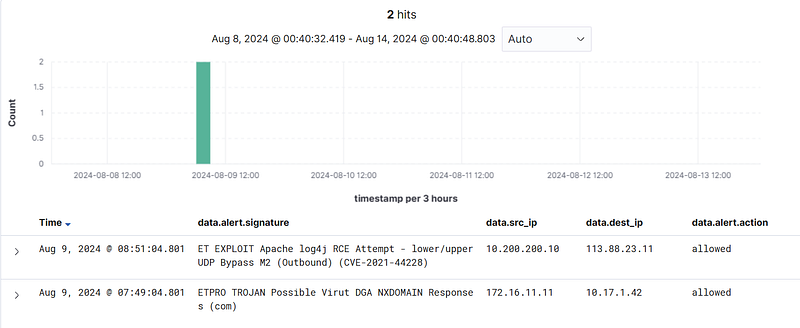
Answer: ET EXPLOIT Apache log4j RCE Attempt — lower/upper UDP Bypass M2 (Outbound) (CVE-2021–44228)
What is the source IP address that triggered the other IDS alert related to the IP address provided in the DNS response?
In SIEM, apply the filter “rule.groups: ids” and analyze the results. Check the “data.src_ip” field.
Answer: 10.200.200.10