Threat Hunting with Email Security Walkthrough — LetsDefend

Introduction
In today’s digital world, email has emerged as one of the cornerstones of both personal and business communications. However, this widespread use makes email accounts an attractive target for cyber attackers. Cybercriminals can cause significant damage by targeting users and organizations using methods such as phishing, spreading malware, and Business Email Compromise (BEC). This is where email-based threat hunting enters the picture.
Email-based threat hunting is the process of in-depth analysis of email traffic to identify, analyze, and prevent potential threats and attacks. Detecting suspicious activity and malicious content requires advanced analysis techniques, threat intelligence, and automation tools. The goal is to catch and neutralize threats as quickly as possible before they start to spread.

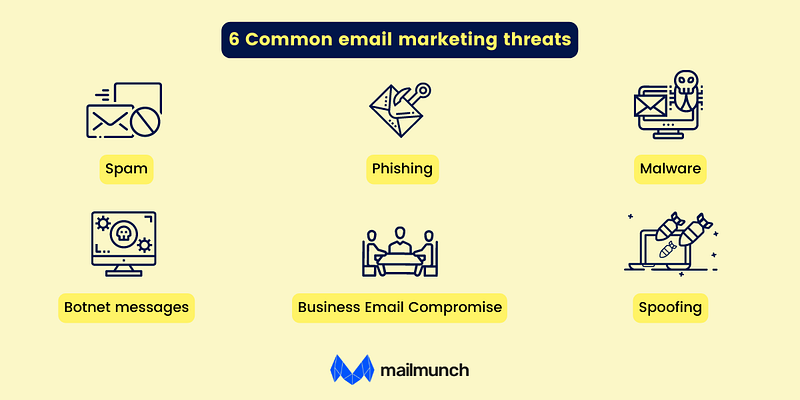
Common E-Mail Threats
- Spam: It is classified as unsolicited email sent in bulk. In some cases, spam emails may contain links that download malicious files.
- Phishing: It is a type of attack in which cybercriminals use deceptive emails, advertisements, links, or messages to steal personal information or gain access to online accounts. According to Verizon, phishing accounts for 36% of breaches.
- Malware: It is an attack method in which cybercriminals use malicious code in email messages to infect one or more devices. By 2020, email malware attacks will increase by 600%.
- Spoofing: It is a technique used by cybercriminals in spam and phishing attacks. It tricks users into believing the message is from someone they know or trust, such as a familiar person or organization.
- Botnet Messages: It is a method of infecting a computer network with malware. The network is controlled by a single attacker known as the “botnet leader. Botnet messages are used to launch attacks, steal data, send spam, and gain access to devices.
- Business Email Compromise (BEC): In this method, attackers gain access to a business email account and impersonate its owner. These attackers often target companies that conduct wire transfers and have overseas suppliers.
This lesson of the course provides an introduction to the topic. The next lesson will cover the “ Role of Email Security Systems in Threat Hunting .”
Questions
No Answer Needed
Role of Email Security Systems in Threat Hunting
Email is one of the most popular and effective attack vectors for cyber attackers. Email attacks such as phishing, malware distribution, ransomware and business email compromise (BEC) target both individuals and organizations. As a result, email security systems play a critical role in the threat hunting process.
Core Functions of Email Security Systems
Email security systems are primarily designed to filter, analyze, and detect malicious content in email traffic. Their core functions include the following:
- Spam Filtering: Email security systems prevent unnecessary and potentially harmful emails from reaching users’ inboxes.
- Phishing Protection: They detect and block fake emails created to steal information from legitimate users.
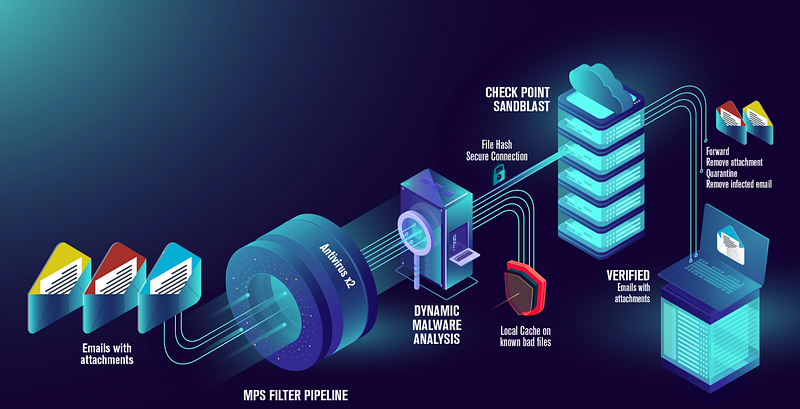
- Malware Detection: Email security systems scan and detect malware in attachments, links, or email content.
- URL and Link Analysis: They check whether links in emails are malicious.
- Content Scanning: Email security systems scan email content for specific keywords and suspicious patterns to identify risky situations.
The Role of Email Security Systems in Threat Hunting
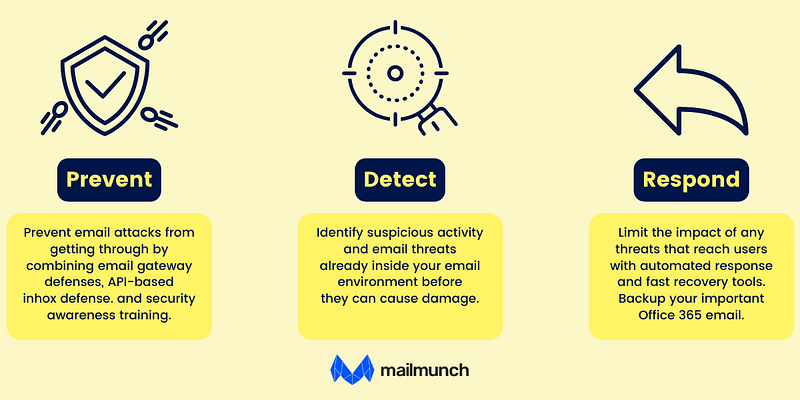
Threat hunting is a proactive cybersecurity strategy aimed at detecting attacks before they occur. Email security systems play a critical role in this process. Here are some of the key roles these systems play in threat hunting:
- Advanced Threat Detection: Email security systems go beyond traditional signature-based threat detection methods by using behavioral analysis, machine learning, and threat intelligence to detect advanced threats. These functions enable the systems to identify new and previously unseen attack methods.
- Providing Data for Incident Response: When an attack occurs or suspicious activity is detected, email security systems provide data that threat hunters analyze to determine the source, method, and purpose of the attack. This data is highly valuable in incident response processes.
- Content and Link Analysis: Email security systems generate detailed analysis reports that threat hunters use to examine the content and links in suspicious emails. These reports are particularly important for detecting and analyzing phishing emails used in targeted attacks.
- Automated Hunting Processes: Email security systems support automated threat hunting processes, enabling effective threat hunting even in large-scale networks. They ensure continuous monitoring of email traffic and immediate detection of abnormal activities.
Techniques and Technologies Included in Email Security Software
Some of the key techniques and technologies used in email security systems include:
- Machine Learning and Artificial Intelligence: Email security systems use machine learning and AI to detect abnormal behavior and suspicious activities. Thanks to their continuous learning capabilities, they can adapt even as attack methods evolve.
- Sandboxing: Email security systems execute files and links from incoming emails in isolated virtual environments to analyze their behavior, ensuring that malicious content is detected before it can harm real systems.
- Threat Intelligence Integration: Email security systems leverage global threat intelligence to quickly detect known threats. Threat intelligence integration, combined with continuously updated threat databases, will provide more effective protection.
Conclusion
Email security systems play a proactive role in the threat hunting process, making them vital for preventing and detecting cyberattacks. Equipped with advanced technologies, these systems are an indispensable part of corporate cybersecurity strategies.
This lesson has discussed the importance of email security systems in the threat hunting process. The next lesson will cover the topic “ Using Email Security Systems .”
Questions
No Answer Needed
Using Email Security Systems
Email security systems help cybersecurity analysts detect and analyze suspicious activity. Detecting phishing emails and emails containing malware is one of their most important functions. Email security systems are equipped with advanced technologies such as machine learning algorithms, behavioral analysis, and threat intelligence. As a result, they are able to detect not only known threats, but also previously unseen or targeted attacks.
Using email security systems in the threat hunting process is critical to protecting corporate networks and data. These systems monitor not only incoming email traffic, but also internal email traffic, helping to detect insider threats. The effective use of email security systems in threat hunting is a critical step in preventing cyber-attacks and minimizing potential threats.
Collection of Email Data and Log Analysis
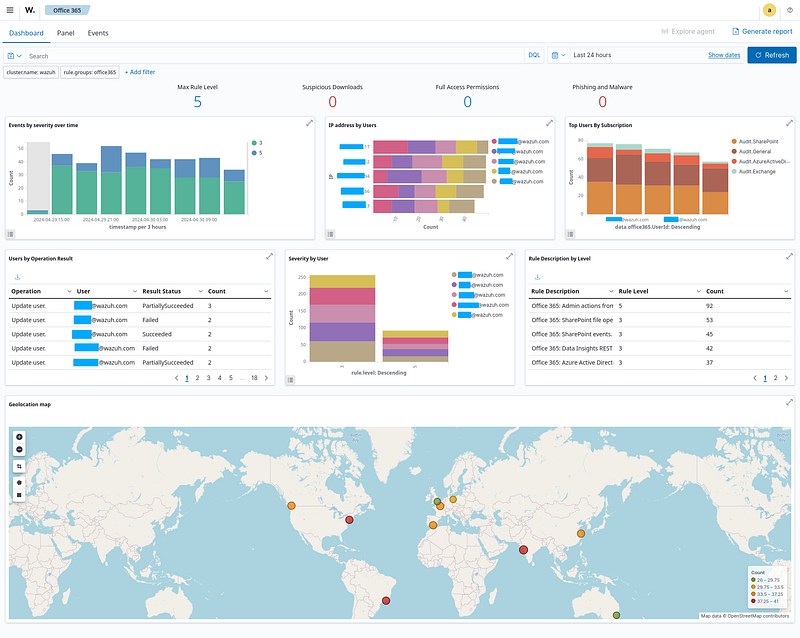
The collection of email data and the analysis of these logs hold a significant place in threat hunting processes. Email logs contain critical information that organizations can use to monitor email traffic, detect anomalies, and take measures against cyberattacks.
Collection of Email Data: Email security systems can monitor all email traffic within an organization and securely store this data. This data may include sender and recipient email addresses, subject lines, IP addresses, email sizes, timestamps, and attachment details. Additionally, links used in emails and their target addresses can also be collected. Proper and complete collection of this data is crucial for detecting traces of cyberattacks during the threat hunting process.
Log Analysis: Email logs provide cybersecurity analysts with detailed information, enabling them to detect deviations from normal behavior and abnormal activities. Log analysis involves examining all email activities within a specific timeframe to identify potential threats. Abnormal activity includes unusual user email patterns, email from unknown IP addresses, or phishing attempts. Log analysis tools can automatically detect such anomalies and alert analysts, allowing potential threats to be identified and mitigated at an early stage.
Email data collection and log analysis is one of the fundamental elements of threat hunting. In order to detect threats in a timely manner and develop an effective defense strategy against cyber attacks, this process is critical.
Detection and Analysis of Malicious Email Content
Detecting and analyzing malicious email content is an important defense mechanism in the cybersecurity world. Cyber attackers use a variety of techniques to spread malware, conduct phishing, or deceive users through email. Therefore, the detection and effective analysis of malicious content is essential to ensure the security of an organization.
- Detection Methods: There are several methods used to detect malicious email content. Signature-based detection methods are effective for identifying known threats. However, for more advanced attacks, techniques such as behavioral analysis, machine learning, and sandboxing are used. These methods analyze suspicious email content and detect anomalous behavior. For example, sandboxing executes email attachments in an isolated environment to test for malware.
- Content Analysis: Email content analysis involves a detailed examination of both text and attachments. Phishing emails often use specific patterns to deceive users, and natural language processing (NLP) techniques are used to detect these patterns. In addition, files in email attachments are scanned for known malware. Malicious email content often includes elements that pressure users to take certain actions (e.g., create a sense of urgency). Detecting such elements helps identify potential threats.

The detection and analysis of malicious email content are critical for the rapid and effective neutralization of cyber threats, playing a vital role in both identifying current threats and protecting against future attacks.
Real-Time and Retrospective Email Analysis
Both real-time and retrospective email analysis are important for email security. These methods are used to detect cyber threats and take preventative measures. Real-time analysis enables the immediate detection of active threats, while retrospective analysis enables the investigation of past incidents.
- Real-time Email Analysis: This method refers to the process by which email security systems monitor email traffic in real time and detect suspicious activity. Real-time analysis can immediately identify phishing attempts, malware distribution, or unusual email activity. This type of analysis can stop attacks before they fully materialize. For example, if an email system detects a user deviating from normal behavior, it can alert the user or IT in real time.
- Retrospective Email Analysis: This method involves analyzing past email traffic. Especially after a security breach, retrospective analysis is used to understand how the breach occurred and to prevent similar incidents in the future. It involves a detailed examination of email logs and is also used to understand the methods used by cybercriminals and how attacks spread. Based on the findings, organizations can review their security policies and develop new strategies.
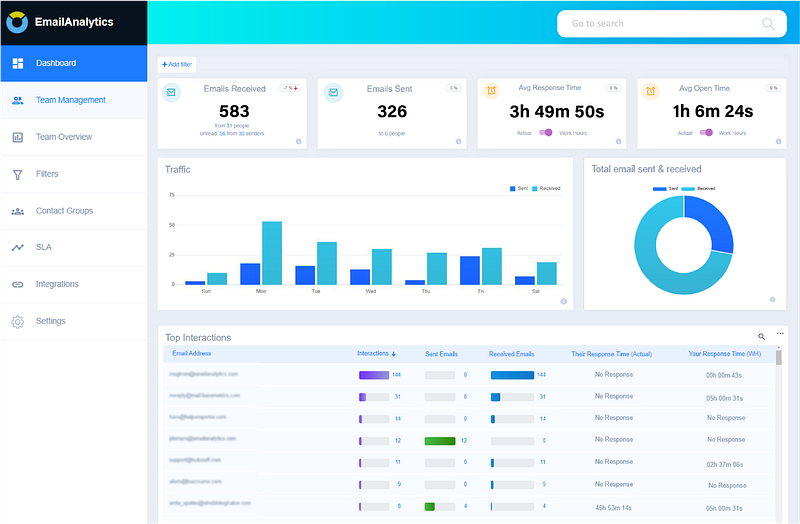
These two approaches to analyzing and responding to cybersecurity threats complement each other. Real-time email analysis provides quick responses to immediate threats, while retrospective analysis provides a broader perspective that contributes to long-term security measures.
Conclusion
Email security systems play both proactive and reactive roles in the threat hunting process, creating a strong line of defense against cyber attacks. Critical steps such as email data collection, log analysis, malicious content detection and analysis, and real-time and retrospective email analysis ensure that potential threats are detected and neutralized early. These processes are critical to ensuring organizational security and preparing for future attacks. Effective use of email security systems enables security teams to respond quickly and knowledgeably to attacks.
This lesson has discussed the use of email security systems in the threat hunting process. The next lesson will cover the “ Abnormal Email Sending Pattern Hypothesis “.
Questions
No Answer Needed
Abnormal Email Sending Pattern Hypothesis
Hypothesis
An employee’s email account may be used to send a high volume of spam or malicious content to multiple external email addresses simultaneously in an unusual manner.

Data Sources
- Email Security System Logs: Inbound and outbound email traffic, email attachments, email content scans, and spam filtering results.
- SIEM Logs: A centralized platform integrating email security systems and other security logs.
- SMTP Server Logs: Outbound email traffic, failed email delivery attempts, and emails marked as spam.
- User Activity Logs: Unusual sending activities from employee email accounts.
- DNS Logs: Domain resolution processes used during email sending and associations with suspicious domains.
Analysis Steps
- Analyze inbound and outbound email traffic in detail.
- Determine how many emails are typically sent per day.
- Analyze typical recipient profiles and email content.
- Analyze email security system results for spam and malicious content detection.
- Identify suspicious email attachments, unusual content, and sends where known malware has been detected.
- Analyze SMTP server logs.
- Analyze email delivery failures and emails marked as spam.
- Analyze user activity logs.
- Identify unusual activity in email accounts, especially intensive email sending.
- Examine and analyze DNS logs.
- Identify emails sent to suspicious domains.
- Deviations from normal sending patterns are analyzed to detect abnormal email sends.
- Identify activities such as sending to many different external email addresses at the same time, sending at an unusual frequency.
- Conduct a correlation analysis of all the security logs with SIEM.
- Analyze suspicious activity in detail by correlating email security system logs, user activity, and SMTP server logs.
- Evaluate detected anomalies for potential threats.
- If an anomaly is detected, it is determined whether it is a spam attack, a phishing campaign, or an account takeover attempt.
- Gather more evidence to confirm the anomaly.
- Perform additional checks to confirm if the suspicious activity is an attack.
- Inform the appropriate security teams about the findings for further action.
Expected Results
- Email security systems detect high-volume email sent from a specific account to multiple external email addresses at the same time.
- Sent emails may contain malicious attachments, phishing links, or unusual text.
- Unusual email sending frequency or high volume of failed delivery attempts observed in SMTP server logs.
- Unusual logon attempts or activity from different IP addresses associated with the email account are detected in user activity logs.
- Email redirects to unknown or malicious domains are observed in DNS logs.
- SIEM logs correlate suspicious email activity with other security events, such as account takeover attempts or malware propagation.
Summary
Email security is one of the most critical defense points for organizations. Threat hunters can analyze data sources such as email security systems and SIEM logs to detect unusual email sending patterns and potential malicious activities.
Questions
No Answer Needed
Practical Lab
Hypothesis
Note: The questions in this section are prepared for Threat Hunting based on the following hypothesis:
Hypothesis: The organization’s network may be targeted by the attackers, and its systems may be damaged by malicious software contained in emails sent to employees from domains with the “.top” extension.
Threat Hunting Lab Environment
- Organization Name: Quantum Synergy Solutions
- Organization Domain: quantumsynergy.io
- Email Security (LetsDefend Platform)
- EDR Events (Sysmon)
- SIEM (Wazuh)
- Firewall Traffic Events
- CTI Events (Threat Intel LetsDefend Platform)
Lab Notes
- Analyze the logs between “Aug 8, 2024 00:00 — Aug 13, 2024 00:00” to answer the questions below.
- Subsequent questions require correct answers from previous ones. Answer all questions strictly in the order they appear.
Note: Analyze the logs between “Aug 8, 2024 00:00 — Aug 13, 2024 00:00” to answer the questions below.
Note: Subsequent questions require correct answers from previous ones. Answer all questions strictly in the order they appear.
How many total emails were received by the organization from domains with the “.top” extension?
Hint: Search for the organization’s domain in the Email Security platform.
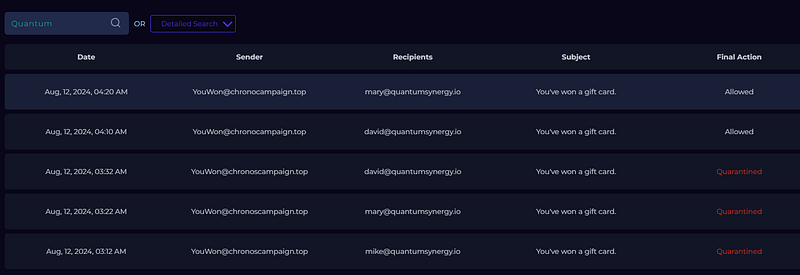
Answer: 5
Out of the emails received from “.top” domains, how many had their Final Action as “allowed”?
Search for the organization’s domain in the Email Security platform. Find the emails for which the “Final Action” value is “Allowed.”
Answer: 2
What is the sender email address for emails sent to the organization from domains with the “.top” extension and a “Final Action” value of “Allowed”?
In the Email Security platform, filter by the organization’s domain and check the “Sender” field of emails with a “Final Action” of “Allowed.”
Answer: YouWon@chronocampaign.top
What is the URL contained in emails sent to the organization from domains with the “.top” extension and with a “Final Action” value of “Allowed”?
Filter by the organization’s domain in the Email Security platform. Check the contents of emails with a “Final Action” of “Allowed”.
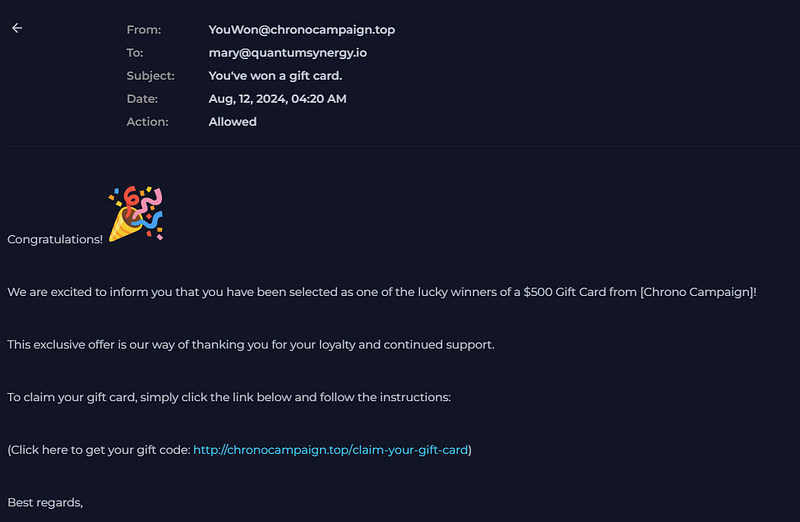
Answer: http://chronocampaign.top/claim-your-gift-card
What is the IP address of the system that queried the domain in the URL contained in the Allowed emails from domains with the .top extension?
In SIEM, use the filter “data.win.eventdata.queryName: [Domain_Name]” and check the “agent.ip” field in the result.

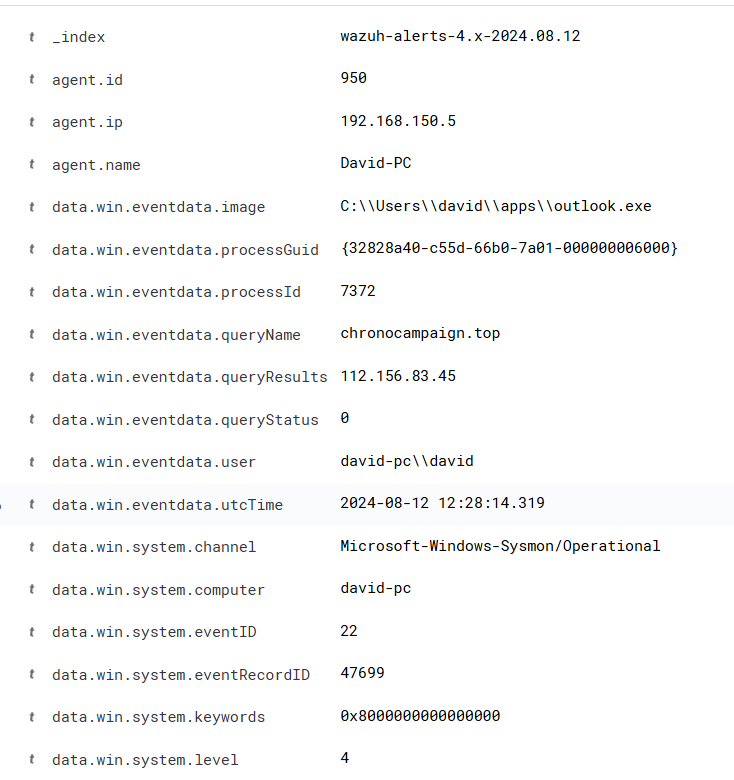
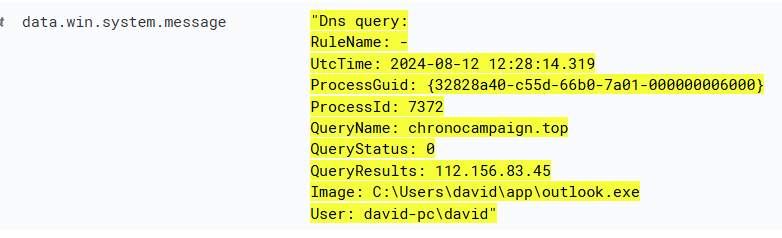
Answer: 192.168.150.5
What is the firewall action for the system that accessed the URL found in the Allowed emails from domains with the .top extension?
What is the firewall action for the system that accessed the URL found in the Allowed emails from domains with the .top extension?

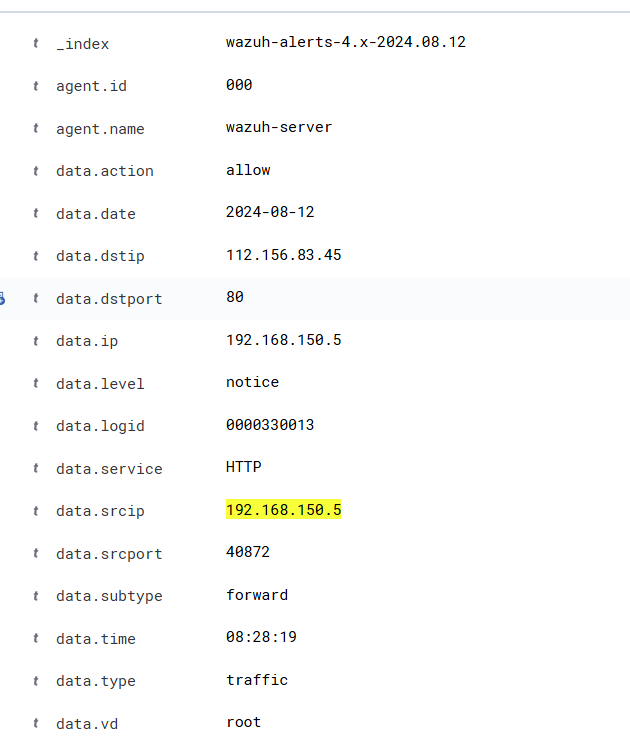
112.156.83.45 is C2 IP adress
Answer: allow
Which APT group is associated with the URL found in the Allowed emails from domains with the .top extension?
Search the domain or C2 IP in the Threat Intel platform.
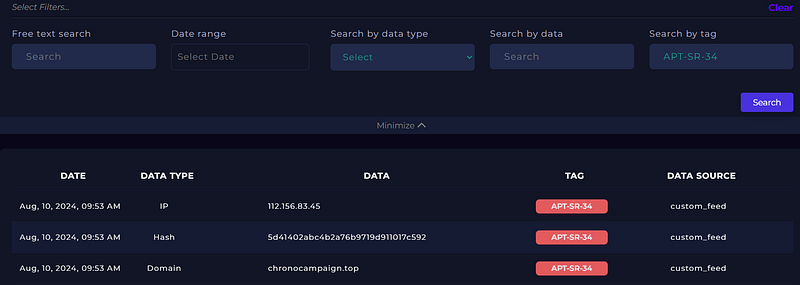
Answer: APT-SR-34
On the system that accessed the URL in the Allowed emails from domains with the .top extension, what is the name of the process (running at the time of access) whose “Company Name” is “Unknown”?
In the SIEM’s EDR events, filter by the system’s “agent.ip” value. Then apply the filter “data.win.eventdata.company: Unknown” and check the value of “data.win.eventdata.originalFileName”.
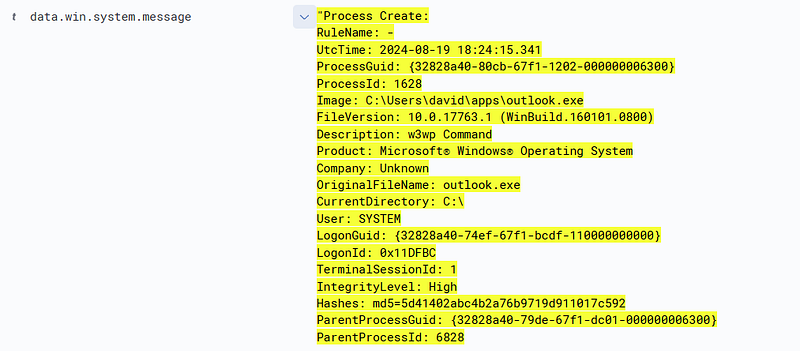
Answer: outlook.exe
When searched in the CTI platform, which APT group is associated with the MD5 hash of the process running on the system that accessed the URL in emails sent to the organization from domains with the “.top” extension and a “Final Action” value of “Allowed”?
same as previous question.
Answer: APT-SR-34