Threat Hunting with Firewalls Walkthrough — LetsDefend

Introduction
Firewall logs are a critical source of data for monitoring network traffic and analyzing security incidents. During threat hunting, firewall logs are used to detect potential threats, identify anomalies, and respond to security incidents quickly and effectively. This course covers the role and importance of firewall logs in the threat hunting process.

( Image Source : https://www.linkedin.com/pulse/crucial-logs-threat-hunting-alex-lasher-50eje/ )
This lesson has provided an introduction to the topic, and the next lesson will cover “ Information from Firewall Logs for Threat Hunting “.
Questions
No Anser Needed
Information from Firewall Logs for Threat Hunting
Firewall logs are essential for monitoring network traffic and detecting security threats. These logs help identify normal network behavior patterns, detect anomalies, and uncover potential threats. In the threat hunting process, firewall logs provide critical information such as source and destination IP addresses, port and protocol usage, access times, traffic types and volumes, access policies, and anomalous behavior. With this information in hand, security teams can develop proactive defense strategies and respond quickly to incidents.
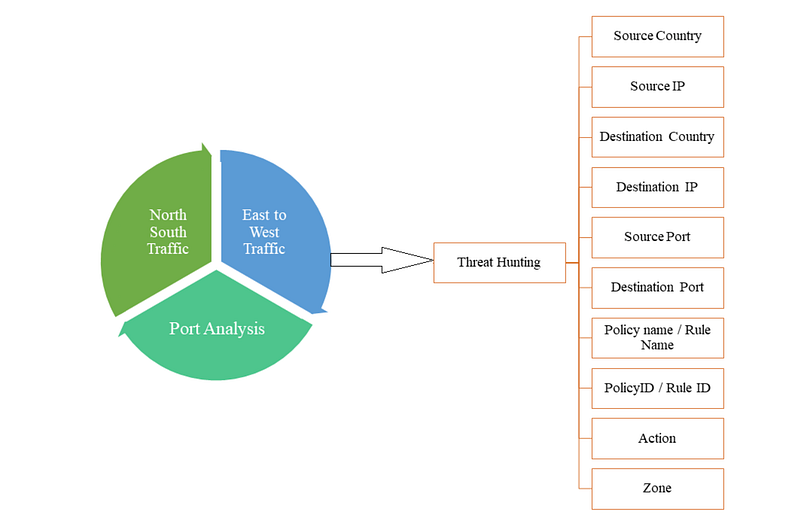
( Image Source : https://hackforlab.com/threat-hunting-with-firewall-traffic/ )
Source and Destination IP Addresses
Monitoring and Analysis
- Monitoring: Firewall logs contain the source and destination IP addresses of all connections on the network. This information can be used to keep track of which IP addresses are frequently communicating with other IP addresses.
- Analysis: Attackers and their targets can be identified by analyzing source and destination IP addresses. To identify potential threats, suspicious IP addresses are compared to known indicators of compromise (IOCs).
Examples
- A sudden increase in connections from an internal IP address to multiple external IP addresses may be an indication of data exfiltration.
- Repeated connection attempts from a suspicious external IP address to a specific internal IP address may be an indication of a brute force attack.
Port and Protocols
Usage Patterns and Security
- Usage Patterns: Monitoring which ports and protocols are used helps establish normal network behavior patterns. Abnormal port usage can indicate potential threats.
- Security: Monitoring traffic to and from unexpected ports is crucial for identifying vulnerabilities and malicious activities.
Examples
- A sudden spike in traffic on a rarely used port may indicate an attack.
- The use of insecure protocols (e.g., Telnet) can increase the risk of security incidents.
Access Times
Time and Chronology
- Analysis of Time: Firewall logs show when network traffic occurs. This information is used to detect abnormal activity during certain time periods.
- Chronology: Determining when events occur helps build timelines of attacks and understand their stages.
Examples
- Large data transfers occurring late at night may be suspicious, as they fall outside normal business hours.
- Repeated failed login attempts within a specific timeframe may be an indication of a brute force attack.
Traffic Types and Volumes
Data Flow and Bandwidth Usage
- Data Flow: Firewall logs show the volume and type of data flow in the network. Abnormal data flows can help identify potential threats.
- Bandwidth Usage: Monitoring bandwidth usage during specific timeframes helps detect deviations from normal traffic patterns.
Examples
- Unusually high bandwidth usage may indicate a DDoS attack.
- Continuous large data transfers from a specific IP address may be an indication of data exfiltration activity.
Access Policies and Rules
Rules and Permissions
- Rule Enforcement: The firewall logs show which access policies and rules are being enforced. This helps evaluate and improve the effectiveness of firewall rules.
- Allow and Deny: To identify potential vulnerabilities and attack attempts, analysis of allowed and denied connections is essential.
Examples
- Repeated denied connection attempts from a specific IP address may indicate malicious activity.
- Frequent violations of firewall rules may suggest the need to review security policies.
Abnormal Behaviors and Violations
Anomaly Detection and Incidents
- Anomaly Detection: Firewall logs are used to detect deviations from normal behavior patterns and identify anomalies, which can indicate potential threats.
- Security Incidents: Analyzing detected security incidents helps determine root causes and impacts.
Examples
- An abnormal number of connection attempts from the internal network to external networks may indicate an insider threat or data exfiltration attempt.
- Connection attempts to systems that are normally inaccessible may suggest a violation of security policies.
Conclusion
Firewall logs provide critical information for threat hunting. Details such as source and destination IP addresses, port and protocol usage, access times, traffic types and volumes, policies, permissions, and anomalous behavior are used to ensure network security and identify potential threats. With this information, security teams can analyze network traffic, identify anomalies and threats, and respond to incidents quickly and effectively.
This lesson discussed the importance of firewall logs in threat hunting and the information that can be gleaned from them. The next lesson will cover “ Threat Hunting Steps with Firewall Logs “.
Questions
No Anser Needed
Threat Hunting Steps with Firewall Logs
This section explains threat hunting methodology using firewall logs, focusing on distinguishing between normal and abnormal network traffic patterns. Normal traffic represents regular, expected data flows including routine user activities, standard application communications, and typical port/protocol usage, while abnormal traffic encompasses unexpected behaviors like unusual data transfer volumes, connections at irregular times, or communications with suspicious IP addresses. The threat hunting process involves three key phases: first, establishing baseline normal behavior by monitoring traffic patterns, user activities, and device behaviors over time to create reference points; second, detecting suspicious activities by comparing logs against threat intelligence databases for malicious IPs/domains and monitoring for unexpected port usage or connections; and third, analyzing anomalies including unusual data transfers, traffic spikes that may indicate DDoS attacks or data exfiltration, failed login attempts suggesting brute force attacks, and repeated unauthorized access attempts. This systematic approach to firewall log analysis enables security teams to effectively identify potential threats, detect security incidents early, and respond quickly to protect network infrastructure, with the methodology serving as a foundation for more advanced threat hunting techniques like outbound connection hypothesis analysis.
Understanding Normal Traffic Behavior
Differences Between Normal and Abnormal Traffic
- Normal Traffic: It refers to the regular and expected data flow within a network. It includes activities performed by specific users at specific times, as well as the ports and protocols regularly used by certain services and applications. For example, a frequently used application within the company consistently exchanging data over a specific IP address and port is considered normal.
- Abnormal Traffic: It refers to traffic that is abnormal, unexpected, or unusual. Examples include sudden increases in data transfers, connections made at unexpected times, or traffic coming from unexpected IP addresses. Abnormal traffic may indicate a potential security incident or attack.
Identifying Normal Traffic Behavior
- Identify Traffic Patterns: To understand the normal operation of a network, traffic is monitored over a period of time. During that period, it is observed which IP addresses communicate over which ports and protocols at certain hours to determine normal traffic patterns.
- Monitor User and Device Behavior: To understand normal behavior, the daily activities of users and devices on the network are monitored. This includes tracking which systems specific users access and what they perform at specific times.
- Create Reference Points: Data collected to understand normal traffic behavior is used as benchmarks to compare when detecting anomalies.
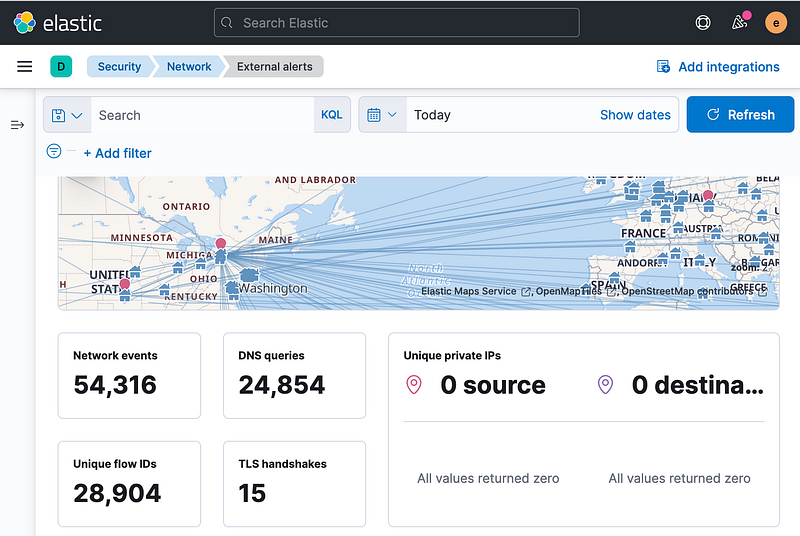
( Image Source : https://www.digitalocean.com/community/tutorials/how-to-build-a-siem-with-suricata-and-elastic-stack-on-debian-11 )
Detecting Suspicious Traffic
Suspicious IP Addresses and Domains
- Review Malicious IP Addresses and Domains: Compare firewall logs against malicious IP addresses and domains obtained from known threat intelligence sources. Traffic coming from or going to these addresses is considered suspicious.
- Monitor and Identify: Continuously monitor firewall logs and identify connections that match known malicious IP addresses and domains. These findings provide advance warning of potential attacks.
Abnormal Port Usage and Connections
- Unexpected Port Usage: Monitor traffic to and from ports which are not normally or infrequently used. This is especially important for high-risk ports (e.g., 3389 — RDP).
- Suspicious Connections: Unexpected connections from inside or outside the network, especially abnormal attempts to connect using certain protocols, are considered suspicious. For example, a system normally used only to access the internal network suddenly tries to connect to the outside world.
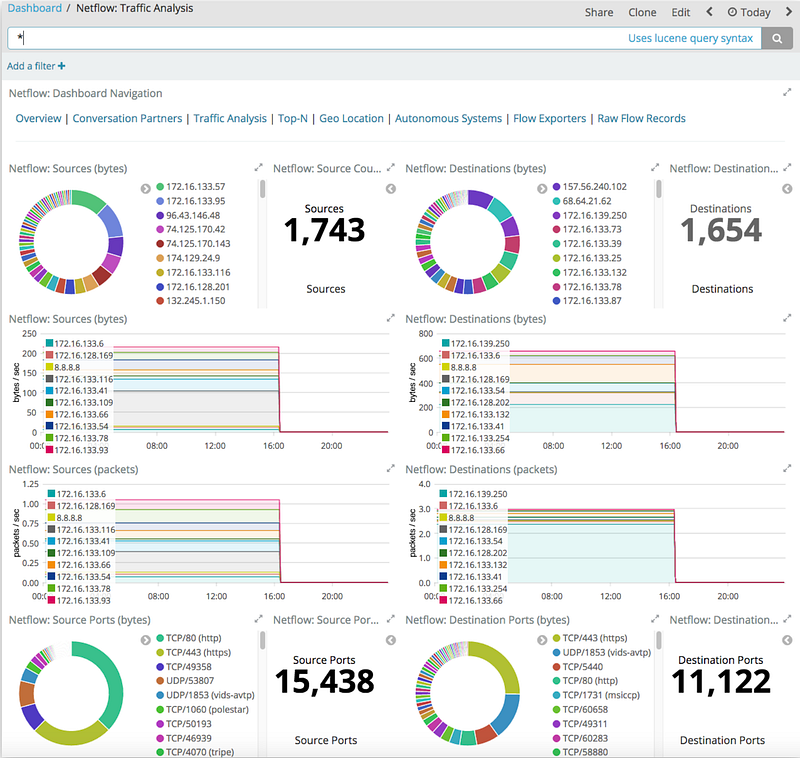
( Image Source : https://www.researchgate.net/figure/Example-of-the-main-Elastiflow-Kibana-page-at-AGLT2_fig2_335862467 )
Analyzing Anomalies and Abnormal Behavior
Traffic Anomalies
- Anomalies In Data Transfers: Data transfers significantly larger than normal or at unexpected times are detected. For example, large transfers made after hours may be considered anomalous.
- Traffic Spikes: A sudden increase in traffic over a short period of time can indicate a DDoS attack or data exfiltration attempt. Such anomalies are detected by analyzing traffic patterns in firewall logs.
Access Attempts and Failed Logins
- Failed Login Attempts: Continuous failed login attempts from a specific IP address or user may indicate a brute force attack.
- Unauthorized Access Attempts: Users or systems attempting to access resources they shouldn’t be accessing are considered potential security incidents.
- Repeated Failures: Repeated failed logon or connection attempts within a short period of time may indicate malicious activity. For example, a system that repeatedly attempts to access a resource using incorrect credentials.
Using firewall logs, these steps and explanations will make the threat hunting process more effective. Firewall logs are a critical source of data for ensuring network security and detecting potential threats. They enable security teams to identify anomalies and potential threats and respond quickly.
This lesson discussed the steps to follow when analyzing firewall logs in the threat hunting process. The next lesson will cover the “Outbound Connection Hypothesis “.
Questions
No Anser Needed
Outbound Connection Hypothesis
The Outbound Connection Hypothesis in cybersecurity focuses on detecting anomalous network behavior characterized by a sudden surge of connection attempts from a specific internal IP address to external destinations using unusual ports, which may indicate malicious activity such as reverse shell connections. The detection methodology involves collecting and analyzing firewall logs, SIEM data, network flow information, and IDS/IPS logs through a centralized system to establish baseline network patterns and identify deviations. The analysis process includes transferring logs to SIEM solutions, recording traffic patterns over time, identifying normal port and protocol usage, and detecting abnormal connection attempts that target external IP addresses through rarely-used ports. Expected outcomes include the detection of unusual connection volumes from internal sources, identification of connections using non-standard ports, discovery of targeted external IP addresses, and correlation analysis that determines whether these activities represent potential security threats, ultimately enabling early threat detection and rapid incident response to protect network infrastructure.
Hypothesis
There may be a sudden high number of attempted connections from a specific local IP address to external IP addresses using unusual ports.
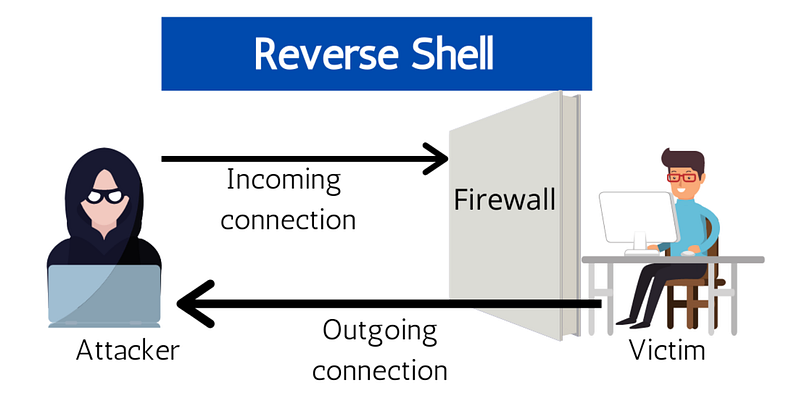
( Image Source : https://www.techslang.com/definition/what-is-a-reverse-shell/ )
Data Sources
- Firewall Logs: Incoming and outgoing network traffic, connection attempts to specific ports, and records of successful and failed connection attempts.
- SIEM Logs: Firewall logs integrated and collected on a centralized platform.
- Network Flow Analysis: Examination of network traffic data and monitoring of connections.
- IDS/IPS Logs: Logs from systems that detect and record suspicious or malicious activities.
Analysis Steps
- Transfer firewall logs to a centralized log management system or SIEM solution.
- Record all inbound and outbound traffic over a specific period.
- Analyze the logs to determine normal network traffic patterns.
- Identify the ports and protocols that are normally used.
- Identify activities that deviate from normal traffic patterns.
- Examine a high number of unusual connection attempts from a specific internal IP address.
- Detect connection attempts over ports that are not normally or rarely used.
- Identify the external IP addresses targeted by these connections.
- Compare firewall logs with other network and security logs.
- Perform correlation analysis of abnormal activities and detect specific patterns.
- Evaluate the accuracy and severity of detected activities.
- Collect additional data to validate the incident and determine the stage of the connections.
Expected Outcomes
- Abnormal numbers of connection attempts from a specific internal IP address are detected in firewall logs.
- Connections to external IP addresses over ports that are not normally or rarely used are identified.
- A high number of unusual connection attempts targeting a specific external IP address are detected.
- Correlation analysis with SIEM and other security logs determines whether these activities indicate a potential attack.
Summary
These analysis steps provide strategies for detecting a sudden high number of attempted connections from a given internal IP address to external IP addresses using unusual ports. Firewall logs are a critical source of data for monitoring and detecting such anomalous activity. Anomaly detection enables early identification of potential attacks and rapid response. This goes a long way in helping to secure the network and proactively manage the threats posed.
Questions
No Anser Needed
Practical Lab
This is a Threat Hunting lab exercise based on the hypothesis that sophisticated attacks from Cambodia may target the organization due to diplomatic tensions between the two countries. The lab environment includes SIEM (Wazuh), firewall traffic and anomaly detection events, CTI events, and EDR (Sysmon) events. Students must analyze logs from August 1–7, 2024, and answer questions sequentially since each requires correct answers from previous ones. To access the Wazuh lab, users need to click connect, wait 3–4 minutes for deployment, navigate to the provided IP address, log in with credentials “letsdefend:letsdefend123,” and open the Discover page.
Hypothesis
Note: The questions in this section are prepared for Threat Hunting based on the following hypothesis.
Hypothesis: Sophisticated attacks targeting the organization from Cambodia are a possibility due to the diplomatic tension between the two countries.
Threat Hunting Lab Environment
- SIEM (Wazuh)
- Firewall Traffic Events
- Firewall Anomaly Detection Module Events
- CTI Events (Threat Intel LetsDefend Platform)
- EDR Events (Sysmon)
Lab Notes
- Analyze the logs between “Aug 1, 2024 00:00 — Aug 7, 2024 00:00” to answer the questions below.
- Subsequent questions require correct answers from previous ones. Answer all questions strictly in the order they appear.
Questions
Note: Analyze the logs between “Aug 1, 2024 00:00 — Aug 7, 2024 00:00” to answer the questions below.
Note: Subsequent questions require correct answers from previous ones. Answer all questions strictly in the order they appear.
How many firewall logs are there for network traffic from “Cambodia” that has the “Allow” action?
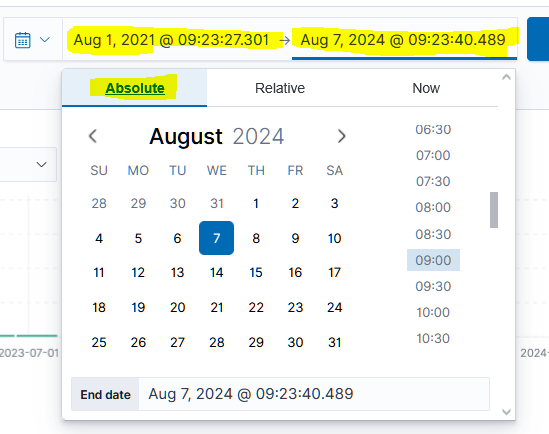
Firstly, I need to set the timeline. I have set the time given in the relevant section of the question as absolute.
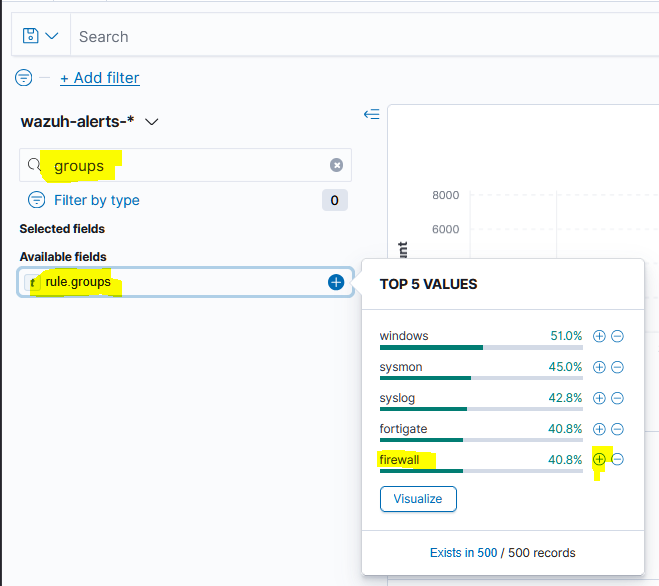
Secondly, I need to select the log type. I need to filter the firewall log by rule groups. Use the ‘+’ button to automatically filter.
Next, I need to select the source country. I can use the data.srccountry filter to do this.

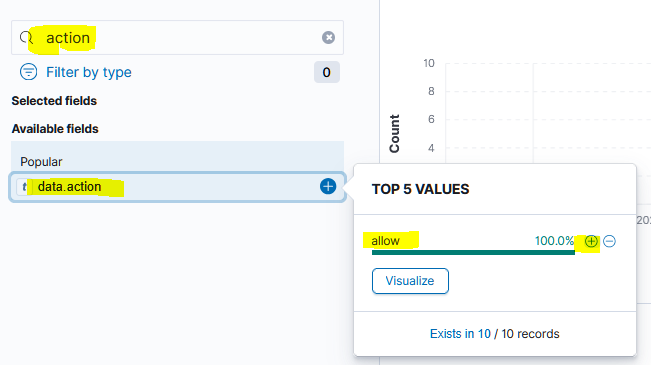
Samely, filter with action type as allowed.
I can see the event count when I mouse over the graph. we found that our answer was 10.
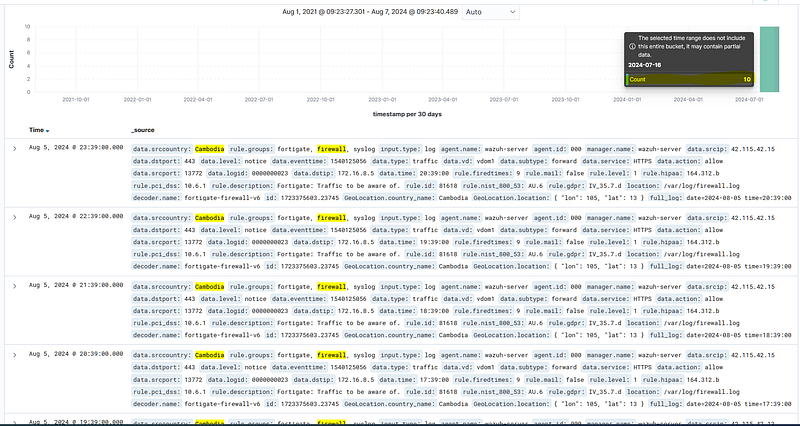
Answer: 10

Among the firewall logs for network traffic from “Cambodia” that has the “Allow” action, how many unique destination systems are targeted?
When I look at the destination IP information over the fields, it is clearly seen that there is traffic to 3 different IPs. From here we found that the answer is 3.

Answer: 3

Among the firewall logs for network traffic from “Cambodia” that has the “Allow” action, how many unique source IP addresses are there?
When I look at the source IP information over the fields, it is clearly seen that there is traffic to 3 different IPs. From here we found that the answer is 3.
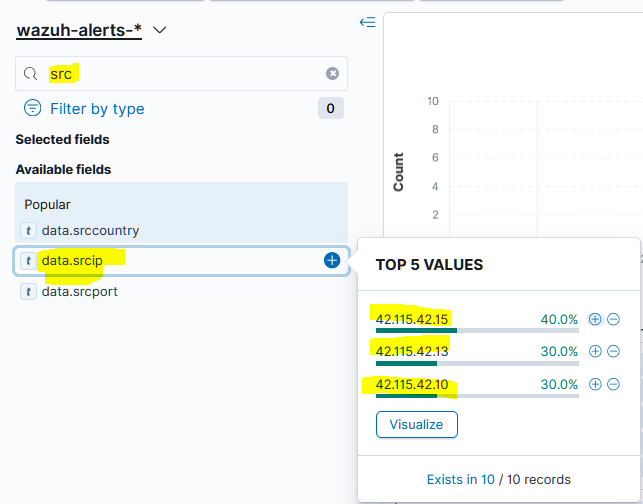
Answer: 3

Investigate the source IPs (from firewall logs showing network traffic from ‘Cambodia’ with ‘Allow’ actions) in the LetsDefend Threat Intel platform. Which threat actor group’s IoCs do these IP addresses belong to?
When we search the relevant IP in the threat intel platform, we find the relevant APT group.

Answer: APT-CN-54

Investigate the source IPs (from firewall logs showing network traffic from ‘Cambodia’ with ‘Allow’ actions) in the LetsDefend Threat Intel platform. What is the IP address of the detected attacker group that is not from Cambodia?
We know 3 IPs belonging to the traffic coming from Cambodia, let’s investigate which other IP address belongs to the APT group other than these 3 IPs. if we write and search the name of the APT group in the tag section, we will find the other IP.
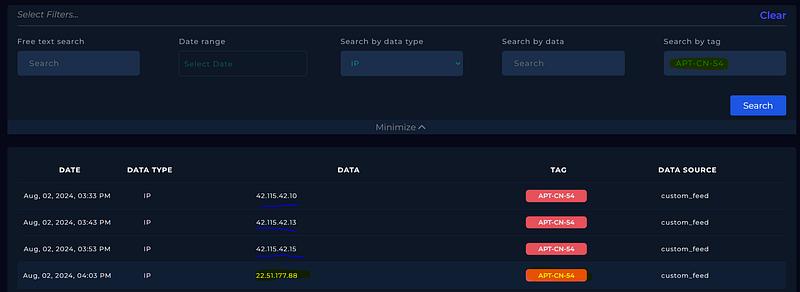
Answer: 22.51.177.88

In previous stages of the threat hunting process, an IP address from a country other than Cambodia was detected and associated with an identified threat actor group. What is the number of different target systems in the firewall logs for network traffic that originates from this IP address and is marked with the action “Allow”?
When we filter the IP related to the data.srcip fielder, we see only 1 event that receives action allow.
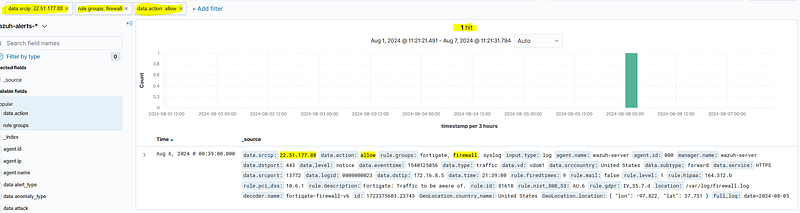
Answer: 1

In previous stages of the threat hunting process, an IP address from a country other than Cambodia was detected and linked to the identified group of threat actors. How many different fire-wall events were reported as “anomalies” among the firewall logs for network traffic originating from this IP address?
When we remove the action allow filter, we observe that 1 packet is dropped due to port_scan anomaly.
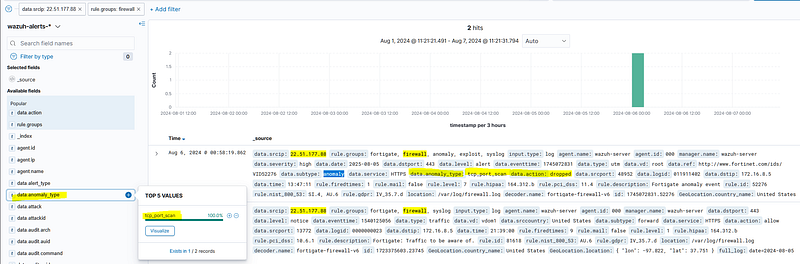
Answer: 1

In previous stages of the threat hunting process, an IP address from a country other than Cambodia was detected and linked to the identified group of threat actors. What type of anomaly of the event/events was reported among the firewall logs for network traffic originating from this IP address?
we also found this answer in the previous question. we observed that the anomaly type was tcp_port_scan.
Answer: tcp_port_scan

In previous stages of the threat hunting process, an IP address from a country other than Cambodia was detected and linked to the identified group of threat actors. What was the firewall’s action for the anomaly events reported in the firewall logs for network traffic originating from this IP address?
we also found this answer in the previous question. we observed that the action type was dropped.
Answer: dropped

What is the domain listed in the IoCs of the threat actor group identified during previous threat hunting stages (earlier questions)?
We can find the relevant domain from the threat Intel platform.
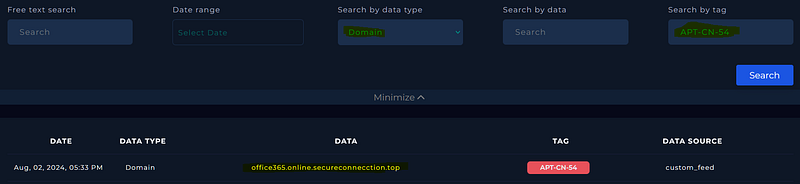
Answer: office365.online.secureconnecction.top

Among the IoCs belonging to the threat actor group identified in previous threat hunting stages (earlier questions), what is the IP address of the system that made DNS queries to the associated domain?
We can now search using the domain that we found. We find one event in the Endpoint Event Logs. We can detect the IP address using the ‘Agent IP’ field.
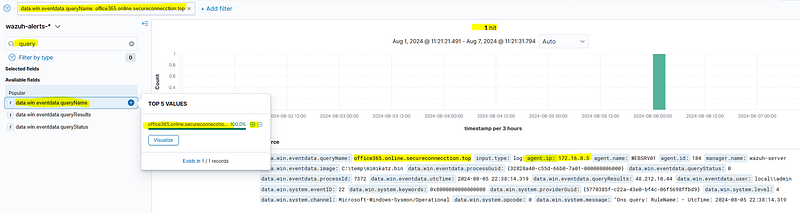
Answer: 172.16.8.5
