Threat Hunting with SIEM Walkthrough — LetsDefend

Introduction
In today’s digital world, the number and complexity of cyber threats are increasing rapidly. Developing an effective defense strategy against these threats is becoming more challenging every day. In this context, SIEM Systems and Threat Hunting activities play a critical role in enhancing an organization’s cybersecurity maturity.
SIEM (Security Information and Event Management) systems are security technologies that collect log data from various sources, analyze this data, and generate meaningful insights using correlation rules. SIEM systems are equipped with capabilities such as real-time monitoring, event detection, alerting, and reporting. These features enable security teams to detect anomalies and suspicious activities occurring within the network.
On the other hand, Threat Hunting is a proactive research process aimed at detecting and eliminating cyber threats. Threat Hunting goes beyond simply responding to alerts generated by SIEM; it also aims to uncover unknown or hidden threats. This process involves security analysts developing specific hypotheses and searching for potential threats within the network.
The relationship between SIEM and Threat Hunting stems from the complementary nature of these two approaches. SIEM provides a broad spectrum of data, offering critical information that threat hunters need. Threat hunters, in turn, perform in-depth analyses on the data provided by SIEM to identify and validate potential threats. This synergy strengthens an organization’s security posture, making it better prepared against cyberattacks.
This lesson has introduced the course content. The next lesson will cover the “Role of SIEM in Threat Hunting” will be discussed.
Questions
No Anser Needed
Role of SIEM in Threat Hunting
SIEM (Security Information and Event Management) systems play a critical role in detecting and preventing cybersecurity threats. In threat hunting processes, SIEM’s comprehensive data collection, analysis, and correlation capabilities enable the rapid and effective detection of potential threats.
Data Collection and Aggregation
SIEM systems collect, aggregate, and store data from multiple sources, including network devices, servers, applications, endpoints, and security devices. By analyzing this data, SIEM helps identify anomalies and potential threats.
- Log Collection from Various Sources: Logs are collected from firewalls, IDS/IPS, antivirus systems, DLP (Data Loss Prevention) tools, and other security devices.
- Data Enrichment: Collected data is enriched with contextual information, such as IP address geolocation and threat intelligence.
- Centralized Storage: All logs are stored in a centralized location, enabling quick access when needed.

Real-Time Analysis and Correlation
SIEM analyzes collected data in real time and generates meaningful insights using correlation rules. Thus it allows for the establishment of relationships between data from different sources, enabling faster detection of potential threats.
- Anomaly Detection: It identifies abnormal behavior in user and system activities.
- Correlation Rules: It establishes relationships between different logs to create meaningful events.
- Instant Alerts: It generates immediate alerts and notifications for detected anomalies.
Incident Detection and Response
SIEM notifies the security team of detected incidents and provides the necessary information for rapid response. This ensures that threats are quickly contained, minimizing damage.
- Incident Management: It enables quick and effective management of detected incidents.
- Alert Prioritization: It prioritizes incoming alerts based on their severity.
- Response and Remediation: It facilitates rapid response and corrective actions against detected threats.
Reporting and Visualization
SIEM systems present the data and findings from threat hunting processes in the form of meaningful reports and visualizations, helping security teams and management better understand the threat landscape.
- Detailed Reporting: It provides detailed reports of threat hunting findings, facilitating information sharing with upper management and stakeholders.
- Dynamic Dashboards: It offers live and interactive dashboards for real-time threat visualization and improved monitoring processes.
- Compliance Reports: It generates regulatory compliance reports to ensure organizations meet legal requirements.
Automation and Orchestration
SIEM systems improve security operations by automating threat hunting processes and integrating with other security tools, reducing the need for manual intervention and enabling faster responses to threats.
- Automated Threat Detection: It automates repetitive tasks and threat detection processes.
- SOAR Integration: SIEM integrates with SOAR (Security Orchestration, Automation, and Response) tools to accelerate incident response processes.
- Increased Efficiency: Automation and orchestration enhance the efficiency of security teams, enabling more effective defense against threats.
Summary
SIEM systems are essential for detecting and preventing cybersecurity threats. They excel in threat hunting by collecting, analyzing, and correlating data from multiple sources, enabling rapid identification of anomalies and potential threats. Key features include real-time analysis, incident prioritization, and automated responses, which enhance security team efficiency. SIEM also provides detailed reporting and dynamic dashboards for better threat visualization and compliance. By automating processes and integrating with tools like SOAR, SIEM reduces manual effort and accelerates threat response, making organizations more resilient against cyber threats.
This lesson has explained the importance of SIEM in threat hunting processes. The next lesson will focus on “Creating and Testing Hypotheses” .
Questions
No Anser Needed
Creating and Testing Hypotheses
Creating hypotheses is a critical step in the threat hunting process. Cybersecurity analysts determine how potential threats might emerge based on existing data and threat intelligence, and they develop hypotheses accordingly. These hypotheses guide the detection of specific attacker behaviors or abnormal activities.
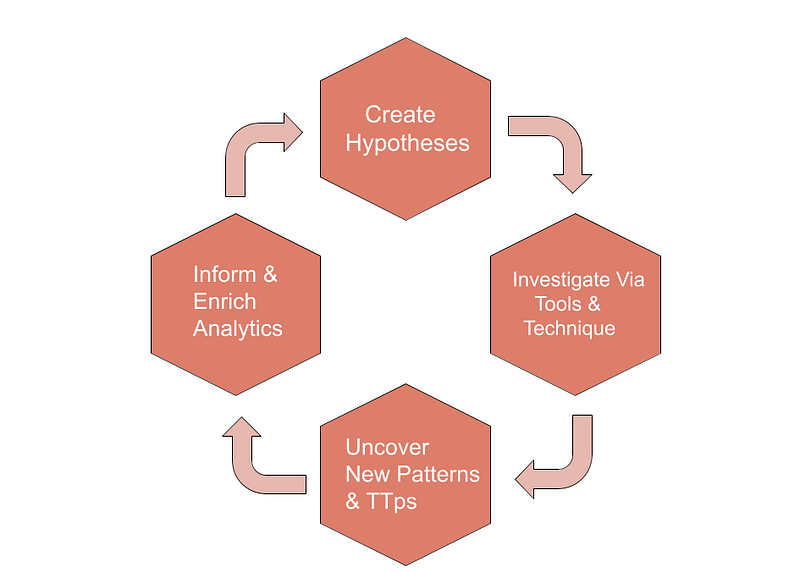
Creating Hypotheses
Data Analysis and Preliminary Review
The first step in the threat hunting process is the rapid and effective examination of collected data. During this phase, logs collected by the SIEM system, network traffic, and endpoint data must be reviewed. This initial review is the cornerstone for identifying potential threats and anomalies.
During the data review, you need to look for the following abnormal behaviors and unusual activities:
- Unusual Access Attempts: Attempts by users to access systems or data they do not normally access.
- Suspicious Login Attempts: Multiple failed login attempts by a user or logins at unusual times.
- Unexpected Data Transfers: Unusual data flows on the network, especially large file transfers or high bandwidth usage.
- Unusual System Resource Usage: Sudden and unexpected spikes in resource usage, such as CPU, memory, or disk usage.
Historical event records and threat intelligence data provide important clues for detecting new threats. Security analysts review past security incidents to assess the likelihood of similar threats reoccurring. Additionally, current threat intelligence sources (e.g., ISACs, commercial threat feeds) can be utilized to gain insight into the current threat landscape.
Threat Models and TTPs
In the threat hunting process, understanding the techniques and methods commonly used by attackers is critical as it helps security analysts detect potential threats more effectively. Common techniques include phishing, malware distribution, brute force attacks, and data exfiltration.
The MITRE ATT&CK Framework systematically classifies the techniques and procedures used by attackers, guiding security analysts in the following areas:
- Tactics: Basically what attackers are trying to achieve (e.g., gaining initial access, privilege escalation).
- Techniques: The methods attackers use to achieve the tactics (e.g., phishing, PowerShell usage).
- Procedures: Details on how specific attacker groups implement the techniques.
By using this framework, analysts identify potential attack vectors and make the threat hunting process more effective.
Defining Hypotheses
During the hypothesis creation process, security analysts define specific threat scenarios and attack vectors. These scenarios help understand the potential threats an organization faces. Such as:
- Insider Threats: For example, an employee attempting to steal sensitive data.
- APT (Advanced Persistent Threats): Long-term, targeted attacks aimed at a specific organization.
- Data Exfiltration: The leakage of critical data.
Hypotheses should explain how a specific event or behavior can be detected. Well-defined hypotheses include the following components:
- Definition: Clearly states what the hypothesis aims to detect and the type of threat it addresses.
- Expected Indicators: Specific indicators to look for to test the hypothesis (e.g., frequent copying of a specific file type, abnormal data flows at certain times).
- Testing Methods: These describe how the hypothesis will be tested and which data sources will be used.
- Expected Outcomes: The results expected if the hypothesis is confirmed or disproven.
Testing Hypotheses
Data Collection
The first step in hypothesis testing is gathering the necessary data to evaluate the hypothesis. During this process, various data sources are utilized:
- Identifying Sources: Identify all data sources relevant to the hypothesis.
- Collection Methods: Decide on data collection methods (e.g., syslog, agent-based collection, API integrations) and implement them accordingly.
- Data Storage: Store the collected data in a data pool for analysis.
Data Analysis
After data collection, the collected data is analyzed in detail. During this phase, the abnormal behaviors and activities specified in the hypothesis should be examined.
- Preprocessing: The collected data is preprocessed to remove unnecessary information and prepare it for analysis.
- Data Visualization: Visualizing data through graphs and tables makes it easier to identify anomalies and patterns.
- Data Filtering: Filtering for specific data types and events relevant to the hypothesis.
Analysis Process
- Anomaly Detection: Identifying anomalies in user and system behavior.
- Trend Analysis: Examining data patterns and trends to detect unusual activities.
- Behavioral Analysis: Investigating deviations from normal user activities to identify abnormal behavior.
Correlation and Anomaly Detection
During the data analysis process, correlating different data sources yields more meaningful and comprehensive results.
- Correlation Rules: These are rules created to establish relationships between different logs and data sources. For example, a user downloading a large amount of data during a specific time frame and then accessing sensitive data during the same period.
- Event Correlation: It is basically associating similar events and activities to see the bigger picture.
Anomaly and Suspicious Activity Detection
- Anomaly Detection Methods: You can utilize machine learning algorithms, statistical analysis, and rule-based approaches to detect anomalies.
- Identifying Suspicious Activities: Evaluate whether abnormal behaviors and activities are suspicious.
Validation and Conclusion
If this hypothesis is confirmed, it means that a potential threat has been identified. Necessary actions should then be taken. If the hypothesis is not confirmed, the process must be repeated and new hypotheses formulated.
- Validation: If the hypothesis is confirmed, detail the threat and the scope of the incident.
- Intervention : For confirmed threats, take immediate action. For example, a suspicious user’s account can be suspended, the system cleaned if malware is detected, or affected devices isolated from the network.
- False Positive Management: Sort out false positives and re-evaluate the hypothesis.
- New Hypotheses: After false positives, new hypotheses are created and the testing process continues.
Continuous Improvement
- Feedback Loop: It includes incorporating insights and feedback from the hypothesis testing process into future threat hunting activities.
- Documentation and Reporting: It is the detailed documentation of hypothesis test results and response processes, shared with relevant stakeholders.
Summary
This lesson explains how to conduct the hypothesis creation and testing process and what to pay attention to during these steps. These processes help develop an effective and proactive security strategy in threat hunting activities.
The next lesson will cover “Insider Threat Hypothesis” .
Questions
No Anser Needed
Insider Threat Hypothesis
Hypothesis
“This hypothesis is based on the assumption that an employee might attempt to illegally exfiltrate sensitive information before leaving the company. The employee could intend to use this data for personal gain or to benefit another organization.“
After creating the hypothesis, the threat hunting process requires the following steps.
Collecting Data
SIEM systems have the ability to collect data from multiple sources. To test the validity of the hypothesis, collect all relevant data in this step.
User Activity Logs
Collect Login/Logout Logs: Gather information about when the user logged in and out of the system.
In the SIEM, filter activities of the relevant user accounts and analyze login/logout times.
Collect File Access Records: Gather information about which files the user accessed and when.
In the SIEM, examine file server logs and review file access activities of specific users.
Network Traffic Data
Collect FTP Traffic Logs: Gather FTP logs to check if the user performed large file transfers.
In the SIEM, examine network traffic logs and analyze large data transfers over the FTP protocol.
Collect Email Traffic Logs: Check whether the user sent large file attachments via email.
In the SIEM, analyze email server logs and filter emails containing large file attachments.
Endpoint Data
Collect USB Device Usage Logs: Check whether the user used USB devices to exfiltrate data.
In the SIEM, examine endpoint security software logs and review the times when USB devices were connected and disconnected.
Collect File Copy Activity Logs: Monitor the user’s file copy activities.
In the SIEM, analyze endpoint device logs and check for large file copy operations by specific users.
Data Analysis
Analyze the collected data in detail. Examine the abnormal behaviors and activities specified in the hypothesis.
Analyze User Activities
Review the user’s recent activities thoroughly.
In the SIEM, filter user activities by time range and examine them in detail.
Analyze the user’s file access and copy activities.
In the SIEM, examine file server and endpoint device logs, and compare file access and copy activities.
Correlation and Anomaly Detection
Correlate multiple data sources to detect anomalies and suspicious activity.
Unusual File Copying at Odd Hours
Determine if the user copied large amounts of data at unusual times.
In the SIEM, filter and examine large file copy operations during specific time frames.
Unusual Data Transfers
Search for unusual data transfers (e.g., large file uploads) in network traffic.
In the SIEM, analyze network traffic logs and detect large file transfers and unusual connections.
Validation and Conclusion
Validate the hypothesis. If confirmed, take necessary actions. If disproven, create new hypotheses and repeat the testing process.
Validate The Hypothesis
Confirm if the user copied a large amount of sensitive data before leaving the company and attempted to exfiltrate it.
In the SIEM, review the collected and analyzed data to confirm anomalies and activities that validate the hypothesis.
Respond Accordingly
Immediately suspend the user’s account if the hypothesis is validated.
In the SIEM, revoke the user account’s access and implement necessary security measures.
Initiate an internal investigation to examine the incident in detail.
In the SIEM, thoroughly review and report all relevant logs and event records.
Disproven Hypothesis & New Hypothesis Creation
If the hypothesis is disproven, create new hypotheses and repeat the testing process.
In the SIEM, develop additional hypotheses for new anomalies and suspicious activities, and initiate new threat hunting processes based on these hypotheses.
Summary
These steps detail how to test and validate the insider threat detection hypothesis using SIEM. Following this process will help your organization to be better prepared and more proactive against insider threats.
The next lesson will cover “Suspicious Admin Account Activity Hypothesis”.
Questions
No Anser Needed
Suspicious Admin Account Activity Hypothesis
The Hypothesis
“An attacker may have compromised an admin account to gain access to critical systems.”

Data Resources
- SIEM Logs: All relevant logs collected through the central log management system.
- Operating System Logs: System events and user activities.
- Account Management Logs: User and group changes, password changes.
- Active Directory (AD) Logs: User and group changes in Active Directory.
- Firewall Logs: Inbound and outbound network traffic.
- Endpoint Detection and Response (EDR) Logs: Records of abnormal activities on endpoints.
- Threat Intelligence Databases: Known malicious IP addresses and domains.
Analysis Steps
Admin Login Attempts
- Failed Logins: Detect failed login attempts for admin accounts.
- Successful Logins: Check for successful logins following failed attempts.
Account Management Activity
- Permission Changes: Monitor changes in user and group permissions.
- Password Changes: Check for password changes on admin accounts.
- Account Creation/Deletion: Monitor unexpected user or group creation/deletion activities.
Network Traffic and Connection
- Abnormal Traffic: Monitor abnormal connections initiated by admin accounts.
- New Targets: Check for connections to IP addresses previously not accessed by admin accounts.
- Port Usage: Monitor connections made through unexpected ports.
Analysis of EDR Logs
- Abnormal Processes: Monitor unusual processes running on endpoints.
- Admin Privileges: Monitor abnormal activities by processes with admin privileges.
- Malware: Check for malware detected by antivirus and antimalware software.
Analysis of Active Directory Logs
- Critical Changes: Monitor critical changes in AD (e.g., group policy changes, account lockouts).
- Login Attempts: Check login attempts on admin accounts in AD.
Threat Intelligence Integration
- Known Malicious IPs: Compare IP addresses connected by admin accounts with threat intelligence databases.
- Domain Reputation: Check the reputation of domains accessed by admin accounts.
Expected Results
- Failed login attempts on admin accounts followed by successful logins.
- Unexpected changes in user and group permissions.
- Abnormal network connections initiated by admin accounts.
- Abnormal processes or file activities on endpoints.
- Critical changes and unexpected login attempts in AD.
- Access to known malicious IP addresses or domains.
Summary
SIEM systems support threat hunting processes within specific hypotheses and provide powerful tools for detecting suspicious admin account activity. The steps outlined in this lesson demonstrate how SIEM can be used to detect unauthorized access attempts to administrator accounts. The process helps organizations proactively manage their cybersecurity posture and become more resilient to potential threats.
Questions
No Anser Needed
Practical Lab-1
Hypothesis-1
Note: The questions in this section are aimed at conducting Threat Hunting based on the following hypothesis.
Hypothesis: There may be attempts to access unauthorized servers and ports from a Linux server located in the DMZ environment.
Threat Hunting Lab Environment
- DMZ Server IP Block: 172.16.8.0/24
- Other Networks: 10.10.10.0/24
- SIEM (Wazuh)
- Firewall Traffic Events
- Firewall System Events
- Linux Security Events
- Linux Audit Events
- Linux Yum Events
Questions
According to firewall logs, what is the “log_id” value of the firewall rule added between Aug 1, 2024 00:00 — Aug 7, 2024 00:00?
When we do the necessary filtering for firewall logs in the system, we find the logid value.
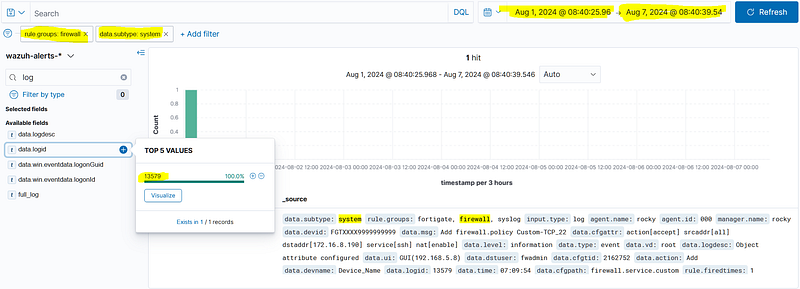
Answer: 13579

According to firewall logs, which user allowed access to the IP address “172.16.8.190” on port 22 between Aug 1, 2024 00:00 — Aug 7, 2024 00:00?
If we look carefully at the log we found in the previous question, we observe that there are 22 SSH access requests. the user value asked to us is also in the log.

Answer: fwadmin

According to DMZ server logs, how many “sshd: authentication failed.” events occurred between Aug 1, 2024 00:00 — Aug 7, 2024 00:00?
We understand that 172.16.8 IPs are DMZ assests. Let’s search for ssh fail events to these hosts. For this we need to search for sshd group and authentication_failed event. When we write the necessary filters, we find the answer as 24 hits.
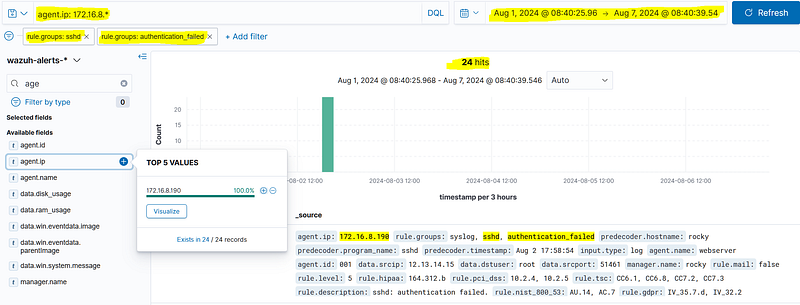
Answer: 24

According to DMZ server logs, what is the IP address that successfully logged in (sshd: authentication success) after a failed attempt (sshd: authentication failed) between Aug 1, 2024 00:00 — Aug 7, 2024 00:00?
in the previous question we saw that 172.16.8.190 host received a large number of ssh auth failures. now let’s look at the auth succces logs. in the auth succes logs we see that 172.16.8.190 host was connected to 172.16.8.190 host by receiving success after a large number of ssh failures. we determine the source IP information as 12.13.14.15.
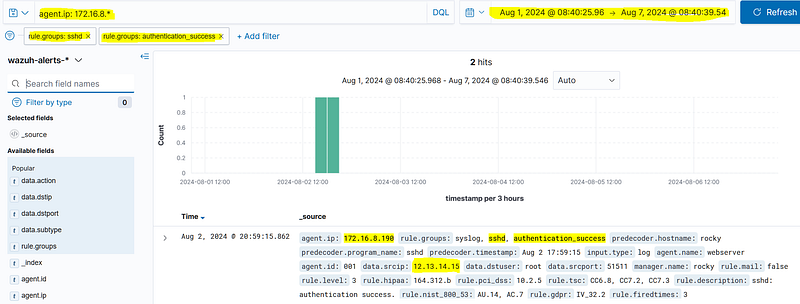
Answer: 12.13.14.15

What application was installed on the webserver with IP address “172.16.8.190” in the DMZ environment after unauthorized access between Aug 1, 2024 00:00 — Aug 7, 2024 00:00?
When we search for the relevant agent ip in the yum group, we get a result and when we look at the full log content in this result, we observe that nmap is installed on the host.
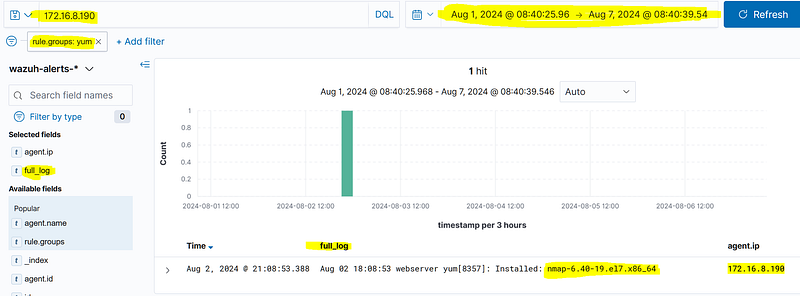
Answer: nmap-6.40–19.el7.x86_64

What IP block was scanned using the application installed after unauthorized access to the webserver with IP address “172.16.8.190” in the DMZ environment between Aug 1, 2024 00:00 — Aug 7, 2024 00:00?
When we filter by agent.name and search for nmap activities, we find the subnet information scanned in the audit logs.

Answer: 10.10.10.0/24

What is the number of the port that was scanned using the application that was installed after the unauthorized access to the web server with the IP address “172.16.8.190” in the DMZ environment between August 1, 2024 00:00 — August 7, 2024 00:00?
Again in the same log content, we see that the port information scanned is 22 ssh port.

Answer: 22

According to firewall logs, how many unique destination IP addresses received “accept/allow” traffic from the IP address “172.16.8.190” to the “10.10.10.0/24” network between Aug 1, 2024 00:00 — Aug 7, 2024 00:00?
When we filter the allow fields from 22 ssh requests from 172.16.8.190 source ip in the firewall group, we see that there are 4 hits.
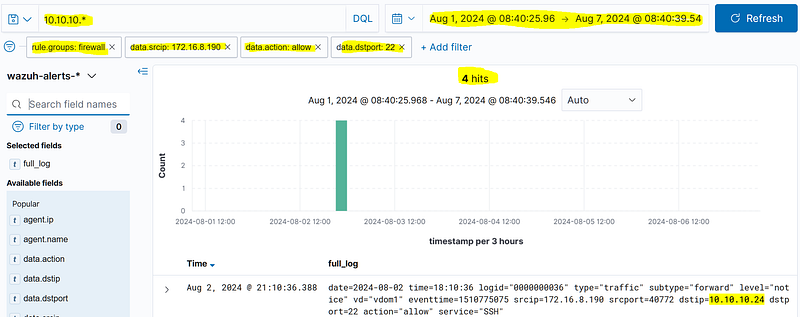
Answer: 4

According to firewall logs, how many “SSH authentication_failed” events occurred from the IP address “172.16.8.190” to the “10.10.10.0/24” network between Aug 1, 2024 00:00 — Aug 7, 2024 00:00?
We can find this answer from sshd logs, not firewall logs. there seems to be a mistake in the question. when we look at auth fail events from ssh logs, we can see that it received 8 fail.

Answer: 8

What is the IP address of the system in the “10.10.10.0/24” network that successfully logged in via SSH (authentication_success) from the IP address “172.16.8.190” between Aug 1, 2024 00:00 — Aug 7, 2024 00:00?
If we search for success events instead of fail using the same filter, we get 1 hit. in this event, agent ip information is our answer.
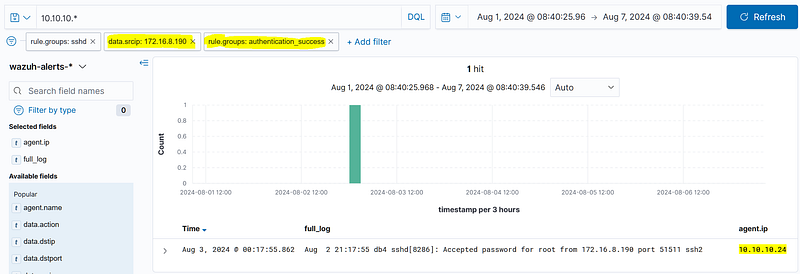
Answer: 10.10.10.24

Practical Lab-2
Hypothesis-2
Note: The questions in this section are aimed at conducting Threat Hunting based on the following hypothesis.
Hypothesis: User accounts with VPN access may have been compromised, and unauthorized access attempts may be occurring.
Threat Hunting Lab Environment
- SIEM (Wazuh)
- Firewall Traffic Events
- VPN Events
Questions
What is the username with the most SSL VPN login failures between Aug 1, 2024 00:00 — Aug 7, 2024 00:00?
If we filter vpn subtype and auth fail events in firewall logs, we will reach the answer.
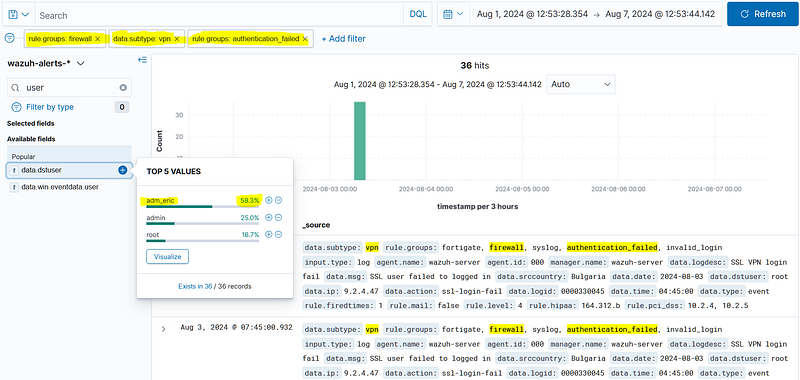
Answer: adm_eric

Apart from Germany, which country had successful logins for the VPN account with the most SSL VPN login failures between Aug 1, 2024 00:00 — Aug 7, 2024 00:00?
For the adm_eric account, we need to find out from which country outside of Germany the successful login was made. for this we need to filter the account and aut success.
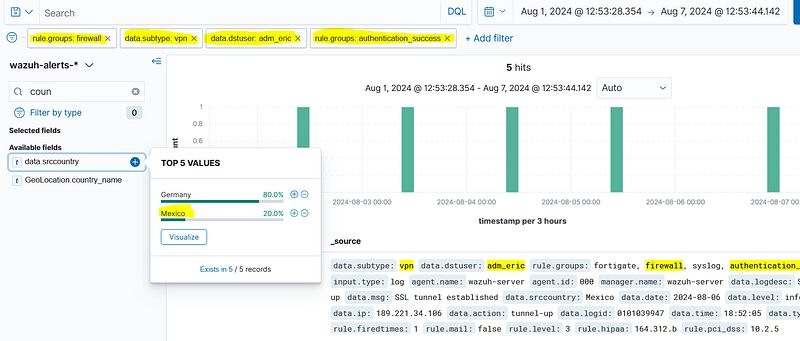
Answer: Mexico

What “tunnel_ip” was assigned after a successful login (excluding Germany) for the VPN account with the most SSL VPN login failures between Aug 1, 2024 00:00 — Aug 7, 2024 00:00?
In the previous question, when we examine the success log originating from mexico, we reach the tunnelip value when we examine the full log content in the relevant log.

Answer: 10.34.1.13

According to traffic logs, what is the most frequently accessed destination port from the “tunnel_ip” assigned after a successful login (excluding Germany) for the VPN account with the most SSL VPN login failures between Aug 1, 2024 00:00 — Aug 7, 2024 00:00?
For this, we need to filter the traffic originating from the address 10.34.1.13 that we find in the firewall logs. Then, when we look at the dstport field, we can find out which port the outgoing traffic is most targeted.
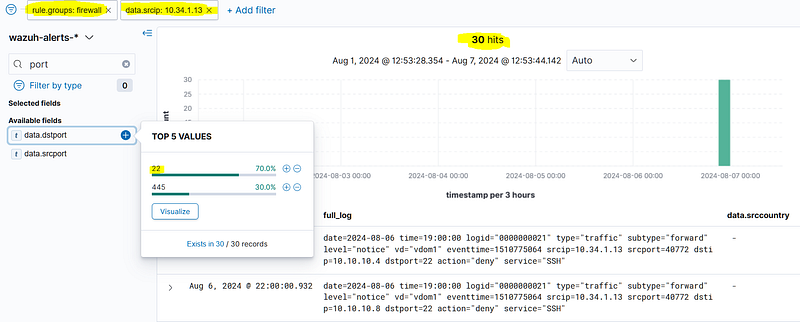
Answer: 22

How many unique destinations had SSH service access allowed via the “tunnel_ip” assigned after a successful login (excluding Germany) for the VPN account with the most SSL VPN login failures between Aug 1, 2024 00:00 — Aug 7, 2024 00:00?
For this, we need to filter the ‘action allow’ fields from the 10.34.1.13 IP addresses and the 22-port targeted traffic. The number of hits will then provide the answer.
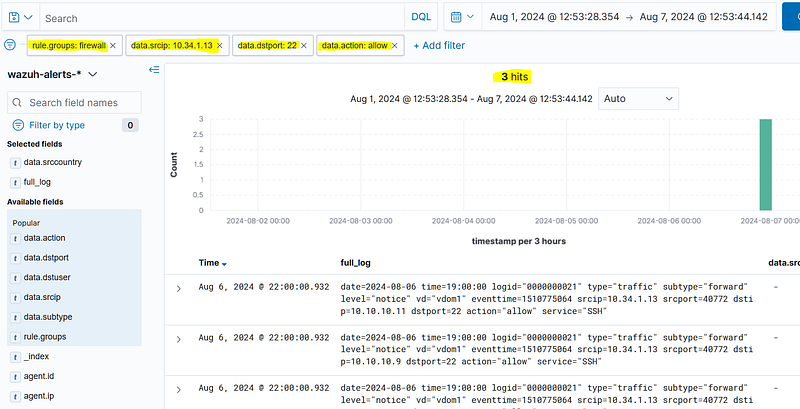
Answer: 3

What IP address received an ssh auth success from the “tunnel_ip” assigned after a successful login (excluding Germany) for the VPN account with the most SSL VPN login failures between Aug 1, 2024 00:00 — Aug 7, 2024 00:00?
To do this, we need to look at the SSHD logs. Filtering the successful SSH logins by source IP address will reveal which host has logged in successfully via the agent.ip field.
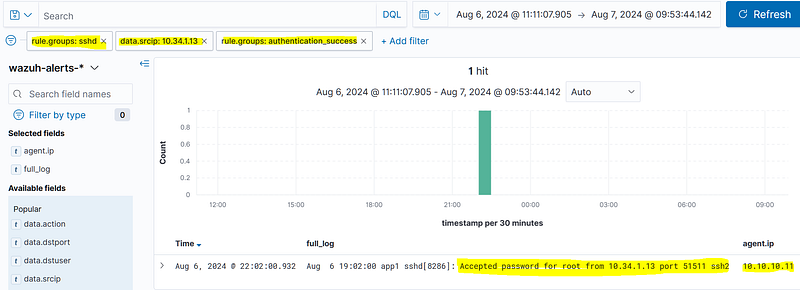
Answer: 10.10.10.11

What command was executed for the “T1057-Process Discovery” activity after successful SSH access from the “tunnel_ip” assigned after a successful login (excluding Germany) for the VPN account with the most SSL VPN login failures between Aug 1, 2024 00:00 — Aug 7, 2024 00:00?
For this, we should look at the audit logs. When we filter with agent.name, we can find the commands running on the host.
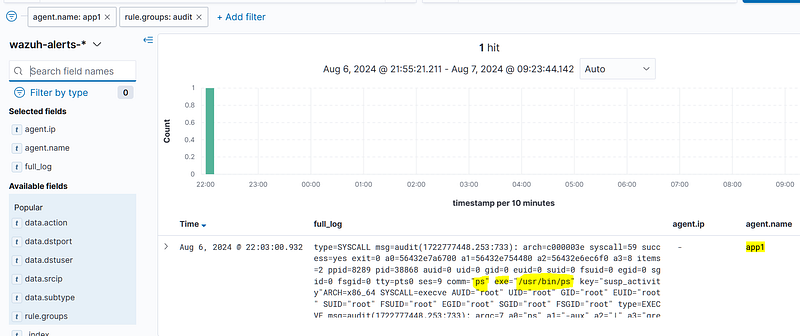
Answer: ps

Which process was searched for during the “T1057-Process Discovery” activity after successful SSH access from the “tunnel_ip” assigned after a successful login (excluding Germany) for the VPN account with the most SSL VPN login failures between Aug 1, 2024 00:00 — Aug 7, 2024 00:00?
When we look at the full log in detail, we see that the “ps -aux | grep proftp” “command is executed.
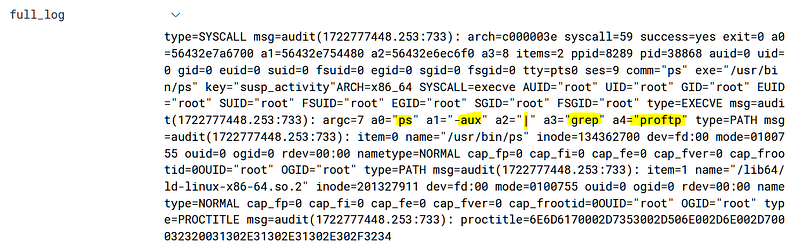
Answer: proftp

Practical Lab-3
Hypothesis-3
Note: The questions in this section are aimed at conducting Threat Hunting based on the following hypothesis.
Hypothesis: Misconfigured FTP services on a server in the DMZ environment may have left anonymous user accounts open, potentially allowing unauthorized file uploads and downloads.
Threat Hunting Lab Environment
- DMZ Server IP Block : 172.16.8.0/24
- SIEM (Wazuh)
- FTP Events
- Linux System Events
- Linux Security Events
- Linux Audit Events
Questions
What is the IP address that successfully logged in as anonymous via FTP between Aug 1, 2024 00:00 — Aug 7, 2024 00:00?
we can find with this filter.
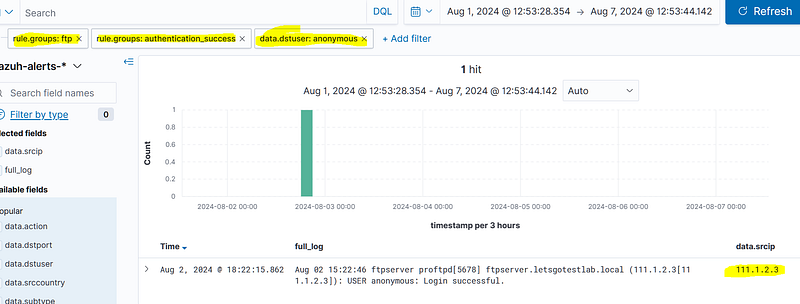
Answer: 111.1.2.3

What is the “country name” of the IP address that successfully logged in as anonymous via FTP between Aug 1, 2024 00:00 — Aug 7, 2024 00:00?
If we search the GeoLocation.country_name information in the log we find, we find the answer. Or you can sarch in the full log.

Answer: China

What is the IP address of the system that allowed anonymous FTP logins between Aug 1, 2024 00:00 — Aug 7, 2024 00:00?
If we search the agent.ip information in the log we find, we find the answer.

Answer: 172.16.8.21

What is the name of the FTP service running on the system that allowed anonymous logins between Aug 1, 2024 00:00 — Aug 7, 2024 00:00?
we can see the answer from the full log content.
Answer: proftpd

When was the FTP service restarted on the system that allowed anonymous logins between Aug 1, 2024 00:00 — Aug 7, 2024 00:00?
Searching for the text ‘stopping’ in the FTP logs will help us to find the log about when the service was stopped.
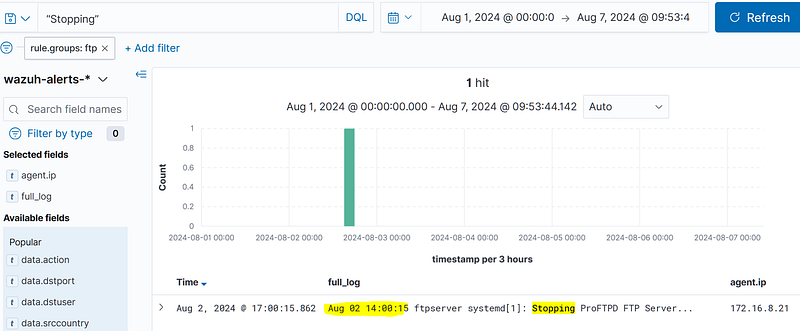
Answer: Aug 02 14:00:15

What is the full path of the file related to the FTP service that was modified before the FTP service was restarted on the system that allowed anonymous logins between Aug 1, 2024 00:00 — Aug 7, 2024 00:00?
Examining the relevant host’s audit logs allows us to observe the activity. The answer can be found in the full log content and the fielded state.
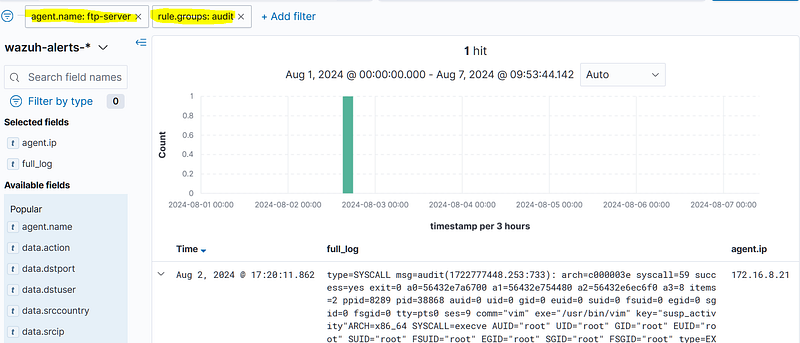
type=SYSCALL msg=audit(1722777448.253:733): arch=c000003e syscall=59 success=yes exit=0 a0=56432e7a6700 a1=56432e754480 a2=56432e6ec6f0 a3=8 items=2 ppid=8289 pid=38868 auid=0 uid=0 gid=0 euid=0 suid=0 fsuid=0 egid=0 sgid=0 fsgid=0 tty=pts0 ses=9 comm=”vim” exe=”/usr/bin/vim” key=”susp_activity”ARCH=x86_64 SYSCALL=execve AUID=”root” UID=”root” GID=”root” EUID=”root” SUID=”root” FSUID=”root” EGID=”root” SGID=”root” FSGID=”root” type=EXECVE msg=audit(1722777448.253:733): argc=7 a0=”vim” a1=”/etc/proftpd/proftpd.conf” type=PATH msg=audit(1722777448.253:733): item=0 name=”/usr/bin/vim” inode=134362700 dev=fd:00 mode=0100755 ouid=0 ogid=0 rdev=00:00 nametype=NORMAL cap_fp=0 cap_fi=0 cap_fe=0 cap_fver=0 cap_frootid=0OUID=”root” OGID=”root” type=PATH msg=audit(1722777448.253:733): item=1 name=”/lib64/ld-linux-x86–64.so.2" inode=201327911 dev=fd:00 mode=0100755 ouid=0 ogid=0 rdev=00:00 nametype=NORMAL cap_fp=0 cap_fi=0 cap_fe=0 cap_fver=0 cap_frootid=0OUID=”root” OGID=”root” type=PROCTITLE msg=audit(1722777448.253:733): proctitle=6E6D6170002D7353002D506E002D6E002D700032320031302E31302E31302E302F3234
Answer: /etc/proftpd/proftpd.conf

Which user modified the file related to the FTP service before it was restarted on the system that allowed anonymous logins between Aug 1, 2024 00:00 — Aug 7, 2024 00:00?
If we look at the full log content, we can determine that it is the root user.
Answer: root

From which IP address did the user who modified the FTP service file log in via SSH before the FTP service was restarted on the system that allowed anonymous logins between Aug 1, 2024 00:00 — Aug 7, 2024 00:00?
If we look at the sshd logs, we can detect the ssh connecting IP.
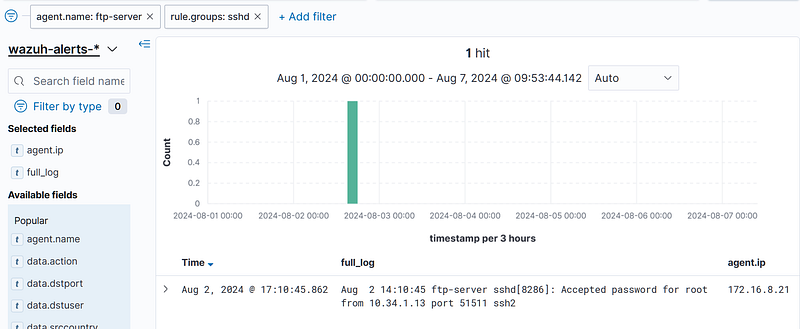
Answer: 10.34.1.13
