Threat Hunting with WAF Walkthrough — LetsDefend

Introduction
A Web Application Firewall (WAF) is a security layer used to protect web applications. Unlike traditional firewalls, WAFs specifically target threats aimed at web applications. These threats include SQL injections, XSS (Cross-Site Scripting) attacks, file upload attacks, and other web-based threats.
WAF-based threat hunting is a proactive security approach aimed at protecting web applications. This process is carried out using logs, alerts, and analyses provided by WAFs. Threat hunters examine WAF data to identify potential threats, analyze the source of these threats, and develop strategies to prevent similar attacks in the future.

This lesson has provided an introduction to the topic. The next lesson will cover the “ Role of WAF in Threat Hunting “.
Questions
No Anser Needed
Role of WAF in Threat Hunting
WAF (Web Application Firewall) plays a critical role in the threat hunting process. The contributions provided by WAF are highly valuable for threat hunting. Below, the key contributions of WAF to threat hunting are summarized.
Real-Time Traffic Monitoring and Attack Detection
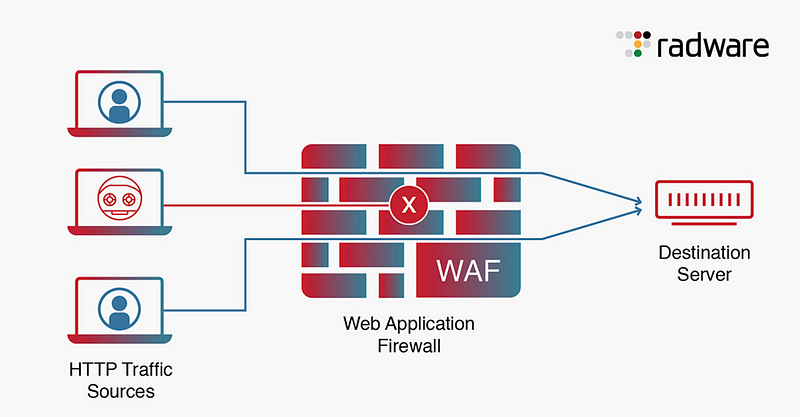
A Web Application Firewall (WAF) continuously monitors inbound and outbound traffic to web applications. WAFs can detect potential attacks in their early stages, which is critical for threat hunting.
- Continuous Monitoring: The WAF monitors all requests to web applications and analyzes every incoming packet. It ensures that threats to the application are detected immediately. Traffic monitoring includes parameters such as IP addresses, protocols used, data volumes and request types.
- Attack Detection: The WAF continuously scans traffic for specific attack patterns and signatures. For example, requests that contain common web attacks such as SQL injection or XSS (Cross-Site Scripting) are immediately detected and blocked by the WAF. This allows attackers to be stopped before they reach their target.
- Real-time Intervention: The WAF’s instant monitoring capability allows for rapid response when an attack is detected. Threat hunters can then identify the source of the attack and take immediate security action.
Signature and Behavior-Based Detection
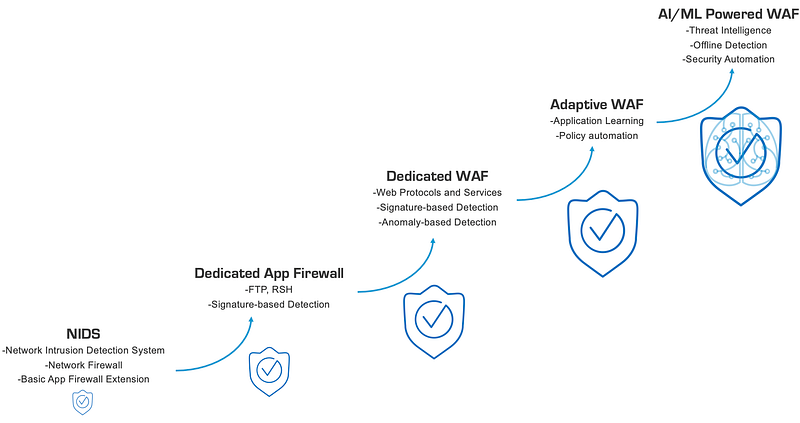
WAF uses two main methods to detect threats: signature-based detection and behavior-based detection. These methods provide comprehensive protection during the threat hunting process.
Signature-Based Detection
- Protection Against Known Attacks: Signature-based detection is based on characteristic traces of known attack types. Using these signatures, WAF detects the traces that attacks leave in web traffic. For example, the WAF detects a known SQL injection attack pattern and blocks the attack.
- Constant Updates: The signature databases of WAFs are constantly updated against cybersecurity threats. This enables rapid detection of newly discovered threats.
Behavior-Based Detection
- Anomaly Detection: Behavior-based detection monitors deviations from the normal operation of the system. For detecting previously unseen or unknown attacks, this method is very effective. For example, a user uploading or downloading large amounts of data at unusual times could be a sign of an attack.
- Machine Learning Support: Behavior-based systems are often supported by machine learning algorithms. This allows the WAF to better differentiate between normal and anomalous behavior over time, and to more accurately detect attacks.
Detailed Logging and Reporting
One of the biggest advantages of WAF in the threat hunting process is its comprehensive logging and reporting capabilities. These features play a crucial role in monitoring and analyzing threats.
Comprehensive Logging
- Data Monitoring: The WAF records every request made to web applications and the responses to those requests. This includes detailed information such as user activity, IP addresses, timestamps, and protocols used.
- Record Suspicious Activity: The WAF logs all suspicious activity and blocked attacks it detects. These logs help threat hunters understand the source and nature of attacks.
Reporting
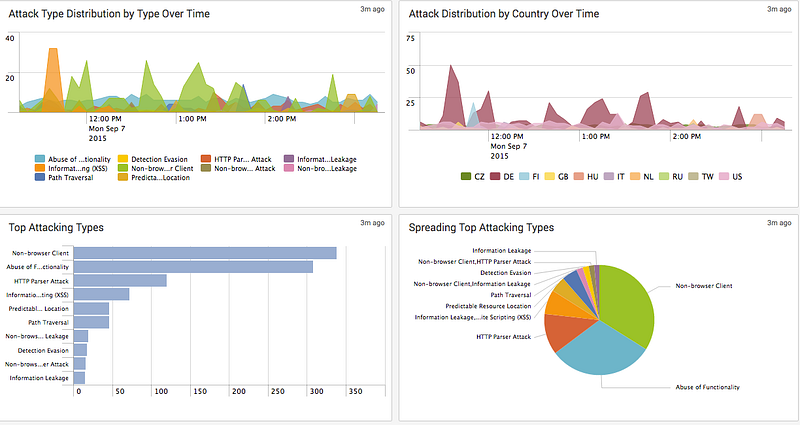
- Customized Reports: The WAF can generate detailed reports on attack activity over a specified time period. Attack types, frequency, and source are included in these reports.
- Visualization and Analysis: WAF reports provide visualized data for threat hunters to better understand attacks. Graphs and tables show the distribution and impact of attacks over time.
Root Cause Analysis
In the threat hunting process, understanding the root cause of attacks is critical to preventing similar attacks in the future. For this type of analysis, the WAF is an essential tool.
Identification of the Root Cause
- Source of the Attack: WAF logs show what IP addresses the attacks came from and what user-agents were used. This is the first step in identifying the source of the attack.
- Method of Attack: WAF helps identify the techniques used by attackers and how these techniques work. For example, WAF logs can be used to understand how an SQL injection attack was executed and what commands were used.
Attack Propagation Analysis
- Timeline: A WAF can help identify when an attack started and how it progressed, as well as the steps taken by the attacker.
- Affected Systems: WAF logs show which systems and applications were affected by the attack. This is important for stopping the spread of the attack and minimizing the damage.
Real-time and Retrospective Analysis
WAF is used both to detect immediate threats and to analyze past attacks in the threat hunting process.
Real Time Analysis
- Prompt Threat Detection: The WAF instantly monitors incoming traffic and responds immediately when it detects threats, ensuring attackers are quickly stopped.
- Automatic Response: When a specific attack is detected, the WAF can automatically apply the specified rules, ensuring that attacks are contained before they spread.
Retrospective Analysis
- Analysis of the Archived Logs: The WAF archives logs to analyze attacks that have occurred in the past. This helps to understand how the attacks occurred and what methods were used.
- Correlation Analysis: Old logs can be used to determine if attacks are related to each other. This helps to understand large and complex attacks.
Post-Attack Remediation and Strategy Development
WAF-based threat hunting is not limited to detecting attacks; it also plays a critical role in improving post-attack processes and developing strategies against future threats.
Post-Attack Analysis
- Incident Damage Evaluation: WAF helps identify affected systems and applications after an attack. This is used to understand what data has been compromised and what areas need remediation.
- Vulnerability Identification: After the attack, WAF logs are analyzed to identify security vulnerabilities in the system. These vulnerabilities must be addressed to prevent similar attacks in the future.
Strategy Development
- Updating Security Policies: WAF-based analysis is used to evaluate the effectiveness of existing security policies and make necessary updates to build a stronger line of defense.
- Training and Awareness: WAF insights can be used to train and raise awareness among security teams, enabling them to identify threats earlier and respond more effectively.
Conclusion
WAF-based threat hunting provides a proactive defense mechanism against web application threats. Features such as instant traffic monitoring, signature- and behavior-based detection, detailed logging, and attack analysis enable threat hunters to identify attacks early and develop more effective security measures. This process is a critical tool not only for managing existing threats, but also for preventing potential future threats.
This lesson has discussed the importance of WAF in the threat hunting process. The next lesson will cover “ Using WAF in the Threat Hunting Process “.
Questions
No Anser Needed
Using WAF in the Threat Hunting Process
Web Application Firewall (WAF) plays a critical role in protecting web applications against various threats. Furthermore, during the threat hunting process, the data provided by WAF significantly supports the testing of hypotheses created by threat hunters. WAF helps threat hunters trace web-based attacks and understand the actions of attackers.
WAF and Threat Hunting
WAF assists threat hunters in detecting potential attacks targeting web applications. Threat hunters can identify the sources and targets of attacks through logs and alerts generated by WAF. For complex attacks targeting web applications, this process is critical.
Using WAF for Hypothesis Testing
During the threat hunting process, threat hunters create hypotheses to test specific attack vectors or the motives of attackers. WAF provides data that can be used to test these hypotheses. For example, repeated attack attempts from a specific IP address or unusual traffic spikes can help threat hunters validate their hypotheses.
Early Alerts and Detection of Anomalies
WAF enables threat hunters to detect web application attacks early, allowing them to analyze attacks from a broader perspective and assess the overall impact of the attack on the network.
Data Collection and Log Analysis
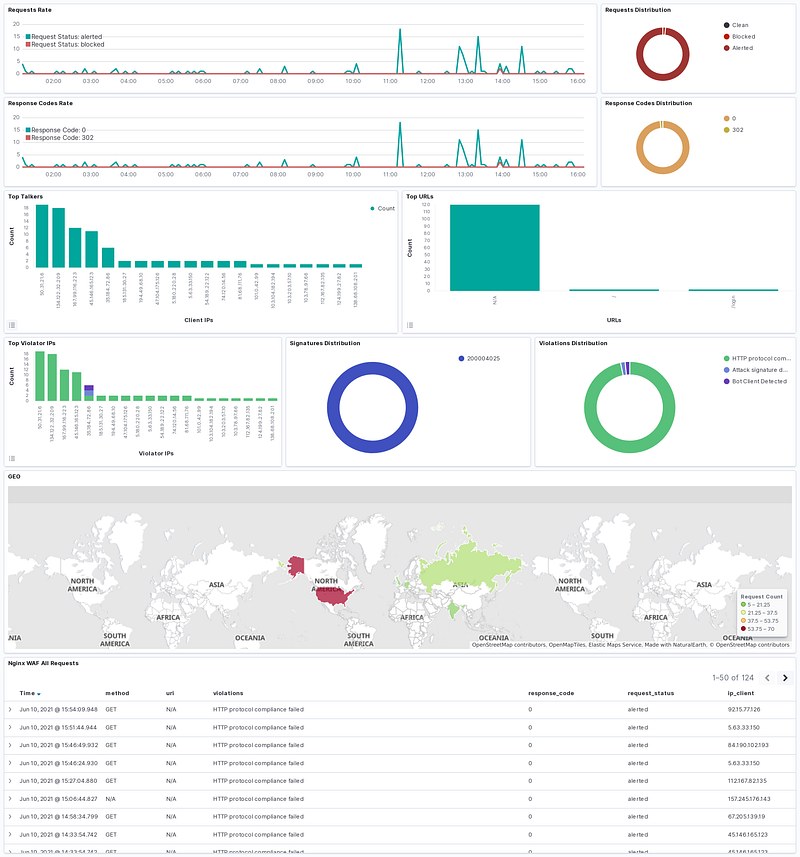
Collecting data and analyzing logs is one of the key functions of WAF in the threat hunting process. WAF monitors all traffic directed to web applications and generates logs for this traffic. These logs provide valuable information for threat hunters.
Collecting WAF Logs
WAF collects various types of data, such as HTTP/HTTPS requests, user agents, IP addresses, protocols used, and response codes. These logs serve as a starting point for threat hunters and are analyzed to trace potential threats.
Log Analysis
Analyzing WAF logs helps threat hunters understand the source, type, and scope of attacks. Logs can reveal how an attack was executed and the techniques used by the attacker. For example, repeated suspicious requests from a certain user agent can point to the presence of a bot or automated attack tool.
Correlation and Anomaly Detection
For more comprehensive analysis, WAF logs can be correlated with logs from other security systems. This can help threat hunters detect larger-scale attacks. In addition, log anomalies can help identify deviations from normal behavior and uncover unknown threats.
Detection and Analysis of Web Attacks
Attacks that target web applications are often detected by a WAF in the first stage of the attack. In order to identify different types of attacks and analyze their impact on web applications, WAF is an important tool.
Identifying Attack Types
WAF detects attack types such as SQL injection, XSS (Cross-Site Scripting), file inclusion, and other web-based attacks. WAF logs can reveal how these attacks were carried out and the methods used by attackers, allowing threat hunters to understand attack vectors and conduct broader analysis.
Analyzing Attacks
WAF logs detail detected attacks by providing information about the source, target, methods used, and results of the attack. Threat hunters can analyze this data to understand the impact of the attack and the motivations of the attacker. For example, repeated SQL injection attacks from a single IP address may indicate that the attacker is attempting to gain access to databases.
Evaluating the Impact of Attacks
WAF logs are also used to evaluate the impact of attacks on web applications. They are critical for determining whether the attack was successful, what data was accessed, and how the attack affected other components of the application.
Real-Time and Retrospective Web Traffic Analysis
WAF allows threat hunters to analyze web traffic both in real-time and retrospectively. These two methods provide different perspectives during the threat hunting process.
Real-Time Analysis
Real-time traffic monitoring allows WAF to instantly detect threats targeting web applications. Threat hunters can use this data to intervene immediately and prevent the attack from spreading. Threat hunting while attackers are still active is possible through real-time analysis.
Retrospective Analysis
The WAF archives logs to analyze historical web traffic. Retrospective analysis is used to track previous attacks, identify repeated attack attempts, and understand the evolution of attacks over time. It helps threat hunters understand attackers’ long-term strategies and predict future attacks.
Correlation and Trend Analysis
Logs can be used to identify trends related to web attacks. These trends can then be correlated with data from other security systems. As a result, large-scale and complex attacks can be understood, and future threats can be detected earlier.
Conclusion
In summary, WAF-based threat hunting plays a critical role in detecting and analyzing threats that target web applications. WAF provides threat hunters with valuable insights into monitoring web traffic, detecting attacks, and understanding their impact. Threat hunters can test their hypotheses and identify the source of threats through data collection, log analysis, in-depth investigation of web attacks, and both real-time and retrospective traffic analysis. This process is an essential approach to improving the security of web applications. It also makes web applications more resilient to future threats.
This lesson has discussed the use of WAF in the threat hunting process. In the next lesson, “ Web-based Brute Force Attack Hypothesis “ will be covered.
Questions
No Anser Needed
Web-based Brute Force Attack Hypothesis
Hypothesis
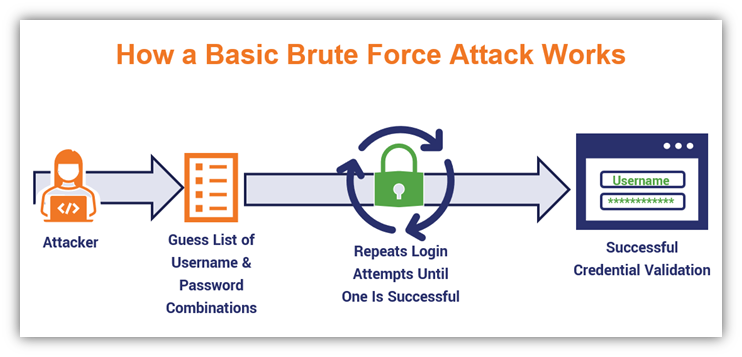
A threat actor may be targeting login forms on a web application using brute force methods to gain unauthorized access and steal credentials.
Data Sources
- WAF Logs: Repeated login attempts and failed authentication requests targeting login forms.
- Web Server Logs: Suspicious IP addresses making repeated requests and unusual data uploads/downloads.
- IPS/IDS Logs: Abnormal traffic spikes and attack activities targeting the web application.
Analysis Steps
- Login Attempts: Monitor WAF logs for multiple failed login attempts originating from specific IP addresses. These attempts may involve repeated tries using the same username.
- IP Address Analysis: Use web server logs to identify IP addresses involved in repeated login attempts and investigate other activities associated with these addresses.
- Login Timestamps: Analyze the timeframes during which login attempts are concentrated. Unusual login attempts during off-hours may indicate a brute force attack.
- WAF and IPS/IDS Alerts: Correlate brute force attack alerts triggered by WAF with IPS/IDS logs to identify the attacker’s activities across other network components.
- User-Agents: Examine user-agents used during suspicious login attempts. Repeated login attempts with the same user-agent but different usernames may indicate the use of automated tools.
- Credential Theft: After successful login attempts, check for suspicious activities in user accounts. Pay attention to unexpected data access or attempts to exfiltrate data.
Expected Outcomes
- Intense brute force attempts from specific IP addresses in WAF logs.
- Failed login attempts followed by a successful login from the same IP address.
- Abnormal traffic spikes and attack activities targeting the web application in IPS/IDS logs.
Summary
WAF plays a critical role in detecting brute force attacks and protecting against them. Threat hunters can analyze WAF and IPS/IDS logs to determine the source, target, and techniques used by attackers. Analysis with WAF is vital for preventing serious security breaches, such as credential theft, and enhancing the security of web applications.
Questions
No Anser Needed
Practical Lab
Hypothesis
Note: The questions in this section are prepared for Threat Hunting based on the following hypothesis.
Hypothesis: Attackers might be trying to exploit the Directory Traversal vulnerability in the organization’s web applications to gain unauthorized access to sensitive files and configuration information on the server.
Threat Hunting Lab Environment
- WAF Events (FortiWeb)
- SIEM (Wazuh)
- Firewall Traffic Events
- CTI Events (Threat Intel LetsDefend Platform)
Lab Notes
- Analyze the logs between “Aug 8, 2024 00:00 — Aug 13, 2024 00:00” to answer the questions below.
- Subsequent questions require correct answers from previous ones. Answer all questions strictly in the order they appear.
Questions
Note: Analyze the logs between “Aug 8, 2024 00:00 — Aug 13, 2024 00:00” to answer the questions below.
Note: Subsequent questions require correct answers from previous ones. Answer all questions strictly in the order they appear.
According to WAF logs, what is the URL where the Directory Traversal attack occurred most frequently?
Use the filter “data.subtype: waf” in SIEM. Check the values in the “data.url” field.
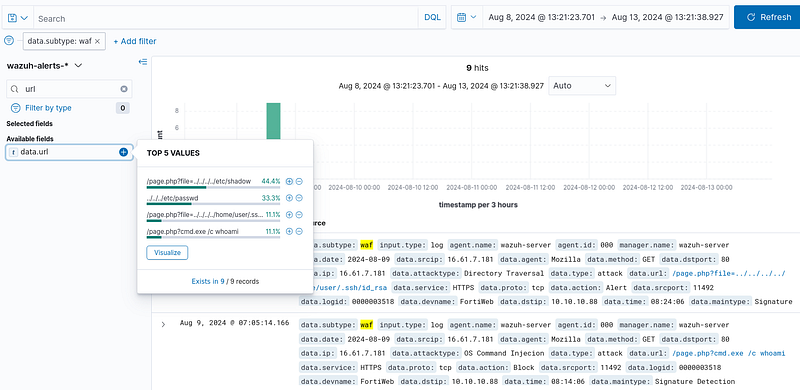
Answer: /page.php?file=../../../../etc/shadow
What is the URL of the Directory Traversal attack that was allowed by the WAF?
Use the filters “data.subtype: waf” and “data.action: Alert” in SIEM.
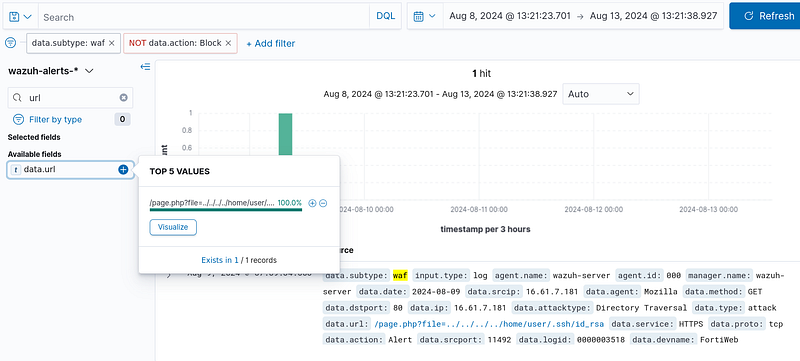
Answer:/page.php?file=../../../../home/user/.ssh/id_rsa
What is the HTTP status code of the Directory Traversal attack that was allowed by the WAF?
Apply the filters “data.subtype: waf” and “data.action: Alert” in SIEM. Locate the “return_code” value within the “full_log”.

Answer: 200
During previous stages of the threat hunting process, an IP address was detected performing a directory traversal attack that was allowed by the WAF. This same IP address has also launched a different type of web attack. What type of web attack is it?
Identify the IP address from the output generated by applying ‘data.subtype: waf’ and ‘data.action: Alert’ filters in SIEM. Then review WAF logs to examine different attack types originating from this IP address.
We see the source address '16.61.7.181' in the previous stage.
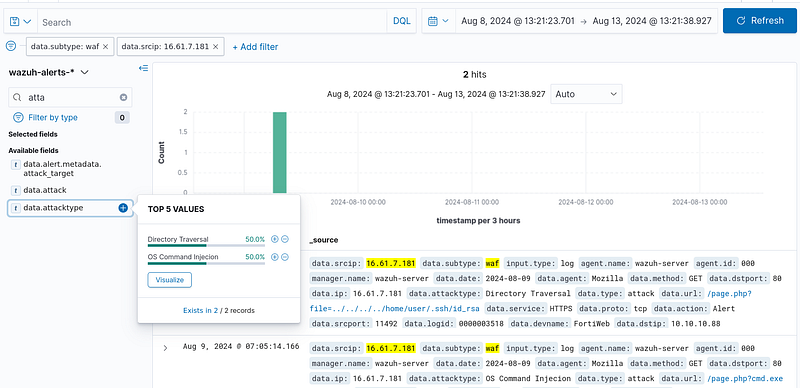
Answer: OS Command Injection
During previous stages of the threat hunting process, an IP address was detected performing a directory traversal attack that was allowed by the WAF. This same IP address has also launched a different type of web attack. What WAF action was taken against this web attack?
Apply the filter “data.subtype: waf” in SIEM. Check the “data.action” field in the log entry related to the web attack.
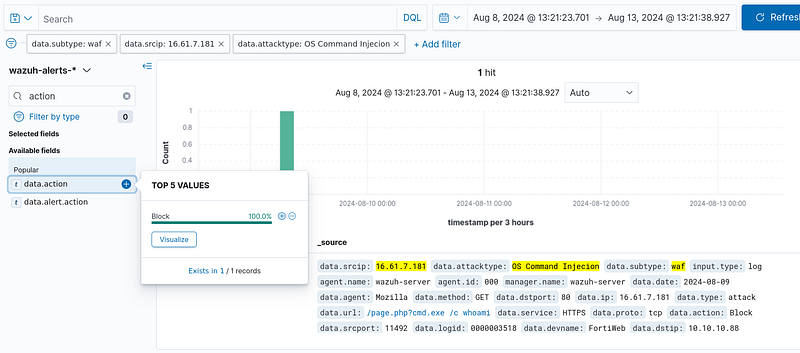
Answer: Block
What is the target server IP address of the Directory Traversal attack allowed by the WAF?
Apply the filters “data.subtype: waf” and “data.action: Alert” in SIEM. Check the “data.dstip” field.

Answer: 10.10.10.88
Which APT group does the IP address that carried out the directory traversal attack allowed by the WAF belong to?
Search for the IP address in the Threat Intel LetsDefend Platform.

Answer: APT-LL-23
What is another reported IP address belonging to the same APT group that carried out the directory traversal attack allowed by the WAF?
Search for the APT group’s name in the Threat Intel LetsDefend Platform.
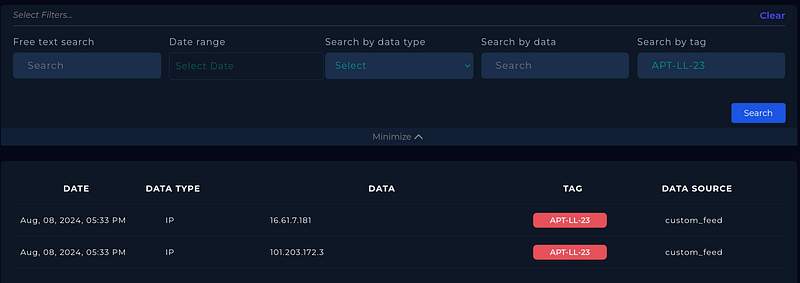
Answer: 101.203.172.3
During earlier stages of Threat Hunting, an IP address was identified executing Directory Traversal attacks. Subsequently, another IP address belonging to the same threat group was discovered. What is the source IP address that accessed this related external IP address in a ‘local → WAN’ pattern?
Locate the IP address of APT Group that was identified in the Threat Intel platform. Apply the filters “rule.groups: firewall” and “data.dstip: “ in SIEM.

Answer: 10.10.10.88
Earlier in the Threat Hunting process, an IP address performing Directory Traversal attacks was identified. Another IP address from the same threat group was later found. What was the firewall action on the endpoint’s access request to this external IP address?”
Locate the IP address of APT Group that was identified in the Threat Intel platform. Apply the filters “rule.groups: firewall” and “data.dstip: [IP_Address]”. Then check the “data.action” field.
Answer: block